> ## Documentation Index
> Fetch the complete documentation index at: https://docs.msportal.ai/llms.txt
> Use this file to discover all available pages before exploring further.
# Copy recurring costs from an earlier budget
> Select recurring services from the company’s latest earlier budget and review them before saving the new plan.
Choose **Import > Import from previous year** in an editable budget to copy recurring costs from the same company's most recent earlier fiscal-year budget. Review the source shown in **Import recurring services**, choose the services, and save the target budget afterward.
**Audience:** MSP staff and Company users with budget editing access assigned by their MSP.
## Choose the source carefully
The source is selected automatically. The portal chooses the highest fiscal year earlier than the target budget's year; if several budgets share that year, it uses the most recently updated one. This can be a Draft, Pending Approval, Approved or Archived budget. It is not limited to the immediately preceding calendar year or to approved plans.
There is no source-budget picker in this dialog. If the displayed source is not the plan you want, cancel. Consider an [Excel import](/user-guides/budgets/import-excel) or the [duplicate workflow](/user-guides/budgets/approving-and-locking-budgets) instead.
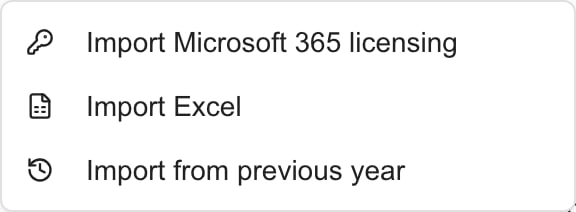 *MSP example: choose Import from previous year. Available sources depend on access and integrations.*
## Import recurring services
Select the company and create or open an editable budget. Check **Fiscal Year** and **Currency** in Budget Details before opening Import.
Choose **Import > Import from previous year**. Read the source budget title and year at the top of the dialog.
Available new recurring services start selected. Clear any you do not want, or use **Select all**. One-time lines are excluded. A description already present in the target is marked **Already in budget** and cannot be selected again.
Review every service, including costs that may have been rejected in the source budget. Copying a row is not evidence that it should be funded again.
Choose **Import … services**. Review the new rows in the builder. They start with line status **Pending**, even if their source status was different.
Check quantity, price, category, notes, recurrence, Start month and term. The target currency is applied without converting the numeric prices. Reconnect any Planner, goal or product associations you still need.
Choose the header **Save**, wait for confirmation, reload the saved budget, and check **Monthly Breakdown**. Importing does not save the target or alter the source.
## What carries forward?
| Copied | Not copied |
| --------------------------------------------------- | ----------------------------------------------------------------------------------- |
| Description, quantity and unit price | Source approval status; new lines are Pending |
| Category and line notes | Source budget title, author, fiscal year and overall status |
| Recurrence, Start month, custom interval and term | Source currency; the target currency is used without conversion |
| Recurring lines, including previously rejected ones | One-time costs, monthly overrides, budget references and Planner/goal/product links |
If the chosen source has no recurring services, the dialog stays empty. It does not continue searching through older budgets for a different source. A cost whose description says subscription can still be excluded if its stored recurrence is One-time.
## Troubleshooting
| Problem | What to check |
| ------------------------------------- | ------------------------------------------------------------------------------------------------------------------------------- |
| No recurring services found | Company, target fiscal year, automatically chosen source and its stored recurrence values. |
| Wrong source budget | Cancel and use another import or duplicate method; this dialog does not let you choose a different source. |
| Already in budget | Check the target's existing description, ignoring case and leading/trailing spaces. Edit that line instead of copying it again. |
| Import is disabled | Select at least one service that is not already in the target. |
| A rejected cost reappears as Pending | Imported lines reset to Pending; review and reject or remove costs you do not want. |
| Price uses an unexpected currency | Compare source and target currency. The import copies numbers, not converted values. |
| Failed to load previous year services | Close the dialog, check access with your MSP and retry later. A loading failure does not prove that there are no costs. |
## Frequently asked questions
Open the target company budget, set its fiscal year, and choose Import > Import from previous year. Review the source and selected services, import, then Save.
It uses the highest fiscal year earlier than the target. Within that year, it chooses the most recently updated budget, regardless of its overall status.
No. Check the automatically displayed source. Cancel and use an Excel import or duplicate workflow when you need a different plan.
Check its stored recurrence in the selected source. One-time lines are excluded even if the description calls them subscriptions. Also check the company and source year.
No. The source's recurring rows are not filtered by line approval status. Imported rows start Pending, so review every selected cost again.
No. The import copies recurring cost fields and billing settings, but not source links or monthly overrides. Review and add what the target plan needs.
No. It adds proposed rows to the target editor. Save persists the target; the earlier source is unchanged.
A description already present in the target is disabled as Already in budget. This is a description check, not a comparison of prices or product identities; review the full selection for duplicate costs.
Related: [Create a budget](/user-guides/budgets/create-and-edit-budgets), [Import Excel](/user-guides/budgets/import-excel), [Monthly Breakdown](/user-guides/budgets/read-monthly-breakdown).
*MSP example: choose Import from previous year. Available sources depend on access and integrations.*
## Import recurring services
Select the company and create or open an editable budget. Check **Fiscal Year** and **Currency** in Budget Details before opening Import.
Choose **Import > Import from previous year**. Read the source budget title and year at the top of the dialog.
Available new recurring services start selected. Clear any you do not want, or use **Select all**. One-time lines are excluded. A description already present in the target is marked **Already in budget** and cannot be selected again.
Review every service, including costs that may have been rejected in the source budget. Copying a row is not evidence that it should be funded again.
Choose **Import … services**. Review the new rows in the builder. They start with line status **Pending**, even if their source status was different.
Check quantity, price, category, notes, recurrence, Start month and term. The target currency is applied without converting the numeric prices. Reconnect any Planner, goal or product associations you still need.
Choose the header **Save**, wait for confirmation, reload the saved budget, and check **Monthly Breakdown**. Importing does not save the target or alter the source.
## What carries forward?
| Copied | Not copied |
| --------------------------------------------------- | ----------------------------------------------------------------------------------- |
| Description, quantity and unit price | Source approval status; new lines are Pending |
| Category and line notes | Source budget title, author, fiscal year and overall status |
| Recurrence, Start month, custom interval and term | Source currency; the target currency is used without conversion |
| Recurring lines, including previously rejected ones | One-time costs, monthly overrides, budget references and Planner/goal/product links |
If the chosen source has no recurring services, the dialog stays empty. It does not continue searching through older budgets for a different source. A cost whose description says subscription can still be excluded if its stored recurrence is One-time.
## Troubleshooting
| Problem | What to check |
| ------------------------------------- | ------------------------------------------------------------------------------------------------------------------------------- |
| No recurring services found | Company, target fiscal year, automatically chosen source and its stored recurrence values. |
| Wrong source budget | Cancel and use another import or duplicate method; this dialog does not let you choose a different source. |
| Already in budget | Check the target's existing description, ignoring case and leading/trailing spaces. Edit that line instead of copying it again. |
| Import is disabled | Select at least one service that is not already in the target. |
| A rejected cost reappears as Pending | Imported lines reset to Pending; review and reject or remove costs you do not want. |
| Price uses an unexpected currency | Compare source and target currency. The import copies numbers, not converted values. |
| Failed to load previous year services | Close the dialog, check access with your MSP and retry later. A loading failure does not prove that there are no costs. |
## Frequently asked questions
Open the target company budget, set its fiscal year, and choose Import > Import from previous year. Review the source and selected services, import, then Save.
It uses the highest fiscal year earlier than the target. Within that year, it chooses the most recently updated budget, regardless of its overall status.
No. Check the automatically displayed source. Cancel and use an Excel import or duplicate workflow when you need a different plan.
Check its stored recurrence in the selected source. One-time lines are excluded even if the description calls them subscriptions. Also check the company and source year.
No. The source's recurring rows are not filtered by line approval status. Imported rows start Pending, so review every selected cost again.
No. The import copies recurring cost fields and billing settings, but not source links or monthly overrides. Review and add what the target plan needs.
No. It adds proposed rows to the target editor. Save persists the target; the earlier source is unchanged.
A description already present in the target is disabled as Already in budget. This is a description check, not a comparison of prices or product identities; review the full selection for duplicate costs.
Related: [Create a budget](/user-guides/budgets/create-and-edit-budgets), [Import Excel](/user-guides/budgets/import-excel), [Monthly Breakdown](/user-guides/budgets/read-monthly-breakdown).