> ## Documentation Index
> Fetch the complete documentation index at: https://docs.msportal.ai/llms.txt
> Use this file to discover all available pages before exploring further.
# Create and edit budget products
> Maintain reusable product names, categories, unit prices and billing recurrence for company budgets.
**Audience:** MSP staff who maintain budgets, and Company users whose MSP has explicitly granted budget editing permissions and access to the relevant product. Your MSP manages permissions.
Open **Budgets > Budgets Menu > Products**. Catalog saves take effect immediately. Adding the resulting product to a budget is a separate step.
## Create a product
Check the company selector before choosing **New Product**. With one company selected, the form offers **Assign to \[company] only**. Select it for a company-specific product. Leaving it clear creates a shared product, subject to your access. Global View has no company assignment checkbox.
Enter **Name** and a **Unit Price** of zero or more. Name is required; leaving Unit Price blank creates a zero-price product. Optionally set SKU, Category, Vendor and Description. Choose Uncategorized if no category is appropriate yet.
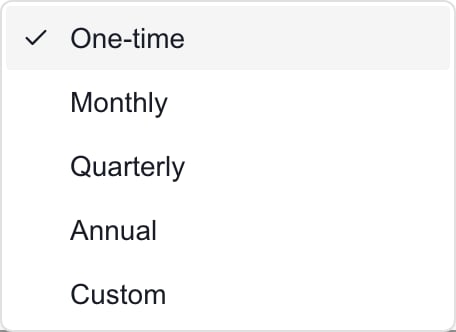
Select **One-time**, **Monthly**, **Quarterly**, **Annual**, or **Custom**. For Custom, enter a whole-number **Interval (months)** from 1 to 60; six means every six months. Unit Price is the amount for one billing occurrence.
Choose **Create**, wait for the dialog to close successfully, and check the catalog row. Newly changed products move toward the first page. Cancel closes the form without creating a product.
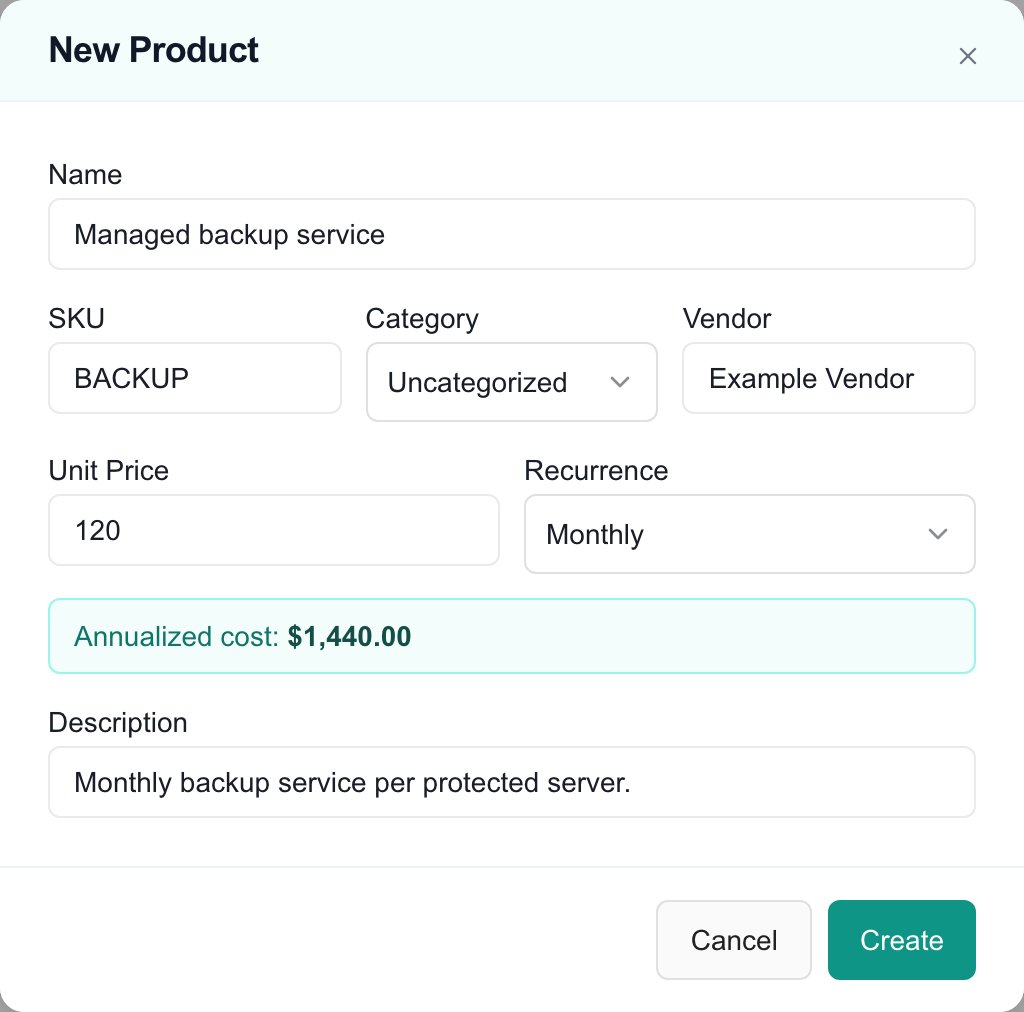 *MSP example with invented, unsaved product details. Select the image to enlarge it.*
## Understand the annualized preview
Recurring products show **Annualized cost** in the form: Monthly multiplies Unit Price by twelve, Quarterly by four, Annual by one, and Custom by twelve divided by the interval. One-time products do not show this preview.
This is an annualized estimate. For intervals that do not divide twelve evenly, it is not a count of invoices in a particular year. Actual budget billing depends on the line's start, term and overrides. Review the [line billing settings](/user-guides/budgets/edit-line-items) after adding a product.
*MSP example with invented, unsaved product details. Select the image to enlarge it.*
## Understand the annualized preview
Recurring products show **Annualized cost** in the form: Monthly multiplies Unit Price by twelve, Quarterly by four, Annual by one, and Custom by twelve divided by the interval. One-time products do not show this preview.
This is an annualized estimate. For intervals that do not divide twelve evenly, it is not a count of invoices in a particular year. Actual budget billing depends on the line's start, term and overrides. Review the [line billing settings](/user-guides/budgets/edit-line-items) after adding a product.
 ## Edit an existing product
1. Find the correct product and open its row **... > Edit**.
2. Change Name, SKU, Category, Vendor, Unit Price, Recurrence or Description. Set the custom interval if needed.
3. Choose **Save**. Check for an error, then reopen the row to confirm the intended values persisted.
The single-product form has no Product Group, setup-fee, currency or company reassignment field. Use [Bulk Edit](/user-guides/budgets/bulk-edit-products) for an available Product Group choice. Ask your MSP to review a scope mistake; changing the company selector does not reassign an existing product.
Edits affect the catalog record. They do not rewrite copied prices in existing budget lines or send a price update to a connected provider. Review unlocked budgets separately; approved budgets retain their locked baseline.
## Troubleshooting
| Problem | What to check |
| ---------------------------------- | ------------------------------------------------------------------------------------------------------------- |
| Create or Save is disabled | Enter a nonblank Name and a valid Custom interval, and wait for any save to finish. |
| A price is rejected | Use a finite number of zero or more. |
| The product shows a zero price | A blank new Unit Price defaults to zero; edit the product if this was unintended. |
| A recurring service shows One-time | Choose its recurrence explicitly; the new-product default is One-time. |
| Changes did not persist | Check the error, refresh and reopen the product. A closing dialog alone is not proof that every change saved. |
| No company assignment option | Select one company before opening New Product. The option is not part of Edit Product. |
## Frequently asked questions
Open Budgets Menu > Products > New Product, check company scope, enter the product details and recurrence, then choose Create and verify the row.
Select the company before opening New Product and check Assign to that company only. Leaving it clear creates a shared product when your access allows it.
Choose Custom recurrence and enter an interval of 6 months. Unit Price is the price for each six-month billing occurrence.
A blank Unit Price becomes zero. Enter and verify the intended nonnegative price before using the product in budgets.
It multiplies Unit Price by twelve divided by the interval. It is an annualized estimate, not the exact number of bills in a specific budget year.
Open its row ... > Edit, change Vendor or Description, choose Save and reopen the product to verify.
No company reassignment field is available in the single-product editor. Ask the MSP to review the intended scope before using or replacing the record.
No. It saves the catalog record. Copied budget line amounts and provider prices require their own workflows.
## Edit an existing product
1. Find the correct product and open its row **... > Edit**.
2. Change Name, SKU, Category, Vendor, Unit Price, Recurrence or Description. Set the custom interval if needed.
3. Choose **Save**. Check for an error, then reopen the row to confirm the intended values persisted.
The single-product form has no Product Group, setup-fee, currency or company reassignment field. Use [Bulk Edit](/user-guides/budgets/bulk-edit-products) for an available Product Group choice. Ask your MSP to review a scope mistake; changing the company selector does not reassign an existing product.
Edits affect the catalog record. They do not rewrite copied prices in existing budget lines or send a price update to a connected provider. Review unlocked budgets separately; approved budgets retain their locked baseline.
## Troubleshooting
| Problem | What to check |
| ---------------------------------- | ------------------------------------------------------------------------------------------------------------- |
| Create or Save is disabled | Enter a nonblank Name and a valid Custom interval, and wait for any save to finish. |
| A price is rejected | Use a finite number of zero or more. |
| The product shows a zero price | A blank new Unit Price defaults to zero; edit the product if this was unintended. |
| A recurring service shows One-time | Choose its recurrence explicitly; the new-product default is One-time. |
| Changes did not persist | Check the error, refresh and reopen the product. A closing dialog alone is not proof that every change saved. |
| No company assignment option | Select one company before opening New Product. The option is not part of Edit Product. |
## Frequently asked questions
Open Budgets Menu > Products > New Product, check company scope, enter the product details and recurrence, then choose Create and verify the row.
Select the company before opening New Product and check Assign to that company only. Leaving it clear creates a shared product when your access allows it.
Choose Custom recurrence and enter an interval of 6 months. Unit Price is the price for each six-month billing occurrence.
A blank Unit Price becomes zero. Enter and verify the intended nonnegative price before using the product in budgets.
It multiplies Unit Price by twelve divided by the interval. It is an annualized estimate, not the exact number of bills in a specific budget year.
Open its row ... > Edit, change Vendor or Description, choose Save and reopen the product to verify.
No company reassignment field is available in the single-product editor. Ask the MSP to review the intended scope before using or replacing the record.
No. It saves the catalog record. Copied budget line amounts and provider prices require their own workflows.