> ## Documentation Index
> Fetch the complete documentation index at: https://docs.msportal.ai/llms.txt
> Use this file to discover all available pages before exploring further.
# Sync a forecast from budgets or Planner
> Refresh starting costs or merge planned spending while preserving the distinctions between totals, overrides and saved rules.
Open **Budgets > Budgets Menu > Forecast**, select one company and check **Base Year** before using **Sync from Budget** or **Sync from Planner**. Both update the proposed forecast worksheet. Choose **Save** afterward to persist the result.
**Audience:** MSP staff and Company users with budget management permission assigned by their MSP. Ordinary budget read or edit permission alone does not show the Sync and Save buttons.
## Refresh starting costs from budgets
1. Check the company, Base Year and current forecast adjustments.
2. Choose **Sync from Budget**.
3. Wait for the refreshed confirmation, then compare each Base Year amount and the resulting totals.
4. Review future overrides and percentages, then choose **Save** if the result is correct.
This refresh replaces starting amounts for the worksheet's current categories with the current company/year budget totals. Categories without a matching total become zero. It keeps the category percentages, inclusion settings and future manual overrides, so future years may still reflect your earlier adjustments.
Budget totals combine categorized costs across matching budgets, rather than selecting one approved plan. Review duplicates, rejected spend and currencies as explained in [Read a company forecast](/user-guides/budgets/read-budget-forecast). Sync does not change the source budgets.
## Merge planned costs from Planner
Confirm Base Year and Years to Forecast. Planner sync uses that base year and the displayed future years.
Read the dialog and select a Merge Strategy. The initial choice is **Overwrite All**; check it every time rather than accepting it automatically.
Clear categories you want to preserve. Use Select All or Deselect All as needed. At least one category must be selected before syncing.
Choose the dialog's **Sync from Planner** button and wait for the result. Compare the selected categories' base amounts and future Override cells before proceeding.
Choose **Save** on the forecast toolbar. Sync confirmation means the worksheet changed; it is not a saved forecast.
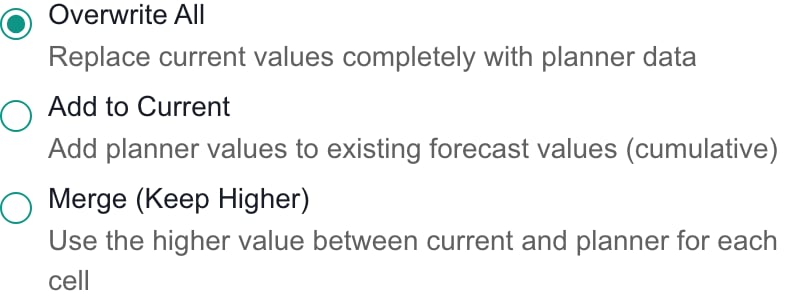 *MSP example: read the merge behavior below before confirming; future years use manual overrides.*
## Choose the merge strategy
The strategies affect only the selected categories. They leave category percentages and Include settings in place.
| Strategy | Base amount when Planner has a positive cost | Future year when Planner has a positive cost |
| ----------------------- | -------------------------------------------------------- | ---------------------------------------------------------------------------------------------------------- |
| **Overwrite All** | Replaces the base amount with Planner's amount. | Replaces the year's manual override with Planner's amount. |
| **Add to Current** | Adds Planner's amount to the current base amount. | Adds Planner's amount to an existing manual override, or to zero when no override exists. |
| **Merge (Keep Higher)** | Keeps the larger of the current base and Planner amount. | Keeps the larger of an existing manual override and Planner amount; an absent override is treated as zero. |
For future years, Add and Merge compare with the stored manual override, not the percentage-calculated amount displayed in the cell. If a calculated cell shows 1,050 with no override and Planner supplies 500, Add to Current sets an override of 500, not 1,550. Review every changed year.
When Planner has no positive cost for a selected category's base year, the existing base amount remains. For a future year without positive Planner data, Overwrite All clears the override and returns the cell to its percentage or flat calculation. Add and Merge keep existing overrides in that case. Overwrite All does not mean every missing Planner cost becomes zero.
Repeating Add to Current can add the same Planner amounts again. This is a merge of numbers, not duplicate detection by Planner item. Do not resync repeatedly as a way to refresh the same costs.
## Which Planner costs are included?
The sync uses the selected company's dated, categorized, non-archived Planner items. Cancelled work is excluded; Completed work can still contribute. This differs from the budget builder's Planner source panel, which excludes Completed items.
The cost year follows Due date, falling back to Start date. The sync uses separate positive cost components when present; otherwise it can use the item's positive overall estimate.
* **One-time** costs contribute only in their scheduled year within the horizon.
* **Monthly** costs contribute twelve times the monthly amount in each year from their starting year through the horizon.
* **Annual** costs contribute once per year over that same range.
Recurring Planner costs are not prorated to the remaining months in their first year. Check late-year starts, completed recurring work and costs already represented in a budget before merging. The sync summarizes costs by category and year; it does not create individual budget lines or mark Planner tasks complete.
## Troubleshooting
| Result | What to check |
| ------------------------------------------------- | ----------------------------------------------------------------------------------------------------------------------- |
| Sync is unavailable | Select one company and ask the MSP to check budget management permission. |
| Dialog confirmation is disabled | Select at least one category. |
| A cost is missing | Company, category, Due/Start date, archive/cancelled status, positive cost and forecast horizon. |
| Add produced a smaller future value than expected | Check whether the original value was calculated or a manual override; Add uses the override, not the calculated cell. |
| Values grew again after another sync | Repeated Add can count the same amounts again. Review the worksheet before Save. |
| A year lost its Override badge | Overwrite clears overrides where Planner has no positive data, restoring calculation. |
| Sync failed | Keep the current worksheet and check the error/access with your MSP. Failure is not evidence that Planner has no costs. |
| Changes disappeared after leaving | Sync does not save. Wait for a successful toolbar Save before leaving. |
## Frequently asked questions
In the selected company's Forecast, check Base Year and choose Sync from Budget. Review the replaced base amounts and existing future overrides, then Save.
No. It replaces the current categories' base amounts while keeping future overrides, category percentages and Include settings.
No. It updates the proposed worksheet. Review the result and choose the toolbar Save to persist it.
It adds to an existing manual override, or zero if no override exists. It does not add to a percentage-calculated cell value.
No. For future years it compares Planner with a manual override, treating an absent override as zero. Review calculated cells before merging.
No. A base amount without positive Planner data remains. A future year without positive data has its override cleared, so its normal calculation applies.
Yes. It adds the amounts again. Review the existing worksheet and choose a suitable strategy instead of repeating Add as a refresh.
No. Completed items can contribute. Archived and Cancelled items are excluded, and the source must have a category, date and positive cost.
No. Monthly costs contribute twelve times the monthly amount for each projected year from their starting year. Review partial-year assumptions separately.
No. It merges category/year amounts into the proposed forecast. Save records forecast rules; source tasks, source budgets and provider records are unchanged.
Related: [Read and adjust a forecast](/user-guides/budgets/read-budget-forecast), [Add Planner costs to budget lines](/user-guides/budgets/import-planning-and-products).
*MSP example: read the merge behavior below before confirming; future years use manual overrides.*
## Choose the merge strategy
The strategies affect only the selected categories. They leave category percentages and Include settings in place.
| Strategy | Base amount when Planner has a positive cost | Future year when Planner has a positive cost |
| ----------------------- | -------------------------------------------------------- | ---------------------------------------------------------------------------------------------------------- |
| **Overwrite All** | Replaces the base amount with Planner's amount. | Replaces the year's manual override with Planner's amount. |
| **Add to Current** | Adds Planner's amount to the current base amount. | Adds Planner's amount to an existing manual override, or to zero when no override exists. |
| **Merge (Keep Higher)** | Keeps the larger of the current base and Planner amount. | Keeps the larger of an existing manual override and Planner amount; an absent override is treated as zero. |
For future years, Add and Merge compare with the stored manual override, not the percentage-calculated amount displayed in the cell. If a calculated cell shows 1,050 with no override and Planner supplies 500, Add to Current sets an override of 500, not 1,550. Review every changed year.
When Planner has no positive cost for a selected category's base year, the existing base amount remains. For a future year without positive Planner data, Overwrite All clears the override and returns the cell to its percentage or flat calculation. Add and Merge keep existing overrides in that case. Overwrite All does not mean every missing Planner cost becomes zero.
Repeating Add to Current can add the same Planner amounts again. This is a merge of numbers, not duplicate detection by Planner item. Do not resync repeatedly as a way to refresh the same costs.
## Which Planner costs are included?
The sync uses the selected company's dated, categorized, non-archived Planner items. Cancelled work is excluded; Completed work can still contribute. This differs from the budget builder's Planner source panel, which excludes Completed items.
The cost year follows Due date, falling back to Start date. The sync uses separate positive cost components when present; otherwise it can use the item's positive overall estimate.
* **One-time** costs contribute only in their scheduled year within the horizon.
* **Monthly** costs contribute twelve times the monthly amount in each year from their starting year through the horizon.
* **Annual** costs contribute once per year over that same range.
Recurring Planner costs are not prorated to the remaining months in their first year. Check late-year starts, completed recurring work and costs already represented in a budget before merging. The sync summarizes costs by category and year; it does not create individual budget lines or mark Planner tasks complete.
## Troubleshooting
| Result | What to check |
| ------------------------------------------------- | ----------------------------------------------------------------------------------------------------------------------- |
| Sync is unavailable | Select one company and ask the MSP to check budget management permission. |
| Dialog confirmation is disabled | Select at least one category. |
| A cost is missing | Company, category, Due/Start date, archive/cancelled status, positive cost and forecast horizon. |
| Add produced a smaller future value than expected | Check whether the original value was calculated or a manual override; Add uses the override, not the calculated cell. |
| Values grew again after another sync | Repeated Add can count the same amounts again. Review the worksheet before Save. |
| A year lost its Override badge | Overwrite clears overrides where Planner has no positive data, restoring calculation. |
| Sync failed | Keep the current worksheet and check the error/access with your MSP. Failure is not evidence that Planner has no costs. |
| Changes disappeared after leaving | Sync does not save. Wait for a successful toolbar Save before leaving. |
## Frequently asked questions
In the selected company's Forecast, check Base Year and choose Sync from Budget. Review the replaced base amounts and existing future overrides, then Save.
No. It replaces the current categories' base amounts while keeping future overrides, category percentages and Include settings.
No. It updates the proposed worksheet. Review the result and choose the toolbar Save to persist it.
It adds to an existing manual override, or zero if no override exists. It does not add to a percentage-calculated cell value.
No. For future years it compares Planner with a manual override, treating an absent override as zero. Review calculated cells before merging.
No. A base amount without positive Planner data remains. A future year without positive data has its override cleared, so its normal calculation applies.
Yes. It adds the amounts again. Review the existing worksheet and choose a suitable strategy instead of repeating Add as a refresh.
No. Completed items can contribute. Archived and Cancelled items are excluded, and the source must have a category, date and positive cost.
No. Monthly costs contribute twelve times the monthly amount for each projected year from their starting year. Review partial-year assumptions separately.
No. It merges category/year amounts into the proposed forecast. Save records forecast rules; source tasks, source budgets and provider records are unchanged.
Related: [Read and adjust a forecast](/user-guides/budgets/read-budget-forecast), [Add Planner costs to budget lines](/user-guides/budgets/import-planning-and-products).