> ## Documentation Index
> Fetch the complete documentation index at: https://docs.msportal.ai/llms.txt
> Use this file to discover all available pages before exploring further.
# Warranty Writeback to Autotask
> Write warranty expiration dates from MSPortal to Autotask configuration items, including items created by Datto RMM.
Warranty writeback copies each device's warranty expiration date from MSPortal into the **Warranty Expiration Date** of its Autotask configuration item. It works whether your configuration items come from Autotask's own configuration item sync or were created in Autotask by Datto RMM. If Autotask syncs configuration items into IT Glue, the date reaches IT Glue through that sync too.
This is a **write to Autotask**. Turn it on only when you want MSPortal's warranty dates to update your Autotask records.
## Which dates are written
MSPortal writes the expiration date that its automatic warranty check found for the device's serial number. The check uses the latest end date across every coverage the manufacturer lists. For HP that includes the factory warranty, bundled warranty and Care Packs.
* Only devices with a successful automatic warranty check and a known expiration date are written.
* A manufacturer record whose start date equals its end date is a placeholder, not real coverage. Those devices show no warranty date and nothing is written until real dates are found.
* Only the expiration date is written. The warranty start date stays in MSPortal.
* Dates you enter by hand in MSPortal, without an automatic check, are not written.
## Before you start
* **Autotask API permissions.** In Autotask, open **Admin > Resources/Users > Security Levels** and edit the level assigned to the MSPortal API user. Under **Inventory**, give **Configuration Item** access of **View (All)** and **Edit**.
* **Company mapping.** Link your Autotask companies to MSPortal companies. Serial-number matching only looks inside the Autotask company mapped to the device's company.
* **Warranty data.** Your devices need serial numbers and a supported manufacturer so MSPortal can check their warranty. See [Understand device details](/user-guides/devices/understand-device-details).
You do not need **Enable configuration item sync** turned on.
## Turn on warranty writeback
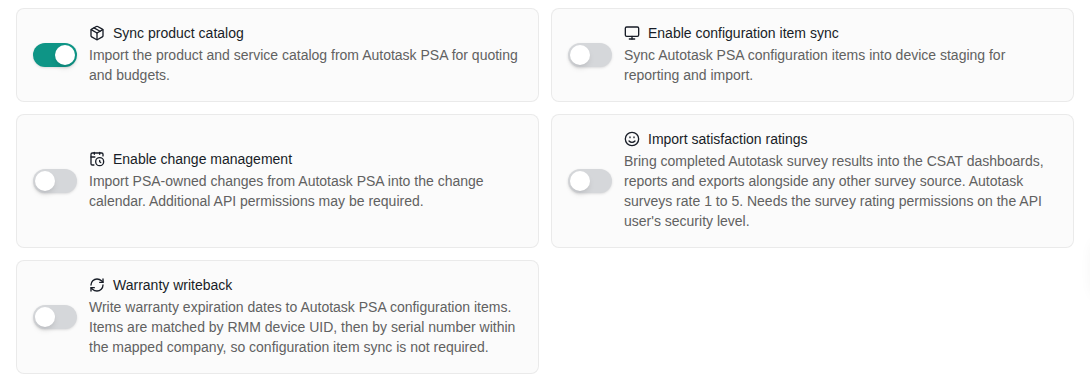
Open **Settings > Integrations > Autotask PSA > Configure** and go to **Sync**.
Under **Extended data**, turn on **Warranty writeback**.
Continue from **Sync**, or select **Save & Exit**. Continuing from Sync also starts a background synchronization of your selected Autotask data.
Under **Permissions**, select **Re-check** and resolve anything reported as denied.
 ## How devices are matched
MSPortal finds the configuration item for each device in this order:
1. **Linked item.** A device imported by Autotask configuration item sync is already linked to its configuration item and is updated directly.
2. **RMM device UID.** A device from Datto RMM matches the active configuration item that carries the same RMM device UID. This is how Datto RMM links its devices to Autotask.
3. **Serial number.** Otherwise, MSPortal looks for exactly one active configuration item with the same serial number in the Autotask company mapped to the device's company.
A device is skipped when:
* its serial number is missing or a placeholder, such as "To be filled by O.E.M." or "Default string";
* more than one configuration item has its serial number in that company;
* another MSPortal device matches the same configuration item.
MSPortal never matches by device name. A configuration item that already shows the same date is left unchanged.
## When it runs
* **Daily**, at about 04:35 UTC.
* **First run:** covers every device with a successful warranty check.
* **Later runs:** send only devices whose warranty was checked again since the previous run.
* **Weekly:** a full pass on Sundays picks up devices whose configuration item appeared in Autotask, or whose company was mapped, after their warranty check.
* **Failures:** if Autotask rejects an update, the next run tries again.
## Check the result
After the next daily run, open a device you know in Autotask and check **Warranty Expiration Date** on its configuration item. Compare it with the warranty end date on the device in MSPortal.
## Turn it off
Turn off **Warranty writeback** on the **Sync** step and save. Future runs stop. Dates already written to Autotask stay as they are.
## Troubleshooting
| Symptom | What to check |
| ----------------------------------------- | ------------------------------------------------------------------------------------------------------------------------------------------------------------------------------------------------------------------- |
| A configuration item never changes | The device has a successful warranty check and an end date in MSPortal; its serial number is unique in the mapped Autotask company, or the item carries its Datto RMM device UID; the configuration item is active. |
| No items change at all | **Warranty writeback** is on and saved; the API user has **Configuration Item** **Edit** access; wait for the daily run. |
| An item shows an older date than MSPortal | The device's warranty was re-checked after the last run; the next daily run sends it. |
| A device has no warranty date in MSPortal | The manufacturer returned no coverage or only a placeholder. Nothing is written for that device. |
## Frequently asked questions
No. Devices from Datto RMM are matched by RMM device UID or serial number. Configuration item sync is only needed if you also want Autotask configuration items imported into MSPortal.
If your Autotask configuration items sync into IT Glue, that sync carries the date into the IT Glue configuration. You can also write IT Glue configurations directly: see [Warranty writeback to IT Glue configurations](/user-guides/integrations/itglue-configuration-warranty-writeback).
MSPortal uses the latest end date across all coverage HP lists for the serial number. Devices checked before Care Packs were included are re-checked automatically. If a date still looks wrong, compare it with HP's warranty check for the same serial number.
No. Only **Warranty Expiration Date** is written.
## Related guides
Connect Autotask and choose what to synchronize.
Write warranty dates to IT Glue configurations.
## How devices are matched
MSPortal finds the configuration item for each device in this order:
1. **Linked item.** A device imported by Autotask configuration item sync is already linked to its configuration item and is updated directly.
2. **RMM device UID.** A device from Datto RMM matches the active configuration item that carries the same RMM device UID. This is how Datto RMM links its devices to Autotask.
3. **Serial number.** Otherwise, MSPortal looks for exactly one active configuration item with the same serial number in the Autotask company mapped to the device's company.
A device is skipped when:
* its serial number is missing or a placeholder, such as "To be filled by O.E.M." or "Default string";
* more than one configuration item has its serial number in that company;
* another MSPortal device matches the same configuration item.
MSPortal never matches by device name. A configuration item that already shows the same date is left unchanged.
## When it runs
* **Daily**, at about 04:35 UTC.
* **First run:** covers every device with a successful warranty check.
* **Later runs:** send only devices whose warranty was checked again since the previous run.
* **Weekly:** a full pass on Sundays picks up devices whose configuration item appeared in Autotask, or whose company was mapped, after their warranty check.
* **Failures:** if Autotask rejects an update, the next run tries again.
## Check the result
After the next daily run, open a device you know in Autotask and check **Warranty Expiration Date** on its configuration item. Compare it with the warranty end date on the device in MSPortal.
## Turn it off
Turn off **Warranty writeback** on the **Sync** step and save. Future runs stop. Dates already written to Autotask stay as they are.
## Troubleshooting
| Symptom | What to check |
| ----------------------------------------- | ------------------------------------------------------------------------------------------------------------------------------------------------------------------------------------------------------------------- |
| A configuration item never changes | The device has a successful warranty check and an end date in MSPortal; its serial number is unique in the mapped Autotask company, or the item carries its Datto RMM device UID; the configuration item is active. |
| No items change at all | **Warranty writeback** is on and saved; the API user has **Configuration Item** **Edit** access; wait for the daily run. |
| An item shows an older date than MSPortal | The device's warranty was re-checked after the last run; the next daily run sends it. |
| A device has no warranty date in MSPortal | The manufacturer returned no coverage or only a placeholder. Nothing is written for that device. |
## Frequently asked questions
No. Devices from Datto RMM are matched by RMM device UID or serial number. Configuration item sync is only needed if you also want Autotask configuration items imported into MSPortal.
If your Autotask configuration items sync into IT Glue, that sync carries the date into the IT Glue configuration. You can also write IT Glue configurations directly: see [Warranty writeback to IT Glue configurations](/user-guides/integrations/itglue-configuration-warranty-writeback).
MSPortal uses the latest end date across all coverage HP lists for the serial number. Devices checked before Care Packs were included are re-checked automatically. If a date still looks wrong, compare it with HP's warranty check for the same serial number.
No. Only **Warranty Expiration Date** is written.
## Related guides
Connect Autotask and choose what to synchronize.
Write warranty dates to IT Glue configurations.