> ## Documentation Index
> Fetch the complete documentation index at: https://docs.msportal.ai/llms.txt
> Use this file to discover all available pages before exploring further.
# Configure Cloudflare Integration
> Connect Cloudflare with a read-only API token, match zones to companies, and review domain security posture.
Preview: the **Connect** steps are checked in production. Zone matching, posture and sync are described from the release and will be rechecked with a live Cloudflare account.
Cloudflare brings your clients' zones into MSPortal: SSL/TLS mode, minimum TLS version, Always Use HTTPS, DNSSEC, security level, managed WAF, Cloudflare Registrar renewals, and the email-authentication DNS records (SPF, DMARC, DKIM, MTA-STS, TLS-RPT, BIMI and MX). This setup is for **MSP staff with integration management access**.
MSPortal only reads from Cloudflare. It never edits DNS records or zone settings.
## Before you connect
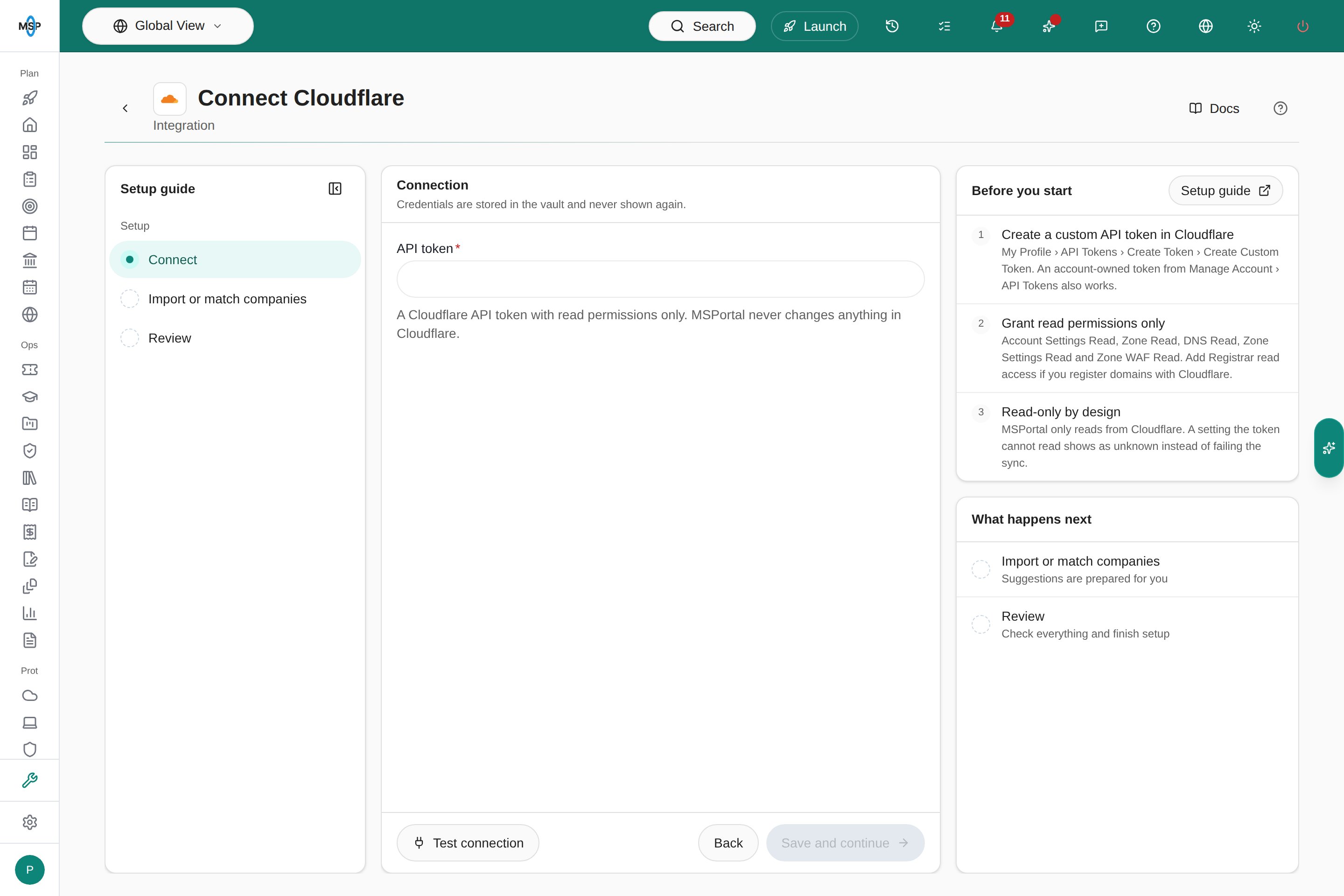
Create an API token in Cloudflare with read permissions only. Follow [Cloudflare's token instructions](https://developers.cloudflare.com/fundamentals/api/get-started/create-token/):
1. In Cloudflare, open **My Profile › API Tokens › Create Token › Create Custom Token**. An account-owned token from **Manage Account › API Tokens** also works.
2. Add these read permissions: **Account Settings Read**, **Zone Read**, **DNS Read**, **Zone Settings Read** and **Zone WAF Read**. If you register domains with Cloudflare Registrar, add Registrar read access too.
3. Choose the accounts and zones the token can read, create it, and copy it securely.
A setting the token cannot read shows as unknown in MSPortal instead of failing the sync.
## Connect
1. Open **Settings › Integrations**, choose **Directory**, find **Cloudflare**, and choose **Connect**.
2. Paste the token into **API token**.
3. Choose **Test connection**. A successful test shows how many accounts and zones the token can read. A rejected token shows **Connection failed** with the reason.
4. Choose **Save and continue**. MSPortal saves the token in the vault and starts the first sync.
 ## Match zones to companies
Each Cloudflare zone is a domain. On **Import or match companies**, link each zone to an existing company, or review the suggested matches first. A zone never creates a company. **Ignore** hides a zone that is not a client's, and you can restore it later.
Mapped zones appear as domains on the company with the source **Cloudflare**, including Registrar expiry and auto-renew when the domain is registered with Cloudflare.
## Review posture
* **Reports:** add the **Cloudflare Zone Posture** block. It shows zones with findings, every finding type, the zones needing attention, and Registrar renewals due within 30 days. It reflects the latest sync, not the report period.
* **AI reports:** security reports include a Cloudflare summary and the zones with findings.
* **Assistant and MCP:** ask about domain security, or use `get_cloudflare_zone_posture`.
Findings: Flexible SSL (traffic from Cloudflare to the origin is unencrypted), SSL off, TLS 1.0/1.1 allowed, HTTPS not enforced, DNSSEC off, security level off, managed WAF off, and zone paused. Only active zones are judged, and an unknown setting never counts as a finding.
## Sync and troubleshooting
Cloudflare syncs daily and when you choose **Refresh** on the integration. Large accounts take longer because MSPortal stays within Cloudflare's API rate limit.
* **Test fails with a rejected token:** check that the token was copied in full and has not expired or been revoked.
* **A setting shows as unknown:** add the matching read permission to the token, then refresh.
* **No Registrar dates:** the domain is not registered with Cloudflare Registrar, or the token lacks Registrar read access.
**Delete** removes the MSPortal connection only. It changes nothing in Cloudflare.
This documentation is built and hosted on [Mintlify](https://mintlify.com), a developer documentation platform.
## Match zones to companies
Each Cloudflare zone is a domain. On **Import or match companies**, link each zone to an existing company, or review the suggested matches first. A zone never creates a company. **Ignore** hides a zone that is not a client's, and you can restore it later.
Mapped zones appear as domains on the company with the source **Cloudflare**, including Registrar expiry and auto-renew when the domain is registered with Cloudflare.
## Review posture
* **Reports:** add the **Cloudflare Zone Posture** block. It shows zones with findings, every finding type, the zones needing attention, and Registrar renewals due within 30 days. It reflects the latest sync, not the report period.
* **AI reports:** security reports include a Cloudflare summary and the zones with findings.
* **Assistant and MCP:** ask about domain security, or use `get_cloudflare_zone_posture`.
Findings: Flexible SSL (traffic from Cloudflare to the origin is unencrypted), SSL off, TLS 1.0/1.1 allowed, HTTPS not enforced, DNSSEC off, security level off, managed WAF off, and zone paused. Only active zones are judged, and an unknown setting never counts as a finding.
## Sync and troubleshooting
Cloudflare syncs daily and when you choose **Refresh** on the integration. Large accounts take longer because MSPortal stays within Cloudflare's API rate limit.
* **Test fails with a rejected token:** check that the token was copied in full and has not expired or been revoked.
* **A setting shows as unknown:** add the matching read permission to the token, then refresh.
* **No Registrar dates:** the domain is not registered with Cloudflare Registrar, or the token lacks Registrar read access.
**Delete** removes the MSPortal connection only. It changes nothing in Cloudflare.
This documentation is built and hosted on [Mintlify](https://mintlify.com), a developer documentation platform.