> ## Documentation Index
> Fetch the complete documentation index at: https://docs.msportal.ai/llms.txt
> Use this file to discover all available pages before exploring further.
# Find and filter Secure Score controls
> Choose a status view, combine column filters and distinguish filtering from row selection.
**Audience:** Company users with Microsoft 365 read access and MSP staff.
## Find a recommendation
1. Open **Cloud > Posture > Secure Score** and confirm the company.
2. Choose **Needs attention**, **Addressed** or **All**. Use All if you do not know the control's status.
3. Type part of the control name into the **Title** column filter.
4. Combine available **Category**, **Service**, **Severity**, **Max Points** and **Status** filters. Broader company views can also show a Company filter.
5. Click the control's **Title** to open it.
6. Use **Clear Filters** to remove table filters. Check the active view separately; clearing filters does not switch Needs attention to All.
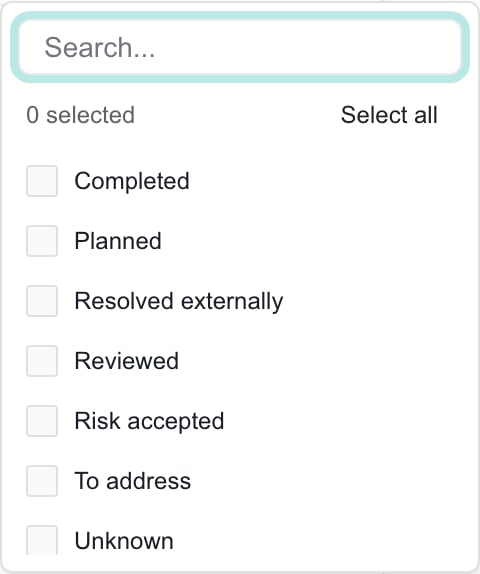 For example, Completed has no results within Needs attention. Switch to Addressed or All before filtering for it. A rare provider state may display its original wording while belonging to Unknown.
## Sort and move through results
Use the sortable column headings to change order. The table displays 20 rows per page; use its pagination controls when more results are available. The reader currently loads at most 5,000 controls for the selected scope. Filtering, view counts and CSV work within that loaded set, so a broad portfolio view is not guaranteed to contain every matching control. Narrow the company scope for a focused review.
The counts beside Needs attention, Addressed and All describe the loaded groups before column filters. They can be larger than your filtered results. Service choices depend on the loaded data. The Severity filter includes Low, although current tier mapping does not assign Low to controls.
## Select controls for an MSP action
Checkboxes select records for actions; filters determine what is visible. The header checkbox selects the current table page, not all pages. Before a bulk action, clear previous selections, filter to one company and check the intended rows and selection count. Changing a column filter can leave earlier checked rows in selection state; switching the status view clears selection.
Use [Plan work from Secure Score](/user-guides/microsoft-365/plan-secure-score-work) for MSP actions. Row selection does not limit a CSV export.
## FAQs
The default Needs attention view excludes Completed. Switch to Addressed or All, then check the Title and other column filters.
Yes. Status allows multiple selections, but results must also belong to the active view.
View counts describe loaded controls before column filters. The filtered table can contain fewer records.
No. Check Needs attention, Addressed or All separately. Clear Filters resets table filters.
No. It selects rows on the current page. Review selections before using bulk actions.
The page currently loads at most 5,000 controls for its scope. Filters operate on that loaded set. Select a company to narrow the review.
Low is an available filter option, but the current tier mapping assigns Critical, High, Medium or Informational.
No. CSV uses the active view and column-filtered loaded rows across table pages, independently of checkboxes.
For example, Completed has no results within Needs attention. Switch to Addressed or All before filtering for it. A rare provider state may display its original wording while belonging to Unknown.
## Sort and move through results
Use the sortable column headings to change order. The table displays 20 rows per page; use its pagination controls when more results are available. The reader currently loads at most 5,000 controls for the selected scope. Filtering, view counts and CSV work within that loaded set, so a broad portfolio view is not guaranteed to contain every matching control. Narrow the company scope for a focused review.
The counts beside Needs attention, Addressed and All describe the loaded groups before column filters. They can be larger than your filtered results. Service choices depend on the loaded data. The Severity filter includes Low, although current tier mapping does not assign Low to controls.
## Select controls for an MSP action
Checkboxes select records for actions; filters determine what is visible. The header checkbox selects the current table page, not all pages. Before a bulk action, clear previous selections, filter to one company and check the intended rows and selection count. Changing a column filter can leave earlier checked rows in selection state; switching the status view clears selection.
Use [Plan work from Secure Score](/user-guides/microsoft-365/plan-secure-score-work) for MSP actions. Row selection does not limit a CSV export.
## FAQs
The default Needs attention view excludes Completed. Switch to Addressed or All, then check the Title and other column filters.
Yes. Status allows multiple selections, but results must also belong to the active view.
View counts describe loaded controls before column filters. The filtered table can contain fewer records.
No. Check Needs attention, Addressed or All separately. Clear Filters resets table filters.
No. It selects rows on the current page. Review selections before using bulk actions.
The page currently loads at most 5,000 controls for its scope. Filters operate on that loaded set. Select a company to narrow the review.
Low is an available filter option, but the current tier mapping assigns Critical, High, Medium or Informational.
No. CSV uses the active view and column-filtered loaded rows across table pages, independently of checkboxes.