> ## Documentation Index
> Fetch the complete documentation index at: https://docs.msportal.ai/llms.txt
> Use this file to discover all available pages before exploring further.
# Microsoft 365 Secure Score
> Monitor and improve your Microsoft 365 security posture with actionable recommendations
The Microsoft 365 module provides comprehensive security monitoring through Microsoft Secure Score. Track your organization's security posture, view recommendations, and create action plans to improve your security configuration.
## Accessing M365 Secure Score
1. Click **Microsoft 365** in the sidebar
2. The Secure Score dashboard displays your security metrics and controls
 ## Summary Dashboard
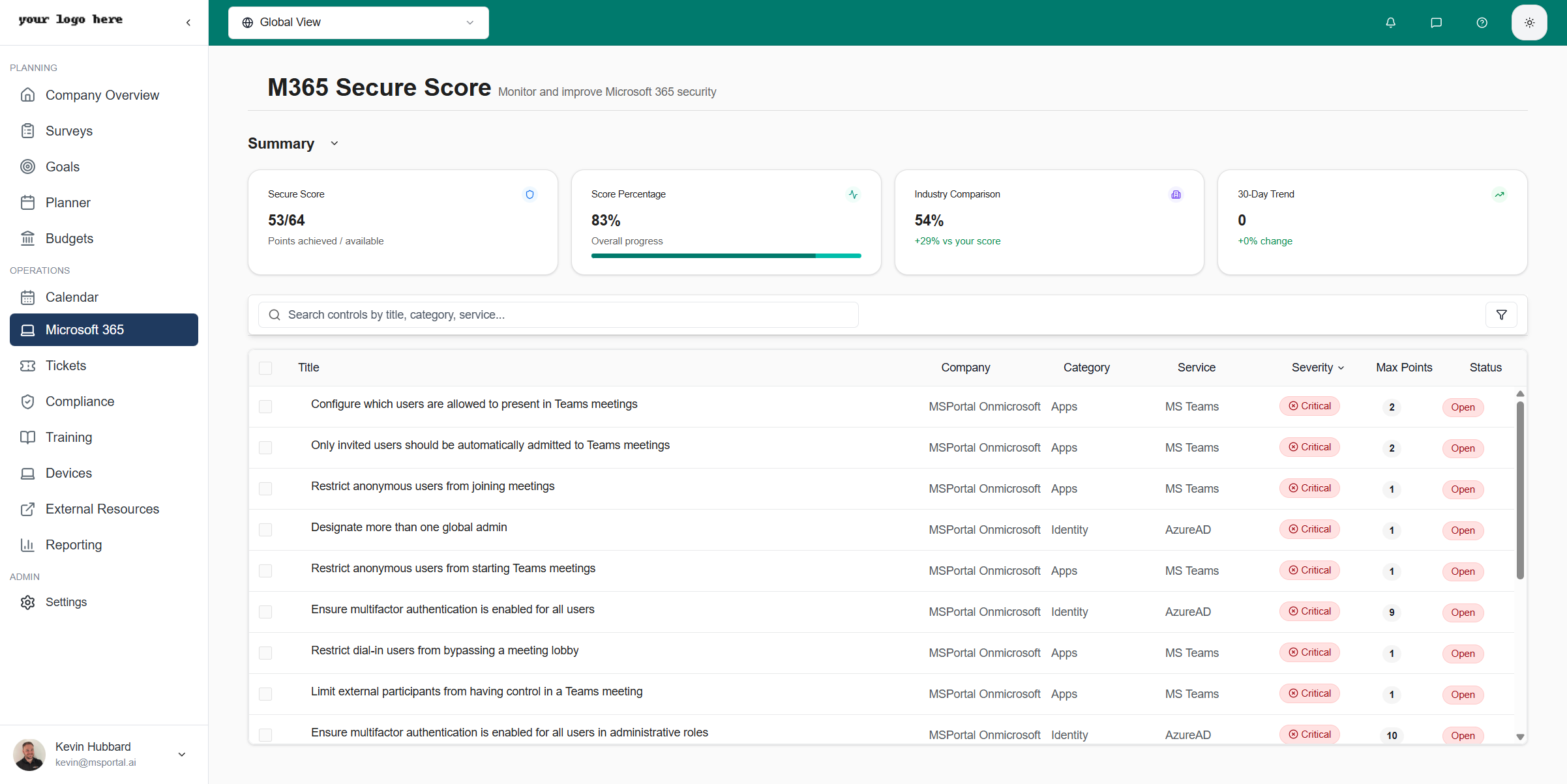
The summary section displays key metrics and category breakdowns:
### Main Metrics
| Metric | Description |
| ----------------------- | ---------------------------------------------------- |
| **Secure Score** | Points achieved out of total available (e.g., 53/64) |
| **Score Percentage** | Overall progress percentage with visual progress bar |
| **Industry Comparison** | How your score compares to industry average |
| **30-Day Trend** | Score change over the past month |
The Industry Comparison shows how your organization compares to similar organizations. A positive difference means you're ahead of the average.
### Category Breakdown
The summary also displays score breakdowns by security category:
| Category | Description |
| ------------------ | -------------------------------------------------- |
| **Identity** | User authentication and access management controls |
| **Device** | Device security and compliance controls |
| **Apps** | Application security and permissions controls |
| **Data** | Data protection and information governance |
| **Infrastructure** | Infrastructure and network security controls |
Each category card shows:
* Percentage score for that category
* Points achieved vs. available
* Color-coded progress indicator (green, yellow, orange, or red based on score)
### Collapsing the Summary
Click **Collapse Summary** to minimize the summary cards and focus on the controls list.
## Security Controls
### Controls Table
The controls table lists all security recommendations with:
| Column | Description |
| -------------- | ----------------------------------------------- |
| **Title** | Name of the security control |
| **Company** | Associated Microsoft tenant |
| **Category** | Control category (Identity, Apps, Data) |
| **Service** | Microsoft service (AzureAD, MS Teams, Exchange) |
| **Severity** | Critical, High, Medium, or Low |
| **Max Points** | Points available if implemented |
| **Status** | Open, Completed, or In Progress |
### Sorting and Filtering
* **Sort by column** - Click column headers to sort
* **Search** - Use the search box to find specific controls
* **Filter** - Click the filter icon to apply filters
### Severity Levels
| Severity | Description |
| ------------ | --------------------------------------------------------- |
| **Critical** | High-impact security issues requiring immediate attention |
| **High** | Important security gaps that should be prioritized |
| **Medium** | Moderate security improvements |
| **Low** | Minor enhancements for comprehensive security |
## Control Details
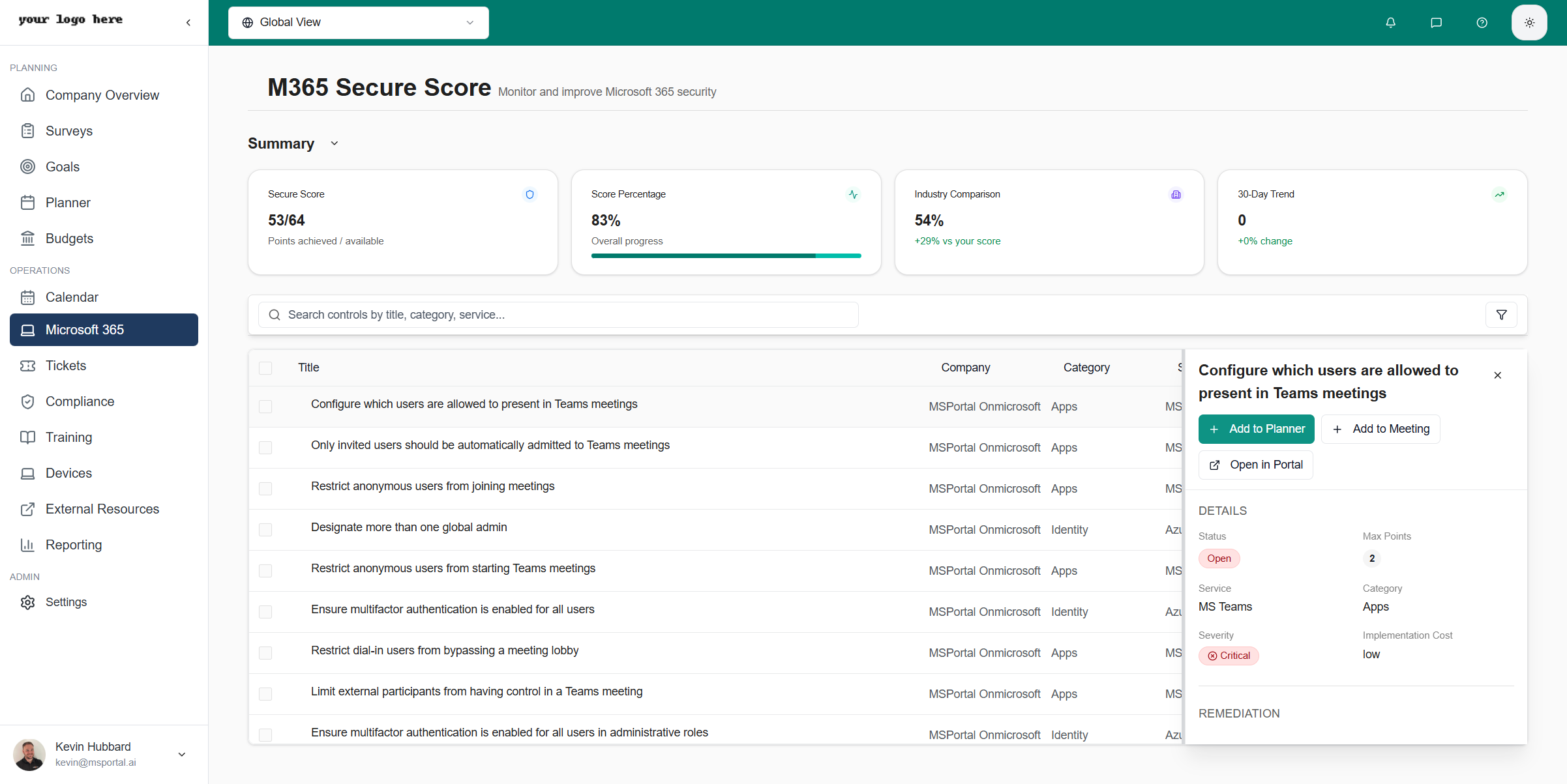
Click any control row to view detailed information:
## Summary Dashboard
The summary section displays key metrics and category breakdowns:
### Main Metrics
| Metric | Description |
| ----------------------- | ---------------------------------------------------- |
| **Secure Score** | Points achieved out of total available (e.g., 53/64) |
| **Score Percentage** | Overall progress percentage with visual progress bar |
| **Industry Comparison** | How your score compares to industry average |
| **30-Day Trend** | Score change over the past month |
The Industry Comparison shows how your organization compares to similar organizations. A positive difference means you're ahead of the average.
### Category Breakdown
The summary also displays score breakdowns by security category:
| Category | Description |
| ------------------ | -------------------------------------------------- |
| **Identity** | User authentication and access management controls |
| **Device** | Device security and compliance controls |
| **Apps** | Application security and permissions controls |
| **Data** | Data protection and information governance |
| **Infrastructure** | Infrastructure and network security controls |
Each category card shows:
* Percentage score for that category
* Points achieved vs. available
* Color-coded progress indicator (green, yellow, orange, or red based on score)
### Collapsing the Summary
Click **Collapse Summary** to minimize the summary cards and focus on the controls list.
## Security Controls
### Controls Table
The controls table lists all security recommendations with:
| Column | Description |
| -------------- | ----------------------------------------------- |
| **Title** | Name of the security control |
| **Company** | Associated Microsoft tenant |
| **Category** | Control category (Identity, Apps, Data) |
| **Service** | Microsoft service (AzureAD, MS Teams, Exchange) |
| **Severity** | Critical, High, Medium, or Low |
| **Max Points** | Points available if implemented |
| **Status** | Open, Completed, or In Progress |
### Sorting and Filtering
* **Sort by column** - Click column headers to sort
* **Search** - Use the search box to find specific controls
* **Filter** - Click the filter icon to apply filters
### Severity Levels
| Severity | Description |
| ------------ | --------------------------------------------------------- |
| **Critical** | High-impact security issues requiring immediate attention |
| **High** | Important security gaps that should be prioritized |
| **Medium** | Moderate security improvements |
| **Low** | Minor enhancements for comprehensive security |
## Control Details
Click any control row to view detailed information:
 ### Details Section
| Field | Description |
| ----------------------- | ----------------------------------- |
| **Status** | Current implementation state |
| **Max Points** | Score points available |
| **Service** | Microsoft service affected |
| **Category** | Control category |
| **Severity** | Risk level |
| **Implementation Cost** | Effort required (Low, Medium, High) |
### Remediation Steps
Each control includes step-by-step remediation instructions:
1. Specific actions to take
2. Portal navigation paths
3. Settings to configure
4. Verification steps
### Impact Information
| Field | Description |
| ---------------------- | --------------------------------------- |
| **User Impact** | Effect on end users (Low, Medium, High) |
| **Remediation Impact** | Overall impact of implementing the fix |
### Recent Scores
View historical score data for the control to track progress over time.
## Taking Action
### Add to Planner
Create a planner task to track implementation:
From the control details panel, click **Add to Planner**
The dialog pre-populates with control information
Set due date, status, business value, and estimates
Click **AI Draft** to generate a comprehensive summary
Click **Save** to create the planner task
### Details Section
| Field | Description |
| ----------------------- | ----------------------------------- |
| **Status** | Current implementation state |
| **Max Points** | Score points available |
| **Service** | Microsoft service affected |
| **Category** | Control category |
| **Severity** | Risk level |
| **Implementation Cost** | Effort required (Low, Medium, High) |
### Remediation Steps
Each control includes step-by-step remediation instructions:
1. Specific actions to take
2. Portal navigation paths
3. Settings to configure
4. Verification steps
### Impact Information
| Field | Description |
| ---------------------- | --------------------------------------- |
| **User Impact** | Effect on end users (Low, Medium, High) |
| **Remediation Impact** | Overall impact of implementing the fix |
### Recent Scores
View historical score data for the control to track progress over time.
## Taking Action
### Add to Planner
Create a planner task to track implementation:
From the control details panel, click **Add to Planner**
The dialog pre-populates with control information
Set due date, status, business value, and estimates
Click **AI Draft** to generate a comprehensive summary
Click **Save** to create the planner task
 #### Planner Task Fields
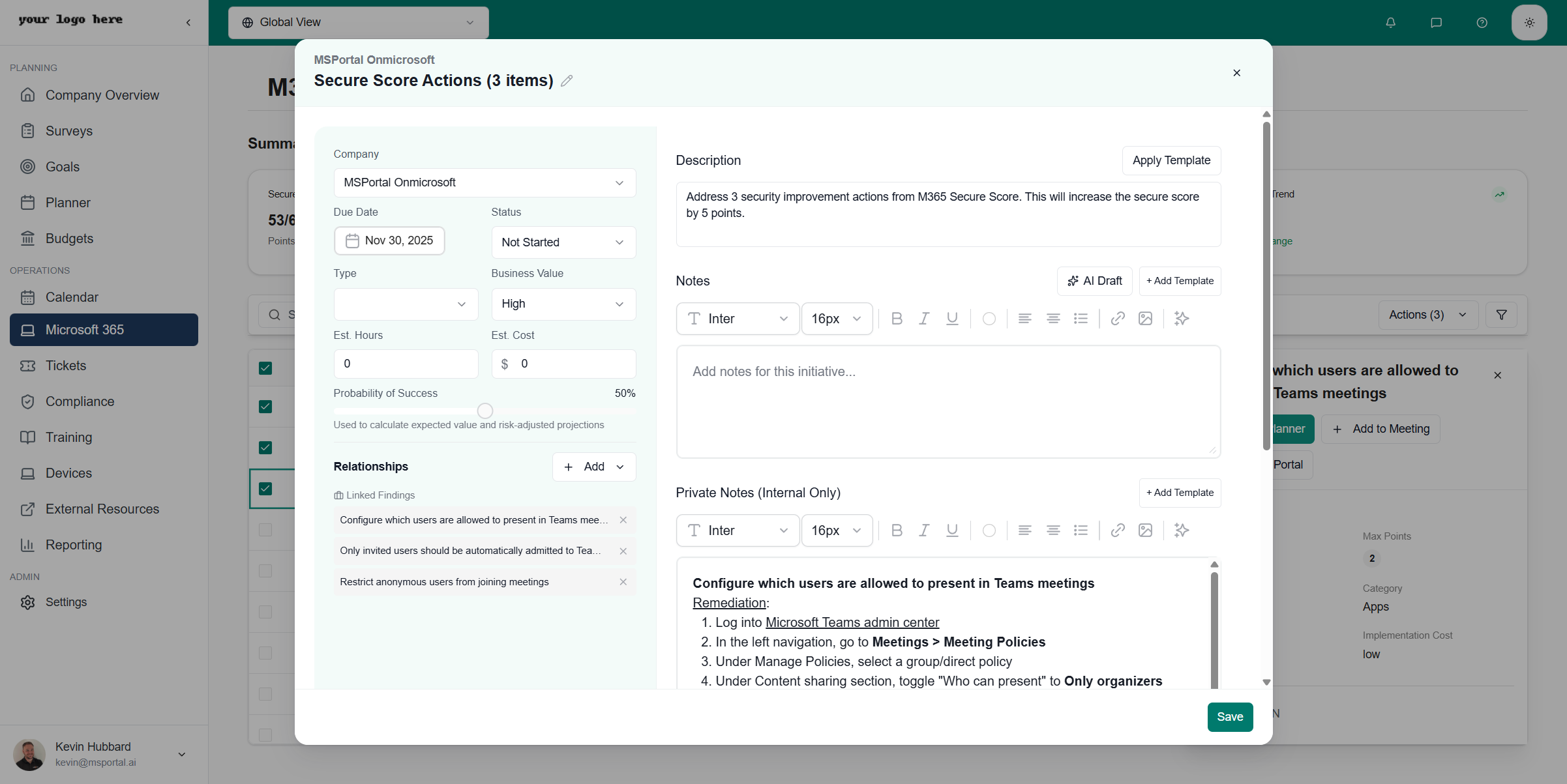
| Field | Description |
| -------------------------- | ----------------------------------- |
| **Company** | Associated company |
| **Title** | Editable task title |
| **Due Date** | Target completion date |
| **Status** | Not Started, In Progress, Completed |
| **Type** | Task categorization |
| **Business Value** | High, Medium, Low |
| **Est. Hours** | Estimated implementation time |
| **Est. Cost** | Estimated implementation cost |
| **Probability of Success** | Confidence slider (0-100%) |
#### Using AI Draft
The **AI Draft** feature automatically generates professional notes from your selected security controls.
**Before AI Draft** - The Notes section starts empty:
**After AI Draft** - Click the **AI Draft** button to generate comprehensive documentation:
#### Planner Task Fields
| Field | Description |
| -------------------------- | ----------------------------------- |
| **Company** | Associated company |
| **Title** | Editable task title |
| **Due Date** | Target completion date |
| **Status** | Not Started, In Progress, Completed |
| **Type** | Task categorization |
| **Business Value** | High, Medium, Low |
| **Est. Hours** | Estimated implementation time |
| **Est. Cost** | Estimated implementation cost |
| **Probability of Success** | Confidence slider (0-100%) |
#### Using AI Draft
The **AI Draft** feature automatically generates professional notes from your selected security controls.
**Before AI Draft** - The Notes section starts empty:
**After AI Draft** - Click the **AI Draft** button to generate comprehensive documentation:
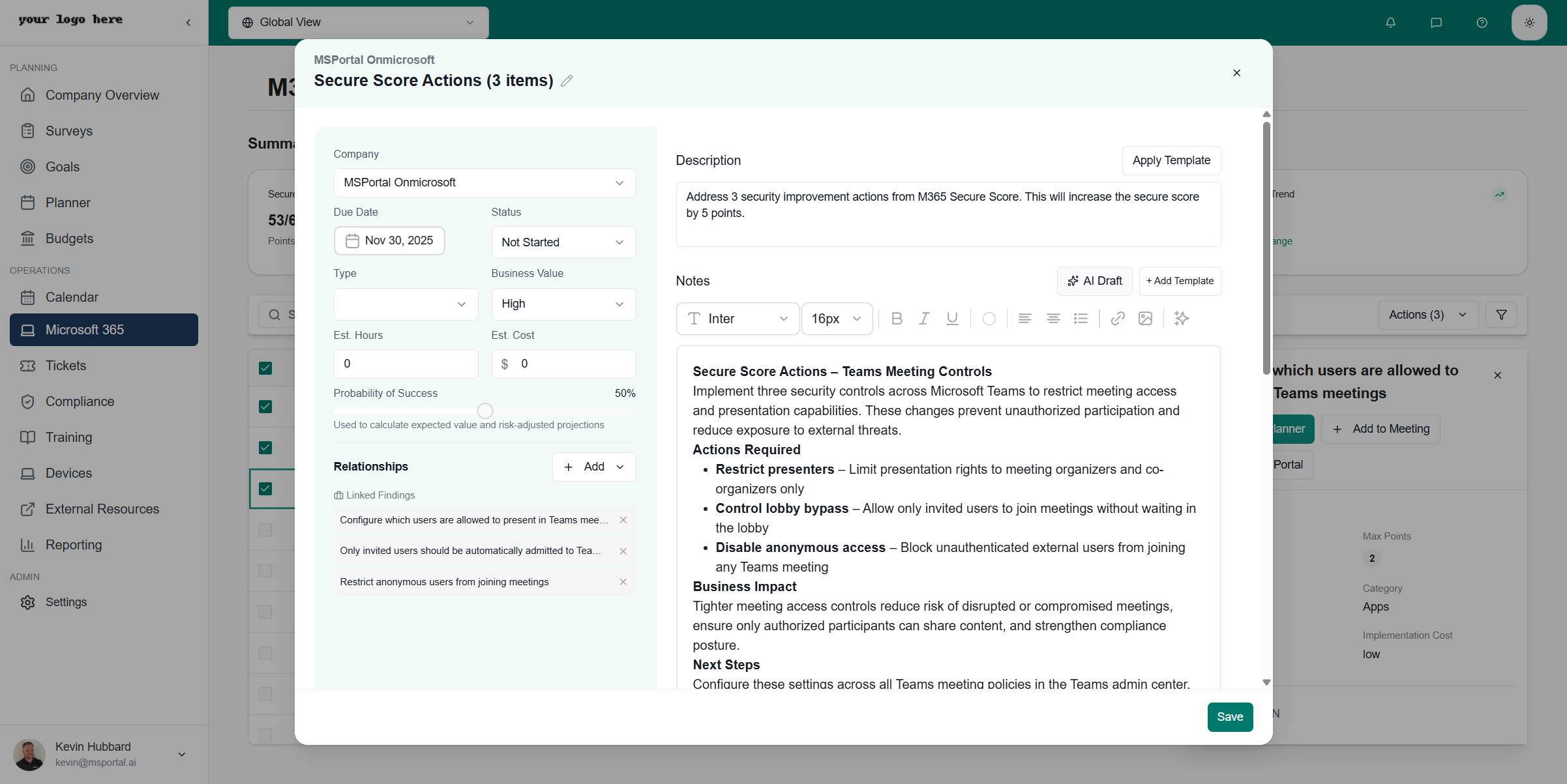 AI Draft creates:
* **Summary** - Clear description of what needs to be done and expected impact
* **Actions Required** - Specific configuration steps for each control
* **Business Impact** - Security benefits and risk reduction explanation
* **Next Steps** - Actionable implementation checklist
#### Relationships
Link the task to:
* **Linked Findings** - Related security controls
* **Goals** - Strategic objectives
* **Compliance Items** - Regulatory requirements
### Add to Meeting
Add the control to an upcoming meeting agenda:
From the control details, click **Add to Meeting**
Choose an existing or create a new meeting
Set discussion time and presenter
### Open in Portal
Click **Open in Portal** to navigate directly to the Microsoft admin portal where you can implement the fix.
## Bulk Actions
### Selecting Multiple Controls
Select multiple security controls to process them together:
1. Use the checkbox next to each control to select individual items
2. Click **Select All** to select all visible controls
3. Click the **Actions** dropdown to view bulk action options
AI Draft creates:
* **Summary** - Clear description of what needs to be done and expected impact
* **Actions Required** - Specific configuration steps for each control
* **Business Impact** - Security benefits and risk reduction explanation
* **Next Steps** - Actionable implementation checklist
#### Relationships
Link the task to:
* **Linked Findings** - Related security controls
* **Goals** - Strategic objectives
* **Compliance Items** - Regulatory requirements
### Add to Meeting
Add the control to an upcoming meeting agenda:
From the control details, click **Add to Meeting**
Choose an existing or create a new meeting
Set discussion time and presenter
### Open in Portal
Click **Open in Portal** to navigate directly to the Microsoft admin portal where you can implement the fix.
## Bulk Actions
### Selecting Multiple Controls
Select multiple security controls to process them together:
1. Use the checkbox next to each control to select individual items
2. Click **Select All** to select all visible controls
3. Click the **Actions** dropdown to view bulk action options
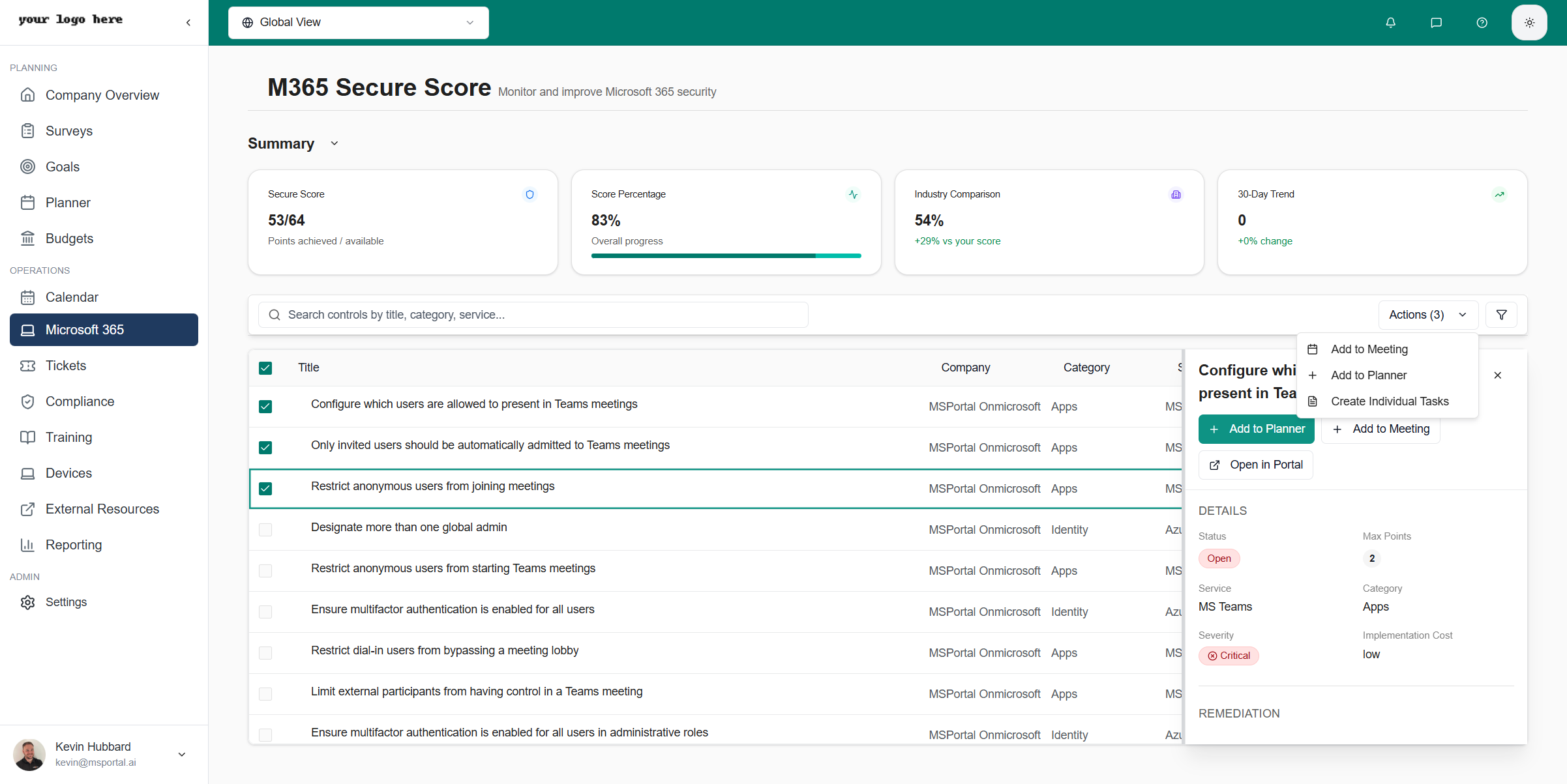 ### Available Bulk Actions
| Action | Description |
| --------------------------- | ------------------------------------------------------------ |
| **Add to Meeting** | Add selected controls to an upcoming meeting agenda |
| **Add to Planner** | Create a single planner task combining all selected controls |
| **Create Individual Tasks** | Create separate planner tasks for each selected control |
## Best Practices
### Prioritization Strategy
1. **Start with Critical** - Address Critical severity items first
2. **High-Point Items** - Focus on controls with highest point values
3. **Low Implementation Cost** - Quick wins with minimal effort
4. **User Impact Consideration** - Balance security with user experience
### Regular Reviews
* **Weekly** - Review Critical and High severity items
* **Monthly** - Assess overall score progress
* **Quarterly** - Comprehensive security posture review
### Documentation
* Create planner tasks for all implementations
* Use AI Draft to document remediation plans
* Track score changes after implementations
## Prerequisites
Before using M365 Secure Score:
1. **Microsoft 365 Integration** - Enable in Settings → Integrations
2. **Permissions** - Global Administrator or Security Administrator role
3. **Tenant Access** - Valid Microsoft 365 subscription
## Troubleshooting
### Score Not Updating
* Microsoft Secure Score updates may have up to 24-hour delay
* Verify integration permissions are still valid
* Check Microsoft 365 service health status
### Controls Not Loading
* Refresh the page
* Check network connectivity
* Re-authenticate the Microsoft 365 integration
### Implementation Not Reflected
* Allow 24-48 hours for Microsoft to detect changes
* Verify the configuration was applied to all users/groups
* Check for policy conflicts
## Related Resources
* [M365 Licenses](/user-guides/microsoft-365/licenses) - License usage monitoring
* [M365 Domains](/user-guides/microsoft-365/domains) - Domain management
* [Calendar Module](/user-guides/calendar/index) - Meeting scheduling
* [Planner Module](/user-guides/planner/index) - Task management
* [Compliance Module](/user-guides/compliance/index) - Compliance tracking
* [Settings - Integrations](/user-guides/settings/integrations) - Integration configuration
### Available Bulk Actions
| Action | Description |
| --------------------------- | ------------------------------------------------------------ |
| **Add to Meeting** | Add selected controls to an upcoming meeting agenda |
| **Add to Planner** | Create a single planner task combining all selected controls |
| **Create Individual Tasks** | Create separate planner tasks for each selected control |
## Best Practices
### Prioritization Strategy
1. **Start with Critical** - Address Critical severity items first
2. **High-Point Items** - Focus on controls with highest point values
3. **Low Implementation Cost** - Quick wins with minimal effort
4. **User Impact Consideration** - Balance security with user experience
### Regular Reviews
* **Weekly** - Review Critical and High severity items
* **Monthly** - Assess overall score progress
* **Quarterly** - Comprehensive security posture review
### Documentation
* Create planner tasks for all implementations
* Use AI Draft to document remediation plans
* Track score changes after implementations
## Prerequisites
Before using M365 Secure Score:
1. **Microsoft 365 Integration** - Enable in Settings → Integrations
2. **Permissions** - Global Administrator or Security Administrator role
3. **Tenant Access** - Valid Microsoft 365 subscription
## Troubleshooting
### Score Not Updating
* Microsoft Secure Score updates may have up to 24-hour delay
* Verify integration permissions are still valid
* Check Microsoft 365 service health status
### Controls Not Loading
* Refresh the page
* Check network connectivity
* Re-authenticate the Microsoft 365 integration
### Implementation Not Reflected
* Allow 24-48 hours for Microsoft to detect changes
* Verify the configuration was applied to all users/groups
* Check for policy conflicts
## Related Resources
* [M365 Licenses](/user-guides/microsoft-365/licenses) - License usage monitoring
* [M365 Domains](/user-guides/microsoft-365/domains) - Domain management
* [Calendar Module](/user-guides/calendar/index) - Meeting scheduling
* [Planner Module](/user-guides/planner/index) - Task management
* [Compliance Module](/user-guides/compliance/index) - Compliance tracking
* [Settings - Integrations](/user-guides/settings/integrations) - Integration configuration