> ## Documentation Index
> Fetch the complete documentation index at: https://docs.msportal.ai/llms.txt
> Use this file to discover all available pages before exploring further.
# Plan vCIO workload and pricing
> Estimate vCIO capacity and monthly add-on prices for your clients.
Branch preview for the October 9 release. The updated table layout and header Save changes action are not yet published.
Open **Calculators** and choose **vCIO Workload** or **vCIO Pricing**. The calculators use available client data and let you override individual inputs. Editing requires permission to manage MSP calculators.
 ## Review workload
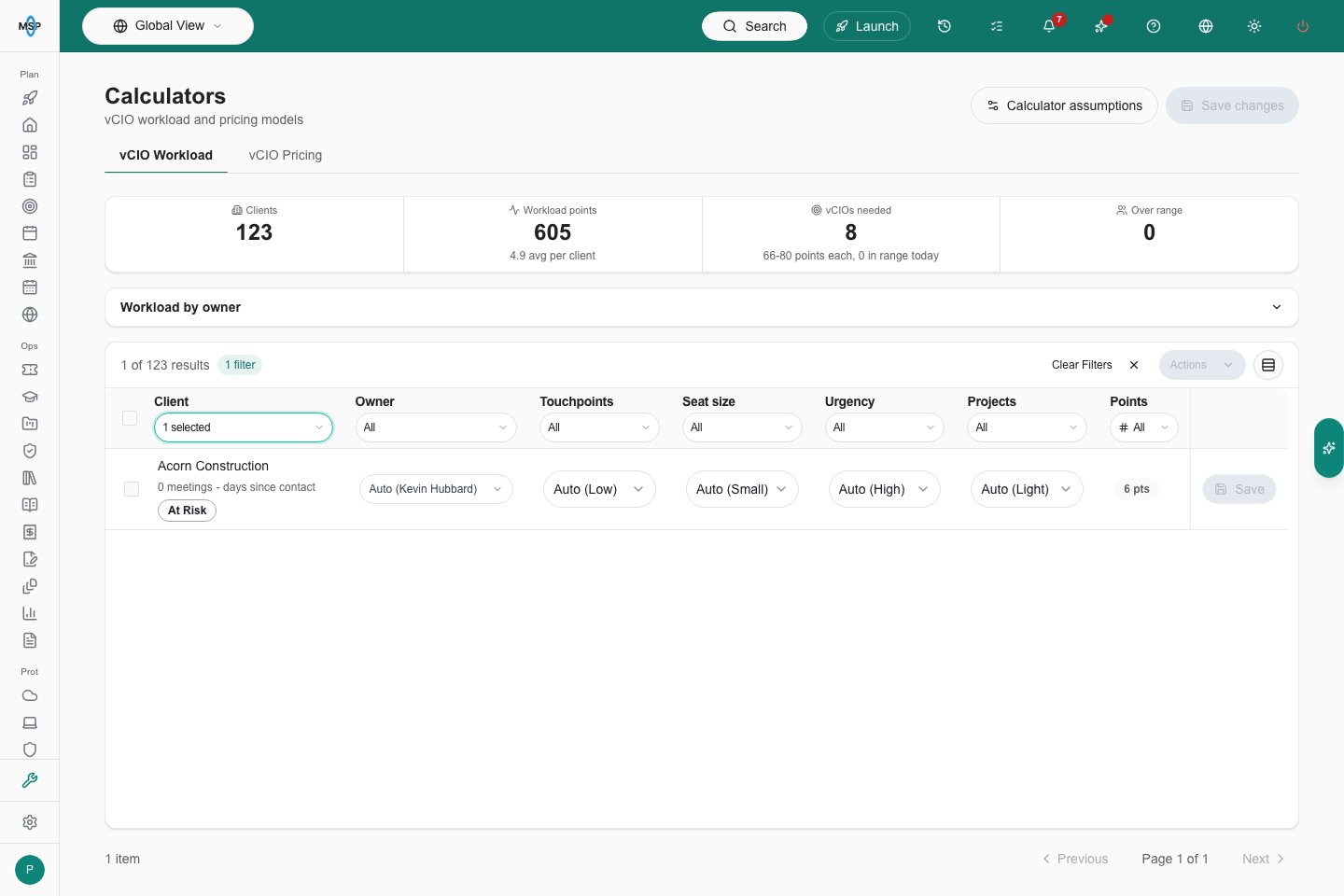
The summary shows clients, total workload points, recommended vCIO headcount, and assigned owners over their workload range. Expand or collapse **Workload by owner** to review each owner's clients, points, and range.
Use the client table's column filters to narrow the list. Adjust the owner, touchpoints, seat size, urgency, or projects for a client. **Auto** uses the detected value. Select clients and open the table's **Actions** menu to apply the same change to the selection.
## Review pricing
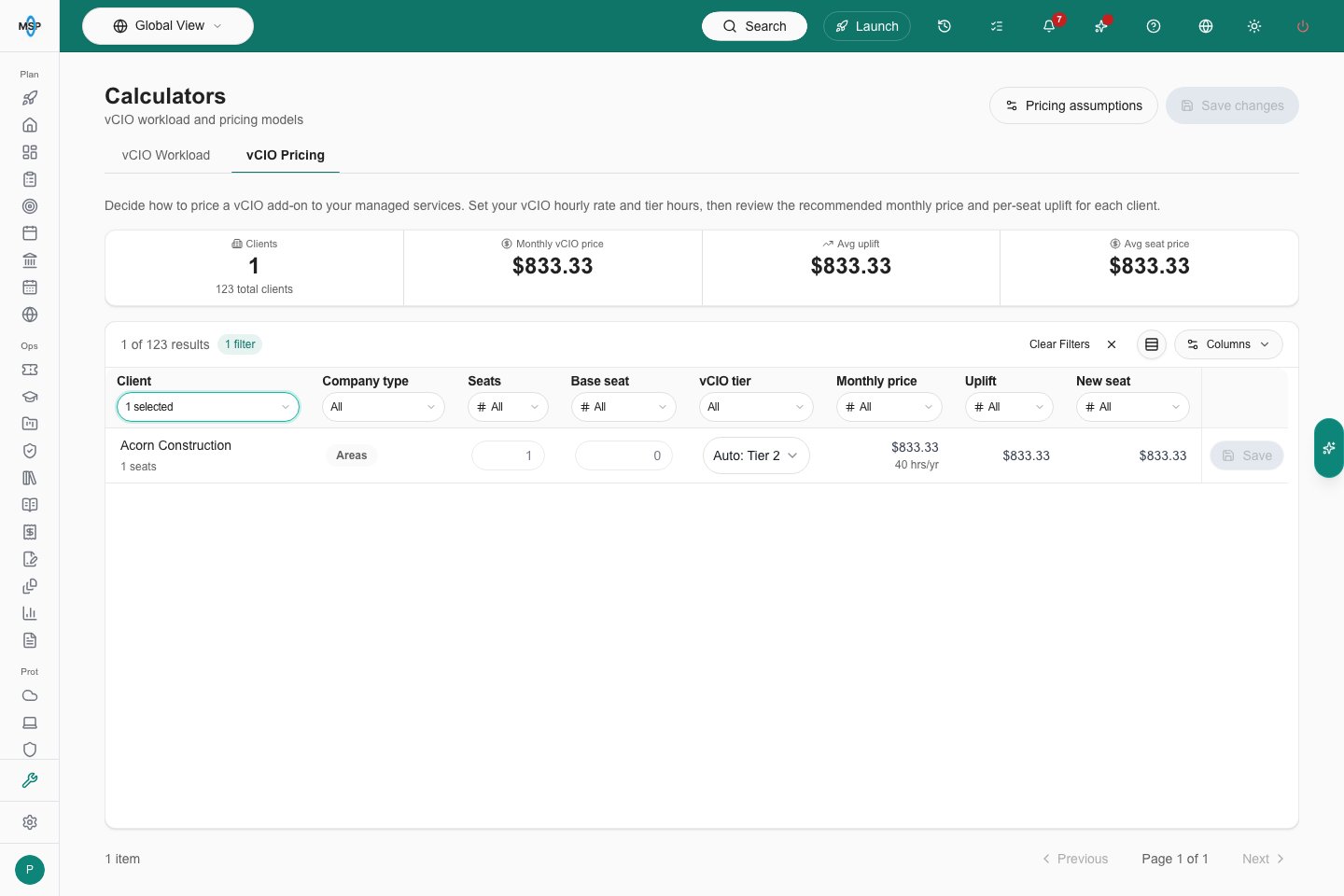
Choose **vCIO Pricing** to review seat counts, base seat prices, tiers, monthly prices, per-seat uplift, and recommended seat prices. Filter **Company type** in its table column; on a phone, open **Filters** to choose it.
Enter a seat count or base seat price to override the detected value, or choose a tier. Clear a number or choose **Auto** to return to the automatic value. A client needs both seats and a base price for a complete per-seat recommendation.
## Review workload
The summary shows clients, total workload points, recommended vCIO headcount, and assigned owners over their workload range. Expand or collapse **Workload by owner** to review each owner's clients, points, and range.
Use the client table's column filters to narrow the list. Adjust the owner, touchpoints, seat size, urgency, or projects for a client. **Auto** uses the detected value. Select clients and open the table's **Actions** menu to apply the same change to the selection.
## Review pricing
Choose **vCIO Pricing** to review seat counts, base seat prices, tiers, monthly prices, per-seat uplift, and recommended seat prices. Filter **Company type** in its table column; on a phone, open **Filters** to choose it.
Enter a seat count or base seat price to override the detected value, or choose a tier. Clear a number or choose **Auto** to return to the automatic value. A client needs both seats and a base price for a complete per-seat recommendation.
 ## Save changes and assumptions
Choose **Save changes** in the page header to save changed clients from either tab, or **Save** on a row to save one client. Switching tabs preserves unsaved inputs. On a phone, open the page header's **Actions** panel to find **Save changes**.
Open **Calculator assumptions** from Workload or **Pricing assumptions** from Pricing to adjust the model. Review the values and save them in the assumptions panel.
Use the table pagination to reach additional clients. Tables show stacked, labelled fields on phones.
This documentation is built and hosted on [Mintlify](https://mintlify.com), a developer documentation platform.
## Save changes and assumptions
Choose **Save changes** in the page header to save changed clients from either tab, or **Save** on a row to save one client. Switching tabs preserves unsaved inputs. On a phone, open the page header's **Actions** panel to find **Save changes**.
Open **Calculator assumptions** from Workload or **Pricing assumptions** from Pricing to adjust the model. Review the values and save them in the assumptions panel.
Use the table pagination to reach additional clients. Tables show stacked, labelled fields on phones.
This documentation is built and hosted on [Mintlify](https://mintlify.com), a developer documentation platform.