> ## Documentation Index
> Fetch the complete documentation index at: https://docs.msportal.ai/llms.txt
> Use this file to discover all available pages before exploring further.
# Plan costs and hours
> Enter quantities, unit costs, recurring estimates, effort and probability for a Planner item.
**Audience:** Company users reading Planner estimates and MSP staff preparing or editing them. Changing estimates requires Planner editing permission; your MSP manages access.
Open a Planner item from **List View** or the timeline. Review **Est. Hours**, the **Qty / Costs** rows and **Probability of Success** on the left side of its details.
## Read quantities and unit costs
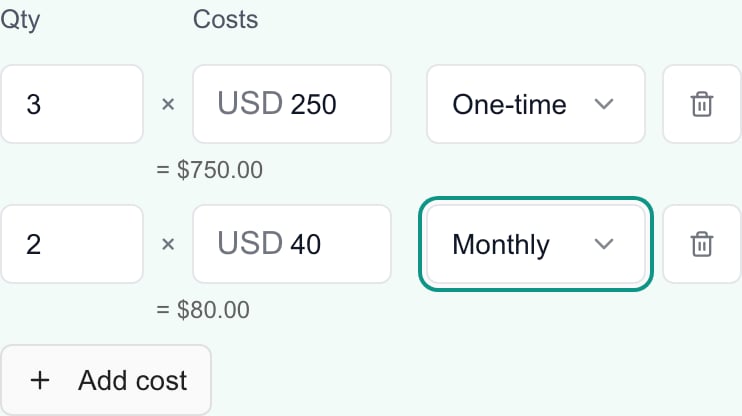
Each row contains a quantity, a unit amount and a recurrence. The row's planning amount is **quantity × unit amount**. When quantity differs from 1 and the amount is positive, a total appears beneath the row.
A quantity of 3 at 250 means 750 for that row. A separate quantity of 2 at 40 Monthly means 80 per month. Keep these cadences separate; adding them as 830 does not produce an annual budget.
 | Recurrence | Meaning |
| ------------ | ----------------------------------------------------------------- |
| **One-time** | A single planned amount. |
| **Monthly** | An amount for each month; it is not already multiplied by twelve. |
| **Annual** | An amount for each year. |
Use [timeline recurring-cost projection](/user-guides/planner/filter-timeline) to understand period rollups. [Analytics](/user-guides/planner/read-analytics) selects a cost type separately; changing a chart filter does not change the item's cost rows.
## Add or change cost rows
1. Open the item with editing access.
2. Enter a positive **Qty** and the nonnegative unit amount under **Costs**.
3. Choose **One-time**, **Monthly** or **Annual** for that row.
4. Choose **Add cost** for another row. An item supports up to 20 rows.
5. Review each row's quantity, amount and cadence, then choose **Save** in the item dialog.
Changing a cost input updates the unsaved form. Wait for Save to succeed and reopen the item to confirm the stored estimate.
Use a row's trash control to remove it when available. The last remaining row cannot be removed; clear its unit amount to leave a zero estimate. A blank unit amount is treated as zero. A blank or zero quantity returns to 1 when you leave the quantity field, so use the unit amount—not quantity—to enter zero cost.
Some rows are labeled **Managed from linked device standard prices** or show a device-price description. Their fields and removal control are locked in this editor. Ask the MSP to review the linked device and its standard pricing; adding another manual row can double-count the same planned cost.
## Hours and probability
**Est. Hours** is a nonnegative effort estimate. The number control supports quarter-hour increments, such as 1.25. Clearing it saves a zero estimate. It does not create time entries or assign staff capacity.
**Probability of Success** ranges from 0% to 100% in 5-point slider steps. It helps calculate expected value and risk-adjusted projections. A new item starts at 50%; changing probability does not change Status or Business Value.
Probability is a planning estimate, not a promise or a percent-complete measurement. Planner Analytics treats completed and cancelled work differently when calculating expected value; see [Understand Analytics charts](/user-guides/planner/understand-analytics-charts).
## Check currency and loading problems
Check the displayed currency code before entering amounts. If the editor's code differs from the company's currency shown elsewhere, ask the MSP to resolve the mismatch before relying on the figures. The editor does not offer an exchange-rate conversion control.
If cost loading fails, use the displayed **Retry** control. Save is unavailable while required cost or custom-field data is not ready. Do not replace an estimate with zero merely because its data has not loaded.
## FAQs
Open the item and edit its Qty, Costs and recurrence rows, then Save. Planner editing permission is required.
Enter the unit amount. The row amount is quantity multiplied by that unit amount; a positive total appears below when quantity differs from 1.
Yes. Use separate rows and choose a recurrence for each. Keep the cadences separate when interpreting the estimate.
No. It is a monthly amount. Timeline projection can roll it into periods; Analytics selects the cadence separately.
Up to 20. Use Add cost while below the limit.
One row remains in the editor. Clear its unit amount to leave a zero estimate.
Clear the unit amount or enter zero. Do not use zero quantity: leaving a blank or zero quantity field restores it to 1.
Rows managed from linked device standard prices cannot be edited or removed here. Ask the MSP to review the linked device's standard pricing.
No. These fields belong to the item form. Choose Save and wait for success; reopen the item to confirm the stored values.
No. It is a planning probability used in expected-value and risk calculations. It is separate from Status and Business Value.
There is no exchange-rate conversion control. Check the displayed code, and ask the MSP about any mismatch with the company's currency elsewhere.
Use Retry and wait for the data. Save is unavailable until required data is ready; do not assume the missing estimate is zero.
## Bulk cost changes
List View **Actions > Set Cost** replaces the selected items' detailed cost breakdowns with one row each. Use individual item editing to preserve separate lines and recurrence. Read [Update several Planner items](/user-guides/planner/update-multiple-items) before applying a bulk cost change.
| Recurrence | Meaning |
| ------------ | ----------------------------------------------------------------- |
| **One-time** | A single planned amount. |
| **Monthly** | An amount for each month; it is not already multiplied by twelve. |
| **Annual** | An amount for each year. |
Use [timeline recurring-cost projection](/user-guides/planner/filter-timeline) to understand period rollups. [Analytics](/user-guides/planner/read-analytics) selects a cost type separately; changing a chart filter does not change the item's cost rows.
## Add or change cost rows
1. Open the item with editing access.
2. Enter a positive **Qty** and the nonnegative unit amount under **Costs**.
3. Choose **One-time**, **Monthly** or **Annual** for that row.
4. Choose **Add cost** for another row. An item supports up to 20 rows.
5. Review each row's quantity, amount and cadence, then choose **Save** in the item dialog.
Changing a cost input updates the unsaved form. Wait for Save to succeed and reopen the item to confirm the stored estimate.
Use a row's trash control to remove it when available. The last remaining row cannot be removed; clear its unit amount to leave a zero estimate. A blank unit amount is treated as zero. A blank or zero quantity returns to 1 when you leave the quantity field, so use the unit amount—not quantity—to enter zero cost.
Some rows are labeled **Managed from linked device standard prices** or show a device-price description. Their fields and removal control are locked in this editor. Ask the MSP to review the linked device and its standard pricing; adding another manual row can double-count the same planned cost.
## Hours and probability
**Est. Hours** is a nonnegative effort estimate. The number control supports quarter-hour increments, such as 1.25. Clearing it saves a zero estimate. It does not create time entries or assign staff capacity.
**Probability of Success** ranges from 0% to 100% in 5-point slider steps. It helps calculate expected value and risk-adjusted projections. A new item starts at 50%; changing probability does not change Status or Business Value.
Probability is a planning estimate, not a promise or a percent-complete measurement. Planner Analytics treats completed and cancelled work differently when calculating expected value; see [Understand Analytics charts](/user-guides/planner/understand-analytics-charts).
## Check currency and loading problems
Check the displayed currency code before entering amounts. If the editor's code differs from the company's currency shown elsewhere, ask the MSP to resolve the mismatch before relying on the figures. The editor does not offer an exchange-rate conversion control.
If cost loading fails, use the displayed **Retry** control. Save is unavailable while required cost or custom-field data is not ready. Do not replace an estimate with zero merely because its data has not loaded.
## FAQs
Open the item and edit its Qty, Costs and recurrence rows, then Save. Planner editing permission is required.
Enter the unit amount. The row amount is quantity multiplied by that unit amount; a positive total appears below when quantity differs from 1.
Yes. Use separate rows and choose a recurrence for each. Keep the cadences separate when interpreting the estimate.
No. It is a monthly amount. Timeline projection can roll it into periods; Analytics selects the cadence separately.
Up to 20. Use Add cost while below the limit.
One row remains in the editor. Clear its unit amount to leave a zero estimate.
Clear the unit amount or enter zero. Do not use zero quantity: leaving a blank or zero quantity field restores it to 1.
Rows managed from linked device standard prices cannot be edited or removed here. Ask the MSP to review the linked device's standard pricing.
No. These fields belong to the item form. Choose Save and wait for success; reopen the item to confirm the stored values.
No. It is a planning probability used in expected-value and risk calculations. It is separate from Status and Business Value.
There is no exchange-rate conversion control. Check the displayed code, and ask the MSP about any mismatch with the company's currency elsewhere.
Use Retry and wait for the data. Save is unavailable until required data is ready; do not assume the missing estimate is zero.
## Bulk cost changes
List View **Actions > Set Cost** replaces the selected items' detailed cost breakdowns with one row each. Use individual item editing to preserve separate lines and recurrence. Read [Update several Planner items](/user-guides/planner/update-multiple-items) before applying a bulk cost change.