> ## Documentation Index
> Fetch the complete documentation index at: https://docs.msportal.ai/llms.txt
> Use this file to discover all available pages before exploring further.
# Use playbooks to prepare compliance reviews
> Choose reusable check content, import it, then configure an assessment.
**Audience:** MSP staff preparing compliance reviews. Company users read the assessments shared by their IT provider; they do not import the MSP's playbook catalog.
A playbook is reusable source content for compliance checks. Import it into the tenant library, review the copied checks, then configure the relevant company or device assessment. Import is not a completed security review or a configuration change to a provider.
## Choose a starting point
Open **Settings > Compliance > Playbooks**. **Best Practices** groups operational and technology reviews. **Security Frameworks** includes the available CIS benchmark catalog and framework families such as NIS2. Search by name or description when you already know what you need.
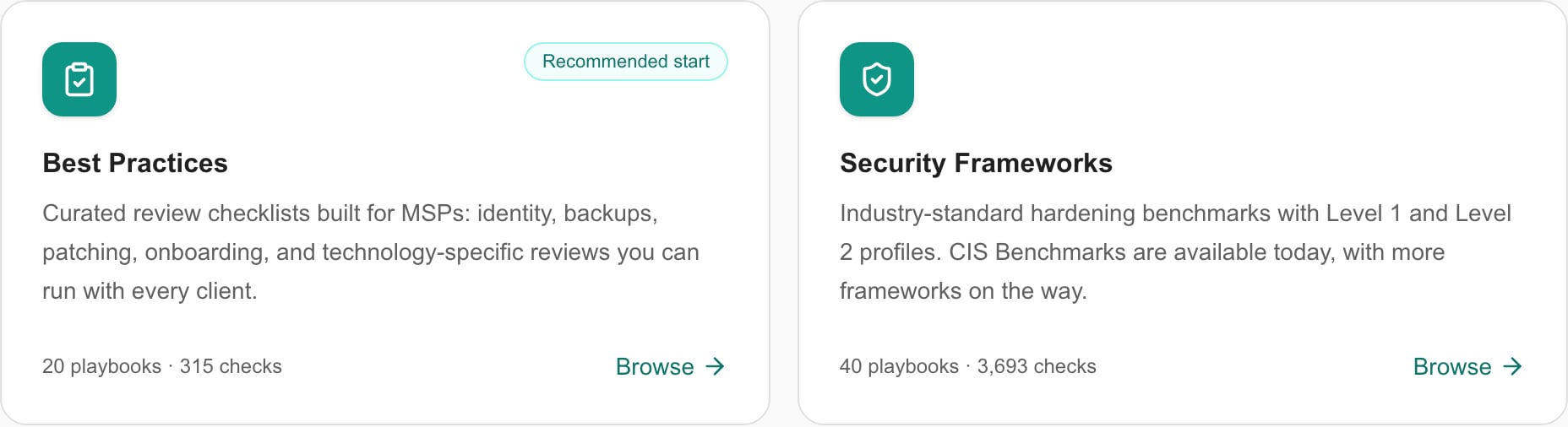 Review the actual card name, version and check count. The page does not guarantee a fixed list of frameworks, every vendor's latest release or the same number of checks in every playbook.
## Move from a playbook to an assessment
1. Open the playbook details to read its check list. Close the preview when finished.
2. Use **Add** to review the destination folder, status list and any device-type suggestions.
3. Submit **Add to Tenant** only after reviewing those choices. The [settings guide](/user-guides/settings/playbooks) explains the distinct immediate Copy action and duplicate-import behavior.
4. Inspect the imported group and checks under **Settings > Compliance**. Tailor guidance and applicability to the intended review.
5. Add the relevant group or checks to the appropriate run/template and company scope using [Compliance settings](/user-guides/settings/compliance).
6. Perform the assessment, record evidence and review the results in [Compliance](/user-guides/compliance/index).
A playbook can help standardize questions across clients. It does not supply missing evidence, decide every exception or certify the client. Check the applicable product version and client scope before assigning a benchmark.
## Keep copied content current
Track which catalog version you imported and review later changes before creating another copy. The **Imported** badge helps identify prior imports, but a missing badge is not sufficient reason to repeat an uncertain operation. Inspect the tenant library if a previous import's result is unclear.
Use [Adding CIS Benchmarks](/user-guides/compliance/adding-cis-benchmarks) when selecting CIS product families and L1/L2 variants. Keep benchmark profiles distinct from CIS Controls Implementation Groups. Use [Adding NIS2 playbooks](/user-guides/compliance/adding-nis2-playbooks) for clients subject to the EU NIS2 directive.
## Troubleshooting
If you can browse but cannot import, ask an MSP administrator to check the relevant management permission and billing. If a check group exists but a company has no assessment, review run/company assignment. If results appear incomplete, inspect actual assessment status and evidence rather than treating the imported check count as completed work.
## FAQs
No. It supplies check content. Assign the review, perform the assessment and record evidence separately.
This is an MSP settings workflow. Company users read the assessments shared by their IT provider.
No. Import adds tenant check content and associated groups; provider remediation is a separate workflow.
Use the actual catalog shown in your account, including its product names and versions.
No. Verify the intended company/run assignment and actual assessment results.
## Related guides
* [Compliance settings](/user-guides/settings/compliance)
* [Playbook settings](/user-guides/settings/playbooks)
* [Compliance assessments](/user-guides/compliance/index)
Review the actual card name, version and check count. The page does not guarantee a fixed list of frameworks, every vendor's latest release or the same number of checks in every playbook.
## Move from a playbook to an assessment
1. Open the playbook details to read its check list. Close the preview when finished.
2. Use **Add** to review the destination folder, status list and any device-type suggestions.
3. Submit **Add to Tenant** only after reviewing those choices. The [settings guide](/user-guides/settings/playbooks) explains the distinct immediate Copy action and duplicate-import behavior.
4. Inspect the imported group and checks under **Settings > Compliance**. Tailor guidance and applicability to the intended review.
5. Add the relevant group or checks to the appropriate run/template and company scope using [Compliance settings](/user-guides/settings/compliance).
6. Perform the assessment, record evidence and review the results in [Compliance](/user-guides/compliance/index).
A playbook can help standardize questions across clients. It does not supply missing evidence, decide every exception or certify the client. Check the applicable product version and client scope before assigning a benchmark.
## Keep copied content current
Track which catalog version you imported and review later changes before creating another copy. The **Imported** badge helps identify prior imports, but a missing badge is not sufficient reason to repeat an uncertain operation. Inspect the tenant library if a previous import's result is unclear.
Use [Adding CIS Benchmarks](/user-guides/compliance/adding-cis-benchmarks) when selecting CIS product families and L1/L2 variants. Keep benchmark profiles distinct from CIS Controls Implementation Groups. Use [Adding NIS2 playbooks](/user-guides/compliance/adding-nis2-playbooks) for clients subject to the EU NIS2 directive.
## Troubleshooting
If you can browse but cannot import, ask an MSP administrator to check the relevant management permission and billing. If a check group exists but a company has no assessment, review run/company assignment. If results appear incomplete, inspect actual assessment status and evidence rather than treating the imported check count as completed work.
## FAQs
No. It supplies check content. Assign the review, perform the assessment and record evidence separately.
This is an MSP settings workflow. Company users read the assessments shared by their IT provider.
No. Import adds tenant check content and associated groups; provider remediation is a separate workflow.
Use the actual catalog shown in your account, including its product names and versions.
No. Verify the intended company/run assignment and actual assessment results.
## Related guides
* [Compliance settings](/user-guides/settings/compliance)
* [Playbook settings](/user-guides/settings/playbooks)
* [Compliance assessments](/user-guides/compliance/index)