> ## Documentation Index
> Fetch the complete documentation index at: https://docs.msportal.ai/llms.txt
> Use this file to discover all available pages before exploring further.
# Export a project to Excel
> Download a full project workbook with phases, tasks, time entries, milestones, updates, decisions, action items, and deliverables.
Branch preview. Project export is not yet generally available. The screenshots show the unreleased branch UI.
**Audience:** MSP staff who can open the project. The **Export to Excel** button is not shown to Company users, because the workbook includes internal content such as hours, budget, and items that are not client visible.
Open **Projects**, select a project, and choose **Export to Excel** in the page header. MSPortal downloads an `.xlsx` workbook named after the project. The export works for PSA-synced and native MSPortal projects and changes nothing in MSPortal or your PSA.
 ## What the workbook contains
The workbook always has an **Overview** sheet. Every other sheet appears only when the project has rows for it.
| Sheet | Contents |
| ---------------------------------- | ----------------------------------------------------------------------------------------------------------------------------------------------------------------------------------------------------------------------------------------------------------------------------- |
| **Overview** | Company, source, status, health and health reason, current phase, project type, dates, percent complete, hours, budget and actual cost, customer PO, outcome, summary, details, contacts, project custom fields, and a linked list of the other sheets with their row counts. |
| **Phases** | WBS, phase, parent phase, status, scheduled and actual dates, deadline, scheduled, budget and actual hours, milestone flag, and task and open-task counts. |
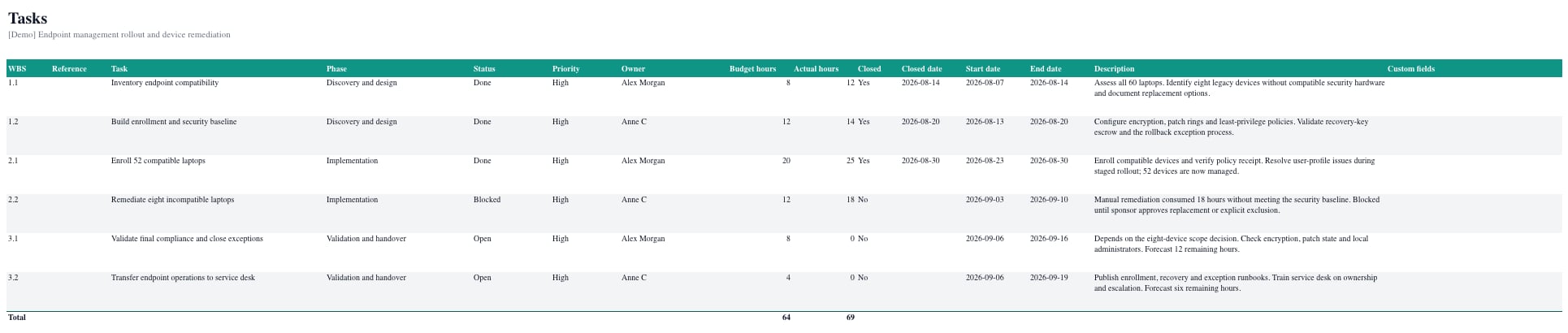
| **Tasks** | WBS, PSA reference, task, phase, status, priority, owner, budget and actual hours, closed flag and date, scheduled dates, description, and task custom fields. |
| **Time Entries** | Date, member, task, phase, hours, billable option, work type, and notes, oldest first. |
| **Team** | ConnectWise project team assignments with role, work role, hours, and dates. |
| **Milestones** | Title, status, planned and actual dates, client visibility, linked phase or task, description, and notes. |
| **Updates** | Week, summary, done, next, risks, decisions needed, posted date and author, and client visibility. |
| **Decisions** and **Action Items** | Title, type, status, urgency, due date, assignees, description, response, completion, and linked phase or task. |
| **Deliverables** | Title, status, due and completed dates, client visibility, linked phase or task, description, and document names. |
## What the workbook contains
The workbook always has an **Overview** sheet. Every other sheet appears only when the project has rows for it.
| Sheet | Contents |
| ---------------------------------- | ----------------------------------------------------------------------------------------------------------------------------------------------------------------------------------------------------------------------------------------------------------------------------- |
| **Overview** | Company, source, status, health and health reason, current phase, project type, dates, percent complete, hours, budget and actual cost, customer PO, outcome, summary, details, contacts, project custom fields, and a linked list of the other sheets with their row counts. |
| **Phases** | WBS, phase, parent phase, status, scheduled and actual dates, deadline, scheduled, budget and actual hours, milestone flag, and task and open-task counts. |
| **Tasks** | WBS, PSA reference, task, phase, status, priority, owner, budget and actual hours, closed flag and date, scheduled dates, description, and task custom fields. |
| **Time Entries** | Date, member, task, phase, hours, billable option, work type, and notes, oldest first. |
| **Team** | ConnectWise project team assignments with role, work role, hours, and dates. |
| **Milestones** | Title, status, planned and actual dates, client visibility, linked phase or task, description, and notes. |
| **Updates** | Week, summary, done, next, risks, decisions needed, posted date and author, and client visibility. |
| **Decisions** and **Action Items** | Title, type, status, urgency, due date, assignees, description, response, completion, and linked phase or task. |
| **Deliverables** | Title, status, due and completed dates, client visibility, linked phase or task, description, and document names. |
 ## Work with the sheets
* Each data sheet has a frozen header row with filters, so you can sort and filter in Excel straight away.
* Hours and counts are numeric cells. **Phases**, **Tasks**, **Time Entries**, and **Team** end with a **Total** row.
* Phases and tasks follow WBS order.
* Documents are listed by name. The files themselves stay in MSPortal.
* The workbook uses your tenant's brand color and your current language. Custom fields follow your role's field access.
## Troubleshooting
| Symptom | What to check |
| ------------------------------------- | ---------------------------------------------------------------------------------------------------------------------------------- |
| The button is missing | You are signed in as a Company user. The export is for MSP staff. |
| A sheet is missing | The project has no rows for that part. **Team** appears only for ConnectWise projects with team assignments. |
| **Details** is blank on a PSA project | The workbook prints Details only when the project has written text there. Use **Summary** and **Outcome** for PSA-synced projects. |
## Work with the sheets
* Each data sheet has a frozen header row with filters, so you can sort and filter in Excel straight away.
* Hours and counts are numeric cells. **Phases**, **Tasks**, **Time Entries**, and **Team** end with a **Total** row.
* Phases and tasks follow WBS order.
* Documents are listed by name. The files themselves stay in MSPortal.
* The workbook uses your tenant's brand color and your current language. Custom fields follow your role's field access.
## Troubleshooting
| Symptom | What to check |
| ------------------------------------- | ---------------------------------------------------------------------------------------------------------------------------------- |
| The button is missing | You are signed in as a Company user. The export is for MSP staff. |
| A sheet is missing | The project has no rows for that part. **Team** appears only for ConnectWise projects with team assignments. |
| **Details** is blank on a PSA project | The workbook prints Details only when the project has written text there. Use **Summary** and **Outcome** for PSA-synced projects. |