> ## Documentation Index
> Fetch the complete documentation index at: https://docs.msportal.ai/llms.txt
> Use this file to discover all available pages before exploring further.
# Use phase and ticket action menus
> Understand MSP project shortcuts, immediate saves, client visibility, and how to recover when a linked-item shortcut fails.
**Audience:** MSP staff. Company users [read shared project phases and tickets](/user-guides/projects/read-project-phases); the MSP manages project editing and permissions.
Use **Projects > select a project > Phases**. The **...** beside a phase is **Phase actions**. Expand a phase to reach **Ticket actions** beside one of its tickets. Available options depend on your editing permissions and the project source.
The current **Mark as Milestone** shortcut failed during Demo verification: no milestone appeared and the view stayed on Phases. Check Timeline before retrying. If no record was created, use [Timeline > Add Milestone](/user-guides/projects/manage-project-milestones) and enter the details there. Automatic phase/ticket linking through that fallback is not guaranteed. This issue is recorded for repair.
## Understand the shortcuts before selecting one
These creation shortcuts attempt an immediate save. They do not first open an unsaved form or request confirmation. Treat the resulting item as shared project content and review its destination after any click.
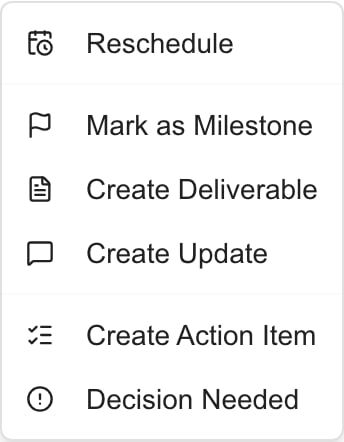 This is the MSP Demo phase menu. A visible menu option does not itself confirm the operation succeeded.
| Option | Destination and starting content |
| ---------------------- | -------------------------------------------------------------------------------------------------------------------------------------------------------------------------------------------------------------------------------------------------------------------------------------------------------------------------------------------- |
| **Mark as Milestone** | Attempts to open an existing linked milestone, or create one on **Timeline**. The intended new item uses the phase or ticket title, starts client-visible, copies an available end date (otherwise start), and starts Complete only if the source is complete; otherwise Pending. Verify dates independently. See the current failure above. |
| **Create Deliverable** | Attempts to add a Planned item to **Deliverables**, linked to the phase or ticket. It starts client-visible. A ticket shortcut copies the ticket summary into the description. |
| **Create Update** | Attempts to add an **Updates** entry for Monday of the current week, linked to the phase or ticket. It starts client-visible with a generated summary and empty progress lists. |
| **Create Action Item** | Attempts to add a Pending item to **Action Items**, linked to the phase or ticket. It starts without an assignee or due date. |
| **Decision Needed** | Attempts to add a Pending decision to **Decisions**, linked to the phase or ticket. It starts without an assignee or due date. |
The creation defaults above describe the shortcuts' configured behavior. Check that the saved record actually appears; successful creation through each shortcut has not been verified. Their behavior differs from **Add Update** and **Add Milestone** on the destination tabs, which start with Client Visible off.
## Finish and verify the result
Confirm the project, phase or ticket, and intended destination before selecting an action. For content that must begin privately, create it on its destination tab and review its visibility there.
Wait for the destination tab and new item. If it does not open, visit that tab yourself and check the available list before trying again. Use Total or clear filters where relevant; do not create another copy just because navigation failed.
Review the generated title and description, dates, status, and client visibility. Finish [deliverables](/user-guides/projects/manage-project-deliverables), [updates](/user-guides/projects/write-project-updates), [milestones](/user-guides/projects/manage-project-milestones), or [decisions and action items](/user-guides/projects/manage-project-actions) using the destination guide.
Check the saved item after reopening the project. Closing a row or returning to Phases does not undo a successful creation. Use the destination's delete control only for an unwanted record you have identified.
Creating these collaboration items does not close the source ticket, update its PSA status, or automatically notify a client. Requests need assignees and an explicit notification action when a message is intended. Client-visible content still requires the reader to have project access.
## Reschedule and native-project editing
**Reschedule** is a separate action available to MSP staff with project write permission and a supported connected project system. It opens the rescheduling workflow; use [Project calendar](/user-guides/projects/calendar) for its preview and confirmation steps. Changing a milestone date is not the same as rescheduling a PSA phase or task.
For MSPortal-native projects, authorized MSP editors can also use **Add Phase**, **Add Ticket**, and native edit/delete controls. Follow [Native Projects: Start to Finish](/user-guides/projects/native-projects). These controls are not a general editor for all PSA-synchronized projects. Company users cannot gain these actions by changing their own role.
## FAQs
This failure was observed in Demo. Check Timeline for an existing or newly saved item before retrying. If none exists, use Timeline > Add Milestone and enter the fields manually; automatic linking is not assured by that fallback.
No. Create Update is configured to save immediately with Client Visible on. Add Update on the Updates tab starts internal instead. Check the saved visibility before adding sensitive content.
No. A successful shortcut has already saved the item. Identify and delete an unwanted record using the destination tab's control.
Do not rely on continuous synchronization. The shortcut copies available dates when creating an item; changing the Timeline milestone does not reschedule the source. Verify its planned and actual dates separately.
Yes, creation shortcuts can add another item. Mark as Milestone is intended to find an existing link first, but you should still inspect Timeline and other destination lists before retrying a failed operation.
No. The new decision starts without an assignee. Open Decisions to set details and assignees, then use an explicit notification control only when you intend to send a message.
Collaboration editing, project writes, native editing, and supported PSA rescheduling have different requirements. Ask an MSP administrator to check the relevant project permission and provider support.
First review its title, description, and client visibility. Then use the [document guide](/user-guides/projects/manage-deliverable-documents), which explains the separate file-sharing controls and the current risk when editing a deliverable that already has attachments.
This is the MSP Demo phase menu. A visible menu option does not itself confirm the operation succeeded.
| Option | Destination and starting content |
| ---------------------- | -------------------------------------------------------------------------------------------------------------------------------------------------------------------------------------------------------------------------------------------------------------------------------------------------------------------------------------------- |
| **Mark as Milestone** | Attempts to open an existing linked milestone, or create one on **Timeline**. The intended new item uses the phase or ticket title, starts client-visible, copies an available end date (otherwise start), and starts Complete only if the source is complete; otherwise Pending. Verify dates independently. See the current failure above. |
| **Create Deliverable** | Attempts to add a Planned item to **Deliverables**, linked to the phase or ticket. It starts client-visible. A ticket shortcut copies the ticket summary into the description. |
| **Create Update** | Attempts to add an **Updates** entry for Monday of the current week, linked to the phase or ticket. It starts client-visible with a generated summary and empty progress lists. |
| **Create Action Item** | Attempts to add a Pending item to **Action Items**, linked to the phase or ticket. It starts without an assignee or due date. |
| **Decision Needed** | Attempts to add a Pending decision to **Decisions**, linked to the phase or ticket. It starts without an assignee or due date. |
The creation defaults above describe the shortcuts' configured behavior. Check that the saved record actually appears; successful creation through each shortcut has not been verified. Their behavior differs from **Add Update** and **Add Milestone** on the destination tabs, which start with Client Visible off.
## Finish and verify the result
Confirm the project, phase or ticket, and intended destination before selecting an action. For content that must begin privately, create it on its destination tab and review its visibility there.
Wait for the destination tab and new item. If it does not open, visit that tab yourself and check the available list before trying again. Use Total or clear filters where relevant; do not create another copy just because navigation failed.
Review the generated title and description, dates, status, and client visibility. Finish [deliverables](/user-guides/projects/manage-project-deliverables), [updates](/user-guides/projects/write-project-updates), [milestones](/user-guides/projects/manage-project-milestones), or [decisions and action items](/user-guides/projects/manage-project-actions) using the destination guide.
Check the saved item after reopening the project. Closing a row or returning to Phases does not undo a successful creation. Use the destination's delete control only for an unwanted record you have identified.
Creating these collaboration items does not close the source ticket, update its PSA status, or automatically notify a client. Requests need assignees and an explicit notification action when a message is intended. Client-visible content still requires the reader to have project access.
## Reschedule and native-project editing
**Reschedule** is a separate action available to MSP staff with project write permission and a supported connected project system. It opens the rescheduling workflow; use [Project calendar](/user-guides/projects/calendar) for its preview and confirmation steps. Changing a milestone date is not the same as rescheduling a PSA phase or task.
For MSPortal-native projects, authorized MSP editors can also use **Add Phase**, **Add Ticket**, and native edit/delete controls. Follow [Native Projects: Start to Finish](/user-guides/projects/native-projects). These controls are not a general editor for all PSA-synchronized projects. Company users cannot gain these actions by changing their own role.
## FAQs
This failure was observed in Demo. Check Timeline for an existing or newly saved item before retrying. If none exists, use Timeline > Add Milestone and enter the fields manually; automatic linking is not assured by that fallback.
No. Create Update is configured to save immediately with Client Visible on. Add Update on the Updates tab starts internal instead. Check the saved visibility before adding sensitive content.
No. A successful shortcut has already saved the item. Identify and delete an unwanted record using the destination tab's control.
Do not rely on continuous synchronization. The shortcut copies available dates when creating an item; changing the Timeline milestone does not reschedule the source. Verify its planned and actual dates separately.
Yes, creation shortcuts can add another item. Mark as Milestone is intended to find an existing link first, but you should still inspect Timeline and other destination lists before retrying a failed operation.
No. The new decision starts without an assignee. Open Decisions to set details and assignees, then use an explicit notification control only when you intend to send a message.
Collaboration editing, project writes, native editing, and supported PSA rescheduling have different requirements. Ask an MSP administrator to check the relevant project permission and provider support.
First review its title, description, and client visibility. Then use the [document guide](/user-guides/projects/manage-deliverable-documents), which explains the separate file-sharing controls and the current risk when editing a deliverable that already has attachments.