> ## Documentation Index
> Fetch the complete documentation index at: https://docs.msportal.ai/llms.txt
> Use this file to discover all available pages before exploring further.
# Read Cork security compliance events
> Filter provider events, inspect affected entities and evidence, and distinguish risk from resolution.
**Audience:** Company users and MSP staff with Security read access and an active, mapped Cork integration.
## Find an event
1. Open **Security > Compliance**. This is the Security tab, not the separate Compliance assessment module.
2. Confirm the company selection.
3. Use **Event Type**, **Company**, **Status**, **Resolved**, or **Created** filters to narrow the results.
4. Review additional pages as needed. The table loads 20 events per server page.
5. Select the linked **Event Type** text to open the event's side panel.
The **Status** filter offers At Risk and Not At Risk. A Not At Risk result is displayed as **OK** in the row. The separate **Resolved** filter offers Resolved and Unresolved; unresolved rows display **Open**.
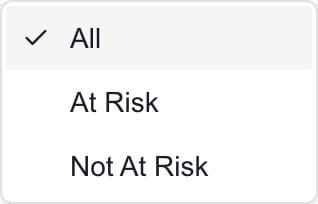 This image shows the generic filter in an MSP Demo session. Your available records and actions depend on your access.
## Read the event
| Field | Meaning |
| -------------- | ---------------------------------------------------------------- |
| **Event Type** | The provider's finding category or description. |
| **Entity** | The affected device, mailbox, address, or domain when available. |
| **Company** | The mapped portal company; a dash can indicate missing mapping. |
| **Status** | Cork's At Risk or OK indication. |
| **Resolved** | Whether the provider event is marked Resolved or remains Open. |
| **Created** | When Cork recorded the event. |
Risk, resolution, and silencing are separate. **OK** does not necessarily mean Resolved. **Silenced** does not mean the underlying issue was fixed.
In the side panel, check the entity and company, status badges, Created and Resolved dates when supplied, and **Cure Period** when available. Evidence can contain a reason and provider metadata. **No evidence details available** means this panel has no supplied evidence to display; it does not prove the finding is false.
This reader does not provide a resolve or silence action. Authorized staff investigate and update the provider workflow separately.
## Search and scope limits
The **Entity** text filter is applied after a page of events has loaded. It cannot reliably search the entire event history and can hide pagination by reducing the displayed count. To find an older event, clear Entity, narrow by company, type, status, or date, and inspect the resulting pages.
Keep the main company selection and Company column filter aligned. If a selected company has no mapping, ask the MSP to verify it before starting follow-up work. A loading failure can leave an empty or earlier result on screen; confirm that the refresh completed before relying on the table.
## Follow up
Company users should start a support request with the [Home AI Assistant](/user-guides/ticketing/open-a-ticket). Include the event type, entity, company, and displayed date, then review and confirm the request.
Permitted staff can select same-company rows and [add them to Planner](/user-guides/security/add-to-planner) or [a meeting agenda](/user-guides/security/add-to-meeting). These actions create follow-up work; they do not change the Cork event's status.
## Frequently asked questions
Those are the filter and display labels for the same risk value. Resolution is shown separately as Open or Resolved.
No. Silencing and resolution are separate provider flags.
It filters the loaded server page. Clear Entity and use the other scope/date filters before browsing additional pages.
The current event table is a reader with Planner and meeting follow-up actions. It has no event resolve/silence control or configured CSV export.
This image shows the generic filter in an MSP Demo session. Your available records and actions depend on your access.
## Read the event
| Field | Meaning |
| -------------- | ---------------------------------------------------------------- |
| **Event Type** | The provider's finding category or description. |
| **Entity** | The affected device, mailbox, address, or domain when available. |
| **Company** | The mapped portal company; a dash can indicate missing mapping. |
| **Status** | Cork's At Risk or OK indication. |
| **Resolved** | Whether the provider event is marked Resolved or remains Open. |
| **Created** | When Cork recorded the event. |
Risk, resolution, and silencing are separate. **OK** does not necessarily mean Resolved. **Silenced** does not mean the underlying issue was fixed.
In the side panel, check the entity and company, status badges, Created and Resolved dates when supplied, and **Cure Period** when available. Evidence can contain a reason and provider metadata. **No evidence details available** means this panel has no supplied evidence to display; it does not prove the finding is false.
This reader does not provide a resolve or silence action. Authorized staff investigate and update the provider workflow separately.
## Search and scope limits
The **Entity** text filter is applied after a page of events has loaded. It cannot reliably search the entire event history and can hide pagination by reducing the displayed count. To find an older event, clear Entity, narrow by company, type, status, or date, and inspect the resulting pages.
Keep the main company selection and Company column filter aligned. If a selected company has no mapping, ask the MSP to verify it before starting follow-up work. A loading failure can leave an empty or earlier result on screen; confirm that the refresh completed before relying on the table.
## Follow up
Company users should start a support request with the [Home AI Assistant](/user-guides/ticketing/open-a-ticket). Include the event type, entity, company, and displayed date, then review and confirm the request.
Permitted staff can select same-company rows and [add them to Planner](/user-guides/security/add-to-planner) or [a meeting agenda](/user-guides/security/add-to-meeting). These actions create follow-up work; they do not change the Cork event's status.
## Frequently asked questions
Those are the filter and display labels for the same risk value. Resolution is shown separately as Open or Resolved.
No. Silencing and resolution are separate provider flags.
It filters the loaded server page. Clear Entity and use the other scope/date filters before browsing additional pages.
The current event table is a reader with Planner and meeting follow-up actions. It has no event resolve/silence control or configured CSV export.