> ## Documentation Index
> Fetch the complete documentation index at: https://docs.msportal.ai/llms.txt
> Use this file to discover all available pages before exploring further.
# Settings
> Configure MSPortal.ai to match your organization's needs with comprehensive settings for users, companies, integrations, and more
The Settings module provides centralized configuration options to customize every aspect of MSPortal.ai. Access Settings from the sidebar to manage your tenant, users, companies, integrations, and more.
## Settings Navigation
Settings are organized into categories accessible from the left sidebar:
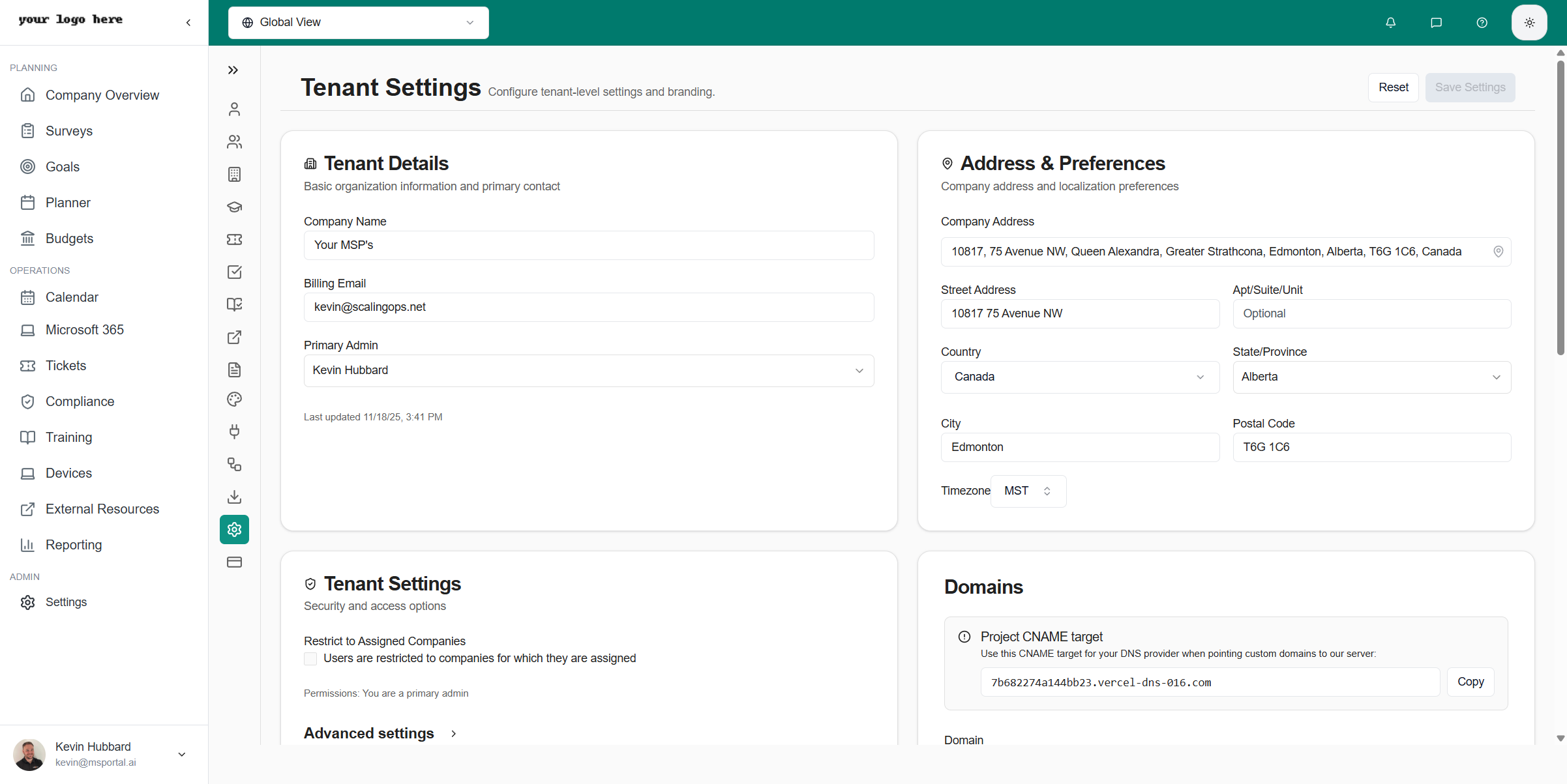 | Category | Description |
| ----------------------- | ------------------------------------------------------------ |
| **User Profile** | Your personal profile, notifications, and preferences |
| **Users & Roles** | Manage team members and their permission levels |
| **Companies** | Configure client companies and their settings |
| **Training** | Manage courses and learning content |
| **Tickets** | Configure ticket delivery, display groups, and statuses |
| **Compliance Checks** | Manage security compliance checks |
| **Playbooks** | CIS benchmarks and security playbooks |
| **External Resources** | Links to external documentation and resources |
| **Templates** | Note templates for meetings and planner items |
| **Email** | Custom sending domains and email templates |
| **Scoring** | Configure which health score dimensions are active |
| **Tool Stack** | Define tool categories and items for your recommended stack |
| **Financial Reporting** | Map revenue categories and configure profitability reporting |
| **Custom Fields** | Create custom data fields for your workflows |
| **Integrations** | Connect to PSA systems and third-party services |
| **Rules** | Automation rules (coming soon) |
| **Import/Export** | Bulk data operations with CSV files |
| **Tenant** | Organization-wide settings and branding |
| **Billing** | Subscription and payment management |
## Quick Start
Click **Settings** in the sidebar
Use the vertical icon bar on the left to switch between settings areas
Update settings as needed - most changes save automatically
For critical settings like Tenant or Billing, click **Save Settings** to confirm
## Settings Categories
### User Management
Add team members, assign roles, and manage permissions across your organization
Configure client companies, locations, and company-specific settings
### Operations Settings
Configure ticket delivery methods, display groups, and allowed statuses
Manage courses, categories, and learning content
### Security & Compliance
Manage security compliance checks across frameworks
CIS security benchmarks and compliance playbooks
### MSP Tools
Configure which dimensions factor into client health scores
Define tool categories and items for your recommended technology stack
Map revenue categories and configure the profitability reporting model
### Customization
Create and manage note templates for meetings and tasks
Configure custom sending domains and email templates
Manage external documentation and resource links
### System Configuration
Connect PSA systems like Halo, ConnectWise, Syncro, and more
Bulk import and export data using CSV files
### Administration
Configure organization-wide settings, domains, and branding
Manage subscriptions, payment methods, and invoices
## Permissions
Access to Settings is controlled by custom roles defined in **Users & Roles**. Each role can be assigned specific permissions to control access to different settings areas.
Common permission patterns include:
| Permission Type | Description |
| ----------------------- | -------------------------------------------------------------- |
| **Full Admin Access** | Complete access to all settings including tenant and billing |
| **Settings Management** | Access to operational settings (tickets, training, compliance) |
| **Company Management** | Ability to configure company-specific settings |
| **User Profile Only** | Limited to personal profile settings |
The **Primary Admin** role always has full access to all settings. Custom roles can be configured with granular permissions in [Users & Roles](/user-guides/settings/users-roles).
## Related Resources
* [Getting Started](/user-guides/getting-started/index) - Initial setup and onboarding
* [Integrations Guide](/user-guides/integrations/index) - Detailed integration setup instructions
* [Users & Roles](/user-guides/settings/users-roles) - User management and permissions
| Category | Description |
| ----------------------- | ------------------------------------------------------------ |
| **User Profile** | Your personal profile, notifications, and preferences |
| **Users & Roles** | Manage team members and their permission levels |
| **Companies** | Configure client companies and their settings |
| **Training** | Manage courses and learning content |
| **Tickets** | Configure ticket delivery, display groups, and statuses |
| **Compliance Checks** | Manage security compliance checks |
| **Playbooks** | CIS benchmarks and security playbooks |
| **External Resources** | Links to external documentation and resources |
| **Templates** | Note templates for meetings and planner items |
| **Email** | Custom sending domains and email templates |
| **Scoring** | Configure which health score dimensions are active |
| **Tool Stack** | Define tool categories and items for your recommended stack |
| **Financial Reporting** | Map revenue categories and configure profitability reporting |
| **Custom Fields** | Create custom data fields for your workflows |
| **Integrations** | Connect to PSA systems and third-party services |
| **Rules** | Automation rules (coming soon) |
| **Import/Export** | Bulk data operations with CSV files |
| **Tenant** | Organization-wide settings and branding |
| **Billing** | Subscription and payment management |
## Quick Start
Click **Settings** in the sidebar
Use the vertical icon bar on the left to switch between settings areas
Update settings as needed - most changes save automatically
For critical settings like Tenant or Billing, click **Save Settings** to confirm
## Settings Categories
### User Management
Add team members, assign roles, and manage permissions across your organization
Configure client companies, locations, and company-specific settings
### Operations Settings
Configure ticket delivery methods, display groups, and allowed statuses
Manage courses, categories, and learning content
### Security & Compliance
Manage security compliance checks across frameworks
CIS security benchmarks and compliance playbooks
### MSP Tools
Configure which dimensions factor into client health scores
Define tool categories and items for your recommended technology stack
Map revenue categories and configure the profitability reporting model
### Customization
Create and manage note templates for meetings and tasks
Configure custom sending domains and email templates
Manage external documentation and resource links
### System Configuration
Connect PSA systems like Halo, ConnectWise, Syncro, and more
Bulk import and export data using CSV files
### Administration
Configure organization-wide settings, domains, and branding
Manage subscriptions, payment methods, and invoices
## Permissions
Access to Settings is controlled by custom roles defined in **Users & Roles**. Each role can be assigned specific permissions to control access to different settings areas.
Common permission patterns include:
| Permission Type | Description |
| ----------------------- | -------------------------------------------------------------- |
| **Full Admin Access** | Complete access to all settings including tenant and billing |
| **Settings Management** | Access to operational settings (tickets, training, compliance) |
| **Company Management** | Ability to configure company-specific settings |
| **User Profile Only** | Limited to personal profile settings |
The **Primary Admin** role always has full access to all settings. Custom roles can be configured with granular permissions in [Users & Roles](/user-guides/settings/users-roles).
## Related Resources
* [Getting Started](/user-guides/getting-started/index) - Initial setup and onboarding
* [Integrations Guide](/user-guides/integrations/index) - Detailed integration setup instructions
* [Users & Roles](/user-guides/settings/users-roles) - User management and permissions