> ## Documentation Index
> Fetch the complete documentation index at: https://docs.msportal.ai/llms.txt
> Use this file to discover all available pages before exploring further.
# External Resources Settings
> Manage external documentation links and resources for your organization
External Resources Settings allows you to configure links to external documentation, knowledge bases, and resources that appear throughout MSPortal.ai.
## Accessing External Resources Settings
1. Click **Settings** in the sidebar
2. Select the **External Resources** icon from the settings navigation
## External Resources Overview
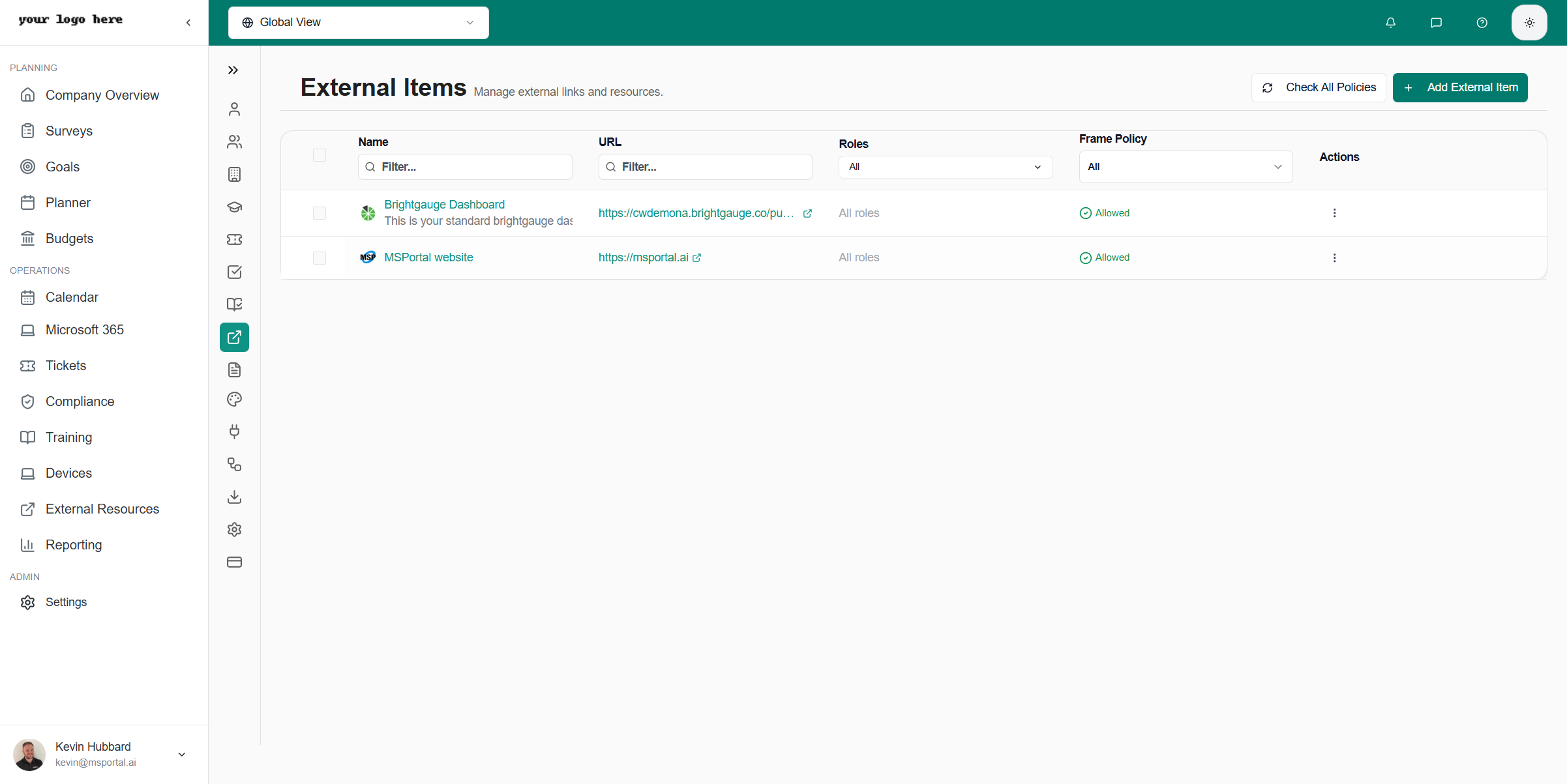 ### Resource Information
Each resource shows:
| Field | Description |
| -------------- | ----------------------------- |
| **Name** | Display name for the resource |
| **URL** | Link destination |
| **Category** | Resource classification |
| **Visibility** | Who can see this resource |
## Managing Resources
### Adding a New Resource
Select the **+ Add Resource** button
Fill in the resource name and URL
Choose an appropriate category
Configure who can access this resource
Click **Save** to add the resource
### Editing Resources
Click on any resource to edit:
* Update the name or URL
* Change category assignment
* Modify visibility settings
* Delete if no longer needed
## Resource Categories
Organize resources by category:
| Category | Use For |
| ------------------ | ------------------------------ |
| **Documentation** | Product docs, user guides |
| **Knowledge Base** | Internal wikis, FAQs |
| **Training** | External training links |
| **Tools** | Utility websites, online tools |
| **Vendor** | Vendor portals and resources |
## Visibility Options
Control who can see each resource:
* **All Users** - Visible to everyone
* **Specific Roles** - Only users with certain roles
* **Specific Companies** - Only users from selected companies
## Use Cases
### For MSP Teams
* Link to internal documentation
* Quick access to vendor portals
* Tool shortcuts for technicians
### For Client Users
* Company-specific resources
* Training materials
* Policy documents
## Best Practices
* **Keep current** - Remove outdated links
* **Use descriptive names** - Make purpose clear
* **Organize by category** - Help users find resources
* **Test links** - Verify URLs work before adding
## Related Resources
* [Settings Overview](/user-guides/settings/index) - All settings options
### Resource Information
Each resource shows:
| Field | Description |
| -------------- | ----------------------------- |
| **Name** | Display name for the resource |
| **URL** | Link destination |
| **Category** | Resource classification |
| **Visibility** | Who can see this resource |
## Managing Resources
### Adding a New Resource
Select the **+ Add Resource** button
Fill in the resource name and URL
Choose an appropriate category
Configure who can access this resource
Click **Save** to add the resource
### Editing Resources
Click on any resource to edit:
* Update the name or URL
* Change category assignment
* Modify visibility settings
* Delete if no longer needed
## Resource Categories
Organize resources by category:
| Category | Use For |
| ------------------ | ------------------------------ |
| **Documentation** | Product docs, user guides |
| **Knowledge Base** | Internal wikis, FAQs |
| **Training** | External training links |
| **Tools** | Utility websites, online tools |
| **Vendor** | Vendor portals and resources |
## Visibility Options
Control who can see each resource:
* **All Users** - Visible to everyone
* **Specific Roles** - Only users with certain roles
* **Specific Companies** - Only users from selected companies
## Use Cases
### For MSP Teams
* Link to internal documentation
* Quick access to vendor portals
* Tool shortcuts for technicians
### For Client Users
* Company-specific resources
* Training materials
* Policy documents
## Best Practices
* **Keep current** - Remove outdated links
* **Use descriptive names** - Make purpose clear
* **Organize by category** - Help users find resources
* **Test links** - Verify URLs work before adding
## Related Resources
* [Settings Overview](/user-guides/settings/index) - All settings options