> ## Documentation Index
> Fetch the complete documentation index at: https://docs.msportal.ai/llms.txt
> Use this file to discover all available pages before exploring further.
# Playbooks Settings
> Manage CIS security benchmarks and compliance playbooks
Playbooks Settings provides access to security benchmarks and compliance playbooks, including CIS (Center for Internet Security) benchmarks that guide security configurations.
## Accessing Playbooks Settings
1. Click **Settings** in the sidebar
2. Select the **Playbooks** icon from the settings navigation
## Playbooks Overview
The Playbooks page displays all available security benchmarks and guides.
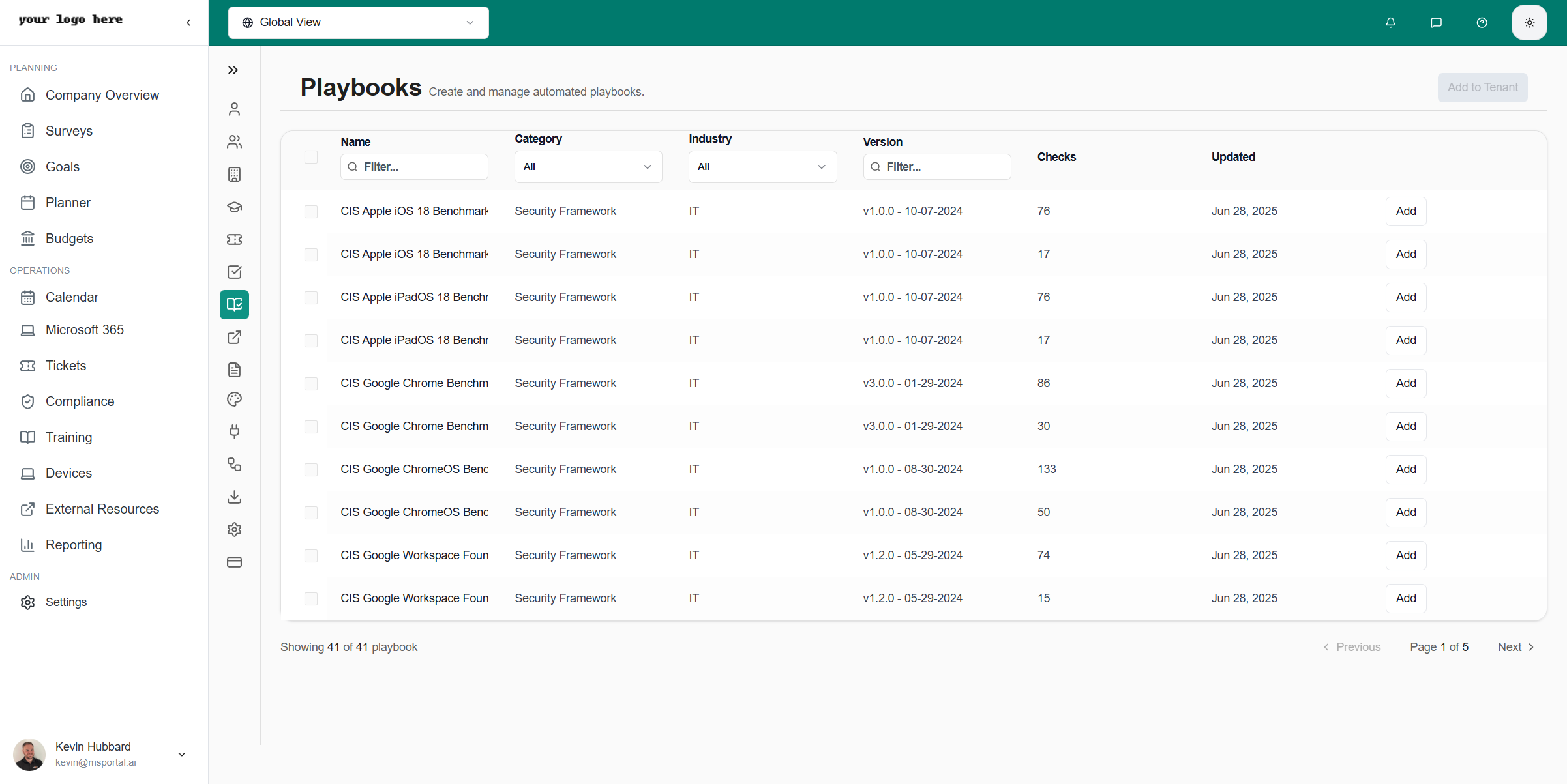 ### Playbook Information
Each playbook shows:
| Field | Description |
| ------------ | ------------------------------------------------------ |
| **Name** | Playbook title (e.g., "CIS Microsoft 365 Foundations") |
| **Version** | Benchmark version number |
| **Controls** | Number of security controls included |
| **Status** | Active or archived |
## CIS Benchmarks
MSPortal includes CIS benchmarks for:
| Platform | Description |
| -------------------- | --------------------------------------------------- |
| **Microsoft 365** | Exchange, SharePoint, Teams, OneDrive configuration |
| **Azure** | Azure Active Directory, cloud infrastructure |
| **Windows** | Windows Server and workstation hardening |
| **Google Workspace** | Gmail, Drive, Admin console settings |
### Using CIS Benchmarks
CIS benchmarks provide:
* **Security recommendations** - Best practice configurations
* **Implementation guidance** - Step-by-step instructions
* **Audit procedures** - How to verify compliance
* **Remediation steps** - Fixing non-compliant settings
## Managing Playbooks
### Viewing Playbook Details
1. Click on any playbook to open its details
2. Review the list of controls and recommendations
3. See implementation guidance for each control
### Enabling/Disabling Playbooks
Click on the playbook you want to manage
Use the status toggle to enable or disable
Disabled playbooks won't appear in compliance reports
## Playbook Controls
Each playbook contains multiple controls:
### Control Levels
| Level | Description |
| ----------------- | -------------------------------------------------- |
| **Level 1** | Basic security settings for all organizations |
| **Level 2** | Advanced settings for higher security requirements |
| **IG1, IG2, IG3** | Implementation Groups based on organization size |
### Control Details
Each control includes:
* **Title** - What the control addresses
* **Rationale** - Why this control matters
* **Audit** - How to check current status
* **Remediation** - Steps to implement the control
* **Impact** - Potential effects on users
## Integration with Compliance
Playbooks connect to the Compliance module:
* **Automatic mapping** - Controls link to compliance checks
* **Progress tracking** - See implementation status
* **Reporting** - Include in compliance reports
## Best Practices
* **Start with Level 1** - Implement basic controls first
* **Prioritize by risk** - Focus on high-impact controls
* **Document exceptions** - Record why controls are skipped
* **Regular review** - Update as new benchmark versions release
## Related Resources
* [Compliance Module](/user-guides/compliance/index) - Compliance tracking
* [Compliance Checks](/user-guides/settings/compliance) - Check configuration
* [Adding CIS Benchmarks](/user-guides/compliance/adding-cis-benchmarks) - Benchmark setup
### Playbook Information
Each playbook shows:
| Field | Description |
| ------------ | ------------------------------------------------------ |
| **Name** | Playbook title (e.g., "CIS Microsoft 365 Foundations") |
| **Version** | Benchmark version number |
| **Controls** | Number of security controls included |
| **Status** | Active or archived |
## CIS Benchmarks
MSPortal includes CIS benchmarks for:
| Platform | Description |
| -------------------- | --------------------------------------------------- |
| **Microsoft 365** | Exchange, SharePoint, Teams, OneDrive configuration |
| **Azure** | Azure Active Directory, cloud infrastructure |
| **Windows** | Windows Server and workstation hardening |
| **Google Workspace** | Gmail, Drive, Admin console settings |
### Using CIS Benchmarks
CIS benchmarks provide:
* **Security recommendations** - Best practice configurations
* **Implementation guidance** - Step-by-step instructions
* **Audit procedures** - How to verify compliance
* **Remediation steps** - Fixing non-compliant settings
## Managing Playbooks
### Viewing Playbook Details
1. Click on any playbook to open its details
2. Review the list of controls and recommendations
3. See implementation guidance for each control
### Enabling/Disabling Playbooks
Click on the playbook you want to manage
Use the status toggle to enable or disable
Disabled playbooks won't appear in compliance reports
## Playbook Controls
Each playbook contains multiple controls:
### Control Levels
| Level | Description |
| ----------------- | -------------------------------------------------- |
| **Level 1** | Basic security settings for all organizations |
| **Level 2** | Advanced settings for higher security requirements |
| **IG1, IG2, IG3** | Implementation Groups based on organization size |
### Control Details
Each control includes:
* **Title** - What the control addresses
* **Rationale** - Why this control matters
* **Audit** - How to check current status
* **Remediation** - Steps to implement the control
* **Impact** - Potential effects on users
## Integration with Compliance
Playbooks connect to the Compliance module:
* **Automatic mapping** - Controls link to compliance checks
* **Progress tracking** - See implementation status
* **Reporting** - Include in compliance reports
## Best Practices
* **Start with Level 1** - Implement basic controls first
* **Prioritize by risk** - Focus on high-impact controls
* **Document exceptions** - Record why controls are skipped
* **Regular review** - Update as new benchmark versions release
## Related Resources
* [Compliance Module](/user-guides/compliance/index) - Compliance tracking
* [Compliance Checks](/user-guides/settings/compliance) - Check configuration
* [Adding CIS Benchmarks](/user-guides/compliance/adding-cis-benchmarks) - Benchmark setup