> ## Documentation Index
> Fetch the complete documentation index at: https://docs.msportal.ai/llms.txt
> Use this file to discover all available pages before exploring further.
# Choose which Standards apply
> Use conditions on platform, industry, company type, tier and company fields to keep Standards relevant to each client.
Branch preview for the September 18 release. These controls are not yet published. Screenshots show MSPortal Demo running the release branch.
**Audience:** MSP staff who manage the Standards catalog. Company platform
changes require Planner write access. Editing a standard's conditions requires
Standards settings management; company field conditions also require
custom-fields read access. Saving requires active billing.
Applicability answers “should this client have this standard?” It does not change
whether a tool is installed or whether a deployment has been completed.
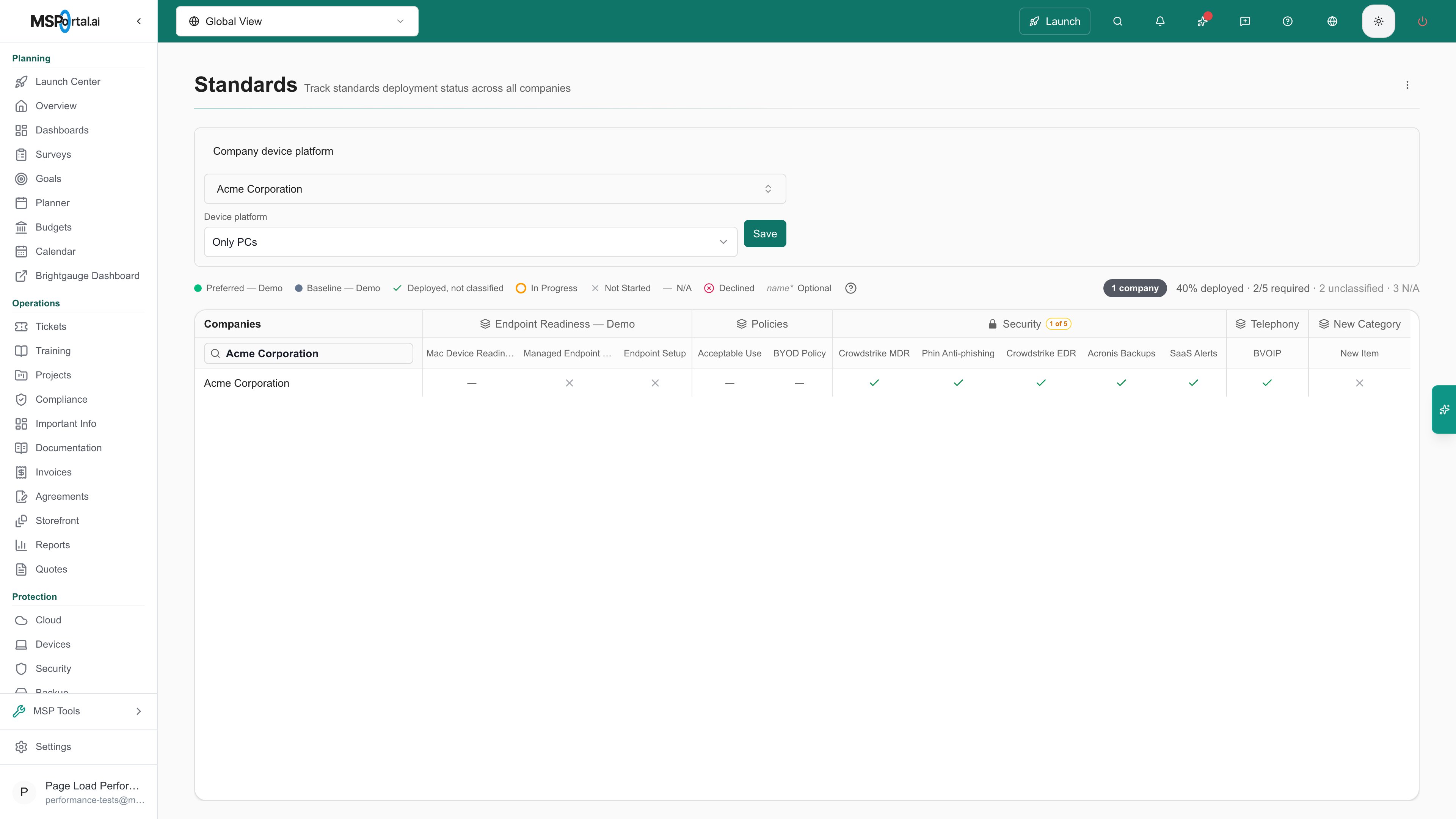
## Set a company's device platform
Open **MSP Tools > Standards**, expand **Company device platform**, and choose the
company. Select **Only PCs**, **Only Macs**, or **PCs and Macs**, then select
**Save**. Standards can then test the platform with a **Device platform** condition.
 ## Add conditions to a standard
Open **Settings > MSP Tools > Standards**, expand the category, and select the
standard's name to open its editor. Find **Applies to**.
Select **Add condition**. Choose what to test, a comparison such as **is any of**,
and the values. A new standard applies to every company until you add one.
With two or more conditions, choose whether the standard applies when
**all conditions match** or when **any condition matches**.
Select **Save**, then return to Standards. Companies that don't match show the
standard as a locked N/A.
| Condition | Tests |
| ------------------- | ---------------------------------------------------------------------------------------------------------------------------------------------------------------------------------------------- |
| **Device platform** | The company's platform. A Mac standard uses **Device platform is any of Only Macs, PCs and Macs**. |
| **Industry** | The company's industry. |
| **Company type** | The company's PSA company type. |
| **Standards tier** | The tier mapped to the company's type. |
| **Company fields** | Any company custom field. Option fields use **is any of** or **is none of**. Text fields support **contains**, and number and date fields support greater, less, before and after comparisons. |
Standards that used a device platform or one company field before this release
keep the same result. Their rules appear as conditions in **Applies to**.
Rule-driven N/A cells cannot be edited and do not count as compliance gaps.
Their previous deployment answers are retained. If a later rule change makes a
standard applicable again, its saved answer becomes visible again.
## Missing values
A company with no value for a condition keeps the standard, so incomplete records
cannot silently improve its compliance percentage. To target companies with no
value, use **is empty** or **is not empty**. For example, **Industry is not empty**
excludes companies whose industry was never set.
Compliance checks use the same conditions, plus device conditions. See
[Compliance Settings](/user-guides/settings/compliance#choosing-which-companies-and-devices-get-a-check).
## Understand scoring and service plans
Condition exclusions remove inapplicable checks from the
Standards compliance calculation and the corresponding Client Health scoring.
Client Health can reflect an earlier scoring run; compare scope and refresh time.
Service-plan membership is a separate setting in each standard's editor. An empty
plan selection means all plans. A standard outside a company's target plan is
de-emphasized with an explanatory dot, but plan membership currently does not
reduce the compliance denominator.
## Troubleshooting
| Symptom | Check |
| ---------------------------------------------- | ------------------------------------------------------------------------------------------------------------------- |
| The company is missing from the picker | Check the app's company selector and your permitted company scope. |
| A company field is missing | Check custom-fields read access. User fields cannot be used in conditions. |
| A company with no value still has the standard | This is intentional. Complete the value, or use **is empty** or **is not empty**. |
| A cell is locked N/A | Review the standard's **Applies to** conditions. Changing a deployment status cannot override them. |
| Save is disabled | Finish or remove incomplete conditions, such as **is any of** with no values. |
| A higher score appears without new deployments | Excluding a required check changes the number of applicable checks. Review the exclusions alongside the percentage. |
Create and organize the standards used by these rules.
Interpret recorded deployments, exclusions, and required checks.
## Add conditions to a standard
Open **Settings > MSP Tools > Standards**, expand the category, and select the
standard's name to open its editor. Find **Applies to**.
Select **Add condition**. Choose what to test, a comparison such as **is any of**,
and the values. A new standard applies to every company until you add one.
With two or more conditions, choose whether the standard applies when
**all conditions match** or when **any condition matches**.
Select **Save**, then return to Standards. Companies that don't match show the
standard as a locked N/A.
| Condition | Tests |
| ------------------- | ---------------------------------------------------------------------------------------------------------------------------------------------------------------------------------------------- |
| **Device platform** | The company's platform. A Mac standard uses **Device platform is any of Only Macs, PCs and Macs**. |
| **Industry** | The company's industry. |
| **Company type** | The company's PSA company type. |
| **Standards tier** | The tier mapped to the company's type. |
| **Company fields** | Any company custom field. Option fields use **is any of** or **is none of**. Text fields support **contains**, and number and date fields support greater, less, before and after comparisons. |
Standards that used a device platform or one company field before this release
keep the same result. Their rules appear as conditions in **Applies to**.
Rule-driven N/A cells cannot be edited and do not count as compliance gaps.
Their previous deployment answers are retained. If a later rule change makes a
standard applicable again, its saved answer becomes visible again.
## Missing values
A company with no value for a condition keeps the standard, so incomplete records
cannot silently improve its compliance percentage. To target companies with no
value, use **is empty** or **is not empty**. For example, **Industry is not empty**
excludes companies whose industry was never set.
Compliance checks use the same conditions, plus device conditions. See
[Compliance Settings](/user-guides/settings/compliance#choosing-which-companies-and-devices-get-a-check).
## Understand scoring and service plans
Condition exclusions remove inapplicable checks from the
Standards compliance calculation and the corresponding Client Health scoring.
Client Health can reflect an earlier scoring run; compare scope and refresh time.
Service-plan membership is a separate setting in each standard's editor. An empty
plan selection means all plans. A standard outside a company's target plan is
de-emphasized with an explanatory dot, but plan membership currently does not
reduce the compliance denominator.
## Troubleshooting
| Symptom | Check |
| ---------------------------------------------- | ------------------------------------------------------------------------------------------------------------------- |
| The company is missing from the picker | Check the app's company selector and your permitted company scope. |
| A company field is missing | Check custom-fields read access. User fields cannot be used in conditions. |
| A company with no value still has the standard | This is intentional. Complete the value, or use **is empty** or **is not empty**. |
| A cell is locked N/A | Review the standard's **Applies to** conditions. Changing a deployment status cannot override them. |
| Save is disabled | Finish or remove incomplete conditions, such as **is any of** with no values. |
| A higher score appears without new deployments | Excluding a required check changes the number of applicable checks. Review the exclusions alongside the percentage. |
Create and organize the standards used by these rules.
Interpret recorded deployments, exclusions, and required checks.