

February 13, 2026
Client Onboarding Portal
A complete client onboarding system that guides new customers through structured workflows — from initial discovery through full deployment. Build reusable templates, launch branded portals for each company, and track every step of the onboarding process in one place. Template Builder:- Phase & Task Designer: Create multi-phase onboarding templates with drag-and-drop task ordering, task dependencies, due date logic, and priority levels
- 10 Task Types: Standard tasks, meetings, document uploads, digital signatures, credential handoff (single or bulk), secure file drops, training (video or in-person), surveys/forms, approvals, and checklists
- AI Template Designer: Describe your onboarding process in plain language and AI generates a complete template with phases, tasks, and structure — review changes in a diff preview before applying
- Import & Export: Share templates across tenants with JSON import/export
- Checklist Templates: Create reusable checklists that attach to any task for granular step tracking
- Portal Management: Launch portals from templates, track progress with per-phase progress bars, and manage the full lifecycle (draft, active, completed, converted)
- Task Tracking: Assign tasks to MSP staff or client contacts, bulk reassign with shift-select, track completion with inline evidence review
- Document Triage Inbox: Review uploaded documents with approve/reject workflow, search and filter by status or phase
- Meeting Scheduling: Schedule meetings directly from tasks with calendar invite generation and attendee selection
- Credential & Signature Review: Securely reveal submitted credentials (auto-hide after 5 minutes), view digital signatures with tamper detection
- Activity Feed: Complete audit trail of every portal event with server-side search and type filtering
- Communication: Send task summary emails, meeting invitations, and overdue reminders — clients can ask questions that notify your team via email
- Task Comments: Bidirectional discussion threads on individual tasks between MSP and client
- Branded Experience: Custom logo, accent color, and welcome message — clients access via secure invite link with email verification, no account required
- Task Completion: Clear “Your Tasks” view with inline evidence collection for each task type
- Progress Tracking: Visual phase timeline showing overall onboarding progress
- Document Uploads: Upload requested files with real-time status tracking
- Approvals & Signatures: Review documents and approve decisions, sign with a built-in signature pad
- Active Onboarding Banner: Quick-link pills on the dashboard showing each active portal with progress bars
- My Onboarding Tasks Widget: Personal task queue showing your assigned onboarding tasks across all portals
M365 Licenses by Office Location
A new table view that breaks down Microsoft 365 license assignments by office location, making it easy to see how licenses are distributed across a company’s sites.Improvements
- Report Block Responsiveness: All 40+ reporting blocks now scale properly across all grid sizes (1x1 through 4x8) with no scrollbars or overflow issues
- Narrative Report Enhancements: Project completion data source, visual widget picker for embedding charts, and improved AI generation reliability
- Report Bundling: Bundle multiple reports into a single package for streamlined client delivery
- ConnectWise Time Entries: New sync task for pulling time entries from ConnectWise Manage
- Signup Flow: Payment method is now optional during signup — users can skip and add it later from billing settings
- User Management: Improved pagination and filtering for large user lists
February 10, 2026
Template Variables & Dynamic Subjects
Ticket template subjects can now include dynamic variables that resolve to field values at submission time. Use{{field_key}} placeholders in your static subject to automatically insert user-selected values like employee names, departments, or locations into the ticket title.
Key Features:
- Variable Picker: Click-to-insert UI in the template editor shows all available fields from your template sections
- Entity Name Resolution: Variables referencing users, devices, locations, or projects resolve to human-readable names instead of IDs
- Live Preview: New preview panel in the template editor shows exactly how the form will look to end users
Priority Override Rules
Automatically override the PSA ticket priority based on field values during submission. Define condition-based rules on any template — the first matching rule wins, so you can escalate priority when a date field is within 24 hours or a specific option is selected. Key Features:- Conditional Rules: Match on any template field using operators like equals, within hours, greater than, includes, and more
- Rule Ordering: Rules evaluate top-to-bottom; place the most urgent rule first
- Per-Template Configuration: Enable or disable overrides independently on each template
Voice Input for AI Chat
Dictate messages to the AI assistant using your microphone. A new mic button appears in the AI chat input when speech recognition is supported by your browser.ConnectWise Ticket Description Fix
ConnectWise ticket descriptions now display reliably in the ticket detail modal. The system correctly extracts the initial description from ConnectWise notes (using the description flag) instead of relying on the often-empty ticket field, and syncs notes from the API before opening the modal for the first time.Improvements
- AI SDK Compatibility: Updated all AI calls to the latest Vercel AI SDK conventions for continued compatibility
- Time Entry Dates: Fixed a timezone issue where time entry dates could shift by one day depending on your browser timezone
- Activity Feed: Description note now pins to the bottom of the activity timeline for clearer reading order
- Report Pages: Increased server timeout for report pages to prevent timeouts on complex reports
- Template Field Keys: New fields auto-generate URL-safe keys from the label, with a visible key display and variable reference hint
February 6, 2026
AI-Powered Narrative Reports
Generate professional, AI-written reports for your clients using real data from across MSPortal. The new Full Report wizard walks you through selecting a report type, configuring content sources, and generating a polished narrative document — ready to share. Key Features:- 14+ Data Sources: Pull from tickets, devices, compliance, M365 licenses, training, meetings, projects, budgets, planner, backup, goals, surveys, documents, and company context
- Multiple Report Types: QBR, Weekly, Monthly, Security Review, Ticket Deep Dive, and Custom reports
- AI Generation with Editing: AI writes the full report, then you refine it in a rich editor with an AI sidebar for further adjustments
- AI Notes for MSPs: See AI-generated notes about data gaps, assumptions, and suggestions — visible only to you, not your clients
- AI Report Builder Sidebar: The AI sidebar is also available in the block-based report builder — describe what you need and AI picks the right blocks and headers for your report
Licensing Storefront
A new storefront experience for managing vendor subscriptions, starting with Pax8 as the first supported vendor. Key Features:- Subscriptions Dashboard: View all subscriptions with filtering by status, product, and company
- Azure Usage Tracking: Monitor Azure consumption with cost breakdowns by product and company
- Request & Get Price: Submit subscription change requests and pull live pricing for any company in real time
- Storefront Settings: Configure approval workflows, quantity change thresholds, and self-service controls per company
- Subscription Details: View provisioning status, billing terms, and commitment details for any subscription
Unified Groups System
A flexible grouping system for organizing users across training and surveys, with support for rule-based automatic membership. Key Features:- Training & Survey Groups: Create groups scoped to individual companies or your entire tenant
- M365 Group Sync: Use your existing Microsoft 365 groups as membership sources — sync users directly from Entra ID groups
- Rule-Based Membership: Define include/exclude rules with AND/OR logic to auto-populate groups based on company, role, or M365 group
- Manual & Automatic Sync: Manage members manually or let rules keep groups updated automatically
Also:
- Ticket Template Static Subjects: Set a pre-defined subject line on ticket templates that auto-fills when users create tickets, with an optional lock so it cannot be changed
- Company AI Home Settings: Per-company toggle to enable or disable the AI-powered home page experience, with a tenant-level global override
Improvements
- M365 License Blocks: Free and trial licenses are now automatically filtered from license reporting blocks for cleaner data
- Report Data Performance: All report data fetched in a single optimized database call for significantly faster generation
- Report Scheduling: Improved reliability for scheduled report delivery
Bug Fixes
- Report Autosave: Fixed an issue where autosave was not triggering on reports
- Datto RMM Sync: Fixed sync issues from Datto RMM
- Session Handling: Fixed an issue where idle sessions would cause unexpected errors on Reports and other pages with images
- Ticket Conditional Fields: Fixed a bug where conditional fields were included in PSA ticket submissions even when their conditions were not met
January 30, 2026
Quoter Integration
Your clients can now view and open quotes directly from the portal. Quotes sync automatically from Quoter (formerly ScalePad), giving clients a single place to review proposals and pricing without switching tools. Key Features:- Client Quote Access: Clients view their quotes with status, amounts, and line items right from the portal
- Quote Details: Open any quote to see full pricing breakdown, items, and current status
- Automatic Sync: Quotes stay up to date as changes are made in Quoter
- Easy Setup: Guided wizard walks you through API key entry and company mapping
Onboarding Wizard
Getting started with MSPortal is now faster and easier. A guided onboarding experience walks new users through every step—from connecting your PSA to importing companies—so you can start delivering value on day one. Key Features:- Guided Setup: Step-by-step walkthrough covering integrations, company import, and configuration
- Pick Your Tools: Choose your PSA and RMM integrations during onboarding
- Progress Tracking: See exactly where you are and what’s left to set up
- Background Sync: Data imports run in the background while you continue configuring
Self-Service Signup
You can now sign up for MSPortal directly at app.msportal.ai/signup or from our website—no demo call required. Create your account with Google, Microsoft, or email and start using the platform immediately. Key Features:- Sign Up Anytime: Get started on your own at app.msportal.ai/signup
- Google & Microsoft Login: Use your existing accounts to sign up in seconds
- Instant Access: Go from signup to your first dashboard with guided onboarding
Cork Security Integration
Get instant visibility into endpoint security across your entire client base. The new Cork integration brings vulnerability tracking, compliance monitoring, and endpoint protection status into a centralized security dashboard. Key Features:- Security Dashboard: See vulnerabilities, compliance status, and endpoint health at a glance
- Vulnerability Tracking: Filter and prioritize vulnerabilities by severity, status, and company
- Compliance Monitoring: Track security compliance events across all clients
- Endpoint Visibility: View all protected endpoints with agent status
- Per-Device Security: See Cork security data directly on individual device pages
Microsoft 365 Company Management
A new dedicated area in Settings makes it easier to see which companies have Microsoft 365 tenants connected and manage their sync status in one place.Improvements
- Faster Performance: Speed optimizations across the app including faster page loads and panel rendering
- More Reliable Syncs: Integration sync tasks are now more secure and resilient
- Autotask: Fixed ticket time entries and notes not loading on the tickets page
- ConnectWise: Improved sync reliability
- Asio: Better device sync stability
- New Reporting Blocks: Additional blocks for budgets and security data
January 23, 2026
Project Kanban Board
Visualize and manage project tickets with a full-featured Kanban board. Drag tickets between status columns to update their status directly in your PSA. Key Features:- Drag-and-Drop: Move tickets between columns to instantly update status in ConnectWise, Autotask, or Halo
- Status Groups: Configure which PSA statuses map to each Kanban column
- Filter & Search: Filter tickets by assignee, priority, or search by title
- Multi-Select: Select multiple tickets and move them together
- Bulk Operations: Bulk update ticket status with a single drag action
- Customizable Density: Switch between comfortable and compact card views
M365 License Reporting Blocks
Six new reporting blocks for Microsoft 365 license management. Add them to dashboards and reports to visualize license allocation, usage trends, and costs. New Blocks:- License Summary: Overview of total, assigned, and available licenses with cost breakdown
- License Distribution: Pie chart showing license allocation by SKU
- License Table: Detailed table of all licenses with filtering and CSV export
- License Trend: Line chart showing license count changes over time
- License Utilization: Gauge showing utilization percentage with thresholds
- License Users: Table of users and their assigned licenses with drilldown
Ticket Notes & Time Entries
Add notes to tickets with optional time tracking directly from the ticket detail view. Features:- Quick Notes: Add internal or external notes without leaving the ticket modal
- Time Tracking: Optionally log time when adding a note
- Note History: View all notes and time entries in a unified timeline
Improvements
- Devices Dashboard: New summary cards showing device counts by warranty status and device type
- Bulk User Import: Improved company user import with better error handling
- Calendar Views: Enhanced calendar rendering with better event display
January 16, 2026
Projects Dashboard
Track and manage client projects with a centralized view of status, health, and team activity. Sync project data from your PSA (ConnectWise, Autotask, Halo) and add your own notes, decisions, and deliverables. Project Health Overview:- Health Tiles: Filter projects by status—Needs Your Input, Blocked, At Risk, On Track, and Completed
- Project Cards: See key details at a glance including progress, health status, and project manager
- Quick Actions: Click any project to open the detail overlay with full project information
- Overview Tab: Project summary with contacts, dates, budget status, and latest weekly update
- Phases Tab: View PSA project phases with ticket counts and time entries per phase
- Deliverables Tab: Track project deliverables with status, owner, and due dates
- Decisions Tab: Document key decisions with status tracking and approval workflows
- Timeline Tab: Manage project milestones and key dates
- Updates Tab: Weekly status updates with AI generation and internal notes
- Display Settings: Configure which columns and data to show in project lists
- Status Mapping: Map PSA project statuses to MSPortal health categories
- AI Weekly Updates: Generate weekly status updates using AI based on time entries, tickets, and project activity
Sidebar Pinning
Pin your most-used navigation items for instant access. Pinned items appear in a dedicated section at the top of the sidebar. Features:- Pin Any Item: Right-click any sidebar item to pin it
- Up to 6 Pins: Keep your most important pages within reach
- Drag to Reorder: Arrange pinned items in your preferred order
- Per-User Settings: Your pins are saved to your profile
Dashboard Widget Exclusions
Filter out specific items from dashboard widgets to focus on what matters. Exclude companies, users, or other entities from appearing in widget data. Key Features:- Per-Widget Filters: Configure exclusions for individual widgets
- Multiple Exclusion Types: Exclude by company, user, status, or custom criteria
- Persist Across Sessions: Your exclusions are saved and applied automatically
Meeting Agenda Enhancements
Present invoices, licenses, and projects directly in meetings with new agenda view types. New Agenda Views:- Invoice Agenda: Display invoice details with status and amounts for financial reviews
- License Agenda: Show M365 license assignments and costs for licensing discussions
- Project Agenda: Present project status, phases, and updates for project reviews
- Add Invoices to Planner: Track invoice-related tasks and follow-ups
- Add Licenses to Planner: Plan license optimization and renewals
Improvements
- Autotask Sync Resilience: Page-level progress tracking with automatic resume on retry
- Ticket Notes: Fixed “Show more” button not responding on first click
- Sidebar Width: Narrower sidebar for more content space
- Invoice Sync: Improved Autotask invoice syncing with better data handling
January 8, 2026
Cove Backup Integration
Monitor backup protection across your entire client base with our new Cove Data Protection integration. Get instant visibility into device and Microsoft 365 backup status from a single dashboard. Backup Dashboard:- Protection Overview: See total, protected, warning, failed, and unprotected device counts at a glance
- Storage Tracking: Monitor total backup storage usage across all devices
- Status Indicators: Quick visual status for backup health
- View all devices with backup agents installed
- Filter by company, protection status, and backup state
- Track last backup time and storage per device
- Monitor Exchange, OneDrive, SharePoint, and Teams backup status
- See protection coverage for each M365 workload
- Track backup success rates and failures
ConnectWise Invoice Sync
View and manage invoices synced from ConnectWise Manage directly within MSPortal. Key Features:- Invoice List: Browse all invoices with filtering by status, type, company, and date range
- PDF Viewer: View invoice PDFs inline without leaving the portal
- Bulk Download: Select multiple invoices and download as a ZIP file
- Search & Sort: Find invoices by number, reference, or customer PO
ConnectWise Sites Sync
Company locations now sync with ConnectWise Manage sites for better site-to-location mapping.- Sync site data from ConnectWise during company import
- Map sites to company locations automatically
- View site details including address and contact info
Improvements
- Company Locations UI: Redesigned locations table with better responsive layout
- Integration Wizard: Improved setup flow for ConnectWise configurations sync
January 2, 2026
Ticket Template Branching & Customization
Create company-specific versions of your ticket templates without duplicating the entire template. Branches let you customize templates for individual clients while maintaining a single parent template for everyone else. Key Features:- Company Branches: Create a full copy of any template customized for a specific company with different fields, labels, or PSA routing
- Independent Editing: Each branch is fully editable—add sections, modify fields, change help text, or configure different PSA defaults
- Smart Visibility: Control which companies can see which templates, with bulk actions and default visibility for new companies
- Branch Indicators: Easily identify templates with branches in the templates list with expandable rows showing all company branches
- Customize a “New Employee Setup” template with client-specific software requirements
- Route tickets to different PSA boards or queues per company
- Simplify templates for clients who need fewer fields
- Use different terminology for different industries
Template Import & Export
Export and import ticket templates in JSON or CSV format for backup, sharing, and bulk editing. JSON Format:- Complete template backup including sections, fields, rules, and PSA settings
- Optionally include company branches in the export
- Diff Preview: When importing to an existing template, see exactly what will change—added fields in green, modified in yellow, removed in red
- Import options: Replace existing, create new, or generate a new key to avoid conflicts
- Spreadsheet-friendly format for bulk editing field labels, help text, and options
- Edit in Excel or Google Sheets, then re-import to apply changes
- Preserves template structure while updating field properties
Enhanced Company Visibility Controls
Fine-grained control over which companies can access each template. New Features:- Default Visibility Setting: Configure whether new companies automatically have access to a template or must be manually enabled
- Enable All Except Branched: One-click action to enable a template for all companies that don’t have a custom branch (perfect when using branching)
- Branch Indicators: Companies with branches are highlighted so you know they’ll use their branch version
- Bulk Actions: Enable All, Disable All, and smart filtering options
Improvements
- Templates in Settings: Template management has moved from the Tickets menu to Settings → Tickets → Templates for better organization
- Expandable Template Rows: Templates with branches show an expandable row in the list to view all branches at a glance
- Branch Management: Edit, delete, and manage branches directly from the templates table
- Cleaner Template Editor: Reorganized accordion sections for template details, PSA settings, visibility, branches, and import/export
December 29, 2025
Microsoft 365 Licensing & Domains
Two new pages in the M365 section give you instant visibility into your clients’ Microsoft 365 environments. Licenses Page:- View all assigned licenses across your tenants
- See license counts, assignment status, and SKU details
- Filter and search across the license inventory
- List all verified domains for each M365 tenant
- View domain verification status and DNS configuration
- Track domain health across your client base
AI-Powered Survey Designer
Create professional surveys faster with our new AI-assisted survey wizard. Describe what you want to measure, and the AI will generate a complete survey with appropriate questions, scales, and logic. Features:- AI Chat Interface: Describe your survey goals in natural language
- Smart Question Generation: AI suggests questions based on survey type (NPS, CSAT, custom)
- Live Preview: See your survey take shape as you refine it
- One-Click Editing: Accept, reject, or modify AI suggestions inline
Improvements
- Redesigned Settings Tabs: Consistent header patterns across all settings pages with cleaner navigation
- Compliance Run Filtering: Filter compliance views by specific run dates for historical analysis
- Enhanced Loading States: Improved skeleton loaders across settings and compliance pages
- Better Tab Navigation: New header tabs component for smoother navigation throughout the app
December 22, 2025
Streamlined Integration Setup Wizard
We’ve completely rebuilt the integrations setup experience. All PSA configuration—authentication, company import, ticket settings, and data sync—now flows through a single, guided wizard that makes initial setup faster and easier. Supported Integrations:- ConnectWise Manage: Full setup including opportunity settings and ticket configuration
- Autotask PSA: Streamlined authentication and company/ticket import
- HaloPSA: Complete configuration with ticket sync settings
- Syncro: Quick setup with company and ticket synchronization
- Authenticate: Enter your API credentials with real-time validation
- Import: Select which companies and contacts to sync with smart mapping
- Configure: Set ticket preferences, opportunity settings, and sync options
- Sync: Start your initial data sync with progress tracking
- All Settings in One Place: No more hunting through multiple pages—everything is configured in the wizard
- Auto-Save: Your progress is saved automatically as you move through steps
- Permission Testing: Verify API permissions before syncing data
- Progress Tracking: Visual indicators show sync status and any issues
Redesigned User Profile Page
Your profile page has been completely redesigned with a modern, card-based layout that puts all your account settings in one organized view. Profile Overview:- Profile Header: Your avatar, name, role, and tenant at a glance
- Personal Info Card: Edit your name, email, and contact details
- Preferences Card: Set your default landing pages and UI preferences
- Security Status Card: Quick overview of your account security posture
- MFA Card: Enroll in or manage multi-factor authentication
- Sign-In Methods Card: View connected authentication providers
- Sessions Card: See active sessions and sign out remotely
- Access Card: View your assigned role and permissions
- Activity Card: Recent account activity and login history
Improvements
- Loading Skeletons: Improved loading states across dashboards, settings, and training pages for a smoother experience
- Settings Navigation: Enhanced settings menu organization with clearer groupings
- Integration Cards: Visual refresh of the integrations grid with status indicators
December 19, 2025 - Year End Release 🎉
We’re ending 2025 with our biggest release yet! This update delivers three major features we’ve been building toward all year: a comprehensive Public API, the full launch of Automation Rules, and two brand-new dashboards that give you instant visibility into your work and client health. Thank you for an incredible year—here’s to making 2026 even better!Public API v1
Programmatic access to your MSPortal data is finally here! The Public API v1 provides RESTful endpoints for integrating MSPortal with your existing tools, building custom workflows, and automating data exchange. What You Can Access:- Companies & Contacts: Full CRUD operations for your client database
- Tickets: Query tickets with advanced filtering, sorting, and search
- Training: Manage courses, enrollments, and certificates programmatically
- Compliance: Access compliance runs, checks, groups, and templates
- Budgets: Create and manage budgets with line items and forecasting
- Calendar & Meetings: Schedule and manage client meetings
- Goals & Planner: Manage strategic goals and planning items
- Devices: Query device inventory and warranty information
- Surveys: Create surveys and access responses with analytics
- Reports: Generate and schedule reports via API
- Dashboards: Manage external dashboards and company-specific URLs
- Automation Rules: Create and manage automation rules programmatically
- Analytics: Access audit logs, training metrics, and portfolio analytics
- 80+ Endpoints across 16 resource categories
- Bearer Token Authentication with API keys generated in Settings
- Permission-Based Access: API access respects your existing user permissions
- Rate Limiting: Built-in protection with generous limits
- Interactive Documentation: Swagger UI at
/api/public/v1/docswith “Try It Out” functionality - OpenAPI 3.0 Spec: Machine-readable specification for easy integration
Create API keys in Settings → Integrations → API Access. API keys inherit your user permissions, so you’ll have access to the same data you can see in the portal.
Automation Rules
The wait is over! Automation Rules is now live for all users. Create intelligent workflows that automatically manage tasks, send communications, and keep your MSP running smoothly—without lifting a finger. Trigger Types:- Date Threshold: Fire when dates approach (warranty expiry, contract renewal, meeting reminder)
- Scheduled: Run on cron schedules (daily reports, weekly reviews, hourly checks)
- Field Change: React when data changes (status updates, priority shifts)
- Data Absence: Alert when nothing happens (stalled tickets, inactive accounts)
- Send Emails: Template-based emails with dynamic variables to contacts, users, or roles
- Create Planner Items: Auto-generate tasks with due dates and business value
- Open PSA Tickets: Create tickets in Halo, ConnectWise, Autotask, or Syncro
- Send In-App Alerts: Real-time notifications to users or role members
- Update Fields: Automatically modify entity data
- AI Transform: Generate meeting agendas, summaries, and reminders with AI
- Approval Workflows: Require review before sending emails or creating tickets
- Batch Processing: Aggregate multiple triggers into single actions (“50 devices need warranty review” instead of 50 separate alerts)
- Complex Conditions: Build sophisticated rules with AND/OR logic and nested groups
- Execution Logging: Full audit trail of every rule execution with success/failure status
- Dry-Run Testing: Test rules against real data before going live
- Automatically send meeting agenda emails before QBRs
- Create follow-up tasks when meetings complete
- Alert team members before important client calls
- Transform meeting notes into professional summaries
New MSP Dashboard
Your new home base. The MSP Dashboard gives you instant visibility into everything that needs your attention across all your assigned companies. Your Companies at a Glance:- See all companies you’re assigned to with your role (vCIO, Technician, etc.)
- Quick-access cards to jump directly to any client
- My Assigned Tickets: Tickets assigned to you with priority and age tracking
- Overdue Compliance: Compliance checks that need attention across your clients
- Upcoming Meetings: Your scheduled meetings for the next 14 days
- Device Alerts: Offline devices and expiring warranties across your portfolio
- Training Summary: Training completion status across companies
- Secure Scores: Microsoft 365 Secure Scores at a glance
New Company Overview Dashboard
A completely redesigned company page that gives you instant visibility into client health. See everything that matters at a glance—from tickets and compliance to training progress and upcoming meetings. Summary Metrics Bar: Seven key metrics displayed at the top of every company page:- Devices: Total device count
- Users: Active user count
- Open Tickets: Current ticket volume (color-coded for urgency)
- Upcoming Meetings: 14-day forward look
- Training Progress: Completion percentage with visual progress bar
- Incomplete Goals: Strategic goals pending completion
- Upcoming Compliance: 30-day compliance due window
- Recent Compliance: Last 10 completed checks with status indicators
- Open Tickets: Priority-sorted with days-open tracking
- Device Alerts: Combined offline devices and expiring warranties
- Strategic Goals: Incomplete goals with priority badges and due dates
- Training Progress: Enrollment completion with overdue highlighting
- Upcoming Meetings: Next 14 days with event type badges
- Recent Reports: Quick access to generated reports
- Planner Items: Active planning items sorted by due date
What’s New Component
Never miss an update! A new “What’s New” section on your dashboard highlights the latest features and improvements. Stay informed about new capabilities as they’re released without having to check the release notes manually.Improvements
- Dark Mode: Resolved various dark mode styling inconsistencies
- Feedback System: You can now include screenshots when submitting feedback
- Meeting Scheduling: Fixed edge cases in meeting scheduling
December 12, 2025
Multi-Dashboard System
Create and customize multiple dashboards tailored to different teams, clients, and use cases. The new dashboard system gives you complete control over how you visualize your MSP data. Key Features:- Unlimited Dashboards: Create as many dashboards as you need—one for each client, team, or focus area
- Role-Based Access: Share dashboards with your entire organization or restrict access to specific roles
- Set Default Dashboard: Choose which dashboard loads when you sign in
- Unified Navigation: Internal dashboards and external resources now appear together in a single sidebar for quick access
Interactive Ticket Drilldown
Click any data point in your ticket charts to instantly see the underlying tickets. No more switching between reports and ticket lists—explore your data in context. Supported Visualizations:- Ticket Summary charts (opened vs. closed over time)
- Tickets by Type (pie/donut charts)
- Tickets by Submitter (bar charts)
- Type Sunburst (hierarchical ticket breakdown)
Report Scheduling & Email Delivery
Automate your client reporting with scheduled email delivery. Set up reports once and have them delivered automatically to stakeholders. Schedule Options:- One-Time: Send a report on a specific date
- Weekly: Choose the day of week for recurring delivery
- Monthly: Select the day of month for monthly reports
- Quarterly: Perfect for QBR preparation and client reviews
- Multi-recipient support with easy user selection
- Customizable email subject and body
- Optional PDF attachment with full report visualization
- Configurable date ranges (last 7/30/90 days, previous week/month/quarter, or custom)
Device Reporting Blocks
Six new reporting blocks for comprehensive device visibility:- Stale Devices: Identify devices that haven’t checked in within a configurable threshold (1-365 days). Color-coded status indicators show overall fleet health.
- Device Health Overview: At-a-glance metrics for your entire device inventory with status breakdowns.
- Devices by Company: See device distribution across your client base.
- Devices by OS: Operating system breakdown with version details.
- Devices by Integration Source: Track which RMM tools are feeding device data.
- Warranty Coverage: Monitor warranty status and upcoming expirations across your fleet.
Enhanced Dashboard Editor
The dashboard editor has been completely rebuilt with a more intuitive drag-and-drop experience. Editor Improvements:- Unified Grid System: Dashboards and reports now share the same 4-column grid layout for consistency
- Resize from Any Edge: Drag any corner or edge to resize widgets
- Keyboard Shortcuts: Use arrow keys with Shift for precise positioning
- Auto-Layout: New widgets automatically find the best available position
- In-Line Configuration: Edit widget titles and settings directly on the canvas
Improvements
- External Items Unified: External URLs and iframes are now managed alongside dashboards in Settings → Dashboards with a tabbed interface
- Dashboard Access Controls: Tenant users can access all shared dashboards; unauthorized users see a friendly “Access Restricted” message instead of a 404 error
- Compliance Reporting: Print-optimized styling for compliance reports with smart page breaks that keep sections together
- Halo PSA Integration: Improved error handling and logging for connection tests—actual error messages now display instead of generic failures
- Report Builder Sidebar: Collapsible sections with localStorage persistence, plus a dedicated “Full Reports” section separate from individual blocks
December 5, 2025
New Features
- AI Home Page Assistant: Get instant answers about your data with the new AI-powered chat assistant on your home page. Ask questions about clients, tickets, compliance status, and more—the assistant provides intelligent responses based on your MSPortal.ai data.
- Settings Customization Section: New customization options in settings allow you to personalize your MSPortal.ai experience with your preferred configurations.
Improvements
- AI Template Designer: The template designer now features a streamlined chat-based interface, making it easier and more intuitive to create and refine ticket templates with AI assistance.
- Training Certificates: Certificates are now easier to access after completing training—a congratulations dialog appears immediately upon completion with quick links to view, download, or share your certificate.
- NPS Survey UX: Enhanced Net Promoter Score surveys with better mobile support, iOS fullscreen compatibility, improved anonymous access, and cleaner analytics display.
- Mobile Experience: Improved mobile UX across the platform with better touch interactions and responsive layouts.
- Autotask Integration: Upgraded sync functionality with improved incremental sync using cursor tracking for faster and more reliable company data synchronization.
- Ticket Note Formatting: Enhanced formatting for ticket notes sent to PSA systems for better readability.
- Navigation Performance: Faster page transitions with optimized client-side navigation throughout the application.
- Planner Updates: Various improvements to planner functionality and display.
November 28, 2025
New Features
- Calendar Year View: Get a bird’s-eye view of your entire year with the new calendar year view. See all scheduled meetings and events across 12 months at once, with click-to-navigate to specific dates.
- Notification Center: Stay on top of important updates with the new in-app notification center. Access all your notifications from the top bar, mark items as read, and never miss critical alerts.
- Role Filtering: Filter calendar events and user lists by role to quickly find what you’re looking for. Perfect for seeing only your technicians’ schedules or filtering by vCIO assignments.
- Compliance Scoring Configuration: Customize how compliance scores are calculated with configurable scoring weights. Adjust the importance of different compliance categories to match your assessment methodology.
- Compliance Reporting Blocks: Four new reporting blocks for compliance data visualization:
- Non-Compliance Items: Display items that need attention with severity and category breakdowns
- Compliance Breakdown: Visualize compliance status by category with charts
- Compliance Progress: Track compliance improvement over time
- Compliance Score Overview: Show overall compliance scores with trend indicators
Improvements
- Planner Density Controls: Adjust the visual density of your planner view between comfortable, compact, and dense layouts to see more or fewer items at once.
- M365 Users & Groups Sync: Enhanced Microsoft 365 integration now syncs users and groups, making it easier to manage M365 accounts alongside your company users.
- Improved Loading States: Smoother loading experience across devices, planner, companies, and training pages with better skeleton loading animations.
- Filter Bar Improvements: Enhanced filter toolbar with better organization and clearer visual hierarchy.
November 21, 2025
New Features
- Bulk Planner Templates: Apply multiple planner templates to multiple companies at once. Select which fields to copy (title, description, type, status, business value, hours, cost, probability, and notes) and set a due date for efficient rollout across your client base.
- Sync Summaries to Tickets: Send meeting summaries and compliance check details directly to your PSA tickets for tracking and documentation. As they say, “If it’s not in your PSA, it didn’t happen!” Supports ConnectWise, Halo, Autotask, and Syncro with provider-specific formatting.
- Budget Integration: Custom planner types can now map to budget categories, with forecast merge functionality to compare budget vs. planner forecasts.
Performance Improvements
- Faster page loading across training, devices, planner, company overview, and dashboard sections.
- Improved reporting blocks with better visual design and faster rendering.
- Reduced loading delays throughout the application, with smoother transitions between pages and faster data retrieval.
Improvements
- Product Import: Enhanced product import with entity type filtering for services, recurring, and one-time products across all PSA integrations.
- Device Management: Better sorting controls and improved company selector UI.
- Settings: Redesigned settings pages with consistent headers and improved navigation.
- Budget Categories: Enhanced planner integration with more accurate category mapping.
November 14, 2025
Multi-Year Budget Forecasting
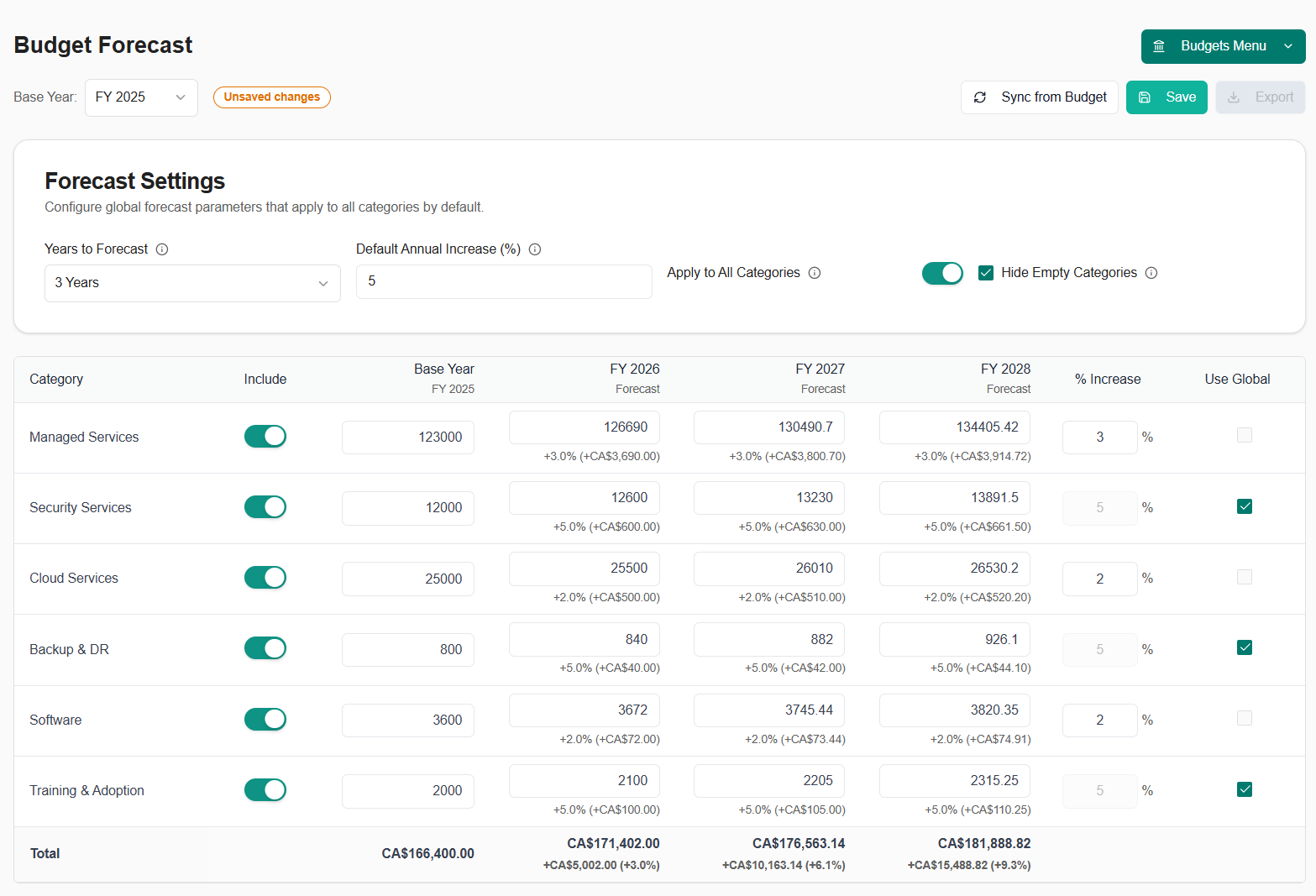
Plan ahead with confidence using our new budget forecasting feature that projects your budgets up to 5 years into the future with intelligent growth calculations and customizable adjustments. Key Features:- Multi-Year Projections: Forecast budgets 1-5 years ahead with automatic calculations based on current budget data
- Flexible Growth Models: Set global growth percentages or customize growth rates per budget category
- Manual Overrides: Override calculated projections for any category and year when you have specific plans
- Year-over-Year Comparisons: Easily compare projected values across multiple years
- Smart Syncing: Automatically sync from your current budget to create forecasts based on real data
- Category Controls: Enable or disable automatic increases for specific budget categories
- Visual Indicators: Color-coded cells show manual overrides vs. calculated projections
- Navigate to Budgets → Forecast
- Select the number of years to project (1-5 years)
- Set a global increase percentage or customize per category
- Click “Sync from Budget” to pull current budget data
- Adjust individual cells as needed with manual overrides
- Save your forecast rules for future reference
Autotask Real-Time Ticket Sync
Experience faster ticket updates with our new webhook-based Autotask integration that syncs changes in real-time instead of waiting for scheduled sync intervals. Key Improvements:- Instant Updates: Tickets sync immediately when created or updated in Autotask (no more waiting for scheduled syncs)
- Real-Time Notifications: Get notified as soon as tickets change status or are assigned
- Faster Client Portal: Your clients see ticket updates instantly
- Reduced Sync Delays: Webhook events trigger immediate syncs instead of waiting up to 15 minutes
- More Reliable: Automatic retry logic ensures webhook deliveries succeed
- Better Performance: Targeted syncs only update changed tickets, not the entire ticket list
- Changes in Autotask appear in MSPortal.ai within seconds
- Time entries, notes, and status changes sync immediately
- Better experience for both your team and your clients
- More accurate real-time reporting
Budget Forecast Reporting Block
Add budget forecast visualizations to your custom reports with the new Budget Forecast reporting block. Features:- Multi-Year Visualization: Display budget projections for up to 5 years
- Category Breakdown: Show forecast data by budget category
- Trend Analysis: Visualize growth trends across forecast years
- Customizable Views: Choose which categories and years to display
- PDF Export: Include forecast data in PDF report exports
- Navigate to Reporting → Custom Reports
- Add a “Budget Forecast” block to your report
- Configure which categories and years to display
- Position and resize the block as needed
- Export to PDF or share with clients
Enhanced Planner Summary Block
The Planner Summary reporting block has been enhanced with better visualizations and more detailed analytics. Improvements:- Better Data Display: Clearer visualization of planner items and completion status
- Enhanced Filtering: Filter planner items by status, priority, or date range within the block
- Improved Layout: Optimized spacing and formatting for better readability
- Faster Loading: Performance improvements for reports with large numbers of planner items
November 7, 2025
Custom Fields System
A comprehensive custom fields system that allows you to extend data collection across multiple entity types, providing flexible tracking and organization capabilities. Key Features:- Multi-Entity Support: Create custom fields for Devices, Compliance Checks, Goals, Budgets, Planner Items, Users, and Companies
- 20+ Field Types: Support for text, numbers, dates, checkboxes, selects, multi-selects, radio buttons, email, phone, URL, and more
- User Scope Filtering: User custom fields can be scoped to tenant-wide, company-specific, or both
- Bulk Operations: Edit custom field values for multiple users or entities at once
- Inline Options Editing: Manage select/multi-select/radio field options directly in the settings interface
- Text: Short text, long text
- Numeric: Number, decimal
- Date/Time: Date, datetime
- Contact: Email, phone, URL
- Boolean: Checkbox
- Selection: Select, multi-select, radio
- Special: Priority, impact, urgency
- Navigate to Settings → Custom Fields
- Select the entity type tab (Devices, Compliance, Goals, etc.)
- Create new fields with labels and types
- Custom fields automatically appear in edit dialogs for the corresponding entity types
- For users, choose whether fields apply to tenant users, company users, or both
- Bulk edit custom fields for multiple company users at once
- Tenant and company-scoped custom fields for users
- Custom fields support in company editing interface
Training Certificates & LinkedIn Sharing
Generate professional training certificates automatically upon course or learning path completion, with built-in LinkedIn sharing capabilities. Key Features:- Automatic Certificate Generation: Certificates are automatically created when users complete courses or learning paths
- Bulk Certificate Generation: Generate certificates for multiple users at once from the enrollments page
- LinkedIn Integration: Share certificates directly to LinkedIn
- Certificate Preview: Preview certificates before downloading or sharing
- Download & Share: Download certificates as PNG images or share via LinkedIn
- Tenant Branding: Certificates include your tenant logo for professional branding
- Public Certificate Access: Certificates can be accessed via public URLs for sharing outside the platform
- Professional design with course/learning path name, completion date, and user name
- Tenant logo for branded certificates
- Social sharing buttons for LinkedIn
- Certificate viewer with download and share options
- Complete a training course or learning path
- Certificate is automatically generated
- View certificate from the Training → Certificates page or enrollment details
- Click “Share to LinkedIn” to authenticate and post
- Or download the certificate as a PNG image
Learning Path Progress Tracking & Reporting
Comprehensive progress tracking and reporting for learning paths, giving you visibility into user completion rates, time spent, and performance metrics. Key Features:- Progress Tracking: Real-time tracking of user progress through learning paths
- Progress Sheets: Detailed progress view showing individual user completion status for each course in a learning path
- Progress Table: Filterable table showing all users’ progress across learning paths
- Time Tracking: Track time spent on courses and learning paths
- Average Scores: Calculate and display average quiz scores per learning path
- Completion Status: Visual indicators for completed, in-progress, and not-started courses
- Bulk Progress View: View progress for multiple users at once
- Learning path completion rates
- User progress summaries
- Time spent per course and learning path
- Quiz scores and pass/fail rates
- Enrollment status tracking
- Progress filtering by user, company, or learning path
- Navigate to Training → Learning Paths
- Select a learning path to view progress
- Click “View Progress” to see detailed progress sheet
- Use the progress table to filter and view progress across all learning paths
- Export progress data for reporting purposes
Training Quiz System
A complete quiz system integrated into training courses, allowing you to assess user knowledge and track quiz performance. Key Features:- Multiple Choice Questions: Create questions with multiple answer options
- Answer Tracking: Track correct and incorrect answers per question
- Quiz Attempts: Users can take quizzes multiple times with attempt history
- Score Calculation: Automatic score calculation and pass/fail determination
- Question Management: Add, edit, and reorder questions within courses
- Answer Options: Configure multiple answer choices with correct answer designation
- Attempt History: View all quiz attempts per user per course
- Question creation and editing interface
- Answer option management
- Question reordering within courses
- Score tracking and pass/fail status
- Attempt history per user
- Navigate to a training course
- Click “Questions” tab to manage quiz questions
- Add questions with multiple choice answers
- Mark the correct answer for each question
- Users will see quizzes when taking courses
- Quiz scores are tracked and displayed in progress reports
Company-Scoped Training Courses
Enable training courses at the company level, allowing you to provide company-specific training content while maintaining tenant-wide course libraries. Key Features:- Per-Company Courses: Enable courses for specific companies only
- Tenant-Wide Courses: Continue to support tenant-wide course enablement
- Dual Scoping: Mix tenant-wide and company-specific courses in your training library
- Company Filtering: Filter courses by company scope in the training manager
- Flexible Enrollment: Enroll users in company-specific or tenant-wide courses
- When enabling a course, choose “Tenant-wide” or select specific companies
- Company-scoped courses only appear for users in those companies
- Tenant-wide courses appear for all users
- Course enablement interface supports both scoping options
Training Email Reminders
Automated email reminder system for training enrollments, helping ensure users complete their assigned training. Key Features:- Individual Reminders: Send training reminders to individual users
- Bulk Reminders: Send reminders to multiple users at once from the enrollments page
- Customizable Templates: Email templates with course information and direct links
- Reminder Management: Track and manage training reminder emails
- Professional email templates
- Course information and links
- User-friendly reminder content
- Bulk sending capabilities
- Navigate to Training → Enrollments
- Select one or more enrollments
- Click “Send Reminders” from the bulk actions menu
- Emails are sent automatically with course details and links
Enhanced Training Enrollment Management
Improved enrollment management with bulk actions and enhanced filtering capabilities. Key Features:- Bulk Actions: Select multiple enrollments and perform actions in bulk
- Bulk Reminders: Send training reminders to multiple users at once
- Bulk Certificate Generation: Generate certificates for multiple completed enrollments
- Enhanced Filtering: Filter enrollments by status, course, user, company, and more
- Improved Sorting: Better sorting options for enrollment lists
October 31, 2025
Major Performance Enhancements
We’ve implemented significant performance optimizations across the platform to improve speed and responsiveness, especially for large datasets. Improved Speed:- Faster page loading across all modules
- Smooth scrolling for large lists
- Instant search and filtering
- Compliance checks list now loads 3-5x faster
- Tickets page handles thousands of tickets smoothly
- Devices page loads instantly
- Goals and Training pages with improved performance
Surveys Module Enhancements
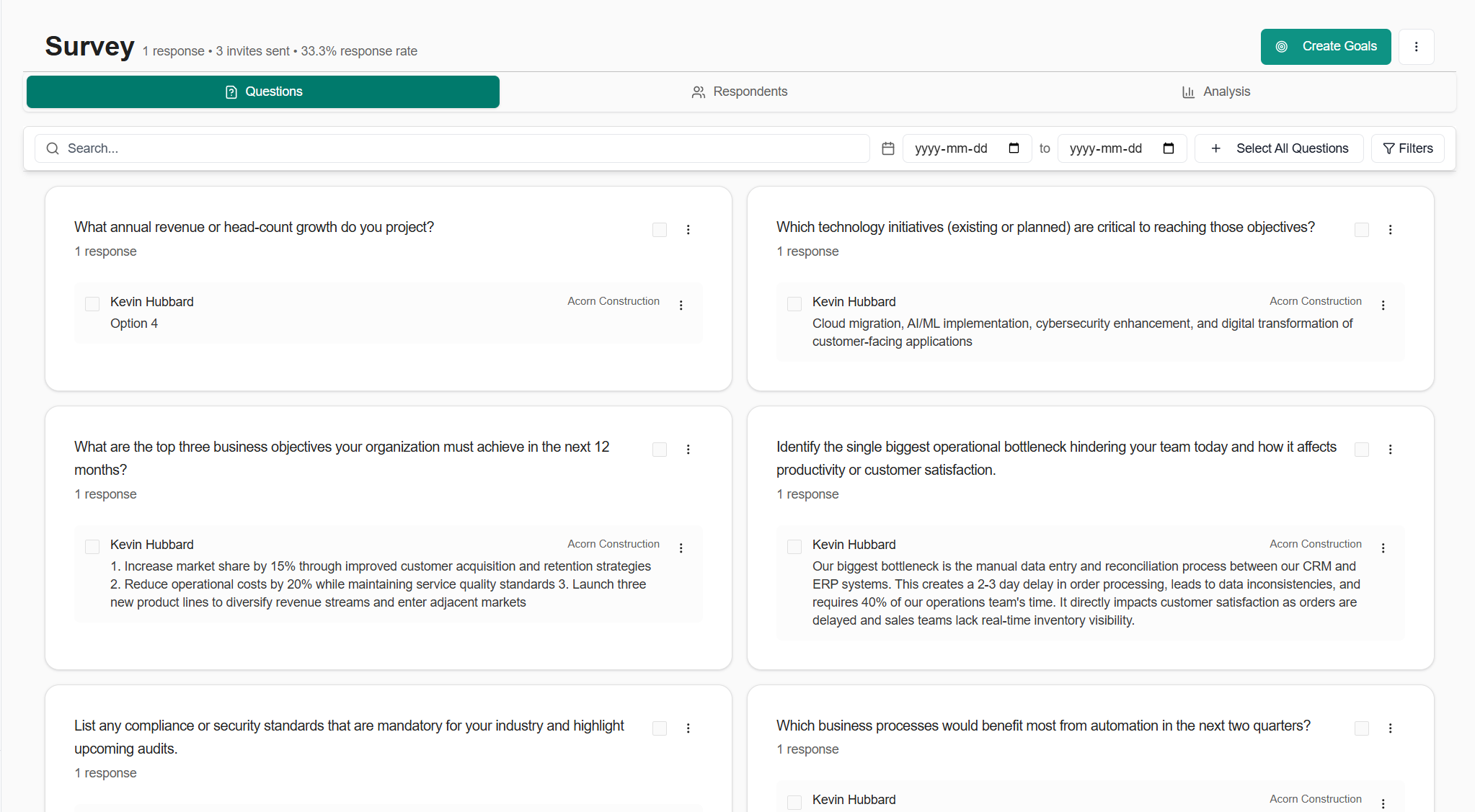
Comprehensive improvements to survey response management with better visualization and bulk operations. Key Features:- Bulk Response Management: Select multiple responses, apply filters, and perform actions on entire groups
- New bulk action toolbar with keyboard shortcuts
- Multi-select with checkboxes
- Bulk delete, export, or categorize responses
- Enhanced Question Cards: Improved visualization with sentiment analysis badges and mini-bar charts
- Sentiment indicators (Positive, Neutral, Negative) with color coding
- Quick visual feedback on response distribution
- Better handling of text responses vs. choice responses
- Response Drawer: Side panel for viewing full response details without leaving the page
- Smart Filtering: Filter by date range, response type, sentiment, and more
- Empty States: Helpful guidance when no data is available
- Navigate to any survey and view the Responses tab
- Use the filter bar to narrow down responses by criteria
- Select multiple responses using checkboxes or keyboard shortcuts
- Apply bulk actions or view individual response details in the drawer
Compliance Module Optimizations
Significant performance and UX improvements to the compliance system. Key Improvements:- Instant page transitions even with thousands of compliance checks
- Smooth infinite scroll experience
- Added notes count and file count to compliance check listings for better visibility
- Faster filtering and search across compliance checks
Bug Fixes & Quality Improvements
Compliance:- Fixed autosave reliability in compliance check editor to prevent data loss
- Improved dialog interactions for better user experience
- Enhanced permission checking for multi-company environments
- Optimized agenda item delete operations for faster performance
- Better handling of meeting attachments and external links
- Improved bulk operations for planner templates
- Enhanced selection dialog with better UX and keyboard navigation
- Optimized ticket category and display group management
- Better PSA settings synchronization
- Improved Autotask ticket details panel rendering
- Faster role management
- Better content loading in user settings pages
- Enhanced role assignment workflow
Reporting Enhancements
New Reporting Blocks:- Enhanced ticket analytics blocks with better visualization
- Improved M365 Secure Score reporting blocks
- Training enrollment and progress tracking blocks
- Budget detail blocks with expanded metrics
- Device warranty timeline blocks
- Better data visualization across all block types
- Faster report loading
- Enhanced customization options for reports
- Improved PDF export quality
October 24, 2025
External Resources Module
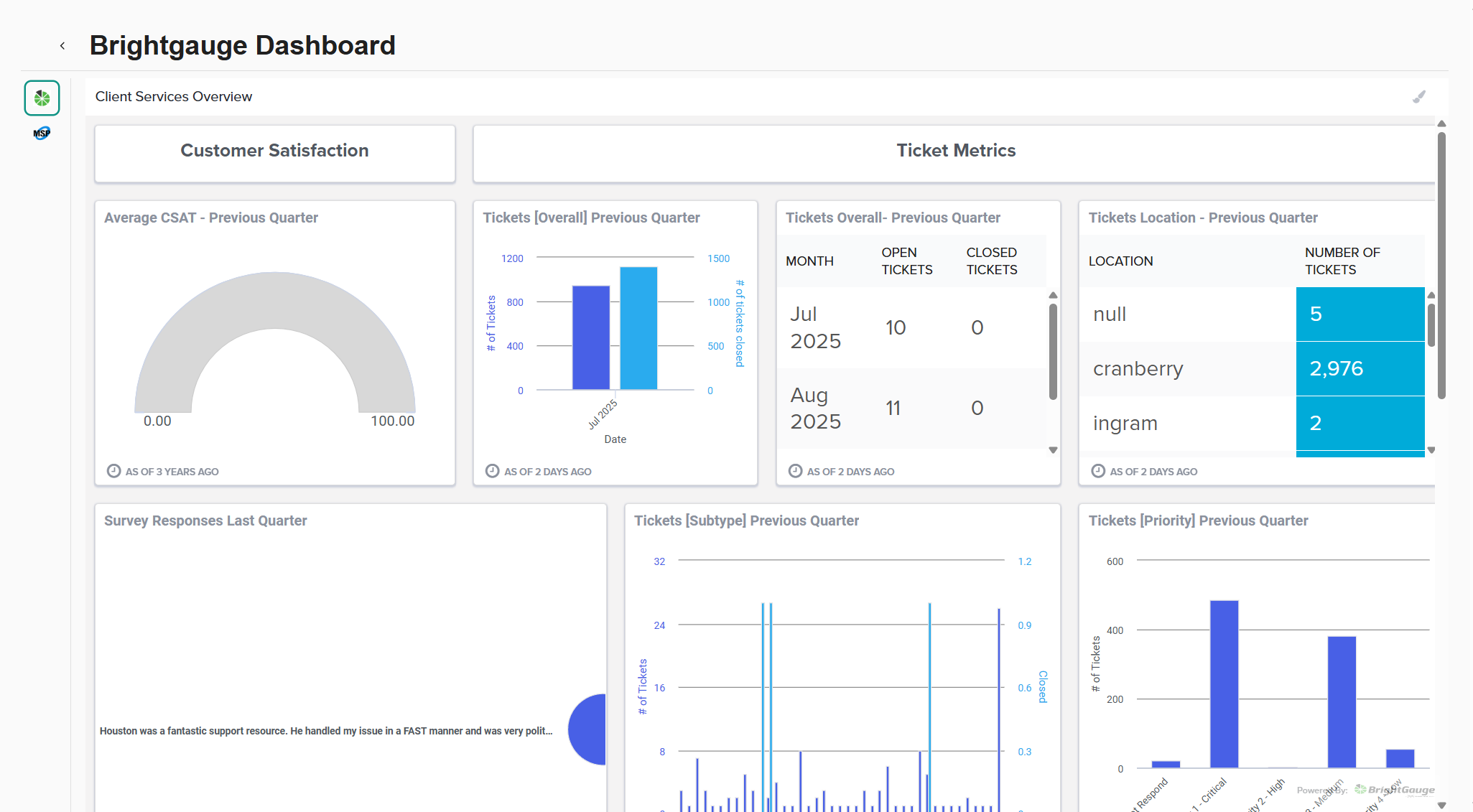
Embed and manage external applications directly within MSPortal.ai, providing your clients with seamless access to third-party tools without leaving the platform. Key Features:- Embed External Applications: Display external applications directly within the platform
- Role-Based Access: Control which user roles can access each external resource
- Per-Company URL Overrides: Different companies can access different instances of the same resource (e.g., separate Bitwarden vaults)
- Bulk Operations: Manage multiple external resources at once - delete, disable, or update permissions in bulk
- Company-Specific URLs: Override the default URL for specific companies while maintaining the same resource configuration
- Navigate to Settings → External Resources
- Create a new external resource with a name, URL, and icon
- Assign roles that should have access
- Optionally configure company-specific URL overrides for multi-instance tools
- The resource appears in the main navigation for authorized users
- Automation Forms: Rewst Forms, Pia Forms - Embed intake forms directly in the portal
- Dashboards: BrightGauge, MSPBots - Display metrics and KPIs for clients
- Documentation Wikis: ITGlue (MyGlue), Hudu, Confluence - Seamless access to documentation
- Custom Apps: Any client-specific portals and internal SaaS tools
Meeting Summary Email Workflow
Transform your meeting notes into professional email summaries with AI assistance and send them directly to participants. Key Features:- AI-Generated Summaries: Automatically generate meeting summaries from your agenda items, notes, and action items
- Smart Recipient Management: Pre-populated with meeting participants, easily add/remove recipients
- Rich Text Editing: Full rich-text editor with formatting, lists, and styling options
- Preview & Edit: Review and customize the AI-generated content before sending
- Integrated with M365: Sends via your configured Microsoft 365 integration
- Action Item Tracking: Automatically includes action items and next steps from the meeting
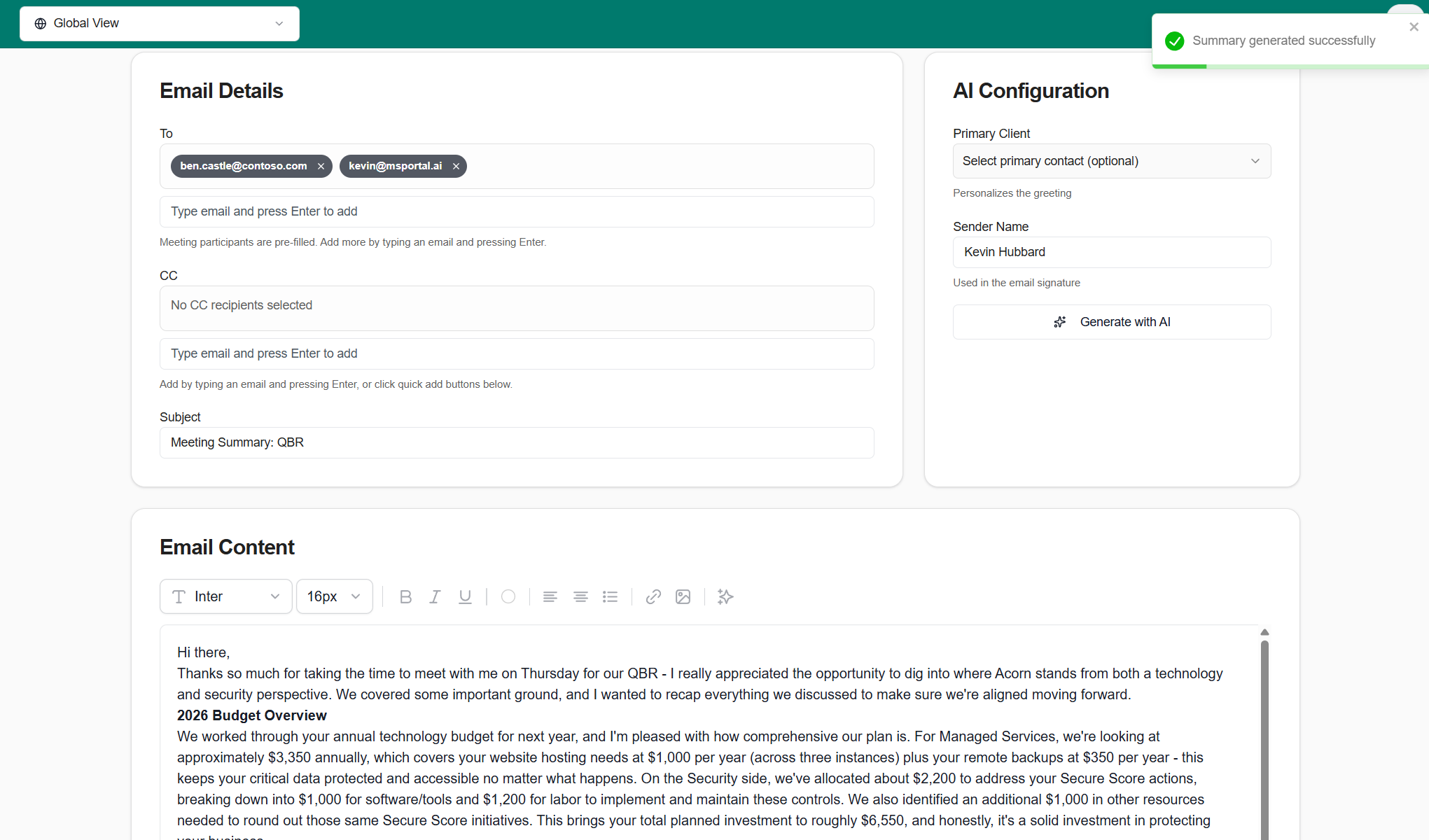
- After completing a meeting, click “Send Summary”
- AI generates a professional summary including key discussion points and action items
- Review participants and add additional recipients if needed
- Edit the summary content using the rich text editor
- Send directly from MSPortal.ai - appears in your Sent Items folder
ConnectWise Configuration Import
Import and map device configurations from ConnectWise Manage to streamline device tracking and warranty management. Key Features:- Configuration Type Mapping: View all configuration types from ConnectWise and map them to MSPortal.ai device types
- Visual Mapping Interface: Clear UI showing ConnectWise types on the left, MSPortal.ai device types on the right
- Bulk Import Preview: See exactly what will be imported before committing changes
- Staged Import Process: Map configurations in stages, allowing you to organize complex device inventories
- Smart Defaults: Common configuration types (Server, Workstation, Laptop) are auto-mapped when possible
- Integration Status Tracking: Real-time feedback on import progress and completion status
- Navigate to Settings → Integrations → ConnectWise
- Click “Import Configurations” to view unmapped configuration types
- For each ConnectWise configuration type, select the corresponding MSPortal.ai device type
- Review the import preview showing how many devices will be created
- Click “Import” to complete the mapping
Compliance Bulk Generation Improvements
Significantly enhanced the bulk compliance check generation system with better reliability, progress tracking, and error recovery. Key Improvements:- Real-Time Progress: See progress updates as compliance checks are created
- Live Progress Indicators: Visual progress bar showing which check is being generated
- Automatic Retry: Failed generations are automatically retried before being marked as failed
- Pending Review Workflow: Generated checks are marked as “pending-review” and can be bulk-approved after review
- Bulk Approval Dialog: Review and approve multiple generated checks at once with a streamlined interface
- Enhanced Error Handling: Clear error messages and recovery options when generation fails
- Navigate to Settings → Compliance → Checks
- Click “Bulk Generate with AI”
- Enter your requirements (e.g., “NIST 800-171 controls for healthcare”)
- Watch real-time progress as checks are generated
- Review the “Pending Review” banner showing how many checks need approval
- Click “Review Pending Checks” to bulk approve or edit generated checks
Bug Fixes & Quality Improvements
- Fixed compliance dialog autosave to reliably save changes without data loss
- Improved planner template management with better bulk operations
- Enhanced text editor extensions with better formatting support
- Fixed calendar meeting agenda view layout and styling
- Improved device warranty timeline block data handling
- Better error handling in ConnectWise ticket sync
- Fixed presentation layout styling for meeting slides
- Updated dependencies for security and stability
October 17, 2025
- Add to Meeting across all modules: Universal “Add to Meeting” functionality lets you link items from Compliance, Goals, Devices, Planner, Tickets, Training, Surveys, and M365 Secure Score directly to meeting agendas for streamlined QBR preparation.
- Learning Paths: Create and assign learning paths for your clients. Have a client who needs HIPAA Training? No problem!
- Ticket resolution status stepper: Visual configuration UI for tracking ticket lifecycle stages with customizable resolution statuses and progress indicators.
- Datto RMM integration: Import and monitor devices from Datto RMM with site mapping and automated sync capabilities.
- Improved planner templates: Enhanced template management with better bulk operations and company-specific template support.
October 10, 2025
- Client Home page: New simplified home view for client users showing their tickets, team members, and assigned training courses in one place—perfect for end-user portals.
- Compliance system performance upgrade: Significantly improved performance for large numbers of compliance checks with faster loading and updates.
- Enhanced impersonation support: Full impersonation capability extended to the Home page, allowing MSPs to view the exact client experience.
- Ticket performance improvements: Faster ticket list loading and improved refresh behavior.
- Multiple UI polish improvements: Fixed ticket modal interactions, improved budget status handling, enhanced compliance filtering, and better dark mode support.
October 3, 2025
- Autotask PSA integration: Full ticket sync with standardized interface, custom field handling, and new sync functions for invoices, opportunities, products, projects, and ticket notes.
- ConnectWise Asio integration: Sync companies, devices, network devices, and tickets with device import mapping tool.
- Reporting system enhancements: Multi-page layout support with smart drag preview, intelligent snap positioning, and new analytics blocks including ticket analytics, M365 secure score blocks, training tracking, budget details, and planner summaries.
- Budget management improvements: Bulk status updates for budget line items and enhanced PDF export with optimized print layouts.
- Report PDF exports: Export custom reports to PDF with all configured blocks and data visualizations.
- Enhanced mobile & tablet support: Improved responsive design across all modules for better viewing on mobile and tablet devices.
- Integration settings improvements: New slide-over drawer design for managing PSA integrations.
- Improved tickets filtering: Enhanced filter options with dark mode support and better scoping for tenant/company visibility.
- Survey analysis system: AI-powered sentiment analysis with automated daily processing and detailed survey insights.
- Custom domain branding: Simplified signin flow for white-label deployments.
- Central SSO relay: Unified authentication flow supporting custom domains.
September 26, 2025
- Custom branding for white-label usage: Upload your branding to fully white-label client-facing views.
- Instant custom domains: Configure custom domains without waiting. Supports unlimited domains with no need to provision separate SSO apps per domain.
- Autotask integration: Sync Tickets, Devices, Products, and Companies for a unified view.
- ConnectWise Asio integration: Ingest Devices, Network Devices, Companies, and Sites with mapping.
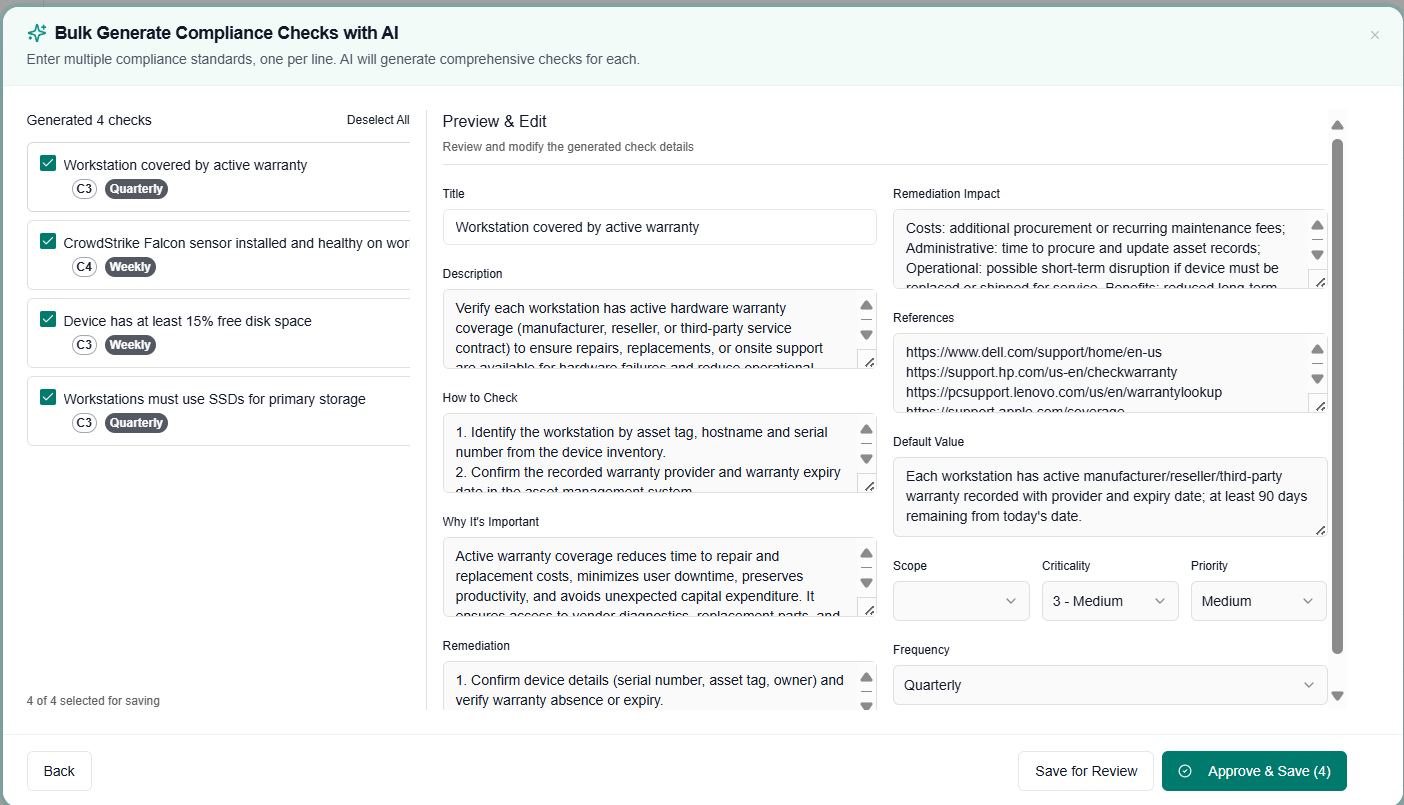
- Bulk creation of Compliance Checks with AI: Create many checks at once from high-level prompts; AI fills details and categories.
September 19, 2025
- Syncro integration: Sync Tickets, Devices, Products, and Companies.
- Meeting presentation view (v1): Build a clean agenda combining Budget, Planner items, Tickets, Reports, and custom notes, optimized for on-screen presentation.
- Fewer clicks for Compliance and Meetings: Streamlined navigation and actions to reduce meeting prep time.
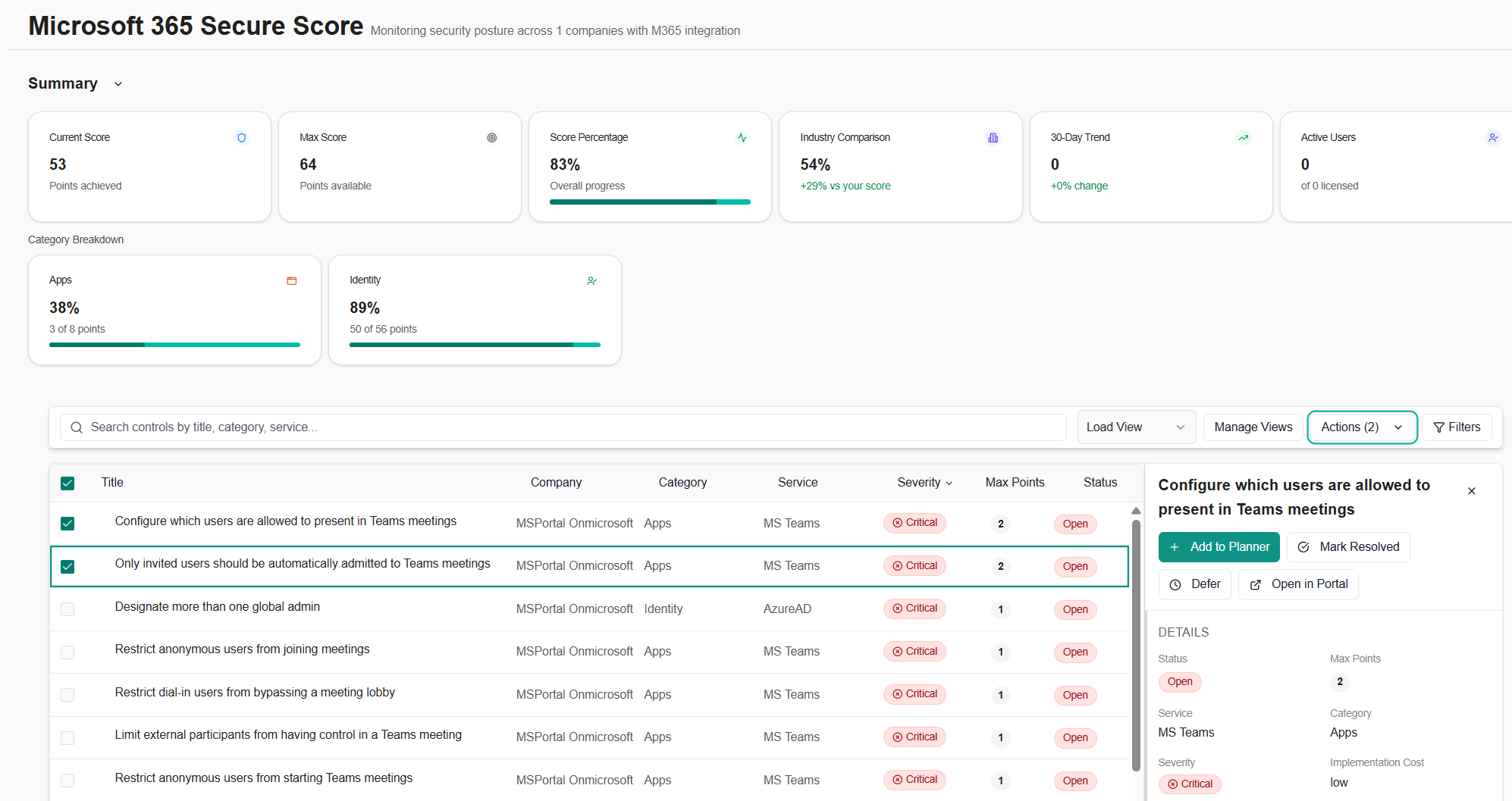
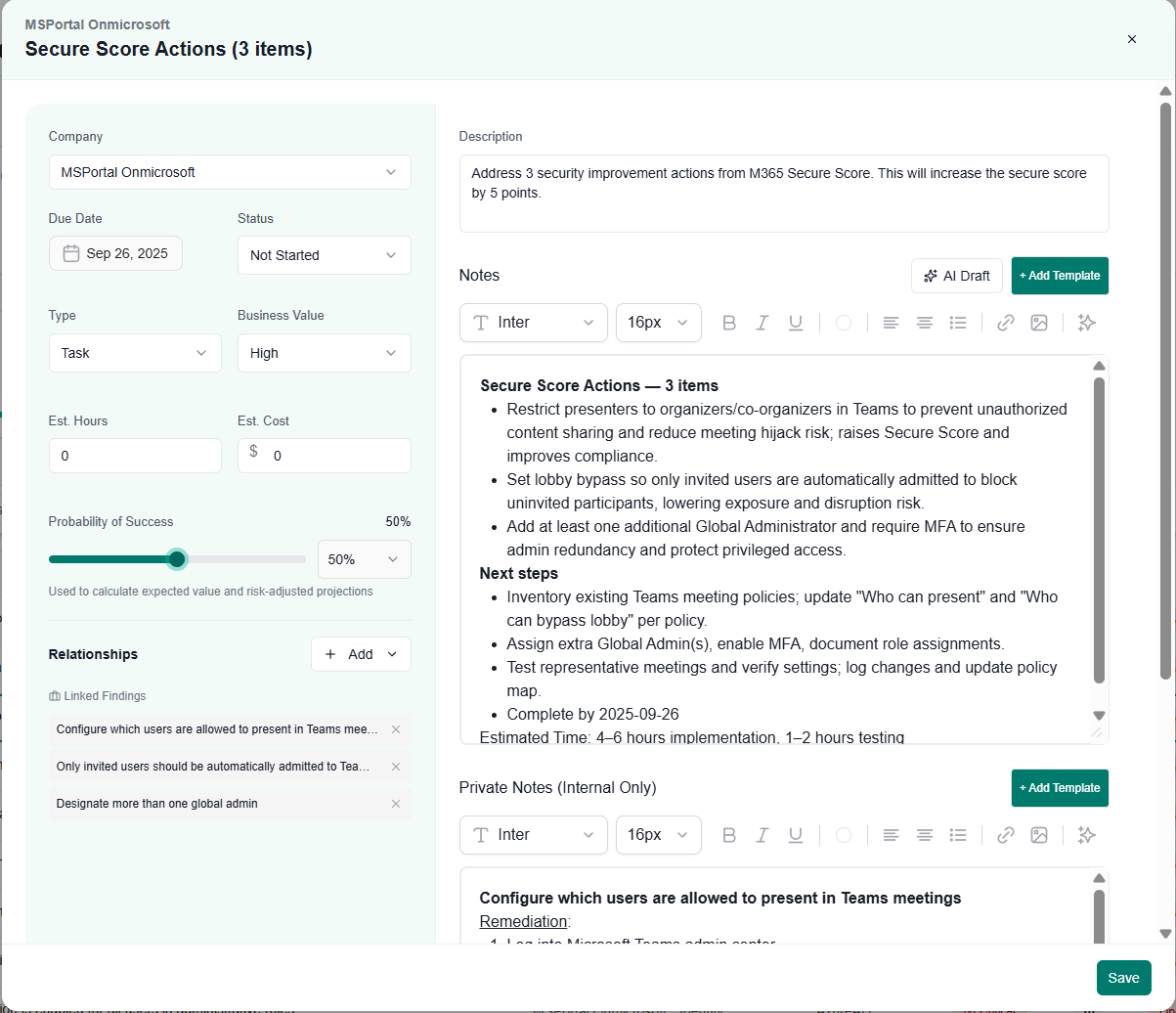
- Microsoft 365 Secure Score reporting: View Secure Score, push findings into the Planner, and get AI summaries when multiple checks are added.
- Parent–Child company relationships: Delegate management from a parent company across all child companies.
- Restricted client visibility: Limit vCIOs and Technicians to only the clients they’re assigned.
September 12, 2025
- Meraki integration: Pull device and network insights from Cisco Meraki.
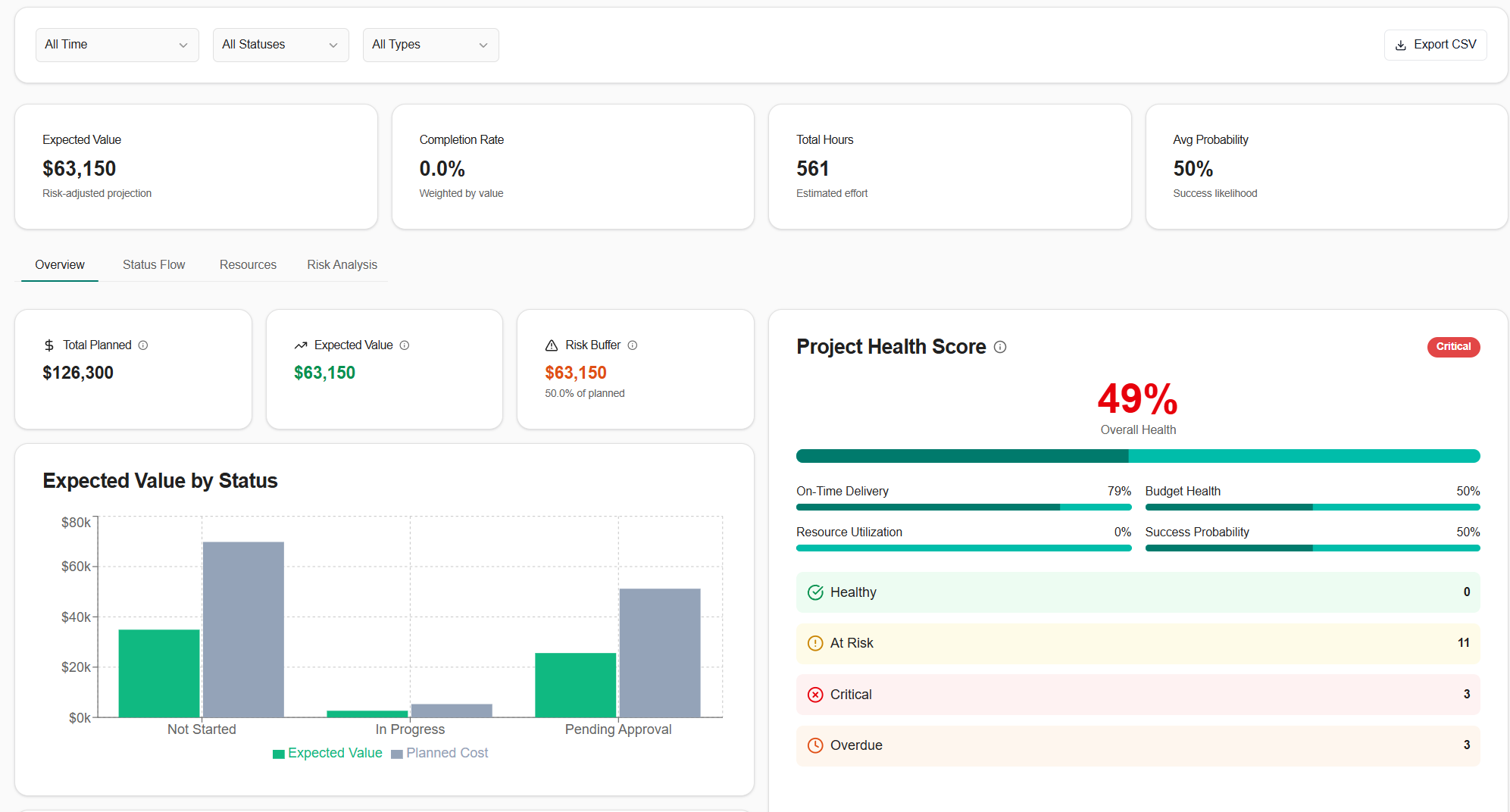
- Planner Analytics page: Measure plan completion, on-time delivery, and trends.
- Net Promoter Score (NPS) surveys: Capture client sentiment with lightweight NPS campaigns.