

Before you start
- You need the Manage Training permission to turn Premium training on or off for companies and users.
- To change the Enabled switches on the courses list, you also need write access to Training settings.
- To see the Actions menu on the Companies page, you also need write access to Companies.
- Premium training uses the Bigger Brains catalog. It is billed per enabled user, based on the highest number of enabled users in the billing period.
- Standard training is the set of included MSPortal courses at no extra training cost.
Turn Premium training on or off for a company
1
Open Settings > Companies
Find the company. The Training column shows Premium or Standard.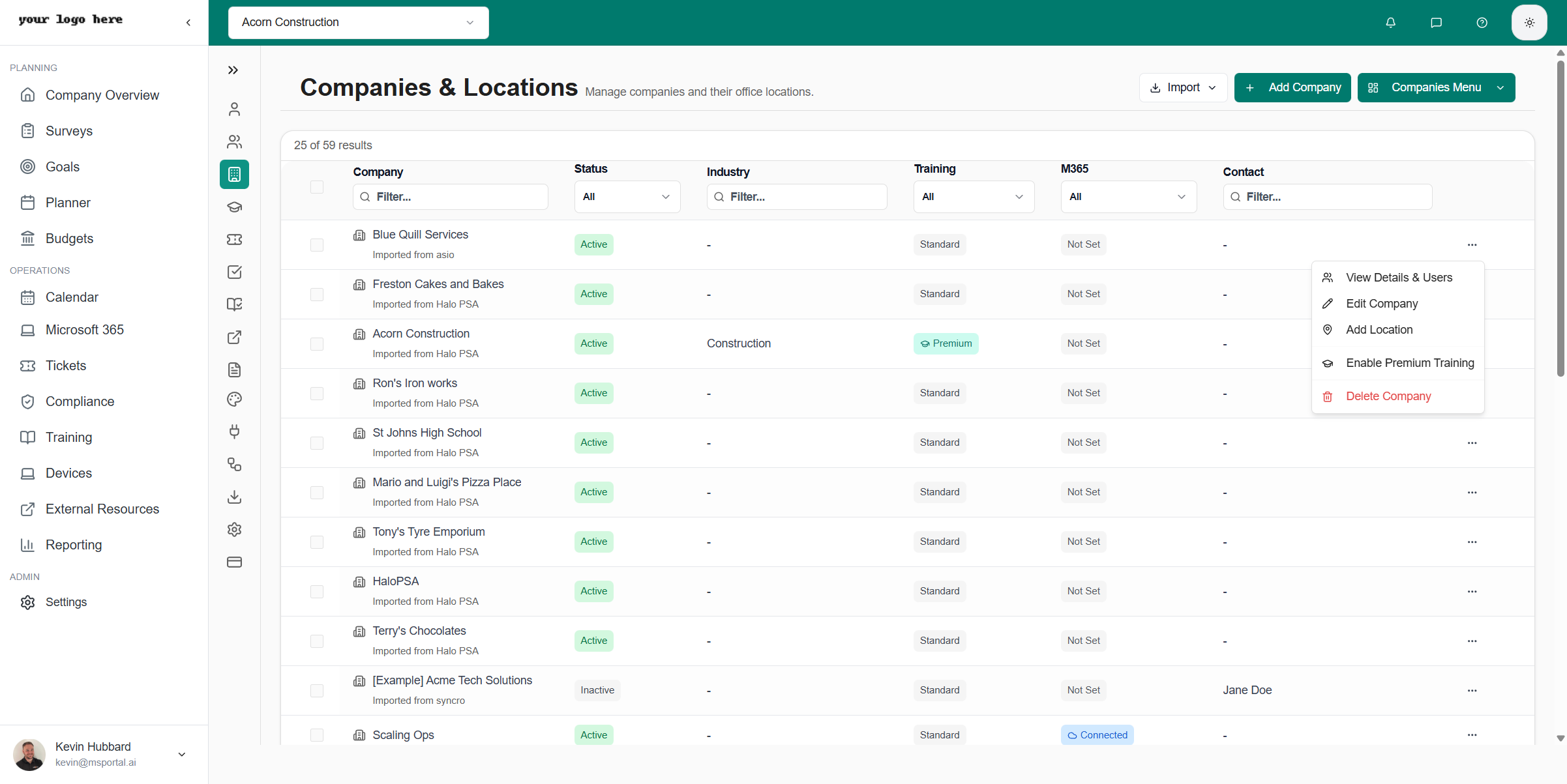
2
Open the company's row menu
Choose Enable Premium Training. To turn it off, choose Disable Premium Training from the same menu.
3
Confirm the result
A message confirms the change. It saves right away, so there is no Save button. The Training column updates.
Turning Premium on for a company gives its users Premium access unless a user has their own setting (see below). Review Billing before you enable it for many companies.
Set Premium training for one user
A user can follow the company default or have their own On or Off setting.1
Open Settings > Users & Roles > Company Users
Find the user. The Premium Training column shows On or Off. Under it, Company default means the user follows the company, and User override means the user has their own setting.
2
Open the user's row menu
Choose Enable Premium Training or Disable Premium Training. The change saves right away.
3
Go back to the company default if needed
On a user with a User override, choose Use Company Default from the same menu. That user then follows future company changes.
Choose which courses are available
1
Open Settings > Training
The table lists every course with Enabled, Course Title, Type, Category, Tags, Duration, and Enrollments columns.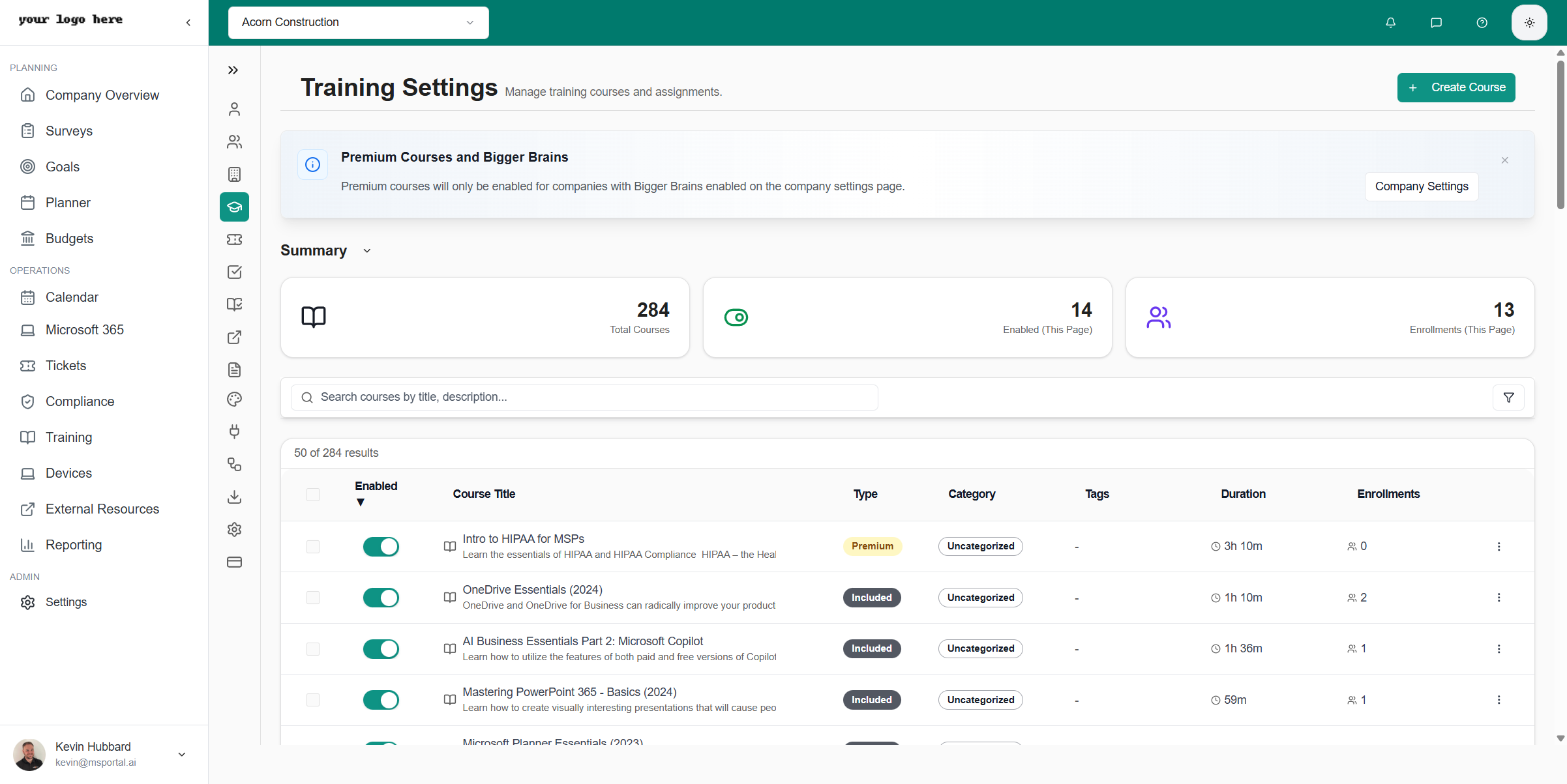
2
Turn courses on
Use the Enabled switch on each course. To change several at once, select rows and choose Enable Selected or Disable Selected.
3
Check the company scope
The page follows the company selector. Premium courses are only enabled for companies that have Premium training turned on.
Enroll learners
1
Open Training > Training Menu > All Enrollments
This menu item needs the Manage Training permission.
2
Click Enroll Users
Choose the courses, optionally set a Due Date, select the users, and click the enroll button, which reads Enroll 3 User(s) when three users are selected. Users get an email about the new course.
3
Send reminders when needed
Select enrollments and use Send Reminders in the bulk actions menu. A single enrollment also has Send Reminder in its row.
Check that it works
Ask a real learner to open Training > Training Menu > Course Library and start a course. A staff preview only shows the content. It does not prove the learner’s Premium access, company scope, or enrollment.Troubleshooting
Frequently asked questions
What is the difference between Off and Use Company Default?
What is the difference between Off and Use Company Default?
Off is a setting for that user and stays Off if the company turns Premium on. Use Company Default removes the user’s own setting so they follow the company.