

Before you start
- Open Settings > Dashboards. You need Dashboards access under Settings. Write lets you add and edit items, run Check All Policies, enable and disable items, and set defaults. Deleting items (single or bulk), pinning to the sidebar, Edit Permissions and changing the role checkboxes on an existing item need Manage. Without Write, the row menu and checkboxes are not shown.
- Adding a link does not connect an API integration or create an account in the external service. Users still sign in to that service themselves.
- Each Company needs its own URL before its users can open the dashboard. See Assign company URLs.
- The default URL must start with
https://.
Add an external dashboard
1
Open the tab
Go to Settings > Dashboards and click External Dashboards. Wait for the table to load.
2
Click Add External Item
The Add External Item dialog opens.
3
Enter the basics
Type a Name and an optional Description. Enter the URL with
https://. This default URL is only used by MSP staff.4
Add an icon (optional)
Click Upload Icon and choose a PNG or JPEG image. 32x32 pixels or larger works well. The icon uploads as soon as you pick the file. Click Remove to clear it.
5
Set the order
Enter a Display Order number. Lower numbers appear first.
6
Choose Company Roles
Under Company Roles (Access Control), tick the Company roles that may open it. When you create an item, this section is always shown. Leave every box clear to allow all Company roles. These choices limit Company users only. MSP staff are not limited by them.
7
Click Create
The item is created as active. Reopen it from the table to check the saved URL and roles.
8
Assign company URLs
Open the row’s … > Company URLs and add a URL for each Company that should see it.
Edit an item
1
Open the dialog
Click the item’s name, or open … > Edit on its row.
2
Change the fields
Editing also shows Active, Pin to Sidebar and, when pinned, a Sidebar Label of up to 30 characters. An inactive item is hidden from the dashboard list. The Company Roles (Access Control) checkboxes are hidden when you edit an item without Manage, so a Write-only user cannot change roles.
3
Click Update
Changes are saved only when you click Update.
Row actions
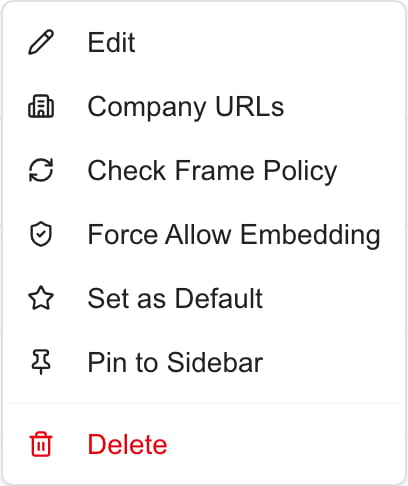
Clicking the URL in the table opens the external site in a new tab.
Check embedding
Each external dashboard is shown inside MSPortal in a frame. Some sites refuse to be framed.1
Run the check
Open … > Check Frame Policy on the row. To check every active item that has no result yet, click Check All Policies at the top of the page.
2
Read Frame Policy
The column shows Not checked, Allowed, Blocked or Force allowed.
3
Test the real link
Open the dashboard as the intended user, with their company, and confirm it loads.
Check All Policies only checks active items with no result yet. Use the row action to recheck one item. The check covers the default URL, not company URLs.
Change several items
1
Select rows
Tick the checkbox on each item you want to change.
2
Open Actions
Click Actions (n) at the top of the page.
3
Choose an action
Edit Permissions (needs Manage) opens a dialog with Assign Roles (optional). Click Update Permissions to replace the selected items’ roles. Enable and Disable change availability. Delete (needs Manage) asks you to confirm and shows the count. Actions you lack access to are not listed.
Troubleshooting
Frequently asked questions
Does creating an external dashboard set up an API integration?
Does creating an external dashboard set up an API integration?
No. It creates a link or embedded view. Set up API integrations separately.
Which URL format is accepted?
Which URL format is accepted?
A full
https:// URL, for the default and for each Company.What does leaving Company Roles empty mean?
What does leaving Company Roles empty mean?
All Company roles can open it. The item still needs to be active and the Company needs its own URL.
Do Company Roles limit MSP staff?
Do Company Roles limit MSP staff?
No. They limit Company users only.
Does Check All Policies recheck everything?
Does Check All Policies recheck everything?
No. It checks active items that have no result yet.
Does Allowed prove the dashboard works?
Does Allowed prove the dashboard works?
No. It means no blocking header was found on the default URL. Sign-in and company URLs still need a test.
Does Set as Default affect internal dashboards?
Does Set as Default affect internal dashboards?
Yes. It clears any other default, internal or external, for the tenant.
Does deleting an item delete the dashboard in the other service?
Does deleting an item delete the dashboard in the other service?
No. It removes the link and company assignments in MSPortal.
What is the difference between Active and pinned?
What is the difference between Active and pinned?
Active controls availability. A pin only adds a navigation shortcut and grants no access.