

Preview: the Connect steps are checked in production. Zone matching, posture and sync are described from the release and will be rechecked with a live Cloudflare account.
Before you connect
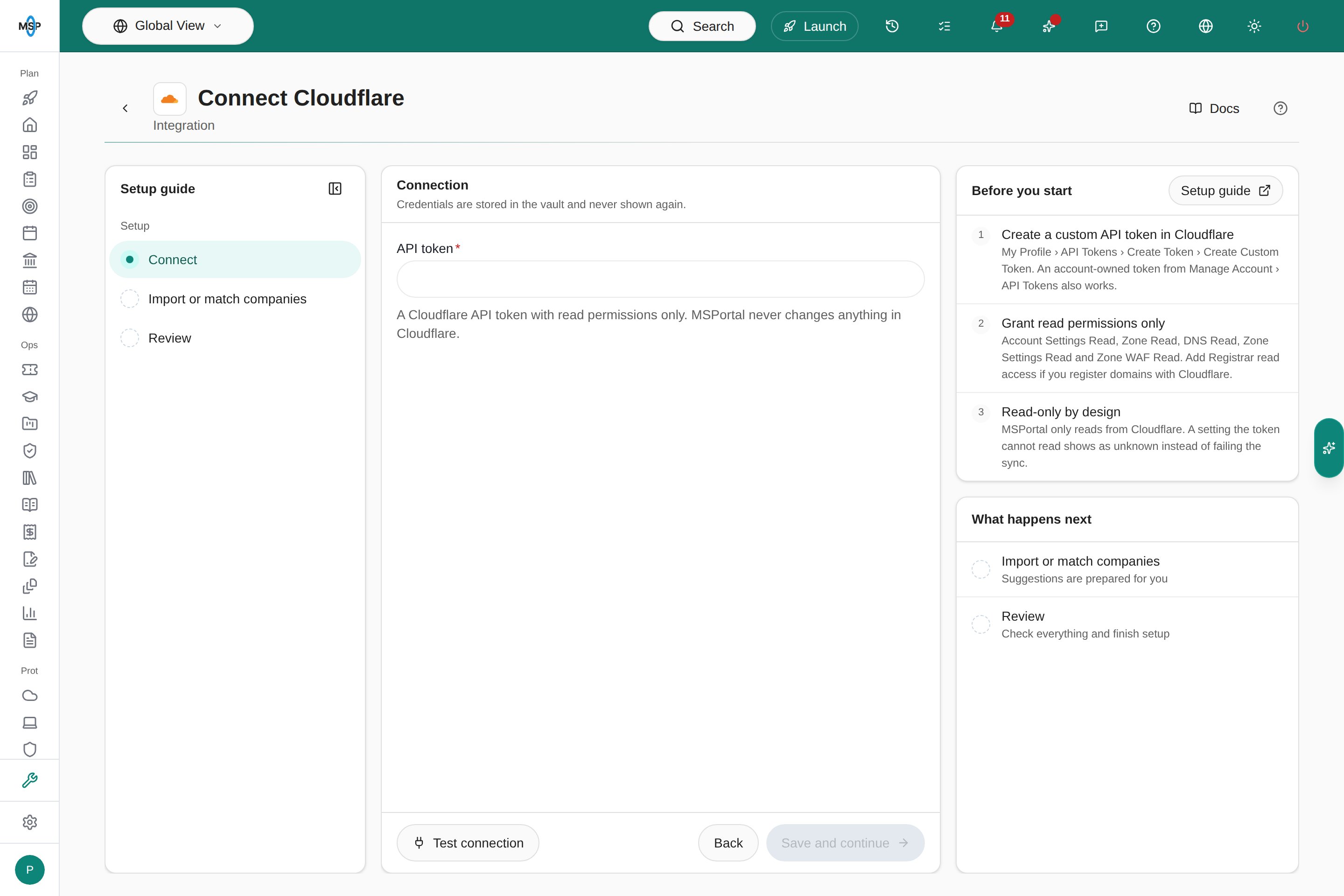
Create an API token in Cloudflare with read permissions only. Follow Cloudflare’s token instructions:- In Cloudflare, open My Profile › API Tokens › Create Token › Create Custom Token. An account-owned token from Manage Account › API Tokens also works.
- Add these read permissions: Account Settings Read, Zone Read, DNS Read, Zone Settings Read and Zone WAF Read. If you register domains with Cloudflare Registrar, add Registrar read access too.
- Choose the accounts and zones the token can read, create it, and copy it securely.
Connect
- Open Settings › Integrations, choose Directory, find Cloudflare, and choose Connect.
- Paste the token into API token.
- Choose Test connection. A successful test shows how many accounts and zones the token can read. A rejected token shows Connection failed with the reason.
- Choose Save and continue. MSPortal saves the token in the vault and starts the first sync.
Match zones to companies
Each Cloudflare zone is a domain. On Import or match companies, link each zone to an existing company, or review the suggested matches first. A zone never creates a company. Ignore hides a zone that is not a client’s, and you can restore it later. Mapped zones appear as domains on the company with the source Cloudflare, including Registrar expiry and auto-renew when the domain is registered with Cloudflare.Review posture
- Reports: add the Cloudflare Zone Posture block. It shows zones with findings, every finding type, the zones needing attention, and Registrar renewals due within 30 days. It reflects the latest sync, not the report period.
- AI reports: security reports include a Cloudflare summary and the zones with findings.
- Assistant and MCP: ask about domain security, or use
get_cloudflare_zone_posture.
Sync and troubleshooting
Cloudflare syncs daily and when you choose Refresh on the integration. Large accounts take longer because MSPortal stays within Cloudflare’s API rate limit.- Test fails with a rejected token: check that the token was copied in full and has not expired or been revoked.
- A setting shows as unknown: add the matching read permission to the token, then refresh.
- No Registrar dates: the domain is not registered with Cloudflare Registrar, or the token lacks Registrar read access.