Filter the domain inventory and download every matching domain as a CSV.
Use the column filters on Cloud > Domains to find domains, then Export CSV to download every matching domain. This page is for MSP staff and company users who can see the Domains tab.
Before you start
You need Cloud read access (the Cloud resource with Read access in the role editor). You do not need write or manage access to export.
The filters and the export follow the company selector in the top bar.
The table shows up to 50 domains per page.
Find a domain
1
Open Cloud > Domains
Click Cloud in the sidebar, then click the Domains tab. Check the company selector in the top bar.
2
Search by name
Type all or part of the name in the filter box under the Domain column heading. Case does not matter. This filter searches domain names only. It does not search company names or aliases.
3
Narrow by provider or company
If the Provider or Company columns are shown, open their filters and check the options you want. With several options checked, a row matches any one of them. Provider appears only when your scope has more than one provider. Company is hidden when one company is selected.
4
Narrow by verification or authentication
Open the Verification filter and choose Verified or Unverified. Open the Authentication filter to pick an authentication type such as Managed or Federated. To filter by Primary or Cloud presence, first show those columns with Columns > Save Changes.
5
Read the results
The table reloads from page 1. Use the page controls under the table to read further pages.
Filters in different columns must all match. Click Clear Filters to remove every column filter. This does not change the company selector.There are no filters for Services, Expires, Auto-renew, Registrar status, Aliases, Created, Email security, or Problems. The table cannot be sorted. To sort by expiry date, export the list and sort it in a spreadsheet.
Find unverified domains
1
Open the Verification filter
Click the filter under the Verification column heading.
2
Choose Unverified
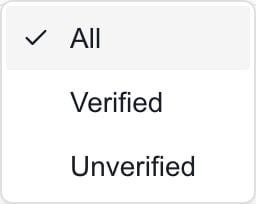
Choose Unverified. Choose All to remove the filter.
The Verification filter has three options.
3
Check the provider
DNSimple rows always show Unverified because DNSimple does not report a verification flag. Look at the Provider column before you act on a row.
Export every matching domain
1
Set your filters
Set the company selector and any column filters first.
2
Click Export CSV
Click Export CSV above the table. A progress toast shows how many domains are loaded. The export includes every domain that matches your filters, across all pages. The browser downloads cloud-domains. When one company is selected, the company name is added to the file name.
3
Check the result
The toast reads Exported N rows when the file is ready. If it reads The export could not finish. Try again., no file was downloaded. Click Export CSV again.
The CSV columns are Domain, Provider, Company, Primary, Verification, Cloud presence, Expires, Auto-renew, Registrar status, Services, Authentication, and Aliases. When the email security columns are shown, the file also has Email security, SPF, DMARC, DKIM, and Problems; these are empty for a domain that has no check result. Hidden table columns are still exported. Services, Aliases, and Problems use semicolons between values. Created is not exported.
Branch preview: the email security CSV columns are part of an upcoming Domains update and may not be in your live portal’s export until it is released.
The summary counts at the top of the page cover every page, as does the CSV.
Troubleshooting
Problem
What to do
You see No cloud domains match these filters.
Click Clear Filters and check the company selector.
A domain you know is missing
Check the company selector and the Provider filter. DNSimple domains appear only when mapped to a company.
Export CSV is missing
Your role does not have Cloud read access.
The CSV has fewer rows than Total domains
The export follows the company selector and column filters, and the summary may not. Clear the filters, then export again.
The export could not finish. Try again.
No file was downloaded. Click Export CSV again.
The Primary or Cloud presence filter is not on screen
Show the column with Columns, then click Save Changes.
Frequently asked questions
Does Export CSV download every matching page?
Yes. It exports every domain that matches your company and filters, not only the page you see.
Do I need management permission to export?
No. Cloud read access is enough.
Can I search by company name or alias in the Domain filter?
No. It searches the domain name only. Use the company selector or the Company filter for companies.
Can I filter or sort by expiry date?
No. Export the list and sort it in a spreadsheet.
Why does Unverified include DNSimple rows?
DNSimple does not report a verification flag, so those rows count as Unverified.
Does Clear Filters change which companies I can see?
No. It clears column filters only. The company selector and your permissions stay the same.
{"docsConfig":{"theme":"aspen","$schema":"https://mintlify.com/docs.json","name":"MSPortal.ai Documentation","colors":{"primary":"#0C8376","light":"#15B79E","dark":"#107569"},"logo":{"light":"https://mintcdn.com/msportal/KnbwIXtZSTlVJTt6/logo/light.svg?fit=max\u0026auto=format\u0026n=KnbwIXtZSTlVJTt6\u0026q=85\u0026s=eb69f6d6bf16b2c401770aef19ade1d2","dark":"https://mintcdn.com/msportal/KnbwIXtZSTlVJTt6/logo/dark.svg?fit=max\u0026auto=format\u0026n=KnbwIXtZSTlVJTt6\u0026q=85\u0026s=03f8df7191e7a8ea7da084df57f6107f"},"favicon":"https://mintcdn.com/msportal/KjsKytvp08K0bejm/favicon-16x16.png?fit=max\u0026auto=format\u0026n=KjsKytvp08K0bejm\u0026q=85\u0026s=378df7f039bbff7885231fec799d29ac","navbar":{"links":[{"href":"/release-notes/roadmap","label":"Roadmap"},{"href":"mailto:support@msportal.ai","label":"Support"}],"primary":{"type":"button","label":"Dashboard","href":"https://app.msportal.ai"}},"footer":{"socials":{"linkedin":"https://linkedin.com/company/msportal"},"links":[{"header":"Resources","items":[{"label":"MSPortal.ai","href":"https://msportal.ai"},{"label":"Support","href":"mailto:support@msportal.ai"},{"label":"Status","href":"https://status.msportal.ai"}]}]},"fonts":{"family":"Inter"},"styling":{"latex":true},"navigation":{"pages":[]}},"deployment":{"deploymentMetadataValue":{"subdomain":"msportal","hasAudioNarration":false,"actualSubdomain":"msportal","customDomains":["docs.msportal.ai"],"gitSource":{"type":"github","owner":"msportal-ai","repo":"mintlify-docs","deployBranch":"main","contentDirectory":"","isPrivate":false,"mountPath":"","label":""},"feedback":{"thumbs":true},"entitlements":{},"buildId":"6b046a7be4412b22d199b348","clientVersion":"0.0.4271","searchFilterCounts":[{"language":"default","tag":"MSP Guides","count":477},{"language":"default","tag":"API Reference","count":433},{"language":"default","tag":"Company Guides","count":182},{"language":"default","tag":"Operations","count":177},{"language":"default","tag":"Planning","count":163},{"language":"default","tag":"Protection","count":109},{"language":"default","tag":"Integrations","count":96},{"language":"default","tag":"Projects","count":90},{"language":"default","tag":"Budgets","count":66},{"language":"default","tag":"Standards","count":56}]},"assistantConfig":{"enableAskAiButton":false,"enableStarterQuestions":false,"enableAskAiSearchBar":true},"basePath":"","hasChatPermissions":false,"hasWebMcpPermissions":false,"toggles":[{"name":"kill-isr","enabled":true,"variant":{"name":"disabled","enabled":false,"feature_enabled":true},"impressionData":false},{"name":"custom-rbac-roles","enabled":true,"variant":{"name":"disabled","enabled":false,"feature_enabled":true},"impressionData":false},{"name":"agent-mintlify-slack","enabled":true,"variant":{"name":"disabled","enabled":false,"feature_enabled":true},"impressionData":false},{"name":"agent-integrations-settings","enabled":true,"variant":{"name":"disabled","enabled":false,"feature_enabled":true},"impressionData":false},{"name":"rbac-expansion","enabled":true,"variant":{"name":"disabled","enabled":false,"feature_enabled":true},"impressionData":false},{"name":"automations-pr-grouping","enabled":true,"variant":{"name":"disabled","enabled":false,"feature_enabled":true},"impressionData":false},{"name":"custom-prefix","enabled":true,"variant":{"name":"disabled","enabled":false,"feature_enabled":true},"impressionData":false},{"name":"analytics-v7","enabled":true,"variant":{"name":"disabled","enabled":false,"feature_enabled":true},"impressionData":false},{"name":"user-flows-analytics","enabled":true,"variant":{"name":"disabled","enabled":false,"feature_enabled":true},"impressionData":false},{"name":"no-publish-flow","enabled":true,"variant":{"name":"disabled","enabled":false,"feature_enabled":true},"impressionData":false},{"name":"workos-onboarding","enabled":true,"variant":{"name":"disabled","enabled":false,"feature_enabled":true},"impressionData":false},{"name":"snapshot-serving-live","enabled":true,"variant":{"name":"disabled","enabled":false,"feature_enabled":true},"impressionData":false},{"name":"stripTemperatureMiddleware","enabled":true,"variant":{"name":"disabled","enabled":false,"feature_enabled":true},"impressionData":false},{"name":"support-platform-pylon-zendesk","enabled":true,"variant":{"name":"disabled","enabled":false,"feature_enabled":true},"impressionData":false},{"name":"snapshot-serving","enabled":true,"variant":{"name":"disabled","enabled":false,"feature_enabled":true},"impressionData":false},{"name":"instant-rollback","enabled":true,"variant":{"name":"disabled","enabled":false,"feature_enabled":true},"impressionData":false},{"name":"granular-notifications-server","enabled":true,"variant":{"name":"disabled","enabled":false,"feature_enabled":true},"impressionData":false},{"name":"granular-notifications","enabled":true,"variant":{"name":"disabled","enabled":false,"feature_enabled":true},"impressionData":false},{"name":"automations-fable","enabled":true,"variant":{"name":"disabled","enabled":false,"feature_enabled":true},"impressionData":false},{"name":"fixed-ai-action-pricing","enabled":true,"variant":{"name":"disabled","enabled":false,"feature_enabled":true},"impressionData":false},{"name":"site-roles","enabled":true,"variant":{"name":"disabled","enabled":false,"feature_enabled":true},"impressionData":false},{"name":"automation-resolve-merge-conflict","enabled":true,"variant":{"name":"disabled","enabled":false,"feature_enabled":true},"impressionData":false},{"name":"scoped-publishing","enabled":true,"variant":{"name":"disabled","enabled":false,"feature_enabled":true},"impressionData":false},{"name":"mintql","enabled":true,"variant":{"name":"disabled","enabled":false,"feature_enabled":true},"impressionData":false},{"name":"page-level-analytics","enabled":true,"variant":{"name":"disabled","enabled":false,"feature_enabled":true},"impressionData":false},{"name":"editor-version-history-v2","enabled":true,"variant":{"name":"disabled","enabled":false,"feature_enabled":true},"impressionData":false},{"name":"billing-page-v2","enabled":true,"variant":{"name":"disabled","enabled":false,"feature_enabled":true},"impressionData":false},{"name":"full-page-search","enabled":true,"variant":{"name":"disabled","enabled":false,"feature_enabled":true},"impressionData":false},{"name":"workspace-projects","enabled":true,"variant":{"name":"disabled","enabled":false,"feature_enabled":true},"impressionData":false},{"name":"assistant-v5","enabled":true,"variant":{"name":"disabled","enabled":false,"feature_enabled":true},"impressionData":false},{"name":"fork-pr-previews","enabled":true,"variant":{"name":"disabled","enabled":false,"feature_enabled":true},"impressionData":false},{"name":"revalidation-jwt","enabled":true,"variant":{"name":"disabled","enabled":false,"feature_enabled":true},"impressionData":false},{"name":"workos-sso-scim","enabled":true,"variant":{"name":"disabled","enabled":false,"feature_enabled":true},"impressionData":false},{"name":"hobby-abuse-scan","enabled":true,"variant":{"name":"disabled","enabled":false,"feature_enabled":true},"impressionData":false},{"name":"dashboard-inbox","enabled":true,"variant":{"name":"disabled","enabled":false,"feature_enabled":true},"impressionData":false},{"name":"workos-signup","enabled":true,"variant":{"name":"disabled","enabled":false,"feature_enabled":true},"impressionData":false},{"name":"turbopuffer-dual-write","enabled":true,"variant":{"name":"disabled","enabled":false,"feature_enabled":true},"impressionData":false},{"name":"workos-enabled","enabled":true,"variant":{"name":"disabled","enabled":false,"feature_enabled":true},"impressionData":false},{"name":"approve-review-flow","enabled":true,"variant":{"name":"disabled","enabled":false,"feature_enabled":true},"impressionData":false},{"name":"editor-metadata","enabled":true,"variant":{"name":"disabled","enabled":false,"feature_enabled":true},"impressionData":false},{"name":"sso-setup-deadline-banner","enabled":true,"variant":{"name":"disabled","enabled":false,"feature_enabled":true},"impressionData":false},{"name":"turbopuffer-serve","enabled":true,"variant":{"name":"disabled","enabled":false,"feature_enabled":true},"impressionData":false},{"name":"live-agents","enabled":true,"variant":{"name":"disabled","enabled":false,"feature_enabled":true},"impressionData":false},{"name":"starter-pricing","enabled":true,"variant":{"name":"control","enabled":true,"payload":{"type":"string","value":"control"},"feature_enabled":true},"impressionData":false},{"name":"llms-txt-v2","enabled":true,"variant":{"name":"disabled","enabled":false,"feature_enabled":true},"impressionData":false},{"name":"wildcard-email-auth","enabled":true,"variant":{"name":"disabled","enabled":false,"feature_enabled":true},"impressionData":false}],"googleFontsInlined":false},"customCss":[{"filePath":"style.css","content":"#page-title{font-size:1.75rem;line-height:2.125rem}#header .prose.text-lg{font-size:1rem;line-height:1.5rem;color:rgb(var(--gray-500))}#content-area .prose{font-size:0.9375rem;line-height:1.6}#content-area .mdx-content{margin-top:1.5rem}#content-area .mdx-content h2{font-size:1.25rem;line-height:1.75rem;margin-top:2.25rem;margin-bottom:0.75rem}#content-area .mdx-content h3{font-size:1.0625rem;line-height:1.5rem;margin-top:1.75rem;margin-bottom:0.5rem}#content-area .mdx-content li{margin-top:0.25em;margin-bottom:0.25em}#content-area .steps{margin-top:1rem}#content-area .step{padding-bottom:0.75rem}#content-area [data-component-part=\"step-title\"]{margin-top:0.25rem;margin-bottom:0.375rem}#content-area [data-component-part=\"accordion-content\"] td,#content-area [data-component-part=\"accordion-content\"] th{min-width:0}@media (max-width: 639px){#content-area [data-component-part=\"accordion-content\"] td:last-child{min-width:16rem}}#content-area [data-table-wrapper]>[data-component-part=\"scroll-area-viewport\"]{-webkit-mask-image:linear-gradient(\n to right,\n transparent 0,\n black min(var(--scroll-area-fade-size), var(--scroll-area-overflow-x-start, 0px)),\n black calc(100% - min(var(--scroll-area-fade-size), var(--scroll-area-overflow-x-end, 0px))),\n transparent 100%\n );mask-image:linear-gradient(\n to right,\n transparent 0,\n black min(var(--scroll-area-fade-size), var(--scroll-area-overflow-x-start, 0px)),\n black calc(100% - min(var(--scroll-area-fade-size), var(--scroll-area-overflow-x-end, 0px))),\n transparent 100%\n )}#content-area [data-table-wrapper]>[data-component-part=\"scroll-area-scrollbar\"][data-has-overflow-x]{opacity:1;pointer-events:auto}#sidebar-content li>a,#sidebar-content li>button{font-size:0.875rem;line-height:1.25rem;padding-top:0.3125rem;padding-bottom:0.3125rem}#sidebar-content li>a span{hyphens:manual}#sidebar-content a.nav-anchor{margin-bottom:0.25rem;font-size:0.875rem}#sidebar-content ul:has(>li>a.nav-anchor){margin-bottom:1rem;padding-bottom:0.5rem;border-bottom:1px solid rgb(var(--gray-100))}.dark #sidebar-content ul:has(>li>a.nav-anchor){border-bottom-color:rgb(255 255 255 / 0.1)}#table-of-contents{font-size:0.8125rem;line-height:1.25rem}#sidebar-content li>a>div:first-child:has(>svg,>img){display:none}:root{--sidebar-width: 16rem}@media (min-width: 1024px){#navbar .max-w-8xl,#body-content{max-width:none}#content-container{max-width:88rem;margin-left:0;padding-left:2.5rem;padding-right:2rem;column-gap:2.5rem;justify-content:space-between}}@media (min-width: 1280px){#content-area{width:calc(100% - 16.5rem);max-width:52rem;margin-left:0}#navbar.is-wide~#body-content #content-container{max-width:none}#navbar.is-wide~#body-content #content-area{width:100%;max-width:none}#table-of-contents-layout{width:14rem;padding-left:0}#table-of-contents{width:14rem}}.roadmap-embed{display:block;border:0;background:transparent;color-scheme:light}.dark .roadmap-embed{color-scheme:dark}#content-area img[width=\"390\"],#content-area img[width=\"780\"]{width:100%!important;max-width:300px!important;height:auto!important;margin-left:auto;margin-right:auto}"}]}
{"page":{"pagePath":"msp-guides/cloud/filter-domains","slug":"/msp-guides/cloud/filter-domains","pageMetadata":{"title":"Find and export domains","description":"Filter the domain inventory and download every matching domain as a CSV.","icon":"filter","href":"/msp-guides/cloud/filter-domains"},"description":{"compiledSource":"\"use strict\";\nconst {jsx: _jsx} = arguments[0];\nconst {useMDXComponents: _provideComponents} = arguments[0];\nfunction _createMdxContent(props) {\n const _components = {\n p: \"p\",\n ..._provideComponents(),\n ...props.components\n };\n return _jsx(_components.p, {\n children: \"Filter the domain inventory and download every matching domain as a CSV.\"\n });\n}\nfunction MDXContent(props = {}) {\n const {wrapper: MDXLayout} = {\n ..._provideComponents(),\n ...props.components\n };\n return MDXLayout ? _jsx(MDXLayout, {\n ...props,\n children: _jsx(_createMdxContent, {\n ...props\n })\n }) : _createMdxContent(props);\n}\nreturn {\n default: MDXContent\n};\n","frontmatter":{},"scope":{}},"pageType":"default","mdx":{"mdxSource":{"compiledSource":"\"use strict\";const{Fragment:_Fragment,jsx:_jsx,jsxs:_jsxs}=arguments[0];const{useMDXComponents:_provideComponents}=arguments[0];function _createMdxContent(props){const _components={a:`a`,code:`code`,li:`li`,p:`p`,strong:`strong`,tbody:`tbody`,td:`td`,th:`th`,thead:`thead`,tr:`tr`,ul:`ul`,..._provideComponents(),...props.components},{Accordion,AccordionGroup,Frame,Heading,Note,OptimizedImage,Step,Steps,Table}=_components;if(!Accordion)_missingMdxReference(`Accordion`,true);if(!AccordionGroup)_missingMdxReference(`AccordionGroup`,true);if(!Frame)_missingMdxReference(`Frame`,true);if(!Heading)_missingMdxReference(`Heading`,true);if(!Note)_missingMdxReference(`Note`,true);if(!OptimizedImage)_missingMdxReference(`OptimizedImage`,true);if(!Step)_missingMdxReference(`Step`,true);if(!Steps)_missingMdxReference(`Steps`,true);if(!Table)_missingMdxReference(`Table`,true);return _jsxs(_Fragment,{children:[_jsxs(_components.p,{children:[`Use the column filters on `,_jsx(_components.strong,{children:`Cloud > Domains`}),` to find domains, then `,_jsx(_components.strong,{children:`Export CSV`}),` to download every matching domain. This page is for MSP staff and company users who can see the Domains tab.`]}),`\n`,_jsx(Heading,{level:`2`,id:`before-you-start`,children:`Before you start`}),`\n`,_jsxs(_components.ul,{children:[`\n`,_jsxs(_components.li,{children:[`You need Cloud read access (the `,_jsx(_components.strong,{children:`Cloud`}),` resource with `,_jsx(_components.strong,{children:`Read`}),` access in the role editor). You do not need write or manage access to export.`]}),`\n`,_jsx(_components.li,{children:`The filters and the export follow the company selector in the top bar.`}),`\n`,_jsx(_components.li,{children:`The table shows up to 50 domains per page.`}),`\n`]}),`\n`,_jsx(Heading,{level:`2`,id:`find-a-domain`,children:`Find a domain`}),`\n`,_jsxs(Steps,{children:[_jsx(Step,{title:`Open Cloud > Domains`,children:_jsxs(_components.p,{children:[`Click `,_jsx(_components.strong,{children:`Cloud`}),` in the sidebar, then click the `,_jsx(_components.strong,{children:`Domains`}),` tab. Check the company selector in the top bar.`]})}),_jsx(Step,{title:`Search by name`,children:_jsxs(_components.p,{children:[`Type all or part of the name in the filter box under the `,_jsx(_components.strong,{children:`Domain`}),` column heading. Case does not matter. This filter searches domain names only. It does not search company names or aliases.`]})}),_jsx(Step,{title:`Narrow by provider or company`,children:_jsxs(_components.p,{children:[`If the `,_jsx(_components.strong,{children:`Provider`}),` or `,_jsx(_components.strong,{children:`Company`}),` columns are shown, open their filters and check the options you want. With several options checked, a row matches any one of them. `,_jsx(_components.strong,{children:`Provider`}),` appears only when your scope has more than one provider. `,_jsx(_components.strong,{children:`Company`}),` is hidden when one company is selected.`]})}),_jsx(Step,{title:`Narrow by verification or authentication`,children:_jsxs(_components.p,{children:[`Open the `,_jsx(_components.strong,{children:`Verification`}),` filter and choose `,_jsx(_components.strong,{children:`Verified`}),` or `,_jsx(_components.strong,{children:`Unverified`}),`. Open the `,_jsx(_components.strong,{children:`Authentication`}),` filter to pick an authentication type such as Managed or Federated. To filter by `,_jsx(_components.strong,{children:`Primary`}),` or `,_jsx(_components.strong,{children:`Cloud presence`}),`, first show those columns with `,_jsx(_components.strong,{children:`Columns > Save Changes`}),`.`]})}),_jsx(Step,{title:`Read the results`,children:_jsx(_components.p,{children:`The table reloads from page 1. Use the page controls under the table to read further pages.`})})]}),`\n`,_jsxs(_components.p,{children:[`Filters in different columns must all match. Click `,_jsx(_components.strong,{children:`Clear Filters`}),` to remove every column filter. This does not change the company selector.`]}),`\n`,_jsxs(_components.p,{children:[`There are no filters for `,_jsx(_components.strong,{children:`Services`}),`, `,_jsx(_components.strong,{children:`Expires`}),`, `,_jsx(_components.strong,{children:`Auto-renew`}),`, `,_jsx(_components.strong,{children:`Registrar status`}),`, `,_jsx(_components.strong,{children:`Aliases`}),`, `,_jsx(_components.strong,{children:`Created`}),`, `,_jsx(_components.strong,{children:`Email security`}),`, or `,_jsx(_components.strong,{children:`Problems`}),`. The table cannot be sorted. To sort by expiry date, export the list and sort it in a spreadsheet.`]}),`\n`,_jsx(Heading,{level:`2`,id:`find-unverified-domains`,children:`Find unverified domains`}),`\n`,_jsxs(Steps,{children:[_jsx(Step,{title:`Open the Verification filter`,children:_jsxs(_components.p,{children:[`Click the filter under the `,_jsx(_components.strong,{children:`Verification`}),` column heading.`]})}),_jsxs(Step,{title:`Choose Unverified`,children:[_jsxs(_components.p,{children:[`Choose `,_jsx(_components.strong,{children:`Unverified`}),`. Choose `,_jsx(_components.strong,{children:`All`}),` to remove the filter.`]}),_jsx(Frame,{caption:`The Verification filter has three options.`,children:_jsx(OptimizedImage,{src:`https://mintcdn.com/msportal/CuJu_16D8ZGdquKW/images/product/cloud-domain-verification-options.png?fit=max\u0026auto=format\u0026n=CuJu_16D8ZGdquKW\u0026q=85\u0026s=298e83518d767ff941abfb5ad0e2a78b`,alt:`Cloud Domains Verification filter options All, Verified, and Unverified.`,width:`256`,height:`204`,\"data-og-width\":`256`,\"data-og-height\":`204`,\"data-path\":`images/product/cloud-domain-verification-options.png`,\"data-optimize\":`true`,\"data-opv\":`3`,srcset:`https://mintcdn.com/msportal/CuJu_16D8ZGdquKW/images/product/cloud-domain-verification-options.png?w=280\u0026fit=max\u0026auto=format\u0026n=CuJu_16D8ZGdquKW\u0026q=85\u0026s=a3eb1395c4598bc9d50fe0c0d19f6e80 280w, https://mintcdn.com/msportal/CuJu_16D8ZGdquKW/images/product/cloud-domain-verification-options.png?w=560\u0026fit=max\u0026auto=format\u0026n=CuJu_16D8ZGdquKW\u0026q=85\u0026s=10f9cd4e11c924847d8e2ddedc94e412 560w, https://mintcdn.com/msportal/CuJu_16D8ZGdquKW/images/product/cloud-domain-verification-options.png?w=840\u0026fit=max\u0026auto=format\u0026n=CuJu_16D8ZGdquKW\u0026q=85\u0026s=49404740450e9ce00b57468390e33255 840w, https://mintcdn.com/msportal/CuJu_16D8ZGdquKW/images/product/cloud-domain-verification-options.png?w=1100\u0026fit=max\u0026auto=format\u0026n=CuJu_16D8ZGdquKW\u0026q=85\u0026s=ad35e25c53bf03d12b7f97f557f9286d 1100w, https://mintcdn.com/msportal/CuJu_16D8ZGdquKW/images/product/cloud-domain-verification-options.png?w=1650\u0026fit=max\u0026auto=format\u0026n=CuJu_16D8ZGdquKW\u0026q=85\u0026s=208cbf5b8d734457999171d31ef4f398 1650w, https://mintcdn.com/msportal/CuJu_16D8ZGdquKW/images/product/cloud-domain-verification-options.png?w=2500\u0026fit=max\u0026auto=format\u0026n=CuJu_16D8ZGdquKW\u0026q=85\u0026s=fed146d91db90593fb9c483c159fcd1e 2500w`})})]}),_jsx(Step,{title:`Check the provider`,children:_jsxs(_components.p,{children:[`DNSimple rows always show `,_jsx(_components.strong,{children:`Unverified`}),` because DNSimple does not report a verification flag. Look at the `,_jsx(_components.strong,{children:`Provider`}),` column before you act on a row.`]})})]}),`\n`,_jsx(Heading,{level:`2`,id:`export-every-matching-domain`,children:`Export every matching domain`}),`\n`,_jsxs(Steps,{children:[_jsx(Step,{title:`Set your filters`,children:_jsx(_components.p,{children:`Set the company selector and any column filters first.`})}),_jsx(Step,{title:`Click Export CSV`,children:_jsxs(_components.p,{children:[`Click `,_jsx(_components.strong,{children:`Export CSV`}),` above the table. A progress toast shows how many domains are loaded. The export includes every domain that matches your filters, across all pages. The browser downloads `,_jsx(_components.code,{children:`cloud-domains`}),`. When one company is selected, the company name is added to the file name.`]})}),_jsx(Step,{title:`Check the result`,children:_jsxs(_components.p,{children:[`The toast reads `,_jsx(_components.strong,{children:`Exported N rows`}),` when the file is ready. If it reads `,_jsx(_components.strong,{children:`The export could not finish. Try again.`}),`, no file was downloaded. Click `,_jsx(_components.strong,{children:`Export CSV`}),` again.`]})})]}),`\n`,_jsxs(_components.p,{children:[`The CSV columns are `,_jsx(_components.strong,{children:`Domain`}),`, `,_jsx(_components.strong,{children:`Provider`}),`, `,_jsx(_components.strong,{children:`Company`}),`, `,_jsx(_components.strong,{children:`Primary`}),`, `,_jsx(_components.strong,{children:`Verification`}),`, `,_jsx(_components.strong,{children:`Cloud presence`}),`, `,_jsx(_components.strong,{children:`Expires`}),`, `,_jsx(_components.strong,{children:`Auto-renew`}),`, `,_jsx(_components.strong,{children:`Registrar status`}),`, `,_jsx(_components.strong,{children:`Services`}),`, `,_jsx(_components.strong,{children:`Authentication`}),`, and `,_jsx(_components.strong,{children:`Aliases`}),`. When the `,_jsx(_components.a,{href:`/msp-guides/cloud/domains#check-email-security`,children:`email security columns`}),` are shown, the file also has `,_jsx(_components.strong,{children:`Email security`}),`, `,_jsx(_components.strong,{children:`SPF`}),`, `,_jsx(_components.strong,{children:`DMARC`}),`, `,_jsx(_components.strong,{children:`DKIM`}),`, and `,_jsx(_components.strong,{children:`Problems`}),`; these are empty for a domain that has no check result. Hidden table columns are still exported. `,_jsx(_components.strong,{children:`Services`}),`, `,_jsx(_components.strong,{children:`Aliases`}),`, and `,_jsx(_components.strong,{children:`Problems`}),` use semicolons between values. `,_jsx(_components.strong,{children:`Created`}),` is not exported.`]}),`\n`,_jsx(Note,{children:_jsx(_components.p,{children:`Branch preview: the email security CSV columns are part of an upcoming Domains update and may not be in your live portal’s export until it is released.`})}),`\n`,_jsx(_components.p,{children:`The summary counts at the top of the page cover every page, as does the CSV.`}),`\n`,_jsx(Heading,{level:`2`,id:`troubleshooting`,children:`Troubleshooting`}),`\n`,_jsxs(Table,{children:[_jsx(_components.thead,{children:_jsxs(_components.tr,{children:[_jsx(_components.th,{children:`Problem`}),_jsx(_components.th,{children:`What to do`})]})}),_jsxs(_components.tbody,{children:[_jsxs(_components.tr,{children:[_jsxs(_components.td,{children:[`You see `,_jsx(_components.strong,{children:`No cloud domains match these filters.`})]}),_jsxs(_components.td,{children:[`Click `,_jsx(_components.strong,{children:`Clear Filters`}),` and check the company selector.`]})]}),_jsxs(_components.tr,{children:[_jsx(_components.td,{children:`A domain you know is missing`}),_jsxs(_components.td,{children:[`Check the company selector and the `,_jsx(_components.strong,{children:`Provider`}),` filter. DNSimple domains appear only when mapped to a company.`]})]}),_jsxs(_components.tr,{children:[_jsxs(_components.td,{children:[_jsx(_components.strong,{children:`Export CSV`}),` is missing`]}),_jsx(_components.td,{children:`Your role does not have Cloud read access.`})]}),_jsxs(_components.tr,{children:[_jsxs(_components.td,{children:[`The CSV has fewer rows than `,_jsx(_components.strong,{children:`Total domains`})]}),_jsx(_components.td,{children:`The export follows the company selector and column filters, and the summary may not. Clear the filters, then export again.`})]}),_jsxs(_components.tr,{children:[_jsx(_components.td,{children:_jsx(_components.strong,{children:`The export could not finish. Try again.`})}),_jsxs(_components.td,{children:[`No file was downloaded. Click `,_jsx(_components.strong,{children:`Export CSV`}),` again.`]})]}),_jsxs(_components.tr,{children:[_jsxs(_components.td,{children:[`The `,_jsx(_components.strong,{children:`Primary`}),` or `,_jsx(_components.strong,{children:`Cloud presence`}),` filter is not on screen`]}),_jsxs(_components.td,{children:[`Show the column with `,_jsx(_components.strong,{children:`Columns`}),`, then click `,_jsx(_components.strong,{children:`Save Changes`}),`.`]})]})]})]}),`\n`,_jsx(Heading,{level:`2`,id:`frequently-asked-questions`,children:`Frequently asked questions`}),`\n`,_jsxs(AccordionGroup,{children:[_jsx(Accordion,{title:`Does Export CSV download every matching page?`,id:`does-export-csv-download-every-matching-page`,children:_jsx(_components.p,{children:`Yes. It exports every domain that matches your company and filters, not only the page you see.`})}),_jsx(Accordion,{title:`Do I need management permission to export?`,id:`do-i-need-management-permission-to-export`,children:_jsx(_components.p,{children:`No. Cloud read access is enough.`})}),_jsx(Accordion,{title:`Can I search by company name or alias in the Domain filter?`,id:`can-i-search-by-company-name-or-alias-in-the-domain-filter`,children:_jsxs(_components.p,{children:[`No. It searches the domain name only. Use the company selector or the `,_jsx(_components.strong,{children:`Company`}),` filter for companies.`]})}),_jsx(Accordion,{title:`Can I filter or sort by expiry date?`,id:`can-i-filter-or-sort-by-expiry-date`,children:_jsx(_components.p,{children:`No. Export the list and sort it in a spreadsheet.`})}),_jsx(Accordion,{title:`Why does Unverified include DNSimple rows?`,id:`why-does-unverified-include-dnsimple-rows`,children:_jsxs(_components.p,{children:[`DNSimple does not report a verification flag, so those rows count as `,_jsx(_components.strong,{children:`Unverified`}),`.`]})}),_jsx(Accordion,{title:`Does Clear Filters change which companies I can see?`,id:`does-clear-filters-change-which-companies-i-can-see`,children:_jsx(_components.p,{children:`No. It clears column filters only. The company selector and your permissions stay the same.`})})]}),`\n`,_jsx(Heading,{level:`2`,id:`related-guides`,children:`Related guides`}),`\n`,_jsxs(_components.ul,{children:[`\n`,_jsx(_components.li,{children:_jsx(_components.a,{href:`/msp-guides/cloud/domains`,children:`Read cloud and registrar domains`})}),`\n`,_jsx(_components.li,{children:_jsx(_components.a,{href:`/msp-guides/cloud/review-domain-renewals`,children:`Review domain renewal information`})}),`\n`]})]})}function MDXContent(props={}){const{wrapper:MDXLayout}={..._provideComponents(),...props.components};return MDXLayout?_jsx(MDXLayout,{...props,children:_jsx(_createMdxContent,{...props})}):_createMdxContent(props)}return{default:MDXContent};function _missingMdxReference(id,component){throw new Error(`Expected `+(component?`component`:`object`)+\" `\"+id+\"` to be defined: you likely forgot to import, pass, or provide it.\")}","frontmatter":{},"scope":{"config":{},"pageMetadata":{"title":"Find and export domains","description":"Filter the domain inventory and download every matching domain as a CSV.","icon":"filter","href":"/msp-guides/cloud/filter-domains"}}},"mdxSourceWithNoJs":null},"mdxExtracts":{"tableOfContents":[{"title":"Before you start","slug":"before-you-start","depth":2,"children":[]},{"title":"Find a domain","slug":"find-a-domain","depth":2,"children":[]},{"title":"Find unverified domains","slug":"find-unverified-domains","depth":2,"children":[]},{"title":"Export every matching domain","slug":"export-every-matching-domain","depth":2,"children":[]},{"title":"Troubleshooting","slug":"troubleshooting","depth":2,"children":[]},{"title":"Frequently asked questions","slug":"frequently-asked-questions","depth":2,"children":[]},{"title":"Related guides","slug":"related-guides","depth":2,"children":[]}],"codeExamples":{}},"jsLinks":["/_mintlify/custom/msportal/d65dc731b8cde0aa/roadmap-embed.js"],"subdomain":"msportal","siteName":"MSPortal.ai Documentation","title":"Find and export domains - MSPortal.ai Documentation","navMaps":{"firstHrefInVersion":{},"firstHrefInLanguage":{}},"lastModified":"2026-11-23T16:24:58.621Z","originalFileLocation":"msp-guides/cloud/filter-domains.mdx"},"headHtml":"\u003cscript data-mint-head>(function(){var d=document.documentElement,p=null;if(!p){try{p=localStorage.getItem(\"isDarkMode\")}catch(e){}if(p==='true')p='dark';else if(p==='false')p='light';if(p!=='light'\u0026\u0026p!=='dark'\u0026\u0026p!=='system')p=\"system\"}var r=p==='system'?(matchMedia(\"(prefers-color-scheme: dark)\").matches?'dark':'light'):p;d.classList.remove(r==='dark'?'light':'dark');d.classList.add(r);d.setAttribute(\"data-theme-preference\",p)})();\u003c/script>\u003cmeta data-mint-head name=\"description\" content=\"Filter the domain inventory and download every matching domain as a CSV.\">\u003cmeta data-mint-head name=\"application-name\" content=\"MSPortal.ai Documentation\">\u003cmeta data-mint-head name=\"generator\" content=\"Mintlify\">\u003clink data-mint-head rel=\"icon\" type=\"image/png\" sizes=\"192x192\" href=\"/mintlify-assets/_mintlify/favicons/msportal/MdEo74vho503Sp8Y/_generated/favicon/android-chrome-192x192.png\" media=\"(prefers-color-scheme: light)\">\u003clink data-mint-head rel=\"apple-touch-icon\" type=\"image/png\" sizes=\"180x180\" href=\"/mintlify-assets/_mintlify/favicons/msportal/MdEo74vho503Sp8Y/_generated/favicon/apple-touch-icon.png\">\u003clink data-mint-head rel=\"icon\" type=\"image/png\" sizes=\"16x16\" href=\"/mintlify-assets/_mintlify/favicons/msportal/MdEo74vho503Sp8Y/_generated/favicon/favicon-16x16.png\" media=\"(prefers-color-scheme: light)\">\u003clink data-mint-head rel=\"icon\" type=\"image/png\" sizes=\"32x32\" href=\"/mintlify-assets/_mintlify/favicons/msportal/MdEo74vho503Sp8Y/_generated/favicon/favicon-32x32.png\" media=\"(prefers-color-scheme: light)\">\u003clink data-mint-head rel=\"shortcut icon\" type=\"image/x-icon\" href=\"/mintlify-assets/_mintlify/favicons/msportal/MdEo74vho503Sp8Y/_generated/favicon/favicon.ico\" media=\"(prefers-color-scheme: light)\">\u003clink data-mint-head rel=\"icon\" type=\"image/png\" sizes=\"192x192\" href=\"/mintlify-assets/_mintlify/favicons/msportal/MdEo74vho503Sp8Y/_generated/favicon-dark/android-chrome-192x192.png\" media=\"(prefers-color-scheme: dark)\">\u003clink data-mint-head rel=\"icon\" type=\"image/png\" sizes=\"16x16\" href=\"/mintlify-assets/_mintlify/favicons/msportal/MdEo74vho503Sp8Y/_generated/favicon-dark/favicon-16x16.png\" media=\"(prefers-color-scheme: dark)\">\u003clink data-mint-head rel=\"icon\" type=\"image/png\" sizes=\"32x32\" href=\"/mintlify-assets/_mintlify/favicons/msportal/MdEo74vho503Sp8Y/_generated/favicon-dark/favicon-32x32.png\" media=\"(prefers-color-scheme: dark)\">\u003clink data-mint-head rel=\"shortcut icon\" type=\"image/x-icon\" href=\"/mintlify-assets/_mintlify/favicons/msportal/MdEo74vho503Sp8Y/_generated/favicon-dark/favicon.ico\" media=\"(prefers-color-scheme: dark)\">\u003cmeta data-mint-head property=\"og:title\" content=\"Find and export domains - MSPortal.ai Documentation\">\u003cmeta data-mint-head property=\"og:description\" content=\"Filter the domain inventory and download every matching domain as a CSV.\">\u003cmeta data-mint-head property=\"og:site_name\" content=\"MSPortal.ai Documentation\">\u003cmeta data-mint-head property=\"og:url\" content=\"https://docs.msportal.ai/msp-guides/cloud/filter-domains\">\u003cmeta data-mint-head property=\"og:type\" content=\"website\">\u003cmeta data-mint-head property=\"og:image\" content=\"https://msportal.mintlify.site/_mintlify/api/og/v2?division=Cloud\u0026amp;title=Find+and+export+domains\u0026amp;description=Filter+the+domain+inventory+and+download+every+matching+domain+as+a+CSV.\u0026amp;theme=88706d4dcbb07b7aeafbf701\u0026amp;signature=abe89bd9eb09331e2aa6c3a7807d8a8540d890d50bf58857e27295576a757cc6\">\u003cmeta data-mint-head property=\"og:image:width\" content=\"1200\">\u003cmeta data-mint-head property=\"og:image:height\" content=\"630\">\u003cmeta data-mint-head name=\"twitter:card\" content=\"summary_large_image\">\u003cmeta data-mint-head name=\"twitter:title\" content=\"Find and export domains - MSPortal.ai Documentation\">\u003cmeta data-mint-head name=\"twitter:description\" content=\"Filter the domain inventory and download every matching domain as a CSV.\">\u003cmeta data-mint-head name=\"twitter:image\" content=\"https://msportal.mintlify.site/_mintlify/api/og/v2?division=Cloud\u0026amp;title=Find+and+export+domains\u0026amp;description=Filter+the+domain+inventory+and+download+every+matching+domain+as+a+CSV.\u0026amp;theme=88706d4dcbb07b7aeafbf701\u0026amp;signature=abe89bd9eb09331e2aa6c3a7807d8a8540d890d50bf58857e27295576a757cc6\">\u003cmeta data-mint-head name=\"twitter:image:width\" content=\"1200\">\u003cmeta data-mint-head name=\"twitter:image:height\" content=\"630\">\u003cmeta data-mint-head name=\"msapplication-config\" content=\"/mintlify-assets/_mintlify/favicons/msportal/MdEo74vho503Sp8Y/_generated/favicon/browserconfig.xml\">\u003cmeta data-mint-head name=\"apple-mobile-web-app-title\" content=\"MSPortal.ai Documentation\">\u003cmeta data-mint-head name=\"msapplication-TileColor\" content=\"#0C8376\">\u003clink data-mint-head rel=\"canonical\" href=\"https://docs.msportal.ai/msp-guides/cloud/filter-domains\">\u003clink data-mint-head rel=\"alternate\" type=\"application/xml\" href=\"/sitemap.xml\">\u003clink data-mint-head rel=\"alternate\" type=\"text/markdown\" href=\"/msp-guides/cloud/filter-domains.md\">\u003cscript data-mint-head type=\"application/ld+json\">{\"@context\":\"https://schema.org\",\"@graph\":[{\"@type\":\"Organization\",\"@id\":\"https://docs.msportal.ai/#organization\",\"name\":\"MSPortal.ai Documentation\",\"url\":\"https://docs.msportal.ai\",\"logo\":{\"@type\":\"ImageObject\",\"url\":\"https://mintcdn.com/msportal/KnbwIXtZSTlVJTt6/logo/light.svg?fit=max\u0026auto=format\u0026n=KnbwIXtZSTlVJTt6\u0026q=85\u0026s=eb69f6d6bf16b2c401770aef19ade1d2\"}},{\"@type\":\"WebSite\",\"@id\":\"https://docs.msportal.ai#website\",\"name\":\"MSPortal.ai Documentation\",\"url\":\"https://docs.msportal.ai\",\"publisher\":{\"@id\":\"https://docs.msportal.ai/#organization\"}},{\"@type\":\"WebPage\",\"@id\":\"https://docs.msportal.ai/msp-guides/cloud/filter-domains#webpage\",\"url\":\"https://docs.msportal.ai/msp-guides/cloud/filter-domains\",\"name\":\"Find and export domains\",\"description\":\"Filter the domain inventory and download every matching domain as a CSV.\",\"dateModified\":\"2026-11-23T16:24:58.621Z\",\"isPartOf\":{\"@id\":\"https://docs.msportal.ai#website\"},\"breadcrumb\":{\"@id\":\"https://docs.msportal.ai/msp-guides/cloud/filter-domains#breadcrumb\"}},{\"@type\":\"BreadcrumbList\",\"@id\":\"https://docs.msportal.ai/msp-guides/cloud/filter-domains#breadcrumb\",\"itemListElement\":[{\"@type\":\"ListItem\",\"position\":1,\"name\":\"Cloud\",\"item\":\"https://docs.msportal.ai/user-guides/cloud\"},{\"@type\":\"ListItem\",\"position\":2,\"name\":\"Find and export domains\",\"item\":\"https://docs.msportal.ai/msp-guides/cloud/filter-domains\"}]},{\"@type\":[\"Article\",\"TechArticle\"],\"@id\":\"https://docs.msportal.ai/msp-guides/cloud/filter-domains#article\",\"headline\":\"Find and export domains\",\"name\":\"Find and export domains\",\"description\":\"Filter the domain inventory and download every matching domain as a CSV.\",\"url\":\"https://docs.msportal.ai/msp-guides/cloud/filter-domains\",\"mainEntityOfPage\":{\"@id\":\"https://docs.msportal.ai/msp-guides/cloud/filter-domains#webpage\"},\"dateModified\":\"2026-11-23T16:24:58.621Z\",\"publisher\":{\"@id\":\"https://docs.msportal.ai/#organization\"},\"isPartOf\":{\"@id\":\"https://docs.msportal.ai#website\"}}]}\u003c/script>\u003cscript data-mint-head type=\"application/ld+json\">{\"@context\":\"https://schema.org\",\"@type\":\"WebSite\",\"name\":\"MSPortal.ai Documentation\",\"publisher\":{\"@type\":\"Organization\",\"name\":\"MSPortal.ai Documentation\"},\"provider\":{\"@type\":\"Organization\",\"name\":\"Mintlify\",\"url\":\"https://mintlify.com\"}}\u003c/script>","agentPointerHref":"/msp-guides/cloud/filter-domains.md","siteName":"MSPortal.ai Documentation","nav":{"global":null,"tabs":[{"tab":"Company Guides","pages":[{"title":"Company Guides","href":"/user-guides/account/manage-your-profile"}]},{"tab":"MSP Guides","anchors":[{"anchor":"Getting started","icon":"rocket","pages":[{"title":"Getting started","href":"/user-guides/getting-started"}]},{"anchor":"Planning","icon":"compass","pages":[{"title":"Planning","href":"/msp-guides/company-overview"}]},{"anchor":"Operations","icon":"briefcase","pages":[{"title":"Operations","href":"/user-guides/client-onboarding"}]},{"anchor":"Protection","icon":"shield-halved","groups":[{"group":"Cloud","pages":[{"title":"Cloud overview","icon":"cloud","href":"/user-guides/cloud"},{"title":"Read cloud security posture","icon":"shield-check","href":"/msp-guides/cloud/posture"},{"title":"Find and filter posture snapshots","icon":"filter","href":"/msp-guides/cloud/find-posture"},{"title":"Understand Google posture checks","icon":"calculator","href":"/msp-guides/cloud/google-posture-checks"},{"title":"Read cloud user accounts","icon":"users","href":"/msp-guides/cloud/users"},{"title":"Find and filter cloud users","icon":"filter","href":"/msp-guides/cloud/find-users"},{"title":"Export cloud users","icon":"file-csv","href":"/msp-guides/cloud/export-users"},{"title":"Read cloud groups and members","icon":"user-group","href":"/msp-guides/cloud/groups"},{"title":"Find and filter cloud groups","icon":"filter","href":"/msp-guides/cloud/find-groups"},{"title":"Manage client group visibility","icon":"eye-slash","href":"/user-guides/cloud/manage-group-visibility"},{"title":"Read cloud license usage","icon":"id-card","href":"/msp-guides/cloud/licenses"},{"title":"Find, filter, and export licenses","icon":"filter","href":"/msp-guides/cloud/filter-licenses"},{"title":"View license assignments and combinations","icon":"users","href":"/msp-guides/cloud/view-license-assignments"},{"title":"Read cloud and registrar domains","description":"Review Microsoft, Google, and DNSimple domain records, summary counts, verification labels, email security results, and provider-specific fields.","icon":"globe","href":"/msp-guides/cloud/domains"},{"title":"Find and export domains","icon":"filter","href":"/msp-guides/cloud/filter-domains"},{"title":"Review domain renewal information","description":"Read synced DNSimple expiry and auto-renew fields, spot missing information, and hand renewal decisions to your MSP.","icon":"calendar","href":"/msp-guides/cloud/review-domain-renewals"}]},{"group":"Microsoft 365","pages":[{"title":"Read Microsoft Secure Score","icon":"shield-check","href":"/msp-guides/microsoft-365/index"},{"title":"Find and filter Secure Score controls","icon":"shield-check","href":"/msp-guides/microsoft-365/find-secure-score-controls"},{"title":"Read a Secure Score control","icon":"shield-check","href":"/msp-guides/microsoft-365/read-secure-score-control"},{"title":"Export Secure Score controls","icon":"shield-check","href":"/user-guides/microsoft-365/export-secure-score"},{"title":"Plan work from Secure Score","icon":"list-check","href":"/user-guides/microsoft-365/plan-secure-score-work"},{"title":"Read Microsoft Current Posture","icon":"radar","href":"/msp-guides/microsoft-365/posture"},{"title":"Find and read Current Posture findings","icon":"radar","href":"/msp-guides/microsoft-365/find-posture-findings"},{"title":"Review and reopen Current Posture findings","icon":"radar","href":"/user-guides/microsoft-365/review-posture-findings"},{"title":"Connecting Companies to Microsoft 365","icon":"plug","href":"/user-guides/microsoft-365/connecting-companies"},{"title":"Microsoft 365 users","icon":"users","href":"/user-guides/microsoft-365/users"},{"title":"Microsoft 365 licenses","icon":"id-card","href":"/user-guides/microsoft-365/licenses"},{"title":"Microsoft 365 domains","icon":"globe","href":"/user-guides/microsoft-365/domains"}]},{"group":"Licensing","pages":[{"title":"Licensing","icon":"key","href":"/user-guides/licensing/index"},{"title":"Set Up Pax8 for Subscriptions and Storefront","icon":"plug","href":"/user-guides/licensing/setup"}]},{"group":"Devices","pages":[{"title":"Devices","icon":"computer","href":"/msp-guides/devices/index"},{"title":"Find and export your devices","icon":"laptop","href":"/msp-guides/devices/find-devices"},{"title":"Understand device details","icon":"computer","href":"/msp-guides/devices/understand-device-details"},{"title":"Add and edit device records","icon":"laptop-medical","href":"/msp-guides/devices/add-and-edit-devices"},{"title":"View networks and configurations","icon":"network-wired","href":"/msp-guides/devices/view-networks-and-configurations"},{"title":"Track installed software","icon":"box-open","href":"/msp-guides/devices/track-software"},{"title":"Find a Device by Its Approximate IP Location","icon":"location-dot","href":"/user-guides/devices/ip-location"},{"title":"Understand Device IP Location Results","icon":"map-location-dot","href":"/user-guides/devices/ip-location-accuracy-and-privacy"}]},{"group":"Security","pages":[{"title":"Security","icon":"shield-halved","href":"/msp-guides/security/index"},{"title":"Read the Security Dashboard","icon":"shield-halved","href":"/msp-guides/security/read-dashboard"},{"title":"Read Cork security compliance events","icon":"shield-halved","href":"/msp-guides/security/read-cork-events"},{"title":"Find and read vulnerabilities","icon":"shield-halved","href":"/msp-guides/security/read-vulnerabilities"},{"title":"Add security findings to Planner","icon":"shield-halved","href":"/msp-guides/security/add-to-planner"},{"title":"Add Cork findings to a meeting agenda","icon":"shield-halved","href":"/msp-guides/security/add-to-meeting"},{"title":"Read Huntress security items","icon":"shield-halved","href":"/msp-guides/security/read-huntress"},{"title":"Find security endpoints","icon":"shield-halved","href":"/msp-guides/security/find-endpoints"},{"title":"Read security endpoint details","icon":"shield-halved","href":"/msp-guides/security/read-endpoint-details"},{"title":"Read Acronis EDR incidents","icon":"shield-halved","href":"/msp-guides/security/read-edr-incidents"},{"title":"Follow up on EDR incidents","icon":"shield-halved","href":"/msp-guides/security/follow-up-edr-incidents"},{"title":"Read CyberHoot company summaries","icon":"shield-check","href":"/msp-guides/security/read-cyberhoot-companies"},{"title":"Review HootPhish challenges","icon":"trophy","href":"/msp-guides/security/read-hootphish-challenges"},{"title":"Read HootPhish participant results","icon":"users","href":"/msp-guides/security/read-hootphish-participants"}]},{"group":"Voice","expanded":false,"pages":[{"title":"Voice","icon":"phone","href":"/msp-guides/voice/index"}]},{"group":"Backup","pages":[{"title":"Backup","icon":"shield-halved","href":"/msp-guides/backup/index"},{"title":"Read the Backup Dashboard","icon":"shield-halved","href":"/msp-guides/backup/read-dashboard"},{"title":"Find device backups","icon":"shield-halved","href":"/msp-guides/backup/find-device-backups"},{"title":"Read Microsoft 365 backups","icon":"shield-halved","href":"/msp-guides/backup/read-microsoft-365-backups"},{"title":"Read SaaS backup health","icon":"shield-halved","href":"/msp-guides/backup/read-saas-backup-health"},{"title":"Read backup activity and device details","icon":"shield-halved","href":"/msp-guides/backup/read-backup-details"},{"title":"Review backup alerts","icon":"shield-halved","href":"/msp-guides/backup/review-alerts"}]}]},{"anchor":"MSP Tools","icon":"toolbox","pages":[{"title":"MSP Tools","href":"/user-guides/msp-tools"}]},{"anchor":"Administration","icon":"gear","pages":[{"title":"Administration","href":"/user-guides/settings"}]},{"anchor":"Integrations","icon":"plug","pages":[{"title":"Integrations","href":"/user-guides/integrations"}]}]},{"tab":"API Reference","pages":[{"title":"API Reference","href":"/api-reference/budgets/list-budgets"}]},{"tab":"Release Notes","pages":[{"title":"Release Notes","href":"/release-notes"}]}]},"basePath":"","title":"Find and export domains - MSPortal.ai Documentation","deploymentId":"dpl_Em2U4NQQ2N2DE3HPbPUJVZLnAtvc","buildId":"dpl_Em2U4NQQ2N2DE3HPbPUJVZLnAtvc","dynamics":["07c022d89b","a74be98ba7"],"chunks":["Frame-DMn5ZJp6.js","DynamicMarkdown-5yMTCLas.js","zoom-image-lightbox-BUkqX3JF.js","lightbox-handle-r17bVUz3.js"]}