

Before you start
- You need Calendar settings access and permission to manage Calendar settings (Manage access to Calendar).
- Tenant-wide windows can only be created or edited from Global View. Set the company selector at the top of the app to Global View first.
- A Specific site window needs an existing site (location) on the company. This editor does not create sites.
Choose the scope
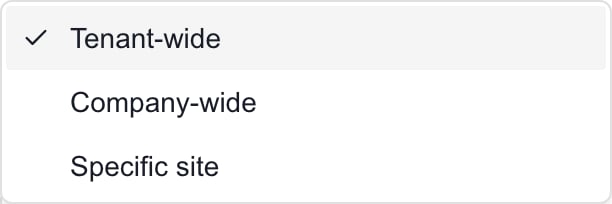
The three freeze scopes. Tenant-wide is available from Global View.
Create a freeze window
1
Open Settings > Calendar
Select the Freeze Windows tab.
2
Click Add freeze window
The Add freeze window dialog opens.
3
Name the window
Enter a Name of 2 to 160 characters. Add a Description if you like, up to 2,000 characters.
4
Choose the scope
Open Scope and pick Tenant-wide, Company-wide or Specific site. Company-wide needs a Company. Specific site needs a Company and then a Site. Changing the company clears the site.
5
Set the dates
Enter Starts at and Ends at. The end must be after the start.
6
Choose the recurrence
Open Recurrence and pick One time, Daily, Weekly, Monthly or Annual. For a repeating window you can set Repeat until.
7
Check Active
Active is on for a new window. Turn it off to save a window without showing it in the Calendar.
8
Click Save
Wait for Freeze window saved. The Save button stays disabled until the name, dates and scope fields are valid. Cancel closes the dialog without saving. This tab has no page-header Save.
How repeating windows work
The start date anchors the repeat, and Starts at and Ends at define each occurrence.
Repeat until includes occurrences that start on that date. It does not cut an occurrence short. Leaving it blank repeats without an end date, but occurrences are only generated for a window of roughly the next 18 months. Open the Calendar to confirm the dates you need.
To turn a repeating window into One time, clear Repeat until first. A hidden old cutoff can stay saved and leave no visible occurrence.
Check time zones
The dialog uses your browser’s time zone and saves it with the window. There is no time zone picker. The list shows each window in its saved zone, while the Calendar shows your viewing zone. When you edit a window from a different zone, check the dates before you click Save. Saving applies your current browser zone.Edit, switch off or delete a window
1
Edit
Click the pencil on the window, change the fields and click Save. Cancel keeps the saved version. Editing a repeating window changes every occurrence. You cannot edit one occurrence on its own.
2
Switch off
Edit the window, turn Active off and click Save. The window stays in the list with an Inactive badge, and its Calendar occurrences are removed. Turn Active back on and save to bring them back.
3
Delete
Click the trash can. The prompt Delete freeze window “name”? asks you to confirm. Confirm to delete the window and its occurrences, or cancel to keep it.
Check the result in the Calendar
1
Open Calendar
Go to Calendar and set the company selector and date range you need.
2
Turn on Changes
Open the layers menu and tick Changes. You need access to view changes, otherwise this layer is missing.
3
Turn on Calendar Blocks
Tick Calendar Blocks in the same menu. Freeze windows draw as blocks in the Day, Week and Month views.
4
Read the block
Check the freeze name and its start and end. A change or appointment that overlaps a freeze shows a snowflake icon, and its details panel says This event overlaps a freeze window.
Troubleshooting
Frequently asked questions
Does a freeze stop meetings from being booked?
Does a freeze stop meetings from being booked?
No. It shows restricted periods and flags overlaps. Follow your own scheduling and approval process.
Why can I see a tenant-wide freeze but not edit it?
Why can I see a tenant-wide freeze but not edit it?
Tenant-wide windows stay visible in a company view. Switch to Global View with the right permission to edit or delete them.
Does changing Company keep the old Site?
Does changing Company keep the old Site?
No. The Site is cleared so you can pick a site of the new company.
Can I prepare a freeze without turning it on?
Can I prepare a freeze without turning it on?
Yes. Turn Active off before you save.
What does a monthly freeze starting on the 31st do?
What does a monthly freeze starting on the 31st do?
It runs on the last day of any shorter month.
Why did my repeating freeze disappear after I edited its dates?
Why did my repeating freeze disappear after I edited its dates?
Check Active, the scope and Repeat until. An old cutoff before the new start date leaves no occurrences.
Does deleting a freeze delete overlapping meetings?
Does deleting a freeze delete overlapping meetings?
No. It removes the freeze and its occurrences only.