

Open the right calendar view
- Open Calendar in the sidebar. Check the top Company selector where available; Global View means your accessible company scope, not unrestricted access to every organization’s calendar.
- Choose Day, Week, Month or Year in the toolbar.
- Use the left and right arrows to move through the selected day, week, month or year. Select Today to return to the current date while retaining the selected view.
- In Month view, select an event line to open it. If a day has more events than fit, select +N more to expand the list.
- In Year view, select a date to open Day view and load that day’s events. A Year summary is not an event-detail view.
Read dates and times
The grid uses the MSP’s configured calendar time zone and week-start settings. It need not match your computer’s time zone. Check the meeting’s date, time and time zone before relying on an invitation or comparing it with another calendar. Week view starts with weekdays unless Enable Saturday / Sunday is selected in the Filter drawer. Month and Year views still show their calendar weekends. Use Day view for a specific weekend date when needed. Your browser remembers the selected view. A selected date can be restored when you return on the same calendar day; on a later day, the calendar returns to the current date while retaining your view preference. Today does not clear search, filters or hidden-title preferences. When focus is outside an input or open dialog, the left/right arrow keys navigate the visible period and T returns to Today. Use the visible controls if a text field or dialog has focus.Open an event
Selecting an event opens the details appropriate to its source. A meeting can open its meeting dialog, a scheduled appointment/change can open a detail panel, and some service-call events open the linked ticket. Day view also provides a selected-event side panel. A recurring occurrence may first ask which occurrence or series to inspect or edit; opening that choice is not a saved change. Review the title, company, timing, source and status. Viewing an event does not imply permission to edit, reschedule, cancel or manage its attendees. If a linked ticket or other record is unavailable, ask your MSP to check that record’s access separately. Selecting an existing card is different from dragging it or choosing an action. Dragging and event actions can start rescheduling workflows when permitted. Use the event details to read information without changing its schedule.Understand Year view
Year shows daily summaries across the selected Company scope and enabled Appointments/Changes layers. Its counts do not apply all the local controls used by the detailed grid: search, staff, company chips, role, status, hidden-title and all-day selections do not narrow this summary. Selecting a day loads the detailed events with those local filters. It can therefore show fewer items than the Year count. The Year summary does not list individual meeting IDs or busy blocks.Find a missing event
- Check the date, Company selector and Calendar access first.
- Use Today if you are looking at an old period, then check Calendar filters and layers.
- Canceled meetings are hidden by default in the main grid. Select Canceled under the Filter drawer’s Status section to look for them.
- Review Hide items, all-day visibility and the Appointments/Changes layers. Resetting ordinary filters does not clear hidden titles.
- A blank grid does not prove the MSP has no meetings. Data may be outside the visible range, hidden by preferences, unavailable to your role or temporarily unable to load.
FAQs
Where do I find the Calendar?
Where do I find the Calendar?
Does Global View reveal every company calendar?
Does Global View reveal every company calendar?
How do I return to today?
How do I return to today?
How do I open a date from Year view?
How do I open a date from Year view?
Why does Year show more events than the day I opened?
Why does Year show more events than the day I opened?
Why are Saturday and Sunday missing from Week view?
Why are Saturday and Sunday missing from Week view?
Which time zone does the grid use?
Which time zone does the grid use?
Why did Calendar remember Week view but return to today?
Why did Calendar remember Week view but return to today?
Why can I not find a canceled meeting?
Why can I not find a canceled meeting?
Does opening an event change or reschedule it?
Does opening an event change or reschedule it?
Why did selecting a service call open Tickets?
Why did selecting a service call open Tickets?
Does being a Company administrator let me create or cancel meetings?
Does being a Company administrator let me create or cancel meetings?
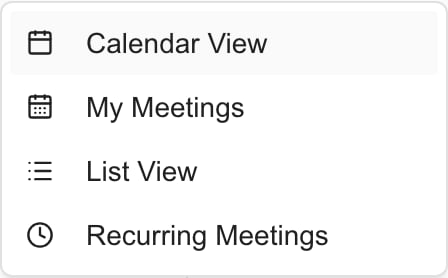
Where are My Meetings and List View?
Where are My Meetings and List View?
Must I access Recurring Meetings to attend a recurring meeting?
Must I access Recurring Meetings to attend a recurring meeting?
Does an empty grid prove there are no meetings?
Does an empty grid prove there are no meetings?
Import your Outlook appointments
In the Calendar header, open ⋮ Page actions > Import Outlook meetings. On a phone, choose Actions > Import Outlook meetings. Select up to 25 of your own appointments from the current calendar view for review; private and confidential events are excluded. This action is available to eligible MSP staff and opens the appointment layers automatically.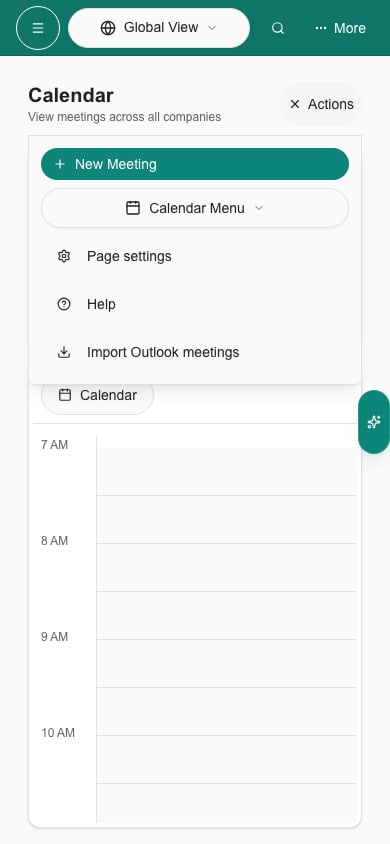
Phone Actions includes Outlook import alongside the other calendar header actions.