

Before you start
- You need access to Calendar settings, plus Manage access to Calendar or Meetings to change questions.
- Question changes save at once. They do not use the page-header Save.
Add a question
1
Open Settings > Calendar
Select the Post-Meeting tab and find the Post-meeting survey questions card.
2
Click Add question
The Add question dialog opens.
3
Write the question
Enter the Question (up to 500 characters). Add a Description (optional) of up to 2,000 characters if it helps.
4
Choose the answer type
Open Answer type and pick 1-5 rating, 1-10 scale, Yes / No, Choice list or Free text. For Choice list, enter one option per line in Options (one per line). Use at least one option, up to 20, each up to 200 characters.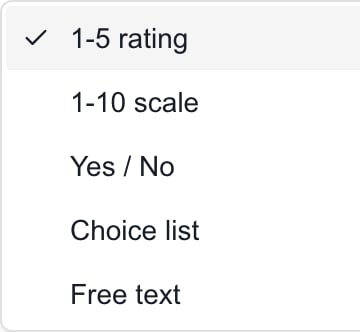
5
Set Required and Active
Turn on Required to make staff answer before Continue. Active puts the question in the survey. New questions start active and not required.
6
Click Save
Question saved confirms it. Cancel drops the dialog.
Add the default questions
When the list is empty, click Add default questions. It creates editable questions for client engagement, meeting value, client sentiment, follow-up needed and additional comments. They start active and not required. The button does not show when any question exists, even if all are off.Edit a question
1
Click the pencil
It is labeled Edit question on the question’s row.
2
Change the fields
Update the question, description, answer type, options, Required or Active.
3
Click Save
Changing a question away from Choice list removes its options. Answers already submitted keep the question as it was when they were saved.
Switch a question on or off
Use the switch on the question’s row. It saves at once. A question that is off stays in the list but leaves the survey. Turn off every question to leave the survey with no questions. Deleting every question is different, because staff then see the built-in defaults.Change the order
Click Move up or Move down on a row. Each move saves at once. Wait for one move to finish before the next. Reload the page to check the order after an error.Delete a question
1
Click the trash can
A prompt reads Delete the question “name”? Existing answers keep a snapshot of it.
2
Confirm
Cancel to keep the question.
Which Save to use
Required only checks the survey’s Continue button. Staff can still skip the survey.
Troubleshooting
Frequently asked questions
Do company users answer these questions?
Do company users answer these questions?
No. They are for MSP staff.
Do I need the page-header Save after editing a question?
Do I need the page-header Save after editing a question?
No. The dialog Save is enough.
How do I hide a question without deleting it?
How do I hide a question without deleting it?
Turn off its Active switch.
Does deleting all questions leave an empty survey?
Does deleting all questions leave an empty survey?
No. Staff then see the built-in defaults. Turn the questions off instead.
Does Required stop staff from skipping?
Does Required stop staff from skipping?
No. It only checks Continue.