

Find the right company
Use the company list’s filters for name, status, industry, integrations, types, training and Microsoft 365 state where offered. Review parent/child relationships and provider badges before editing; similarly named imported companies may be different records. Open Edit Company from the row menu, or View Details & Users with read access. The detail workspace has Overview, Users, Locations, Defaults, Ticketing, Team, and Notes. Each tab has its own controls and save boundaries; there is no single Save for every tab.Create a company
- Select Add Company. The dialog is titled Add New Company.
- Enter the required Name. Add contact name, email, phone, website, industry, company size and primary domain as appropriate.
- Review the address, Active state, Compliance Schedule, Business Review Schedule, and Year-end Date further down the form. Scroll inside the dialog to reach all fields.
- Select Save Company and wait for success. Cancel closes the draft without creating the company.
- Find the created company and review its details before importing users or starting onboarding.
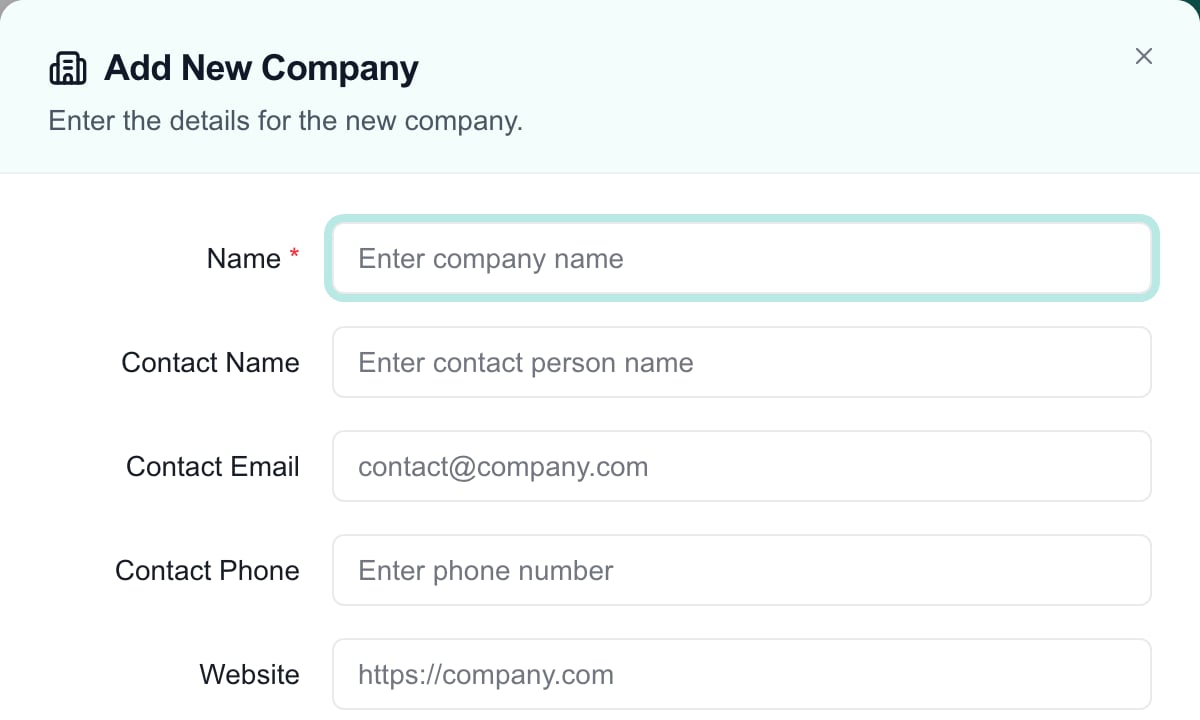
The top of an unsaved Add New Company form. Address, active state and schedule fields continue below this crop; Save Company is in the dialog footer.
Edit details and related records
In Overview, open the relevant inline field editor, make the change and use its Save control. Cancel closes that field’s unsaved edit. Saving one field does not save another tab’s pending work. Review provider-managed values when a change is later overwritten by synchronization.Import and map companies
The header Import menu appears for active supported company-import providers. Choose the provider and follow Import Companies. A provider badge or successful connection does not prove that every company has been imported and mapped. Review Integration Company Mapping before creating a duplicate for an existing client. Some provider selections create a company before the pending link is applied, and unlinking can be immediate. Follow that guide’s save boundaries instead of assuming Cancel reverses every setup action.Bulk actions and selection scope
Select company checkboxes, then open Actions (count). Review whether selection covers the visible page or all matching companies across pages before applying an operation. The total can exceed the rows on screen. Clear the selection when switching tasks; a filter is not a substitute for checking the selection count and target names.Set a custom field on many companies
Before you start
- You need write access to Companies settings, and your MSPortal billing must be active.
- Create the field first. Open Settings > Customization > Fields, choose Companies, and save the field. See Custom Fields.
- A Dropdown, Multi-Select or Radio Buttons field appears only after it has at least one saved option.
Set the value
Select the companies
Open Edit Custom Field
Check the selected companies
Choose the field and value
Apply the value
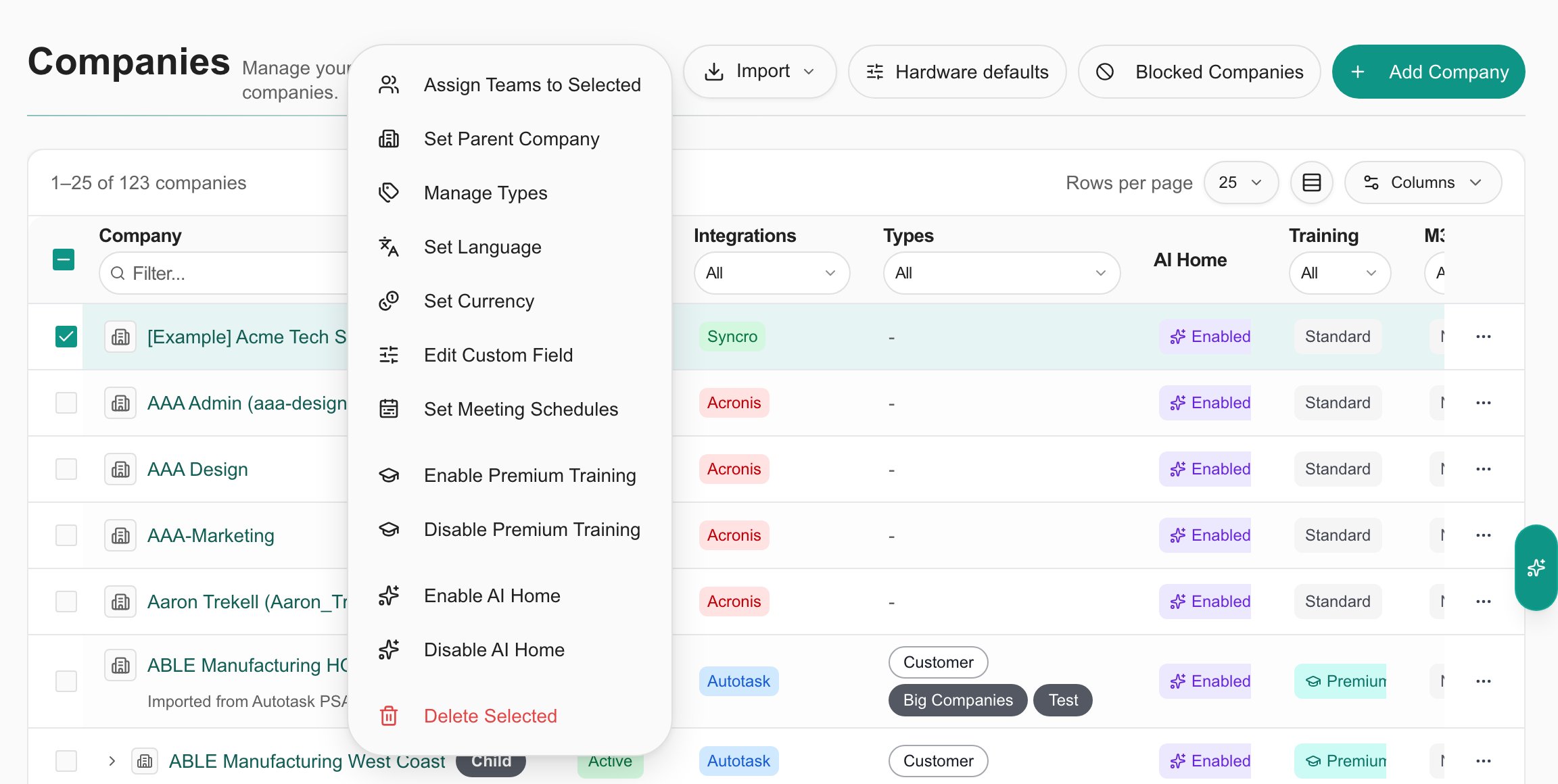
Branch preview: Edit Custom Field in the Actions menu for one selected company.
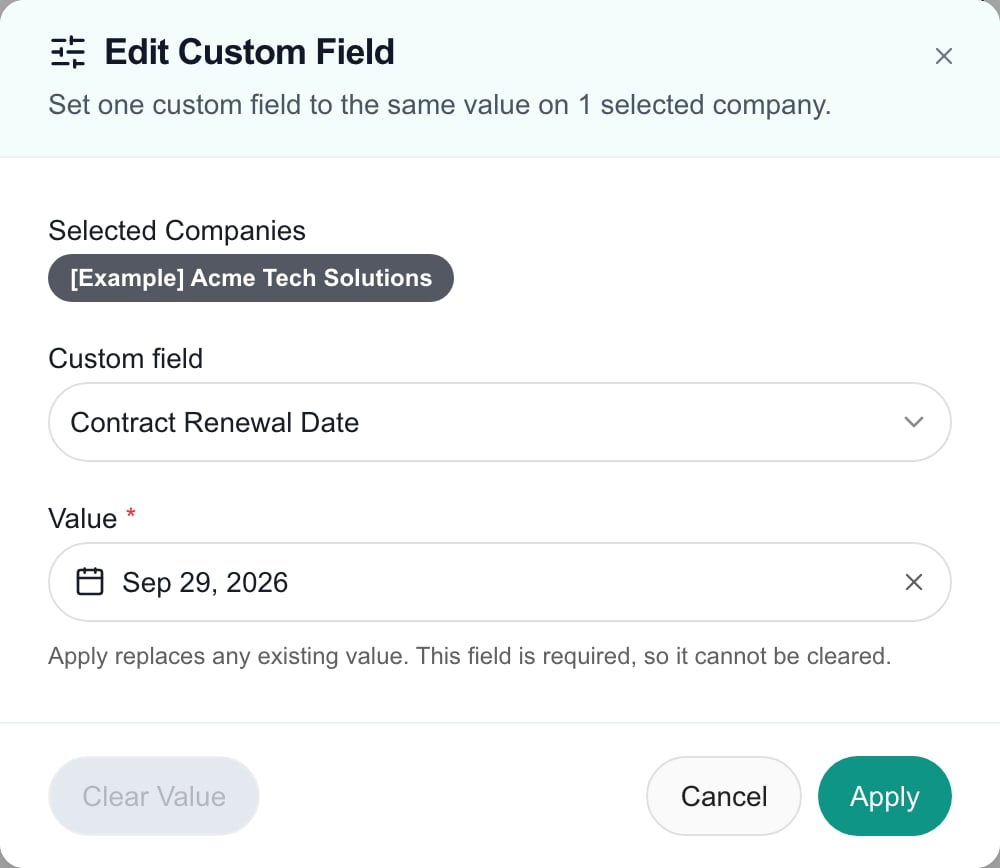
Branch preview: The Edit Custom Field dialog with a required date field and a value chosen. Clear Value is unavailable because the field is required.
Replace, clear and required fields
- Apply replaces the existing value on every selected company. It does not add to it. For a Multi-Select field, the companies end up with exactly the options you chose.
- Clear Value removes the field’s value from every selected company. You do not need to enter a value first.
- Required fields cannot be cleared. The dialog disables Clear Value and says the field cannot be cleared. Apply still works.
- Apply updates all selected companies together. If it fails, no company changes.
- Clear Value works through the companies in batches. If it stops partway, the message says how many companies were cleared. Run Clear Value again to clear the rest.
- A Company user only sees fields that are visible to company users, and can only change their own companies.
Company Types
Types classify companies for supported filters and targeting, including ticket-template availability. A company can have multiple types. Manual types are maintained in MSPortal; PSA-synced types identify provider-owned classification. The table distinguishes their sources.- Select the companies and open Manage Types, or use the single-company action.
- Choose Add, Remove, or Replace. Replace replaces manual memberships while preserving PSA-synced memberships. Remove offers types present on the selected companies.
- Select existing types. If you create a new manual type inline, that type definition is saved immediately; cancelling the surrounding dialog does not undo its creation.
- Select Apply to update company memberships. Reopen or inspect the Types column afterward.
Company users, access roles and Team Roles
Auto-Mapping PSA Contact Types to Roles
Where provider team mappings are available, review the chosen PSA role or manager slots before saving. Mappings can reconcile staff assignments on sync; manually changing a mapped assignment may not persist through the next synchronization. Account teams and Team Roles covers assignment and client team-menu review. Send Welcome Email sends an actual message; it is not a preview or a required step for every user edit. Remove Access affects portal access and re-import behavior. Use the existing user-administration instructions before either action. Impersonation is a staff preview, not proof of a real Company user’s session.Deletion, blocks and administration
Company deletion requires confirmation. Review dependencies and the displayed warning before confirming: company data, associations and history can be affected. Do not use deletion merely to hide a company or troubleshoot an import. Review Active status and visibility controls for the intended task instead. Blocked Companies is an administrative re-import control. Unblocking permits the company to be considered again; it is not restoration of deleted history or proof that an import completed. Hardware Defaults is tenant-wide configuration, not an override for the currently selected row. AI classification and cleanup are deliberate operations; review their proposed scope and apply boundary before use.Troubleshooting and related guides
If a company is missing, clear list filters and check status, permissions and import mapping before adding a duplicate. If a client cannot access the portal, verify their actual user record and Company Role; a company contact field and Team Role are insufficient. If a user at a parent company sees only their own company’s tickets or data, assign them the Parent Admin role. If a bulk action affects more companies than expected, inspect page versus all-pages selection before continuing.- Users & Roles
- Company Overview
- Import Companies
- Company-user permissions
- Account teams and Team Roles
FAQs
Where are Company Users now?
Where are Company Users now?
Are Team Roles only job labels for client users?
Are Team Roles only job labels for client users?
How does a client admin at a parent company see the child companies?
How does a client admin at a parent company see the child companies?
Does a company contact email create a portal login?
Does a company contact email create a portal login?
Does the company Compliance Schedule field create automated assessment runs?
Does the company Compliance Schedule field create automated assessment runs?
Can a bulk selection include off-screen companies?
Can a bulk selection include off-screen companies?
Does cancelling Manage Types undo a newly created type?
Does cancelling Manage Types undo a newly created type?
Does Replace remove PSA-synced types?
Does Replace remove PSA-synced types?
Does saving an Overview field save all company tabs?
Does saving an Overview field save all company tabs?
Will unblocking a company restore its deleted history?
Will unblocking a company restore its deleted history?