

Accessing Compliance Settings
- Click Settings in the sidebar
- Select Compliance
- Choose the task-specific tab. Checks, Groups and Runs use split-pane library editors; Schedule, Scoring and Risk have different controls.
Checks Tab
The Checks tab manages every compliance question your tenant can ask. Checks are organized in folders, and each check can be wired up to auto-populate notes when an assessor picks a particular answer.Layout
- Left sidebar - Folder tree, an Uncategorized bucket at the bottom, and a search box. Click the panel icon at the top to collapse the sidebar.
- Right pane - Details for the selected check: title, description, guidance, criticality, priority, frequency, status list, compliance type, group assignments, and per-status note template links.
Folders
Folders are a settings-only organizational tool. They do not change how checks behave during a run, they just make a large check library easier to browse.Create a folder
Name it
Add checks
Moving checks with drag and drop
Select one or many checks
Drag to a folder
Drop on Uncategorized
Search
Type in the sidebar search box to filter. Folders that contain a matching check auto-expand in place, and clearing the search restores your previous expanded/collapsed state.Editing a check
Click any check to open it in the detail pane. The form covers everything about the check:Linking note templates to statuses
Each check uses a status list that defines its answer choices (for example, Pass / Fail / Needs review). You can link a different note template to each answer, and that template’s content will be auto-applied to the assessor’s public notes when they pick that answer.Assign a status list
Pick a template for each status
Assessor picks the status
Choosing which companies and devices get a check
By default a check is assigned to every company, location or device a run covers. Add conditions under Applies to to narrow that. For example, a FileVault check can go only to Macs, and a HIPAA policy check only to healthcare clients.Add a condition
Combine conditions
Save
Creating checks
Click the + icon on the checks tab header (or New check here on a folder’s menu) to open the new-check form. New checks default to the currently selected folder, or Uncategorized if none is selected. The Bulk generate option is also available from the page header if you want AI to draft multiple checks at once.Deleting checks
Open the three-dot menu on any check row in the sidebar and choose Delete. Delete requires the manage_compliance permission. Deletion is permanent — the check is removed from every group it was in.Groups Tab
Groups bundle related checks together so you can assign a whole category (for example, “Microsoft 365 security baseline”) to a run with one action. A check can belong to any number of groups.Layout
- Left sidebar - List of every group. Search by name or description, filter by compliance type, collapse the sidebar with the panel icon.
- Right pane - Group metadata header and two transfer columns: Available checks (left) and Members (right).
Creating a group
Click New
Fill in the details
Save
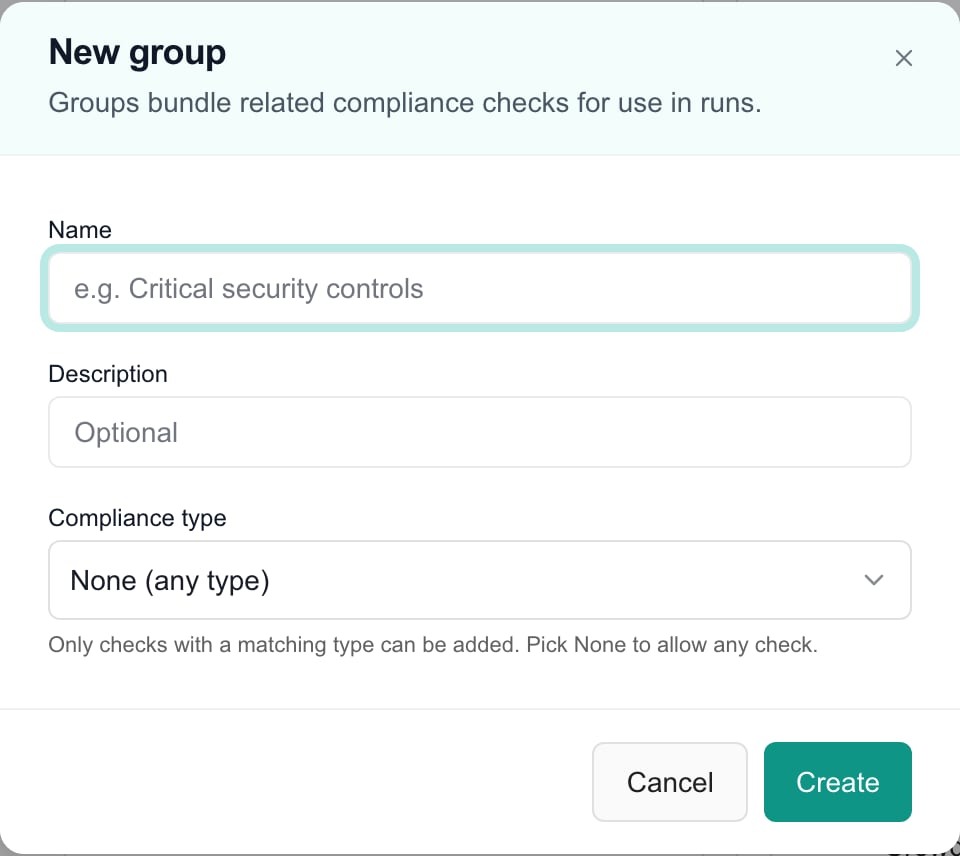
New group is an unsaved metadata draft. Choose the compliance type before creating it; membership transfers are separate saved actions.
Adding and removing checks
The right pane shows two columns — Available checks on the left and Members on the right. Drag checks between them to change membership. Each completed transfer saves immediately; there is no later page Save. Wait for the result before making another change.Search and select
Drag across
Compliance-type filtering
If the group has a compliance type set, only checks with a matching type appear in Available checks. This prevents mismatched checks from being added. If you later clear the compliance type (by editing the group), every check becomes available.Editing or deleting a group
Use the three-dot menu on a sidebar row, or the Edit and Delete buttons in the detail pane header. Deleting a group does not delete its checks — it only removes the group itself.Runs Tab
Run templates bundle groups and individual checks into reusable assessment packages. When you run a template against a company, every check in every member group (plus every individually-added check) gets assigned as a compliance run.Layout
- Left sidebar - List of every template. Each row shows the group count and individual-check count at a glance. Search, filter by active/inactive, collapse the sidebar.
- Right pane - Template metadata header with an Active toggle, and two tabs: Groups and Individual checks. Each tab is its own two-column transfer.
Creating a template
Click New
Fill in the basics
Save
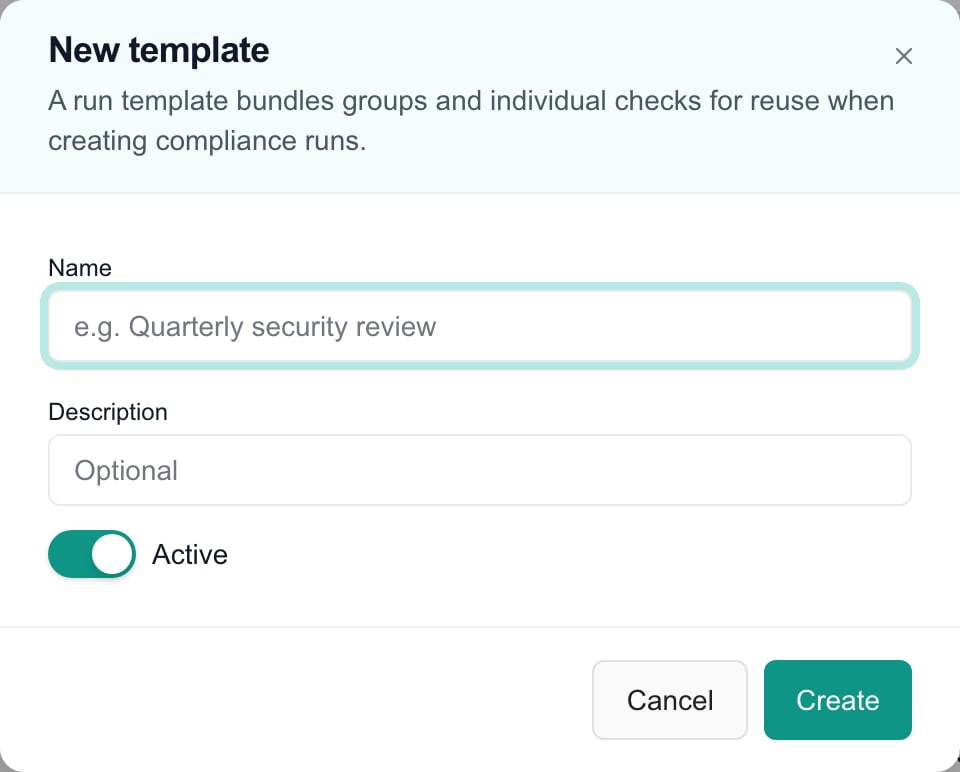
New template starts with Active enabled. Create saves the template; the group and check memberships are added separately afterward.
Adding groups to a template
Open the Groups tab
Drag to add
Drag back to remove
Adding individual checks
Switch to the Individual checks tab for one-off checks that aren’t part of a group. These run in addition to any group membership. The same drag-and-drop transfer UI applies. Group and individual-check transfers save immediately; Cancel in the template metadata dialog does not undo them.Activating, editing, and deleting
- Active toggle - Each template has an Active switch in the header that saves immediately. Inactive templates remain in settings and are omitted from the active-template schedule picker. Review existing schedules separately before retiring a template.
- Edit - Opens the name/description/active dialog.
- Delete - Removes the template. Runs already created from the template are not affected — they keep their original check assignments.
Schedule, scoring and risk
- Schedule assessments: select an active run template, target companies and a recurrence. All companies is the new schedule’s default target.
- Configure Compliance Scoring: edit weights and grade thresholds, then Save Changes. Confirmed Reset to Defaults immediately changes saved configuration.
- Configure risk tracking: enable the register and maintain categories. Reordering, archiving and disabling are immediate changes.
- Playbooks: import selected library content before assigning it to companies.
- Liongard Metrics: review the provider-backed metrics path when available.
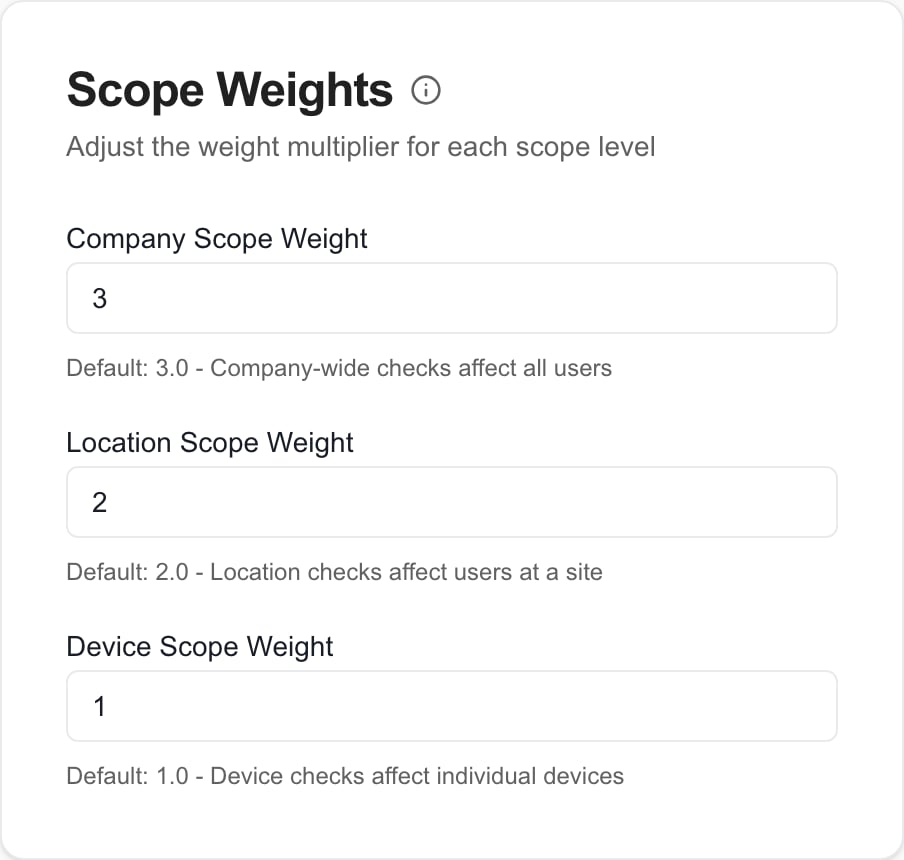
Scope weight settings have their own save controls; they are separate from check and template editing.
Permissions
Opening a tab requires the relevant settings read access and feature availability. The table below describes the library editor’s content permissions; schedule writes and scoring/risk administration use their own Compliance settings permissions.Keyboard and mouse reference
Best practices
- Start with folders - Organize your check library by framework (CIS, NIST, SOC 2) or by domain (Microsoft 365, networking, physical security) before you have a lot of checks.
- Use note templates for repetitive findings - If most “Fail” answers on a given check need the same remediation write-up, link a template to that status once instead of typing it every assessment.
- Keep groups compliance-type-aware - Set a compliance type on groups whose checks all target the same scope (device, location, company). This prevents accidentally adding mismatched checks.
- Build templates around groups, not individual checks - Groups are easier to maintain than long flat lists of checks in a template.
- Disable instead of delete - Use the Active toggle on run templates rather than deleting them. Keeps the history without cluttering pickers.
Related resources
- Compliance module - Running checks and reviewing results
- Templated Notes - Create the note templates that auto-populate on status change
- Playbooks - CIS and other pre-built benchmark content
- Adding CIS Benchmarks - Seed your library from a standard framework
FAQs
Does Runs show completed company assessments?
Does Runs show completed company assessments?
Are there only three Compliance settings tabs?
Are there only three Compliance settings tabs?
Does cancelling a check discard changes to note-template links?
Does cancelling a check discard changes to note-template links?
Do group and run-template transfers wait for Save?
Do group and run-template transfers wait for Save?
Does turning off a template pause all its schedules?
Does turning off a template pause all its schedules?
Does changing a group type affect its membership?
Does changing a group type affect its membership?
Does a successful main check save prove custom fields saved?
Does a successful main check save prove custom fields saved?
Does creating a run template start an assessment?
Does creating a run template start an assessment?