

Before you start
- You need permission to edit project collaboration content (project overlay edit).
- Company users read shared milestones. They cannot edit them.
- Milestones live in MSPortal. Changing one does not change a linked PSA ticket, phase schedule, or project status.
Add a milestone
1
Open Milestones
Open Projects, click the project, then click Project Plan and Milestones.
2
Add the milestone
Click the + button at the top of the list and choose New Milestone. If the list is empty, click New Milestone in the empty state. The milestone is saved at once as Pending, with Client Visible off, and opens on the right.
3
Name and describe it
Replace Title with a clear outcome and add a Description if you want. Keep the title filled in. Text saves shortly after you stop typing. There is no Save button.
4
Set the dates and status
Pick a Planned Date and a Status.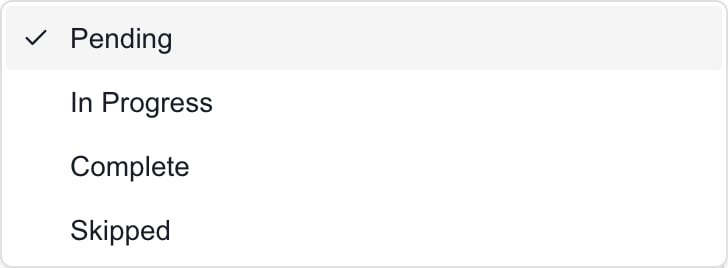
5
Add internal notes
Use Notes (internal) for staff-only notes. Company users never see them, even when Client Visible is on. Put anything clients should read in Description.
6
Share it when ready
Turn on Client Visible when the milestone is ready for Company users who can access the project. It saves at once. With it off, the whole milestone is hidden from Company users.
7
Link it to work
Under the editor fields, pick a Linked phase, Linked ticket, or Linked files if the milestone belongs with them.
Edit, reorder, and remove milestones
1
Edit
Click a milestone in the list and change any field. Changes save as you make them.
2
Reorder
Drag a milestone by its grip handle. Reordering is off while a search is active, and it never changes dates.
3
Skip
Set the status to Skipped when a milestone is no longer in the plan but should stay on record. It does not count as Complete.
4
Delete
Click the milestone, click Delete at the top, and confirm. Check the list to make sure it is gone.
Troubleshooting
Frequently asked questions
Why did New Milestone create a record before I finished?
Why did New Milestone create a record before I finished?
It saves the default Pending milestone at once. Finish its fields or delete it. Closing it does not discard it.
Does Complete fill the completion date?
Does Complete fill the completion date?
No. Set Status and Actual Completion Date separately. Reopening a milestone does not clear the date either.
Does Client Visible notify clients or give them access?
Does Client Visible notify clients or give them access?
No. It shows the milestone inside a project they can already open. It sends nothing.
Can I rely on Notes (internal) to hide text?
Can I rely on Notes (internal) to hide text?
Yes. Internal notes are left out of what Company users receive, even when Client Visible is on.