

Destination paths below use the grouped project navigation.
Before you start
- You need MSP staff access. The collaboration shortcuts need project overlay-edit permission. Reschedule needs project write permission and a PSA that supports it.
- Every shortcut saves the new item at once. It does not open an unsaved form first.
- Open Projects, click the project, then click Project Plan and Tasks. The … on a phase row is Phase actions. The … on a task row is Ticket actions.
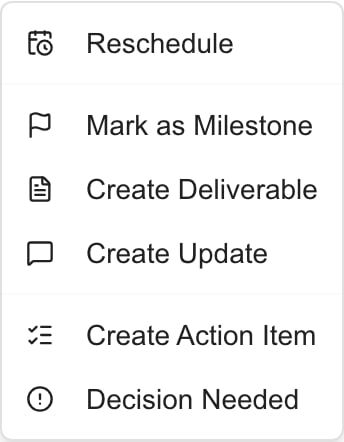
What each shortcut creates
Updates and milestones from these shortcuts start client visible. Add Update and New Milestone on their own tabs start with Client Visible off. For content that must start private, create it on its own tab.
Use a shortcut
1
Check the row
Make sure you are on the right project, and the right phase or ticket.
2
Open the menu and choose an option
Click the … and choose an option. MSPortal saves the item and opens the destination tab on it.
3
Finish the fields
Review the generated title, description, dates, status, and Client Visible. Finish it with the destination guide: deliverables, updates, milestones, or decisions and action items.
4
Delete a copy you do not want
Clicking a shortcut again can add another item. If you made one by mistake, open it on its tab, click Delete, and confirm. Closing the editor does not undo a saved item.
Change or remove a link
1
Open the item
Open the item on its tab: Updates, Milestones, Deliverables, Decisions, or Action Items.
2
Change the link
Under the fields, use Linked phase and Linked ticket. Search and pick another one, or pick No phase or No ticket to remove the link. Each change saves at once.

Reschedule and native-project editing
Reschedule opens the rescheduling dialog for MSP staff with project write permission on a supported project system. See Project calendar. Changing a milestone date is not the same as rescheduling a PSA phase or task. On MSPortal-native projects, MSP editors also get Edit phase, Delete phase, Add phase, Add ticket, and Edit or delete ticket. See Native Projects: Start to Finish. The ticket menu also has Visibility and scheduling. See Read project phases and tickets.Troubleshooting
Frequently asked questions
Can I cancel an item the shortcut created by closing its editor?
Can I cancel an item the shortcut created by closing its editor?
No. The item is already saved. Delete it from its tab.
Does Mark as Milestone keep following PSA date changes?
Does Mark as Milestone keep following PSA date changes?
No. It copies the dates once. Later changes to the milestone do not move the source, and PSA changes do not move the milestone.
Does Decision Needed email or assign someone?
Does Decision Needed email or assign someone?
No. Open Decisions, set the assignees, and use Notify Assignee only when you want to send a message.