

Change which metrics count
- Review the eight dimension cards and the enabled count. There are 25 metrics in the current catalog.
- Switch individual metrics on or off. These changes are an unsaved preview until you select Save Changes in the page header.
- Review the percentage beside each enabled metric. It is the metric’s share within that dimension, not its percentage of the overall health score. Remaining shares update when you exclude a metric.
- Review each dimension’s enabled count. A dimension switch is on whenever at least one of its metrics is enabled. Switching it off excludes all metrics in that card; switching it on enables all of them. It does not restore a previous partial selection.
- Select Save Changes once and wait for the result. The button is disabled when there are no unsaved changes or while saving.
- Review the resulting Client Health scorecard after the background refresh finishes. A saved configuration or a Refreshing message is not proof that recalculation has completed.
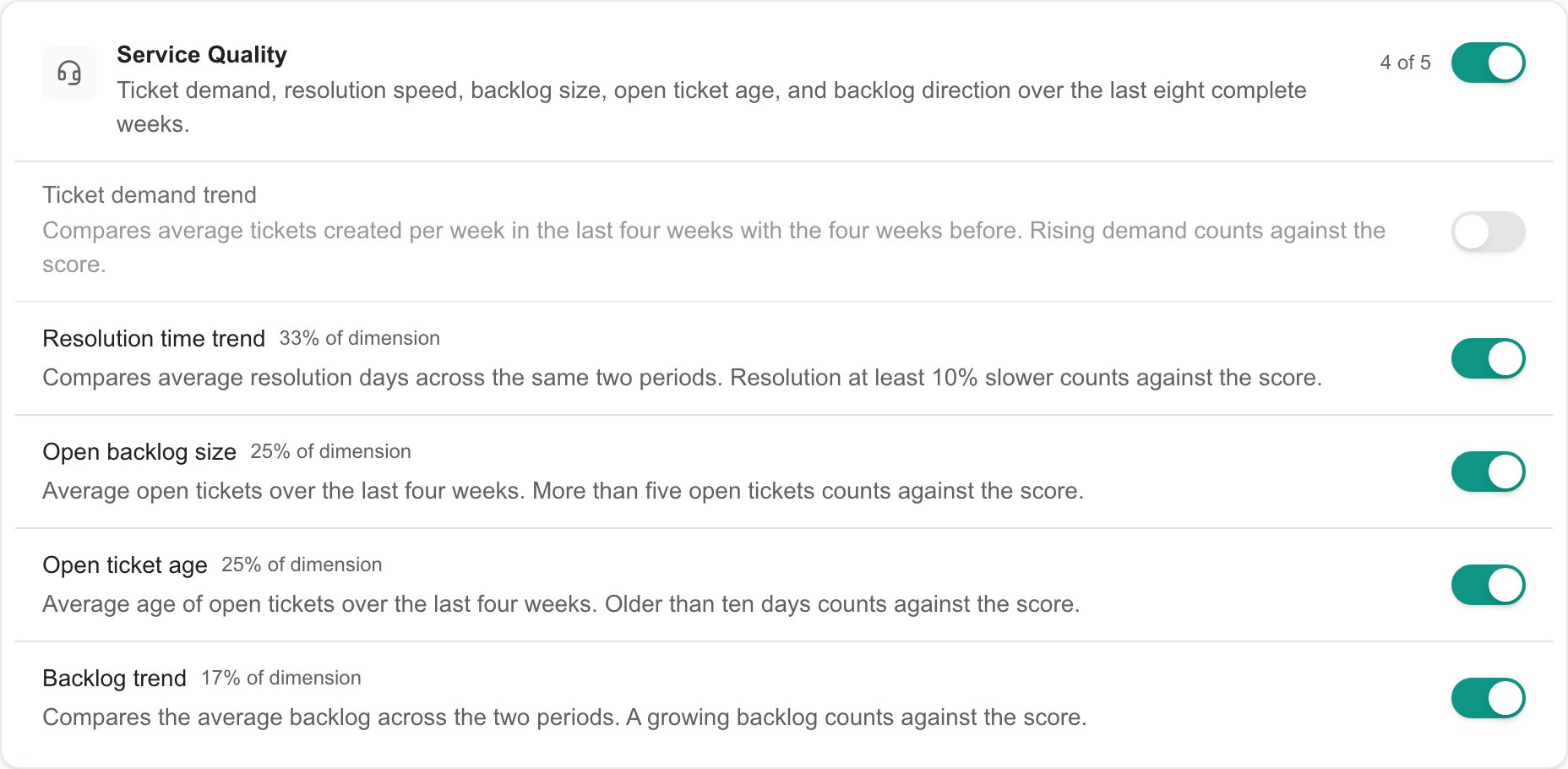
Unsaved preview: Ticket demand trend is excluded, and the four remaining Service Quality metrics share the dimension. Save Changes is required to persist the selection.
Understand shares and evidence
The displayed metric percentages are rounded to whole numbers and total 100% within an enabled dimension. They describe the selected configuration, while the published company score also depends on applicable, observed evidence and its coverage. Excluding a metric does not turn its value into zero. The enabled metrics share the dimension’s weight proportionally. If every metric in a dimension is excluded, that dimension does not contribute to the overall score. Available observations may still appear in company details for context, with excluded dimensions identified; missing observations are not guaranteed to appear. Coverage is recalculated against enabled metrics. It can increase or decrease depending on whether the excluded metric had observed evidence. Excluding a dimension can also reduce the number of scored dimensions. The default model still requires at least three scored dimensions and 40% overall evidence coverage for a numeric health score. Enabling a metric does not create missing source data, connect an integration or guarantee a numeric score. Review data availability before excluding relevant metrics solely to remove N/A results.Available metrics
The table lists the default base dimension weights and metric shares when all metrics are enabled. The page’s displayed shares change with your selection. Use each metric’s on-screen description for context and Understand Client Health scoring for scoring evidence requirements.Saving and score publication
Save Changes stores the tenant configuration first, then attempts to start a Client Health refresh. If saving succeeds but the refresh cannot start, the saved choices remain. Reopen Scoring to confirm them, then use Refresh Client Health scores or allow the scheduled refresh to run. The settings page does not track the background job through completion. The previously published scorecard remains visible until a complete replacement is published. Check a relevant company’s Last computed date, dimension weights and evidence after the refresh. A failure to refresh does not mean the configuration save was rolled back. Saving affects future scorecards; it does not rewrite previous publications. This page does not change source data, manual risk flags, company permissions or provider configuration. There is no per-company scoring override here. If saving fails, reopen the page and inspect the stored choices before retrying. View access alone is insufficient to save, even if a switch can be changed in the current browser session.FAQs
Where do I configure Client Health metrics?
Where do I configure Client Health metrics?
Can Company users change health scoring?
Can Company users change health scoring?
Does the Company selector limit a scoring change to one company?
Does the Company selector limit a scoring change to one company?
What permission lets me save scoring settings?
What permission lets me save scoring settings?
How many metrics can I configure?
How many metrics can I configure?
Does switching a metric immediately save it?
Does switching a metric immediately save it?
Why is Save Changes disabled?
Why is Save Changes disabled?
What does a dimension switch do?
What does a dimension switch do?
How do I discard unsaved scoring changes?
How do I discard unsaved scoring changes?
Can I set my own risk bands or base dimension weights?
Can I set my own risk bands or base dimension weights?
Does excluding a metric always improve evidence coverage?
Does excluding a metric always improve evidence coverage?
Why can disabling dimensions create more Limited data results?
Why can disabling dimensions create more Limited data results?
Will enabling a metric fill in missing data?
Will enabling a metric fill in missing data?
Does Save Changes mean the scorecard is already recalculated?
Does Save Changes mean the scorecard is already recalculated?
The settings saved but the refresh failed to start. Were my settings lost?
The settings saved but the refresh failed to start. Were my settings lost?
Will changing scoring rewrite old results?
Will changing scoring rewrite old results?
Does excluding a dimension delete its observed data or manual risk flags?
Does excluding a dimension delete its observed data or manual risk flags?