Review Microsoft, Google, and DNSimple domain records, summary counts, verification labels, email security results, and provider-specific fields.
Use Cloud > Domains to see the domains synced from Microsoft 365, Google Workspace, and DNSimple (the registrar) for your companies. This page is for MSP staff and company users who need to check verification, primary domains, expiry dates, or email security.
You need Cloud read access. In the role editor this is the Cloud resource with Read access. It covers all three providers on this page.
Company users see only their own company. MSP staff see the companies selected in the company selector.
Each provider must be connected in Settings > Integrations, and each domain must be mapped to a company. DNSimple domains that are not mapped to a company do not appear.
Domains are synced data. They are not a live registrar lookup.
The Email security and Problems columns appear only when your MSP has email domain security checks turned on and your role can read documentation domains or security. See Check email security.
Click Cloud in the sidebar, then click the Domains tab.
2
Pick the company
Use the company selector in the top bar. MSP staff can pick one company, Global View, or Assigned Companies if their access is limited. With one company selected, the Company column is hidden.
3
Read the summary
The row above the table shows Total domains, Verified, Primary domains, Secondary domains, and Companies. With one company selected, Primary domain shows that company’s primary domain name instead of a count.
4
Find a domain
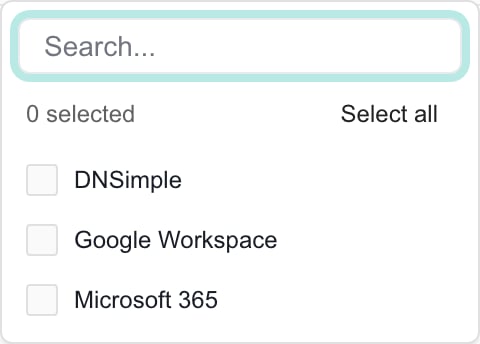
Type in the filter box under the Domain column heading. If your scope has more than one provider, a Provider column appears. Open its filter to pick Microsoft 365, Google Workspace, or DNSimple.
The Provider filter lists only the providers that have domains in your current scope.
5
Page through the results
The table shows 50 domains per page. Use the page controls under the table to move between pages.
The same domain name can appear more than once. A Microsoft row describes the Microsoft 365 tenant, and a DNSimple row describes the registrar record. Compare Provider and Company before you treat two rows as duplicates.Company users see DNSimple rows labeled Managed by followed by their MSP name.
The domain name. A star marks a cloud primary domain. A Secondary badge marks a DNSimple domain that is not in any synced Microsoft 365 or Google Workspace tenant.
Email security
The latest email security result, with SPF, DMARC and DKIM badges. Click the status to open the details. A dash means the domain is not in the company’s domain inventory. Shown only when email domain security checks are on.
Problems
What to fix, most serious first, such as No DMARC record. Shown with Email security.
Provider and Company
The source and the mapped company. Provider appears only when your scope has more than one provider.
Verification
Verified or Unverified.
Services
The services Microsoft reports for the domain. Google and DNSimple rows show a dash.
Authentication
The Microsoft authentication type, such as Managed or Federated. Other providers show a dash.
Expires
The DNSimple expiry date. Microsoft and Google rows show a dash.
Primary
Hidden by default. Primary or Secondary for the domain’s role in its cloud tenant.
Cloud presence
Hidden by default. In cloud tenant or Secondary domain.
Auto-renew
Hidden by default. On or Off for DNSimple domains.
Registrar status
Hidden by default. The DNSimple state of the domain.
Aliases
Hidden by default. Google domain aliases. Microsoft and DNSimple rows show a dash.
Created
Hidden by default. When the domain was created or registered.
DNSimple does not report a verification flag, so every DNSimple row shows Unverified. That label does not mean the domain failed verification. Check the matching Microsoft 365 or Google Workspace row for the real verification state.
Branch preview: the email security columns, row selection and actions in this section, and their screenshots, show an upcoming Domains update. They may differ from your live portal until it is released.
Cloud > Domains shows the same email security results as Documentation > Domains. Results come from daily checks over public DNS, and each row is matched to the company’s domain inventory by company and domain name.
Branch preview, MSPortal Demo: the star marks the primary domain, and Problems lists what to fix.
1
Read the results
Email security shows Passing, Needs attention, Failing, Domain not found or Not checked yet, with SPF, DMARC and DKIM badges. Problems lists what to fix, most serious first. Optional records most domains never publish, such as MTA-STS or BIMI, are left out of Problems.
2
Open the details
Click the status badge. The sheet shows the mail provider and each check (SPF, DMARC, DKIM, MTA-STS, TLS-RPT, DNSSEC and BIMI) with its explanation and DNS record.
Branch preview: the detail sheet for scalingops.net.
3
Check again or plan the fix
Open a row’s … menu and select Check now or Create Planner item. For several domains, select their checkboxes and open Actions (N), then choose Check email security or Create Planner items. Up to 100 domains can be included at once.
Check now and Check email security need write or manage access to documentation domains. Create Planner item needs Write Planner or Manage Planner. Both need active billing. Rows with a dash under Email security cannot be selected. The Planner dialog and the notes it writes work as described in Create Planner items from the results.
Branch preview: on a phone, each domain card shows Email security and Problems.
Primary = Secondary means the domain is not the primary domain in its cloud tenant. It is still a normal domain in Microsoft 365 or Google Workspace.
Cloud presence = Secondary domain means a DNSimple domain has no matching name in any synced Microsoft 365 or Google Workspace tenant under your MSP. The same name also gets a Secondary badge next to it.
In cloud tenant means the name was found in some Microsoft 365 or Google Workspace tenant under your MSP. It can be a different company’s tenant.
The summary counts follow the company selector and the Provider filter. They do not follow the Domain, Verification, Primary, Cloud presence, or Authentication filters. The table can be empty while the summary still shows domains. The summary counts rows, not unique domain names.
Can I add, verify, renew, or delete a domain here?
No. Domain records are read only here. Make domain changes in the provider, then wait for the next sync. The only actions are rechecking email security and creating Planner items.
Why does the same domain appear twice?
Each provider and each company mapping creates its own row. Compare Provider and Company.
Does Unverified on a DNSimple row mean my email is broken?
No. DNSimple rows always show Unverified because DNSimple does not report that flag.
Why do the summary counts not change when I filter by Verification?
The summary follows only the company selector and the Provider filter.
{"docsConfig":{"theme":"aspen","$schema":"https://mintlify.com/docs.json","name":"MSPortal.ai Documentation","colors":{"primary":"#0C8376","light":"#15B79E","dark":"#107569"},"logo":{"light":"https://mintcdn.com/msportal/KnbwIXtZSTlVJTt6/logo/light.svg?fit=max\u0026auto=format\u0026n=KnbwIXtZSTlVJTt6\u0026q=85\u0026s=eb69f6d6bf16b2c401770aef19ade1d2","dark":"https://mintcdn.com/msportal/KnbwIXtZSTlVJTt6/logo/dark.svg?fit=max\u0026auto=format\u0026n=KnbwIXtZSTlVJTt6\u0026q=85\u0026s=03f8df7191e7a8ea7da084df57f6107f"},"favicon":"https://mintcdn.com/msportal/KjsKytvp08K0bejm/favicon-16x16.png?fit=max\u0026auto=format\u0026n=KjsKytvp08K0bejm\u0026q=85\u0026s=378df7f039bbff7885231fec799d29ac","navbar":{"links":[{"href":"/release-notes/roadmap","label":"Roadmap"},{"href":"mailto:support@msportal.ai","label":"Support"}],"primary":{"type":"button","label":"Dashboard","href":"https://app.msportal.ai"}},"footer":{"socials":{"linkedin":"https://linkedin.com/company/msportal"},"links":[{"header":"Resources","items":[{"label":"MSPortal.ai","href":"https://msportal.ai"},{"label":"Support","href":"mailto:support@msportal.ai"},{"label":"Status","href":"https://status.msportal.ai"}]}]},"fonts":{"family":"Inter"},"styling":{"latex":true},"navigation":{"pages":[]}},"deployment":{"deploymentMetadataValue":{"subdomain":"msportal","hasAudioNarration":false,"actualSubdomain":"msportal","customDomains":["docs.msportal.ai"],"gitSource":{"type":"github","owner":"msportal-ai","repo":"mintlify-docs","deployBranch":"main","contentDirectory":"","isPrivate":false,"mountPath":"","label":""},"chroma":{"liveDeploymentHistoryId":"6aea63712a80ffd58d478047","collectionId":"5790027f-e79f-4c5d-9583-37ba24a1dfca","schemaVersion":"v3","latestBuiltDeploymentHistoryId":"6aea63712a80ffd58d478047"},"feedback":{"thumbs":true},"entitlements":{},"buildId":"6aea63712a80ffd58d478047","clientVersion":"0.0.4067","searchFilterCounts":[{"language":"default","tag":"MSP Guides","count":465},{"language":"default","tag":"API Reference","count":432},{"language":"default","tag":"Operations","count":124},{"language":"default","tag":"Planning","count":101},{"language":"default","tag":"Integrations","count":93},{"language":"default","tag":"Projects","count":75},{"language":"default","tag":"Protection","count":59},{"language":"default","tag":"Standards","count":56},{"language":"default","tag":"Client Onboarding","count":48},{"language":"default","tag":"Compliance","count":44}]},"assistantConfig":{"enableAskAiButton":false,"enableStarterQuestions":false,"enableAskAiSearchBar":true},"basePath":"","hasChatPermissions":false,"hasWebMcpPermissions":false,"toggles":[{"name":"kill-isr","enabled":true,"variant":{"name":"disabled","enabled":false,"feature_enabled":true},"impressionData":false},{"name":"agent-mintlify-slack","enabled":true,"variant":{"name":"disabled","enabled":false,"feature_enabled":true},"impressionData":false},{"name":"agent-integrations-settings","enabled":true,"variant":{"name":"disabled","enabled":false,"feature_enabled":true},"impressionData":false},{"name":"rbac-expansion","enabled":true,"variant":{"name":"disabled","enabled":false,"feature_enabled":true},"impressionData":false},{"name":"automations-pr-grouping","enabled":true,"variant":{"name":"disabled","enabled":false,"feature_enabled":true},"impressionData":false},{"name":"custom-prefix","enabled":true,"variant":{"name":"disabled","enabled":false,"feature_enabled":true},"impressionData":false},{"name":"analytics-v7","enabled":true,"variant":{"name":"disabled","enabled":false,"feature_enabled":true},"impressionData":false},{"name":"user-flows-analytics","enabled":true,"variant":{"name":"disabled","enabled":false,"feature_enabled":true},"impressionData":false},{"name":"no-publish-flow","enabled":true,"variant":{"name":"disabled","enabled":false,"feature_enabled":true},"impressionData":false},{"name":"workos-onboarding","enabled":true,"variant":{"name":"disabled","enabled":false,"feature_enabled":true},"impressionData":false},{"name":"llms-txt-v2","enabled":true,"variant":{"name":"disabled","enabled":false,"feature_enabled":true},"impressionData":false},{"name":"snapshot-serving-live","enabled":true,"variant":{"name":"disabled","enabled":false,"feature_enabled":true},"impressionData":false},{"name":"stripTemperatureMiddleware","enabled":true,"variant":{"name":"disabled","enabled":false,"feature_enabled":true},"impressionData":false},{"name":"support-platform-pylon-zendesk","enabled":true,"variant":{"name":"disabled","enabled":false,"feature_enabled":true},"impressionData":false},{"name":"snapshot-serving","enabled":true,"variant":{"name":"disabled","enabled":false,"feature_enabled":true},"impressionData":false},{"name":"instant-rollback","enabled":true,"variant":{"name":"disabled","enabled":false,"feature_enabled":true},"impressionData":false},{"name":"granular-notifications-server","enabled":true,"variant":{"name":"disabled","enabled":false,"feature_enabled":true},"impressionData":false},{"name":"granular-notifications","enabled":true,"variant":{"name":"disabled","enabled":false,"feature_enabled":true},"impressionData":false},{"name":"automations-fable","enabled":true,"variant":{"name":"disabled","enabled":false,"feature_enabled":true},"impressionData":false},{"name":"fixed-ai-action-pricing","enabled":true,"variant":{"name":"disabled","enabled":false,"feature_enabled":true},"impressionData":false},{"name":"automation-resolve-merge-conflict","enabled":true,"variant":{"name":"disabled","enabled":false,"feature_enabled":true},"impressionData":false},{"name":"scoped-publishing","enabled":true,"variant":{"name":"disabled","enabled":false,"feature_enabled":true},"impressionData":false},{"name":"mintql","enabled":true,"variant":{"name":"disabled","enabled":false,"feature_enabled":true},"impressionData":false},{"name":"page-level-analytics","enabled":true,"variant":{"name":"disabled","enabled":false,"feature_enabled":true},"impressionData":false},{"name":"editor-version-history-v2","enabled":true,"variant":{"name":"disabled","enabled":false,"feature_enabled":true},"impressionData":false},{"name":"billing-page-v2","enabled":true,"variant":{"name":"disabled","enabled":false,"feature_enabled":true},"impressionData":false},{"name":"full-page-search","enabled":true,"variant":{"name":"disabled","enabled":false,"feature_enabled":true},"impressionData":false},{"name":"workspace-projects","enabled":true,"variant":{"name":"disabled","enabled":false,"feature_enabled":true},"impressionData":false},{"name":"assistant-v5","enabled":true,"variant":{"name":"disabled","enabled":false,"feature_enabled":true},"impressionData":false},{"name":"fork-pr-previews","enabled":true,"variant":{"name":"disabled","enabled":false,"feature_enabled":true},"impressionData":false},{"name":"revalidation-jwt","enabled":true,"variant":{"name":"disabled","enabled":false,"feature_enabled":true},"impressionData":false},{"name":"vite-origin","enabled":true,"variant":{"name":"disabled","enabled":false,"feature_enabled":true},"impressionData":false},{"name":"workos-sso-scim","enabled":true,"variant":{"name":"disabled","enabled":false,"feature_enabled":true},"impressionData":false},{"name":"hobby-abuse-scan","enabled":true,"variant":{"name":"disabled","enabled":false,"feature_enabled":true},"impressionData":false},{"name":"dashboard-inbox","enabled":true,"variant":{"name":"disabled","enabled":false,"feature_enabled":true},"impressionData":false},{"name":"workos-signup","enabled":true,"variant":{"name":"disabled","enabled":false,"feature_enabled":true},"impressionData":false},{"name":"turbopuffer-dual-write","enabled":true,"variant":{"name":"disabled","enabled":false,"feature_enabled":true},"impressionData":false},{"name":"workos-enabled","enabled":true,"variant":{"name":"disabled","enabled":false,"feature_enabled":true},"impressionData":false},{"name":"approve-review-flow","enabled":true,"variant":{"name":"disabled","enabled":false,"feature_enabled":true},"impressionData":false},{"name":"sso-setup-deadline-banner","enabled":true,"variant":{"name":"disabled","enabled":false,"feature_enabled":true},"impressionData":false},{"name":"turbopuffer-serve","enabled":true,"variant":{"name":"disabled","enabled":false,"feature_enabled":true},"impressionData":false}],"googleFontsInlined":false},"customCss":[{"filePath":"style.css","content":"#page-title{font-size:1.75rem;line-height:2.125rem}#header .prose.text-lg{font-size:1rem;line-height:1.5rem;color:rgb(var(--gray-500))}#content-area .prose{font-size:0.9375rem;line-height:1.6}#content-area .mdx-content{margin-top:1.5rem}#content-area .mdx-content h2{font-size:1.25rem;line-height:1.75rem;margin-top:2.25rem;margin-bottom:0.75rem}#content-area .mdx-content h3{font-size:1.0625rem;line-height:1.5rem;margin-top:1.75rem;margin-bottom:0.5rem}#content-area .mdx-content li{margin-top:0.25em;margin-bottom:0.25em}#content-area .steps{margin-top:1rem}#content-area .step{padding-bottom:0.75rem}#content-area [data-component-part=\"step-title\"]{margin-top:0.25rem;margin-bottom:0.375rem}#sidebar-content li>a,#sidebar-content li>button{font-size:0.875rem;line-height:1.25rem;padding-top:0.3125rem;padding-bottom:0.3125rem}#sidebar-content li>a span{hyphens:manual}#sidebar-content a.nav-anchor{margin-bottom:0.25rem;font-size:0.875rem}#sidebar-content ul:has(>li>a.nav-anchor){margin-bottom:1rem;padding-bottom:0.5rem;border-bottom:1px solid rgb(var(--gray-100))}.dark #sidebar-content ul:has(>li>a.nav-anchor){border-bottom-color:rgb(255 255 255 / 0.1)}#table-of-contents{font-size:0.8125rem;line-height:1.25rem}#sidebar-content li>a>div:first-child:has(>svg,>img){display:none}:root{--sidebar-width: 16rem}@media (min-width: 1024px){#navbar .max-w-8xl,#body-content{max-width:none}#content-container{max-width:88rem;margin-left:0;padding-left:2.5rem;padding-right:2rem;column-gap:2.5rem;justify-content:space-between}}@media (min-width: 1280px){#content-area{width:calc(100% - 16.5rem);max-width:52rem;margin-left:0}#navbar.is-wide~#body-content #content-container{max-width:none}#navbar.is-wide~#body-content #content-area{width:100%;max-width:none}#table-of-contents-layout{width:14rem;padding-left:0}#table-of-contents{width:14rem}}.roadmap-embed{display:block;border:0;background:transparent;color-scheme:light}.dark .roadmap-embed{color-scheme:dark}#content-area img[width=\"390\"],#content-area img[width=\"780\"]{width:100%!important;max-width:300px!important;height:auto!important;margin-left:auto;margin-right:auto}"}],"page":{"pagePath":"user-guides/cloud/domains","slug":"/user-guides/cloud/domains","pageMetadata":{"title":"Read cloud and registrar domains","description":"Review Microsoft, Google, and DNSimple domain records, summary counts, verification labels, email security results, and provider-specific fields.","icon":"globe","href":"/user-guides/cloud/domains"},"description":{"compiledSource":"\"use strict\";\nconst {jsx: _jsx} = arguments[0];\nconst {useMDXComponents: _provideComponents} = arguments[0];\nfunction _createMdxContent(props) {\n const _components = {\n p: \"p\",\n ..._provideComponents(),\n ...props.components\n };\n return _jsx(_components.p, {\n children: \"Review Microsoft, Google, and DNSimple domain records, summary counts, verification labels, email security results, and provider-specific fields.\"\n });\n}\nfunction MDXContent(props = {}) {\n const {wrapper: MDXLayout} = {\n ..._provideComponents(),\n ...props.components\n };\n return MDXLayout ? _jsx(MDXLayout, {\n ...props,\n children: _jsx(_createMdxContent, {\n ...props\n })\n }) : _createMdxContent(props);\n}\nreturn {\n default: MDXContent\n};\n","frontmatter":{},"scope":{}},"pageType":"default","mdx":{"mdxSource":{"compiledSource":"\"use strict\";const{Fragment:_Fragment,jsx:_jsx,jsxs:_jsxs}=arguments[0];const{useMDXComponents:_provideComponents}=arguments[0];function _createMdxContent(props){const _components={a:`a`,li:`li`,p:`p`,strong:`strong`,tbody:`tbody`,td:`td`,th:`th`,thead:`thead`,tr:`tr`,ul:`ul`,..._provideComponents(),...props.components},{Accordion,AccordionGroup,Frame,Heading,Note,OptimizedImage,Step,Steps,Table}=_components;if(!Accordion)_missingMdxReference(`Accordion`,true);if(!AccordionGroup)_missingMdxReference(`AccordionGroup`,true);if(!Frame)_missingMdxReference(`Frame`,true);if(!Heading)_missingMdxReference(`Heading`,true);if(!Note)_missingMdxReference(`Note`,true);if(!OptimizedImage)_missingMdxReference(`OptimizedImage`,true);if(!Step)_missingMdxReference(`Step`,true);if(!Steps)_missingMdxReference(`Steps`,true);if(!Table)_missingMdxReference(`Table`,true);return _jsxs(_Fragment,{children:[_jsxs(_components.p,{children:[`Use `,_jsx(_components.strong,{children:`Cloud > Domains`}),` to see the domains synced from Microsoft 365, Google Workspace, and DNSimple (the registrar) for your companies. This page is for MSP staff and company users who need to check verification, primary domains, expiry dates, or email security.`]}),`\n`,_jsx(Heading,{level:`2`,id:`before-you-start`,children:`Before you start`}),`\n`,_jsxs(_components.ul,{children:[`\n`,_jsxs(_components.li,{children:[`You need Cloud read access. In the role editor this is the `,_jsx(_components.strong,{children:`Cloud`}),` resource with `,_jsx(_components.strong,{children:`Read`}),` access. It covers all three providers on this page.`]}),`\n`,_jsx(_components.li,{children:`Company users see only their own company. MSP staff see the companies selected in the company selector.`}),`\n`,_jsxs(_components.li,{children:[`Each provider must be connected in `,_jsx(_components.strong,{children:`Settings > Integrations`}),`, and each domain must be mapped to a company. DNSimple domains that are not mapped to a company do not appear.`]}),`\n`,_jsx(_components.li,{children:`Domains are synced data. They are not a live registrar lookup.`}),`\n`,_jsxs(_components.li,{children:[`The `,_jsx(_components.strong,{children:`Email security`}),` and `,_jsx(_components.strong,{children:`Problems`}),` columns appear only when your MSP has email domain security checks turned on and your role can read documentation domains or security. See `,_jsx(_components.a,{href:`#check-email-security`,children:`Check email security`}),`.`]}),`\n`]}),`\n`,_jsx(Heading,{level:`2`,id:`open-the-domain-list`,children:`Open the domain list`}),`\n`,_jsxs(Steps,{children:[_jsx(Step,{title:`Open Cloud > Domains`,children:_jsxs(_components.p,{children:[`Click `,_jsx(_components.strong,{children:`Cloud`}),` in the sidebar, then click the `,_jsx(_components.strong,{children:`Domains`}),` tab.`]})}),_jsx(Step,{title:`Pick the company`,children:_jsxs(_components.p,{children:[`Use the company selector in the top bar. MSP staff can pick one company, `,_jsx(_components.strong,{children:`Global View`}),`, or `,_jsx(_components.strong,{children:`Assigned Companies`}),` if their access is limited. With one company selected, the `,_jsx(_components.strong,{children:`Company`}),` column is hidden.`]})}),_jsx(Step,{title:`Read the summary`,children:_jsxs(_components.p,{children:[`The row above the table shows `,_jsx(_components.strong,{children:`Total domains`}),`, `,_jsx(_components.strong,{children:`Verified`}),`, `,_jsx(_components.strong,{children:`Primary domains`}),`, `,_jsx(_components.strong,{children:`Secondary domains`}),`, and `,_jsx(_components.strong,{children:`Companies`}),`. With one company selected, `,_jsx(_components.strong,{children:`Primary domain`}),` shows that company’s primary domain name instead of a count.`]})}),_jsxs(Step,{title:`Find a domain`,children:[_jsxs(_components.p,{children:[`Type in the filter box under the `,_jsx(_components.strong,{children:`Domain`}),` column heading. If your scope has more than one provider, a `,_jsx(_components.strong,{children:`Provider`}),` column appears. Open its filter to pick Microsoft 365, Google Workspace, or DNSimple.`]}),_jsx(Frame,{caption:`The Provider filter lists only the providers that have domains in your current scope.`,children:_jsx(OptimizedImage,{src:`https://mintcdn.com/msportal/CuJu_16D8ZGdquKW/images/product/cloud-domain-provider-options.png?fit=max\u0026auto=format\u0026n=CuJu_16D8ZGdquKW\u0026q=85\u0026s=4a47e2f325f4c14e7b305855f827baab`,alt:`Cloud Domains Provider filter with DNSimple, Google Workspace, and Microsoft 365 options.`,width:`480`,height:`344`,\"data-og-width\":`480`,\"data-og-height\":`344`,\"data-path\":`images/product/cloud-domain-provider-options.png`,\"data-optimize\":`true`,\"data-opv\":`3`,srcset:`https://mintcdn.com/msportal/CuJu_16D8ZGdquKW/images/product/cloud-domain-provider-options.png?w=280\u0026fit=max\u0026auto=format\u0026n=CuJu_16D8ZGdquKW\u0026q=85\u0026s=92d5b6ccdb94b9ccb420bf0e528ec46c 280w, https://mintcdn.com/msportal/CuJu_16D8ZGdquKW/images/product/cloud-domain-provider-options.png?w=560\u0026fit=max\u0026auto=format\u0026n=CuJu_16D8ZGdquKW\u0026q=85\u0026s=9d011fbb438c3fda796e1ad78e059971 560w, https://mintcdn.com/msportal/CuJu_16D8ZGdquKW/images/product/cloud-domain-provider-options.png?w=840\u0026fit=max\u0026auto=format\u0026n=CuJu_16D8ZGdquKW\u0026q=85\u0026s=1ee5fef2df5c9a5055a01e1a31d16300 840w, https://mintcdn.com/msportal/CuJu_16D8ZGdquKW/images/product/cloud-domain-provider-options.png?w=1100\u0026fit=max\u0026auto=format\u0026n=CuJu_16D8ZGdquKW\u0026q=85\u0026s=113b18bed0e8afdbc0ae2aa68e5654d2 1100w, https://mintcdn.com/msportal/CuJu_16D8ZGdquKW/images/product/cloud-domain-provider-options.png?w=1650\u0026fit=max\u0026auto=format\u0026n=CuJu_16D8ZGdquKW\u0026q=85\u0026s=f23017914054497311d167a5e104ed89 1650w, https://mintcdn.com/msportal/CuJu_16D8ZGdquKW/images/product/cloud-domain-provider-options.png?w=2500\u0026fit=max\u0026auto=format\u0026n=CuJu_16D8ZGdquKW\u0026q=85\u0026s=a4fff4670f01026db1ab43b80082b68e 2500w`})})]}),_jsx(Step,{title:`Page through the results`,children:_jsx(_components.p,{children:`The table shows 50 domains per page. Use the page controls under the table to move between pages.`})})]}),`\n`,_jsxs(_components.p,{children:[`The same domain name can appear more than once. A Microsoft row describes the Microsoft 365 tenant, and a DNSimple row describes the registrar record. Compare `,_jsx(_components.strong,{children:`Provider`}),` and `,_jsx(_components.strong,{children:`Company`}),` before you treat two rows as duplicates.`]}),`\n`,_jsxs(_components.p,{children:[`Company users see DNSimple rows labeled `,_jsx(_components.strong,{children:`Managed by`}),` followed by their MSP name.`]}),`\n`,_jsx(Heading,{level:`2`,id:`show-more-columns`,children:`Show more columns`}),`\n`,_jsxs(Steps,{children:[_jsx(Step,{title:`Open the column list`,children:_jsxs(_components.p,{children:[`Click `,_jsx(_components.strong,{children:`Columns`}),` above the table.`]})}),_jsx(Step,{title:`Turn on the columns you want`,children:_jsx(_components.p,{children:`Check the columns to show. You can drag a column to change its order.`})}),_jsx(Step,{title:`Save`,children:_jsxs(_components.p,{children:[`Click `,_jsx(_components.strong,{children:`Save Changes`}),`. Click `,_jsx(_components.strong,{children:`Cancel`}),` to discard your changes.`]})})]}),`\n`,_jsx(Heading,{level:`2`,id:`what-each-column-shows`,children:`What each column shows`}),`\n`,_jsxs(Table,{children:[_jsx(_components.thead,{children:_jsxs(_components.tr,{children:[_jsx(_components.th,{children:`Column`}),_jsx(_components.th,{children:`What it shows`})]})}),_jsxs(_components.tbody,{children:[_jsxs(_components.tr,{children:[_jsx(_components.td,{children:_jsx(_components.strong,{children:`Domain`})}),_jsxs(_components.td,{children:[`The domain name. A star marks a cloud primary domain. A `,_jsx(_components.strong,{children:`Secondary`}),` badge marks a DNSimple domain that is not in any synced Microsoft 365 or Google Workspace tenant.`]})]}),_jsxs(_components.tr,{children:[_jsx(_components.td,{children:_jsx(_components.strong,{children:`Email security`})}),_jsxs(_components.td,{children:[`The latest email security result, with `,_jsx(_components.strong,{children:`SPF`}),`, `,_jsx(_components.strong,{children:`DMARC`}),` and `,_jsx(_components.strong,{children:`DKIM`}),` badges. Click the status to open the details. A dash means the domain is not in the company’s domain inventory. Shown only when email domain security checks are on.`]})]}),_jsxs(_components.tr,{children:[_jsx(_components.td,{children:_jsx(_components.strong,{children:`Problems`})}),_jsxs(_components.td,{children:[`What to fix, most serious first, such as `,_jsx(_components.strong,{children:`No DMARC record`}),`. Shown with `,_jsx(_components.strong,{children:`Email security`}),`.`]})]}),_jsxs(_components.tr,{children:[_jsxs(_components.td,{children:[_jsx(_components.strong,{children:`Provider`}),` and `,_jsx(_components.strong,{children:`Company`})]}),_jsxs(_components.td,{children:[`The source and the mapped company. `,_jsx(_components.strong,{children:`Provider`}),` appears only when your scope has more than one provider.`]})]}),_jsxs(_components.tr,{children:[_jsx(_components.td,{children:_jsx(_components.strong,{children:`Verification`})}),_jsxs(_components.td,{children:[_jsx(_components.strong,{children:`Verified`}),` or `,_jsx(_components.strong,{children:`Unverified`}),`.`]})]}),_jsxs(_components.tr,{children:[_jsx(_components.td,{children:_jsx(_components.strong,{children:`Services`})}),_jsx(_components.td,{children:`The services Microsoft reports for the domain. Google and DNSimple rows show a dash.`})]}),_jsxs(_components.tr,{children:[_jsx(_components.td,{children:_jsx(_components.strong,{children:`Authentication`})}),_jsx(_components.td,{children:`The Microsoft authentication type, such as Managed or Federated. Other providers show a dash.`})]}),_jsxs(_components.tr,{children:[_jsx(_components.td,{children:_jsx(_components.strong,{children:`Expires`})}),_jsx(_components.td,{children:`The DNSimple expiry date. Microsoft and Google rows show a dash.`})]}),_jsxs(_components.tr,{children:[_jsx(_components.td,{children:_jsx(_components.strong,{children:`Primary`})}),_jsxs(_components.td,{children:[`Hidden by default. `,_jsx(_components.strong,{children:`Primary`}),` or `,_jsx(_components.strong,{children:`Secondary`}),` for the domain’s role in its cloud tenant.`]})]}),_jsxs(_components.tr,{children:[_jsx(_components.td,{children:_jsx(_components.strong,{children:`Cloud presence`})}),_jsxs(_components.td,{children:[`Hidden by default. `,_jsx(_components.strong,{children:`In cloud tenant`}),` or `,_jsx(_components.strong,{children:`Secondary domain`}),`.`]})]}),_jsxs(_components.tr,{children:[_jsx(_components.td,{children:_jsx(_components.strong,{children:`Auto-renew`})}),_jsxs(_components.td,{children:[`Hidden by default. `,_jsx(_components.strong,{children:`On`}),` or `,_jsx(_components.strong,{children:`Off`}),` for DNSimple domains.`]})]}),_jsxs(_components.tr,{children:[_jsx(_components.td,{children:_jsx(_components.strong,{children:`Registrar status`})}),_jsx(_components.td,{children:`Hidden by default. The DNSimple state of the domain.`})]}),_jsxs(_components.tr,{children:[_jsx(_components.td,{children:_jsx(_components.strong,{children:`Aliases`})}),_jsx(_components.td,{children:`Hidden by default. Google domain aliases. Microsoft and DNSimple rows show a dash.`})]}),_jsxs(_components.tr,{children:[_jsx(_components.td,{children:_jsx(_components.strong,{children:`Created`})}),_jsx(_components.td,{children:`Hidden by default. When the domain was created or registered.`})]})]})]}),`\n`,_jsx(Note,{children:_jsxs(_components.p,{children:[`DNSimple does not report a verification flag, so every DNSimple row shows `,_jsx(_components.strong,{children:`Unverified`}),`. That label does not mean the domain failed verification. Check the matching Microsoft 365 or Google Workspace row for the real verification state.`]})}),`\n`,_jsx(Heading,{level:`2`,id:`check-email-security`,children:`Check email security`}),`\n`,_jsx(Note,{children:_jsx(_components.p,{children:`Branch preview: the email security columns, row selection and actions in this section, and their screenshots, show an upcoming Domains update. They may differ from your live portal until it is released.`})}),`\n`,_jsxs(_components.p,{children:[`Cloud > Domains shows the same email security results as `,_jsx(_components.a,{href:`/user-guides/documentation/index#email-security-checks-for-client-domains`,children:`Documentation > Domains`}),`. Results come from daily checks over public DNS, and each row is matched to the company’s domain inventory by company and domain name.`]}),`\n`,_jsx(Frame,{caption:`Branch preview, MSPortal Demo: the star marks the primary domain, and Problems lists what to fix.`,children:_jsx(OptimizedImage,{src:`https://mintcdn.com/msportal/NOeWG0a-_CYuCMGv/images/product/cloud-domains-email-security-preview-desktop.png?fit=max\u0026auto=format\u0026n=NOeWG0a-_CYuCMGv\u0026q=85\u0026s=7ec5e6851f93dd3d0a2d46c2c9e95c4f`,alt:`Cloud domains for Scaling Ops with Email security badges, Problems such as No DMARC record, and a star beside the primary domain scalingops.net.`,width:`2880`,height:`1920`,\"data-og-width\":`2880`,\"data-og-height\":`1920`,\"data-path\":`images/product/cloud-domains-email-security-preview-desktop.png`,\"data-optimize\":`true`,\"data-opv\":`3`,srcset:`https://mintcdn.com/msportal/NOeWG0a-_CYuCMGv/images/product/cloud-domains-email-security-preview-desktop.png?w=280\u0026fit=max\u0026auto=format\u0026n=NOeWG0a-_CYuCMGv\u0026q=85\u0026s=945421d6ba2c45177118615fcd092a3f 280w, https://mintcdn.com/msportal/NOeWG0a-_CYuCMGv/images/product/cloud-domains-email-security-preview-desktop.png?w=560\u0026fit=max\u0026auto=format\u0026n=NOeWG0a-_CYuCMGv\u0026q=85\u0026s=0905d7a6a8f3110ba5c8440b2d804a53 560w, https://mintcdn.com/msportal/NOeWG0a-_CYuCMGv/images/product/cloud-domains-email-security-preview-desktop.png?w=840\u0026fit=max\u0026auto=format\u0026n=NOeWG0a-_CYuCMGv\u0026q=85\u0026s=4e511063153170b16d10a9c363139fb2 840w, https://mintcdn.com/msportal/NOeWG0a-_CYuCMGv/images/product/cloud-domains-email-security-preview-desktop.png?w=1100\u0026fit=max\u0026auto=format\u0026n=NOeWG0a-_CYuCMGv\u0026q=85\u0026s=28969320e644803f99aecb3fa941895c 1100w, https://mintcdn.com/msportal/NOeWG0a-_CYuCMGv/images/product/cloud-domains-email-security-preview-desktop.png?w=1650\u0026fit=max\u0026auto=format\u0026n=NOeWG0a-_CYuCMGv\u0026q=85\u0026s=213e162f33bc51add93647bae840a939 1650w, https://mintcdn.com/msportal/NOeWG0a-_CYuCMGv/images/product/cloud-domains-email-security-preview-desktop.png?w=2500\u0026fit=max\u0026auto=format\u0026n=NOeWG0a-_CYuCMGv\u0026q=85\u0026s=3f616ba3f4650a23655e91e80bc156c4 2500w`})}),`\n`,_jsxs(Steps,{children:[_jsx(Step,{title:`Read the results`,children:_jsxs(_components.p,{children:[_jsx(_components.strong,{children:`Email security`}),` shows `,_jsx(_components.strong,{children:`Passing`}),`, `,_jsx(_components.strong,{children:`Needs attention`}),`, `,_jsx(_components.strong,{children:`Failing`}),`, `,_jsx(_components.strong,{children:`Domain not found`}),` or `,_jsx(_components.strong,{children:`Not checked yet`}),`, with `,_jsx(_components.strong,{children:`SPF`}),`, `,_jsx(_components.strong,{children:`DMARC`}),` and `,_jsx(_components.strong,{children:`DKIM`}),` badges. `,_jsx(_components.strong,{children:`Problems`}),` lists what to fix, most serious first. Optional records most domains never publish, such as MTA-STS or BIMI, are left out of `,_jsx(_components.strong,{children:`Problems`}),`.`]})}),_jsxs(Step,{title:`Open the details`,children:[_jsx(_components.p,{children:`Click the status badge. The sheet shows the mail provider and each check (SPF, DMARC, DKIM, MTA-STS, TLS-RPT, DNSSEC and BIMI) with its explanation and DNS record.`}),_jsx(Frame,{caption:`Branch preview: the detail sheet for scalingops.net.`,children:_jsx(OptimizedImage,{src:`https://mintcdn.com/msportal/NOeWG0a-_CYuCMGv/images/product/cloud-domains-email-security-sheet-preview-desktop.png?fit=max\u0026auto=format\u0026n=NOeWG0a-_CYuCMGv\u0026q=85\u0026s=fe3285d8fe9b03433956f6fff961336d`,alt:`Email security detail sheet for scalingops.net showing Failing, DMARC is not enforced, SPF Pass with its record, DMARC Not set up, DKIM Pass, and MTA-STS, TLS-RPT, DNSSEC and BIMI Not set up.`,width:`2880`,height:`1920`,\"data-og-width\":`2880`,\"data-og-height\":`1920`,\"data-path\":`images/product/cloud-domains-email-security-sheet-preview-desktop.png`,\"data-optimize\":`true`,\"data-opv\":`3`,srcset:`https://mintcdn.com/msportal/NOeWG0a-_CYuCMGv/images/product/cloud-domains-email-security-sheet-preview-desktop.png?w=280\u0026fit=max\u0026auto=format\u0026n=NOeWG0a-_CYuCMGv\u0026q=85\u0026s=d2d8dc6cc9cb6af86b81189ff196351f 280w, https://mintcdn.com/msportal/NOeWG0a-_CYuCMGv/images/product/cloud-domains-email-security-sheet-preview-desktop.png?w=560\u0026fit=max\u0026auto=format\u0026n=NOeWG0a-_CYuCMGv\u0026q=85\u0026s=0d2b94896bffa71be883f61b5226d1ad 560w, https://mintcdn.com/msportal/NOeWG0a-_CYuCMGv/images/product/cloud-domains-email-security-sheet-preview-desktop.png?w=840\u0026fit=max\u0026auto=format\u0026n=NOeWG0a-_CYuCMGv\u0026q=85\u0026s=f87486fdf43e1d3371f3bffe5d9f1dcb 840w, https://mintcdn.com/msportal/NOeWG0a-_CYuCMGv/images/product/cloud-domains-email-security-sheet-preview-desktop.png?w=1100\u0026fit=max\u0026auto=format\u0026n=NOeWG0a-_CYuCMGv\u0026q=85\u0026s=37eb057bf1e97b6892f438ee8d353d9e 1100w, https://mintcdn.com/msportal/NOeWG0a-_CYuCMGv/images/product/cloud-domains-email-security-sheet-preview-desktop.png?w=1650\u0026fit=max\u0026auto=format\u0026n=NOeWG0a-_CYuCMGv\u0026q=85\u0026s=232b01a9a80d2cabe039f9dd11e2cf4b 1650w, https://mintcdn.com/msportal/NOeWG0a-_CYuCMGv/images/product/cloud-domains-email-security-sheet-preview-desktop.png?w=2500\u0026fit=max\u0026auto=format\u0026n=NOeWG0a-_CYuCMGv\u0026q=85\u0026s=d6ad3838825bf8df1b906f2d1492c2da 2500w`})})]}),_jsx(Step,{title:`Check again or plan the fix`,children:_jsxs(_components.p,{children:[`Open a row’s `,_jsx(_components.strong,{children:`…`}),` menu and select `,_jsx(_components.strong,{children:`Check now`}),` or `,_jsx(_components.strong,{children:`Create Planner item`}),`. For several domains, select their checkboxes and open `,_jsx(_components.strong,{children:`Actions (N)`}),`, then choose `,_jsx(_components.strong,{children:`Check email security`}),` or `,_jsx(_components.strong,{children:`Create Planner items`}),`. Up to 100 domains can be included at once.`]})})]}),`\n`,_jsxs(_components.p,{children:[_jsx(_components.strong,{children:`Check now`}),` and `,_jsx(_components.strong,{children:`Check email security`}),` need write or manage access to documentation domains. `,_jsx(_components.strong,{children:`Create Planner item`}),` needs `,_jsx(_components.strong,{children:`Write Planner`}),` or `,_jsx(_components.strong,{children:`Manage Planner`}),`. Both need active billing. Rows with a dash under `,_jsx(_components.strong,{children:`Email security`}),` cannot be selected. The Planner dialog and the notes it writes work as described in `,_jsx(_components.a,{href:`/user-guides/documentation/index#create-planner-items-from-the-results`,children:`Create Planner items from the results`}),`.`]}),`\n`,_jsx(Frame,{caption:`Branch preview: on a phone, each domain card shows Email security and Problems.`,children:_jsx(OptimizedImage,{src:`https://mintcdn.com/msportal/NOeWG0a-_CYuCMGv/images/product/cloud-domains-email-security-preview-phone.png?fit=max\u0026auto=format\u0026n=NOeWG0a-_CYuCMGv\u0026q=85\u0026s=b712ee081c0bf96db4c4fe5523e91b50`,alt:`Phone view of Cloud domains with the summary cards and a scalingops.net card showing a star, Email security badges and No DMARC record.`,width:`780`,height:`1688`,\"data-og-width\":`780`,\"data-og-height\":`1688`,\"data-path\":`images/product/cloud-domains-email-security-preview-phone.png`,\"data-optimize\":`true`,\"data-opv\":`3`,srcset:`https://mintcdn.com/msportal/NOeWG0a-_CYuCMGv/images/product/cloud-domains-email-security-preview-phone.png?w=280\u0026fit=max\u0026auto=format\u0026n=NOeWG0a-_CYuCMGv\u0026q=85\u0026s=4563b5269727a8bd471a16e750c3c091 280w, https://mintcdn.com/msportal/NOeWG0a-_CYuCMGv/images/product/cloud-domains-email-security-preview-phone.png?w=560\u0026fit=max\u0026auto=format\u0026n=NOeWG0a-_CYuCMGv\u0026q=85\u0026s=a790ae6e7de6109c648df5e1acd4af92 560w, https://mintcdn.com/msportal/NOeWG0a-_CYuCMGv/images/product/cloud-domains-email-security-preview-phone.png?w=840\u0026fit=max\u0026auto=format\u0026n=NOeWG0a-_CYuCMGv\u0026q=85\u0026s=2596de3b8cbc1451dd7826a47f240d6d 840w, https://mintcdn.com/msportal/NOeWG0a-_CYuCMGv/images/product/cloud-domains-email-security-preview-phone.png?w=1100\u0026fit=max\u0026auto=format\u0026n=NOeWG0a-_CYuCMGv\u0026q=85\u0026s=b0933bbc654c64153d16c29b20c7955b 1100w, https://mintcdn.com/msportal/NOeWG0a-_CYuCMGv/images/product/cloud-domains-email-security-preview-phone.png?w=1650\u0026fit=max\u0026auto=format\u0026n=NOeWG0a-_CYuCMGv\u0026q=85\u0026s=05956bcd4b10f412cee0e78a42de34f9 1650w, https://mintcdn.com/msportal/NOeWG0a-_CYuCMGv/images/product/cloud-domains-email-security-preview-phone.png?w=2500\u0026fit=max\u0026auto=format\u0026n=NOeWG0a-_CYuCMGv\u0026q=85\u0026s=c29010eed0c9b1af961c6020d6e8609c 2500w`})}),`\n`,_jsx(Heading,{level:`2`,id:`tell-the-two-kinds-of-secondary-apart`,children:`Tell the two kinds of Secondary apart`}),`\n`,_jsxs(_components.ul,{children:[`\n`,_jsxs(_components.li,{children:[_jsx(_components.strong,{children:`Primary = Secondary`}),` means the domain is not the primary domain in its cloud tenant. It is still a normal domain in Microsoft 365 or Google Workspace.`]}),`\n`,_jsxs(_components.li,{children:[_jsx(_components.strong,{children:`Cloud presence = Secondary domain`}),` means a DNSimple domain has no matching name in any synced Microsoft 365 or Google Workspace tenant under your MSP. The same name also gets a `,_jsx(_components.strong,{children:`Secondary`}),` badge next to it.`]}),`\n`,_jsxs(_components.li,{children:[_jsx(_components.strong,{children:`In cloud tenant`}),` means the name was found in some Microsoft 365 or Google Workspace tenant under your MSP. It can be a different company’s tenant.`]}),`\n`]}),`\n`,_jsx(Heading,{level:`2`,id:`summary-counts-and-filters`,children:`Summary counts and filters`}),`\n`,_jsxs(_components.p,{children:[`The summary counts follow the company selector and the `,_jsx(_components.strong,{children:`Provider`}),` filter. They do not follow the `,_jsx(_components.strong,{children:`Domain`}),`, `,_jsx(_components.strong,{children:`Verification`}),`, `,_jsx(_components.strong,{children:`Primary`}),`, `,_jsx(_components.strong,{children:`Cloud presence`}),`, or `,_jsx(_components.strong,{children:`Authentication`}),` filters. The table can be empty while the summary still shows domains. The summary counts rows, not unique domain names.`]}),`\n`,_jsx(Heading,{level:`2`,id:`troubleshooting`,children:`Troubleshooting`}),`\n`,_jsxs(Table,{children:[_jsx(_components.thead,{children:_jsxs(_components.tr,{children:[_jsx(_components.th,{children:`Problem`}),_jsx(_components.th,{children:`What to do`})]})}),_jsxs(_components.tbody,{children:[_jsxs(_components.tr,{children:[_jsxs(_components.td,{children:[`The `,_jsx(_components.strong,{children:`Domains`}),` tab is missing`]}),_jsx(_components.td,{children:`Your role does not have Cloud read access. Ask your MSP to add it.`})]}),_jsxs(_components.tr,{children:[_jsxs(_components.td,{children:[`You see `,_jsx(_components.strong,{children:`No cloud domains match these filters.`})]}),_jsx(_components.td,{children:`Clear the column filters and check the company selector.`})]}),_jsxs(_components.tr,{children:[_jsx(_components.td,{children:`A DNSimple domain is missing`}),_jsxs(_components.td,{children:[`The domain is not mapped to a company yet. MSP staff map it in `,_jsx(_components.strong,{children:`Settings > Integrations`}),`.`]})]}),_jsxs(_components.tr,{children:[_jsxs(_components.td,{children:[`A DNSimple domain shows `,_jsx(_components.strong,{children:`Secondary domain`}),` but the domain is in use`]}),_jsx(_components.td,{children:`The Microsoft 365 or Google Workspace tenant has not synced that domain yet. Ask your MSP to check the integration.`})]}),_jsxs(_components.tr,{children:[_jsxs(_components.td,{children:[`A recently verified domain still shows `,_jsx(_components.strong,{children:`Unverified`})]}),_jsx(_components.td,{children:`The list shows the last sync. Wait for the next sync, then ask your MSP to confirm the connection is healthy.`})]}),_jsxs(_components.tr,{children:[_jsxs(_components.td,{children:[_jsx(_components.strong,{children:`Email security`}),` shows a dash`]}),_jsxs(_components.td,{children:[`The domain is not in the company’s domain inventory in `,_jsx(_components.strong,{children:`Documentation > Domains`}),`, so it has no check result and cannot be selected.`]})]}),_jsxs(_components.tr,{children:[_jsxs(_components.td,{children:[_jsx(_components.strong,{children:`Email security`}),` and `,_jsx(_components.strong,{children:`Problems`}),` are missing`]}),_jsx(_components.td,{children:`Email domain security checks are off for your MSP, or your role cannot read documentation domains or security.`})]}),_jsxs(_components.tr,{children:[_jsxs(_components.td,{children:[`There are no checkboxes or `,_jsx(_components.strong,{children:`Check now`})]}),_jsx(_components.td,{children:`Your role cannot check domains or create Planner items, or billing is restricted.`})]}),_jsxs(_components.tr,{children:[_jsxs(_components.td,{children:[`You see `,_jsx(_components.strong,{children:`You do not have access to this Cloud data.`})]}),_jsx(_components.td,{children:`Your role lacks Cloud read access.`})]}),_jsxs(_components.tr,{children:[_jsxs(_components.td,{children:[`You see `,_jsx(_components.strong,{children:`Cloud data is temporarily unavailable. Try again shortly.`})]}),_jsx(_components.td,{children:`Reload the page after a minute. If it persists, tell your MSP.`})]})]})]}),`\n`,_jsx(Heading,{level:`2`,id:`frequently-asked-questions`,children:`Frequently asked questions`}),`\n`,_jsxs(AccordionGroup,{children:[_jsx(Accordion,{title:`Can I add, verify, renew, or delete a domain here?`,id:`can-i-add-verify-renew-or-delete-a-domain-here`,children:_jsx(_components.p,{children:`No. Domain records are read only here. Make domain changes in the provider, then wait for the next sync. The only actions are rechecking email security and creating Planner items.`})}),_jsx(Accordion,{title:`Why does the same domain appear twice?`,id:`why-does-the-same-domain-appear-twice`,children:_jsxs(_components.p,{children:[`Each provider and each company mapping creates its own row. Compare `,_jsx(_components.strong,{children:`Provider`}),` and `,_jsx(_components.strong,{children:`Company`}),`.`]})}),_jsx(Accordion,{title:`Does Unverified on a DNSimple row mean my email is broken?`,id:`does-unverified-on-a-dnsimple-row-mean-my-email-is-broken`,children:_jsxs(_components.p,{children:[`No. DNSimple rows always show `,_jsx(_components.strong,{children:`Unverified`}),` because DNSimple does not report that flag.`]})}),_jsx(Accordion,{title:`Why do the summary counts not change when I filter by Verification?`,id:`why-do-the-summary-counts-not-change-when-i-filter-by-verification`,children:_jsxs(_components.p,{children:[`The summary follows only the company selector and the `,_jsx(_components.strong,{children:`Provider`}),` filter.`]})}),_jsx(Accordion,{title:`Can I export the domain list?`,id:`can-i-export-the-domain-list`,children:_jsxs(_components.p,{children:[`Yes. See `,_jsx(_components.a,{href:`/user-guides/cloud/filter-domains`,children:`Find and export domains`}),`.`]})}),_jsx(Accordion,{title:`I am a company user and a domain looks wrong. What do I do?`,id:`i-am-a-company-user-and-a-domain-looks-wrong-what-do-i-do`,children:_jsxs(_components.p,{children:[_jsx(_components.a,{href:`/user-guides/ticketing/open-a-ticket`,children:`Open a ticket`}),` with the domain name, the provider, and what looks wrong.`]})})]}),`\n`,_jsx(Heading,{level:`2`,id:`related-guides`,children:`Related guides`}),`\n`,_jsxs(_components.ul,{children:[`\n`,_jsx(_components.li,{children:_jsx(_components.a,{href:`/user-guides/cloud/filter-domains`,children:`Find and export domains`})}),`\n`,_jsx(_components.li,{children:_jsx(_components.a,{href:`/user-guides/cloud/review-domain-renewals`,children:`Review domain renewal information`})}),`\n`,_jsx(_components.li,{children:_jsx(_components.a,{href:`/user-guides/documentation/index#email-security-checks-for-client-domains`,children:`Email security checks for client domains`})}),`\n`,_jsx(_components.li,{children:_jsx(_components.a,{href:`/user-guides/cloud/index`,children:`Cloud overview`})}),`\n`]})]})}function MDXContent(props={}){const{wrapper:MDXLayout}={..._provideComponents(),...props.components};return MDXLayout?_jsx(MDXLayout,{...props,children:_jsx(_createMdxContent,{...props})}):_createMdxContent(props)}return{default:MDXContent};function _missingMdxReference(id,component){throw new Error(`Expected `+(component?`component`:`object`)+\" `\"+id+\"` to be defined: you likely forgot to import, pass, or provide it.\")}","frontmatter":{},"scope":{"config":{},"pageMetadata":{"title":"Read cloud and registrar domains","description":"Review Microsoft, Google, and DNSimple domain records, summary counts, verification labels, email security results, and provider-specific fields.","icon":"globe","href":"/user-guides/cloud/domains"}}},"mdxSourceWithNoJs":null},"mdxExtracts":{"tableOfContents":[{"title":"Before you start","slug":"before-you-start","depth":2,"children":[]},{"title":"Open the domain list","slug":"open-the-domain-list","depth":2,"children":[]},{"title":"Show more columns","slug":"show-more-columns","depth":2,"children":[]},{"title":"What each column shows","slug":"what-each-column-shows","depth":2,"children":[]},{"title":"Check email security","slug":"check-email-security","depth":2,"children":[]},{"title":"Tell the two kinds of Secondary apart","slug":"tell-the-two-kinds-of-secondary-apart","depth":2,"children":[]},{"title":"Summary counts and filters","slug":"summary-counts-and-filters","depth":2,"children":[]},{"title":"Troubleshooting","slug":"troubleshooting","depth":2,"children":[]},{"title":"Frequently asked questions","slug":"frequently-asked-questions","depth":2,"children":[]},{"title":"Related guides","slug":"related-guides","depth":2,"children":[]}],"codeExamples":{}},"jsLinks":["/_mintlify/custom/msportal/d65dc731b8cde0aa/roadmap-embed.js"],"subdomain":"msportal","siteName":"MSPortal.ai Documentation","title":"Read cloud and registrar domains - MSPortal.ai Documentation","navMaps":{"firstHrefInVersion":{},"firstHrefInLanguage":{}},"lastModified":"2026-10-29T20:45:42.553Z","originalFileLocation":"user-guides/cloud/domains.mdx"},"headHtml":"\u003cscript data-mint-head>(function(){var d=document.documentElement,p=null;if(!p){try{p=localStorage.getItem(\"isDarkMode\")}catch(e){}if(p==='true')p='dark';else if(p==='false')p='light';if(p!=='light'\u0026\u0026p!=='dark'\u0026\u0026p!=='system')p=\"system\"}var r=p==='system'?(matchMedia(\"(prefers-color-scheme: dark)\").matches?'dark':'light'):p;d.classList.remove(r==='dark'?'light':'dark');d.classList.add(r);d.setAttribute(\"data-theme-preference\",p)})();\u003c/script>\u003cmeta data-mint-head name=\"description\" content=\"Review Microsoft, Google, and DNSimple domain records, summary counts, verification labels, email security results, and provider-specific fields.\">\u003cmeta data-mint-head name=\"application-name\" content=\"MSPortal.ai Documentation\">\u003cmeta data-mint-head name=\"generator\" content=\"Mintlify\">\u003clink data-mint-head rel=\"icon\" type=\"image/png\" sizes=\"192x192\" href=\"/mintlify-assets/_mintlify/favicons/msportal/MdEo74vho503Sp8Y/_generated/favicon/android-chrome-192x192.png\" media=\"(prefers-color-scheme: light)\">\u003clink data-mint-head rel=\"apple-touch-icon\" type=\"image/png\" sizes=\"180x180\" href=\"/mintlify-assets/_mintlify/favicons/msportal/MdEo74vho503Sp8Y/_generated/favicon/apple-touch-icon.png\">\u003clink data-mint-head rel=\"icon\" type=\"image/png\" sizes=\"16x16\" href=\"/mintlify-assets/_mintlify/favicons/msportal/MdEo74vho503Sp8Y/_generated/favicon/favicon-16x16.png\" media=\"(prefers-color-scheme: light)\">\u003clink data-mint-head rel=\"icon\" type=\"image/png\" sizes=\"32x32\" href=\"/mintlify-assets/_mintlify/favicons/msportal/MdEo74vho503Sp8Y/_generated/favicon/favicon-32x32.png\" media=\"(prefers-color-scheme: light)\">\u003clink data-mint-head rel=\"shortcut icon\" type=\"image/x-icon\" href=\"/mintlify-assets/_mintlify/favicons/msportal/MdEo74vho503Sp8Y/_generated/favicon/favicon.ico\" media=\"(prefers-color-scheme: light)\">\u003clink data-mint-head rel=\"icon\" type=\"image/png\" sizes=\"192x192\" href=\"/mintlify-assets/_mintlify/favicons/msportal/MdEo74vho503Sp8Y/_generated/favicon-dark/android-chrome-192x192.png\" media=\"(prefers-color-scheme: dark)\">\u003clink data-mint-head rel=\"icon\" type=\"image/png\" sizes=\"16x16\" href=\"/mintlify-assets/_mintlify/favicons/msportal/MdEo74vho503Sp8Y/_generated/favicon-dark/favicon-16x16.png\" media=\"(prefers-color-scheme: dark)\">\u003clink data-mint-head rel=\"icon\" type=\"image/png\" sizes=\"32x32\" href=\"/mintlify-assets/_mintlify/favicons/msportal/MdEo74vho503Sp8Y/_generated/favicon-dark/favicon-32x32.png\" media=\"(prefers-color-scheme: dark)\">\u003clink data-mint-head rel=\"shortcut icon\" type=\"image/x-icon\" href=\"/mintlify-assets/_mintlify/favicons/msportal/MdEo74vho503Sp8Y/_generated/favicon-dark/favicon.ico\" media=\"(prefers-color-scheme: dark)\">\u003cmeta data-mint-head property=\"og:title\" content=\"Read cloud and registrar domains - MSPortal.ai Documentation\">\u003cmeta data-mint-head property=\"og:description\" content=\"Review Microsoft, Google, and DNSimple domain records, summary counts, verification labels, email security results, and provider-specific fields.\">\u003cmeta data-mint-head property=\"og:site_name\" content=\"MSPortal.ai Documentation\">\u003cmeta data-mint-head property=\"og:url\" content=\"https://docs.msportal.ai/user-guides/cloud/domains\">\u003cmeta data-mint-head property=\"og:type\" content=\"website\">\u003cmeta data-mint-head property=\"og:image\" content=\"https://msportal.mintlify.app/_mintlify/api/og/v2?division=Cloud\u0026amp;title=Read+cloud+and+registrar+domains\u0026amp;description=Review+Microsoft%2C+Google%2C+and+DNSimple+domain+records%2C+summary+counts%2C+verification+labels%2C+email+security+results%2C+and+provider-specific+fields.\u0026amp;theme=601404f1acc62abadd26bc13\u0026amp;signature=753f08a50ed65eece03ee38ebbc5a7d97fdc7e890c7f5944c4015973c1a777af\">\u003cmeta data-mint-head property=\"og:image:width\" content=\"1200\">\u003cmeta data-mint-head property=\"og:image:height\" content=\"630\">\u003cmeta data-mint-head name=\"twitter:card\" content=\"summary_large_image\">\u003cmeta data-mint-head name=\"twitter:title\" content=\"Read cloud and registrar domains - MSPortal.ai Documentation\">\u003cmeta data-mint-head name=\"twitter:description\" content=\"Review Microsoft, Google, and DNSimple domain records, summary counts, verification labels, email security results, and provider-specific fields.\">\u003cmeta data-mint-head name=\"twitter:image\" content=\"https://msportal.mintlify.app/_mintlify/api/og/v2?division=Cloud\u0026amp;title=Read+cloud+and+registrar+domains\u0026amp;description=Review+Microsoft%2C+Google%2C+and+DNSimple+domain+records%2C+summary+counts%2C+verification+labels%2C+email+security+results%2C+and+provider-specific+fields.\u0026amp;theme=601404f1acc62abadd26bc13\u0026amp;signature=753f08a50ed65eece03ee38ebbc5a7d97fdc7e890c7f5944c4015973c1a777af\">\u003cmeta data-mint-head name=\"twitter:image:width\" content=\"1200\">\u003cmeta data-mint-head name=\"twitter:image:height\" content=\"630\">\u003cmeta data-mint-head name=\"msapplication-config\" content=\"/mintlify-assets/_mintlify/favicons/msportal/MdEo74vho503Sp8Y/_generated/favicon/browserconfig.xml\">\u003cmeta data-mint-head name=\"apple-mobile-web-app-title\" content=\"MSPortal.ai Documentation\">\u003cmeta data-mint-head name=\"msapplication-TileColor\" content=\"#0C8376\">\u003clink data-mint-head rel=\"canonical\" href=\"https://docs.msportal.ai/user-guides/cloud/domains\">\u003clink data-mint-head rel=\"alternate\" type=\"application/xml\" href=\"/sitemap.xml\">\u003clink data-mint-head rel=\"alternate\" type=\"text/markdown\" href=\"/user-guides/cloud/domains.md\">\u003cscript data-mint-head type=\"application/ld+json\">{\"@context\":\"https://schema.org\",\"@graph\":[{\"@type\":\"Organization\",\"@id\":\"https://docs.msportal.ai/#organization\",\"name\":\"MSPortal.ai Documentation\",\"url\":\"https://docs.msportal.ai\",\"logo\":{\"@type\":\"ImageObject\",\"url\":\"https://mintcdn.com/msportal/KnbwIXtZSTlVJTt6/logo/light.svg?fit=max\u0026auto=format\u0026n=KnbwIXtZSTlVJTt6\u0026q=85\u0026s=eb69f6d6bf16b2c401770aef19ade1d2\"}},{\"@type\":\"WebSite\",\"@id\":\"https://docs.msportal.ai#website\",\"name\":\"MSPortal.ai Documentation\",\"url\":\"https://docs.msportal.ai\",\"publisher\":{\"@id\":\"https://docs.msportal.ai/#organization\"}},{\"@type\":\"WebPage\",\"@id\":\"https://docs.msportal.ai/user-guides/cloud/domains#webpage\",\"url\":\"https://docs.msportal.ai/user-guides/cloud/domains\",\"name\":\"Read cloud and registrar domains\",\"description\":\"Review Microsoft, Google, and DNSimple domain records, summary counts, verification labels, email security results, and provider-specific fields.\",\"dateModified\":\"2026-10-29T20:45:42.553Z\",\"isPartOf\":{\"@id\":\"https://docs.msportal.ai#website\"},\"breadcrumb\":{\"@id\":\"https://docs.msportal.ai/user-guides/cloud/domains#breadcrumb\"}},{\"@type\":\"BreadcrumbList\",\"@id\":\"https://docs.msportal.ai/user-guides/cloud/domains#breadcrumb\",\"itemListElement\":[{\"@type\":\"ListItem\",\"position\":1,\"name\":\"Cloud\",\"item\":\"https://docs.msportal.ai/user-guides/cloud/posture\"},{\"@type\":\"ListItem\",\"position\":2,\"name\":\"Read cloud and registrar domains\",\"item\":\"https://docs.msportal.ai/user-guides/cloud/domains\"}]},{\"@type\":[\"Article\",\"TechArticle\"],\"@id\":\"https://docs.msportal.ai/user-guides/cloud/domains#article\",\"headline\":\"Read cloud and registrar domains\",\"name\":\"Read cloud and registrar domains\",\"description\":\"Review Microsoft, Google, and DNSimple domain records, summary counts, verification labels, email security results, and provider-specific fields.\",\"url\":\"https://docs.msportal.ai/user-guides/cloud/domains\",\"mainEntityOfPage\":{\"@id\":\"https://docs.msportal.ai/user-guides/cloud/domains#webpage\"},\"dateModified\":\"2026-10-29T20:45:42.553Z\",\"publisher\":{\"@id\":\"https://docs.msportal.ai/#organization\"},\"isPartOf\":{\"@id\":\"https://docs.msportal.ai#website\"}}]}\u003c/script>\u003cscript data-mint-head type=\"application/ld+json\">{\"@context\":\"https://schema.org\",\"@type\":\"WebSite\",\"name\":\"MSPortal.ai Documentation\",\"creator\":{\"@type\":\"Organization\",\"name\":\"Mintlify\",\"url\":\"https://mintlify.com\"}}\u003c/script>","siteName":"MSPortal.ai Documentation","nav":{"global":null,"tabs":[{"tab":"Company Guides","anchors":[{"anchor":"Getting started","icon":"rocket","pages":[{"title":"Getting started","href":"/user-guides/account/manage-your-profile"}]},{"anchor":"Planning","icon":"compass","pages":[{"title":"Planning","href":"/user-guides/company-overview"}]},{"anchor":"Operations","icon":"briefcase","pages":[{"title":"Operations","href":"/user-guides/ticketing/open-a-ticket"}]},{"anchor":"Protection","icon":"shield-halved","groups":[{"group":"Cloud","pages":[{"title":"Read cloud security posture","icon":"shield-check","href":"/user-guides/cloud/posture"},{"title":"Find and filter posture snapshots","icon":"filter","href":"/user-guides/cloud/find-posture"},{"title":"Understand Google posture checks","icon":"calculator","href":"/user-guides/cloud/google-posture-checks"},{"title":"Read Microsoft Secure Score","icon":"shield-check","href":"/user-guides/microsoft-365/index"},{"title":"Find and filter Secure Score controls","icon":"shield-check","href":"/user-guides/microsoft-365/find-secure-score-controls"},{"title":"Read a Secure Score control","icon":"shield-check","href":"/user-guides/microsoft-365/read-secure-score-control"},{"title":"Read Microsoft Current Posture","icon":"radar","href":"/user-guides/microsoft-365/posture"},{"title":"Find and read Current Posture findings","icon":"radar","href":"/user-guides/microsoft-365/find-posture-findings"},{"title":"Read cloud user accounts","icon":"users","href":"/user-guides/cloud/users"},{"title":"Find and filter cloud users","icon":"filter","href":"/user-guides/cloud/find-users"},{"title":"Export cloud users","icon":"file-csv","href":"/user-guides/cloud/export-users"},{"title":"Read cloud groups and members","icon":"user-group","href":"/user-guides/cloud/groups"},{"title":"Find and filter cloud groups","icon":"filter","href":"/user-guides/cloud/find-groups"},{"title":"Read cloud license usage","icon":"id-card","href":"/user-guides/cloud/licenses"},{"title":"Find, filter, and export licenses","icon":"filter","href":"/user-guides/cloud/filter-licenses"},{"title":"View license assignments and combinations","description":"Find who holds a Microsoft or Google license and compare assignments by domain, office, or license combination.","icon":"users","href":"/user-guides/cloud/view-license-assignments"},{"title":"Read cloud and registrar domains","icon":"globe","href":"/user-guides/cloud/domains"},{"title":"Find and export domains","description":"Filter the domain inventory and download every matching domain as a CSV.","icon":"filter","href":"/user-guides/cloud/filter-domains"},{"title":"Review domain renewal information","icon":"calendar","href":"/user-guides/cloud/review-domain-renewals"}]},{"group":"Devices","pages":[{"title":"Devices","icon":"computer","href":"/user-guides/devices/index"},{"title":"Find and export your devices","icon":"laptop","href":"/user-guides/devices/find-devices"},{"title":"Understand device details","icon":"computer","href":"/user-guides/devices/understand-device-details"},{"title":"Add and edit device records","icon":"laptop-medical","href":"/user-guides/devices/add-and-edit-devices"},{"title":"View networks and configurations","icon":"network-wired","href":"/user-guides/devices/view-networks-and-configurations"},{"title":"Track installed software","icon":"box-open","href":"/user-guides/devices/track-software"}]},{"group":"Security","pages":[{"title":"Security","icon":"shield-halved","href":"/user-guides/security/index"},{"title":"Read the Security Dashboard","icon":"shield-halved","href":"/user-guides/security/read-dashboard"},{"title":"Read Cork security compliance events","icon":"shield-halved","href":"/user-guides/security/read-cork-events"},{"title":"Find and read vulnerabilities","icon":"shield-halved","href":"/user-guides/security/read-vulnerabilities"},{"title":"Add security findings to Planner","icon":"shield-halved","href":"/user-guides/security/add-to-planner"},{"title":"Add Cork findings to a meeting agenda","icon":"shield-halved","href":"/user-guides/security/add-to-meeting"},{"title":"Read Huntress security items","icon":"shield-halved","href":"/user-guides/security/read-huntress"},{"title":"Security awareness training","icon":"shield-check","href":"/user-guides/training/security-awareness"},{"title":"Read security awareness learner status","icon":"user-shield","href":"/user-guides/training/read-awareness-status"},{"title":"Read a Breach Secure Now learner's risk details","icon":"user-shield","href":"/user-guides/training/read-bsn-risk"},{"title":"Read CyberHoot company summaries","icon":"shield-check","href":"/user-guides/security/read-cyberhoot-companies"},{"title":"Review HootPhish challenges","icon":"trophy","href":"/user-guides/security/read-hootphish-challenges"},{"title":"Read HootPhish participant results","icon":"users","href":"/user-guides/security/read-hootphish-participants"},{"title":"Find security endpoints","icon":"shield-halved","href":"/user-guides/security/find-endpoints"},{"title":"Read security endpoint details","icon":"shield-halved","href":"/user-guides/security/read-endpoint-details"},{"title":"Read Acronis EDR incidents","icon":"shield-halved","href":"/user-guides/security/read-edr-incidents"},{"title":"Follow up on EDR incidents","icon":"shield-halved","href":"/user-guides/security/follow-up-edr-incidents"}]},{"group":"Voice","pages":[{"title":"Voice","icon":"phone","href":"/user-guides/voice/index"}]},{"group":"Backup","pages":[{"title":"Backup","icon":"shield-halved","href":"/user-guides/backup/index"},{"title":"Read the Backup Dashboard","icon":"shield-halved","href":"/user-guides/backup/read-dashboard"},{"title":"Find device backups","icon":"shield-halved","href":"/user-guides/backup/find-device-backups"},{"title":"Read Microsoft 365 backups","icon":"shield-halved","href":"/user-guides/backup/read-microsoft-365-backups"},{"title":"Read Kaseya and Spanning backup health","icon":"shield-halved","href":"/user-guides/backup/read-saas-backup-health"},{"title":"Read backup activity and device details","icon":"shield-halved","href":"/user-guides/backup/read-backup-details"},{"title":"Review backup alerts","icon":"shield-halved","href":"/user-guides/backup/review-alerts"}]}]}]},{"tab":"MSP Guides","anchors":[{"anchor":"Getting started","icon":"rocket","pages":[{"title":"Getting started","href":"/user-guides/getting-started"}]},{"anchor":"Planning","icon":"compass","pages":[{"title":"Planning","href":"/user-guides/company-overview"}]},{"anchor":"Operations","icon":"briefcase","pages":[{"title":"Operations","href":"/user-guides/client-onboarding"}]},{"anchor":"Protection","icon":"shield-halved","groups":[{"group":"Cloud","pages":[{"title":"Cloud overview","icon":"cloud","href":"/user-guides/cloud"},{"title":"Read cloud security posture","icon":"shield-check","href":"/user-guides/cloud/posture"},{"title":"Find and filter posture snapshots","icon":"filter","href":"/user-guides/cloud/find-posture"},{"title":"Understand Google posture checks","icon":"calculator","href":"/user-guides/cloud/google-posture-checks"},{"title":"Read cloud user accounts","icon":"users","href":"/user-guides/cloud/users"},{"title":"Find and filter cloud users","icon":"filter","href":"/user-guides/cloud/find-users"},{"title":"Export cloud users","icon":"file-csv","href":"/user-guides/cloud/export-users"},{"title":"Read cloud groups and members","icon":"user-group","href":"/user-guides/cloud/groups"},{"title":"Find and filter cloud groups","icon":"filter","href":"/user-guides/cloud/find-groups"},{"title":"Manage client group visibility","icon":"eye-slash","href":"/user-guides/cloud/manage-group-visibility"},{"title":"Read cloud license usage","icon":"id-card","href":"/user-guides/cloud/licenses"},{"title":"Find, filter, and export licenses","icon":"filter","href":"/user-guides/cloud/filter-licenses"},{"title":"View license assignments and combinations","description":"Find who holds a Microsoft or Google license and compare assignments by domain, office, or license combination.","icon":"users","href":"/user-guides/cloud/view-license-assignments"},{"title":"Read cloud and registrar domains","icon":"globe","href":"/user-guides/cloud/domains"},{"title":"Find and export domains","description":"Filter the domain inventory and download every matching domain as a CSV.","icon":"filter","href":"/user-guides/cloud/filter-domains"},{"title":"Review domain renewal information","icon":"calendar","href":"/user-guides/cloud/review-domain-renewals"}]},{"group":"Microsoft 365","pages":[{"title":"Read Microsoft Secure Score","icon":"shield-check","href":"/user-guides/microsoft-365/index"},{"title":"Find and filter Secure Score controls","icon":"shield-check","href":"/user-guides/microsoft-365/find-secure-score-controls"},{"title":"Read a Secure Score control","icon":"shield-check","href":"/user-guides/microsoft-365/read-secure-score-control"},{"title":"Export Secure Score controls","icon":"shield-check","href":"/user-guides/microsoft-365/export-secure-score"},{"title":"Plan work from Secure Score","icon":"list-check","href":"/user-guides/microsoft-365/plan-secure-score-work"},{"title":"Read Microsoft Current Posture","icon":"radar","href":"/user-guides/microsoft-365/posture"},{"title":"Find and read Current Posture findings","icon":"radar","href":"/user-guides/microsoft-365/find-posture-findings"},{"title":"Review and reopen Current Posture findings","icon":"radar","href":"/user-guides/microsoft-365/review-posture-findings"},{"title":"Connecting Companies to Microsoft 365","icon":"plug","href":"/user-guides/microsoft-365/connecting-companies"},{"title":"Microsoft 365 users","icon":"users","href":"/user-guides/microsoft-365/users"},{"title":"Microsoft 365 licenses","icon":"id-card","href":"/user-guides/microsoft-365/licenses"},{"title":"Microsoft 365 domains","icon":"globe","href":"/user-guides/microsoft-365/domains"}]},{"group":"Licensing","pages":[{"title":"Licensing","icon":"key","href":"/user-guides/licensing/index"},{"title":"Set Up Pax8 for Subscriptions and Storefront","icon":"plug","href":"/user-guides/licensing/setup"}]},{"group":"Devices","pages":[{"title":"Devices","icon":"computer","href":"/user-guides/devices/index"},{"title":"Find and export your devices","icon":"laptop","href":"/user-guides/devices/find-devices"},{"title":"Understand device details","icon":"computer","href":"/user-guides/devices/understand-device-details"},{"title":"Add and edit device records","icon":"laptop-medical","href":"/user-guides/devices/add-and-edit-devices"},{"title":"View networks and configurations","icon":"network-wired","href":"/user-guides/devices/view-networks-and-configurations"},{"title":"Track installed software","icon":"box-open","href":"/user-guides/devices/track-software"},{"title":"Find a Device by Its Approximate IP Location","icon":"location-dot","href":"/user-guides/devices/ip-location"},{"title":"Understand Device IP Location Results","icon":"map-location-dot","href":"/user-guides/devices/ip-location-accuracy-and-privacy"}]},{"group":"Security","pages":[{"title":"Security","icon":"shield-halved","href":"/user-guides/security/index"},{"title":"Read the Security Dashboard","icon":"shield-halved","href":"/user-guides/security/read-dashboard"},{"title":"Read Cork security compliance events","icon":"shield-halved","href":"/user-guides/security/read-cork-events"},{"title":"Find and read vulnerabilities","icon":"shield-halved","href":"/user-guides/security/read-vulnerabilities"},{"title":"Add security findings to Planner","icon":"shield-halved","href":"/user-guides/security/add-to-planner"},{"title":"Add Cork findings to a meeting agenda","icon":"shield-halved","href":"/user-guides/security/add-to-meeting"},{"title":"Read Huntress security items","icon":"shield-halved","href":"/user-guides/security/read-huntress"},{"title":"Find security endpoints","icon":"shield-halved","href":"/user-guides/security/find-endpoints"},{"title":"Read security endpoint details","icon":"shield-halved","href":"/user-guides/security/read-endpoint-details"},{"title":"Read Acronis EDR incidents","icon":"shield-halved","href":"/user-guides/security/read-edr-incidents"},{"title":"Follow up on EDR incidents","icon":"shield-halved","href":"/user-guides/security/follow-up-edr-incidents"},{"title":"Read CyberHoot company summaries","icon":"shield-check","href":"/user-guides/security/read-cyberhoot-companies"},{"title":"Review HootPhish challenges","icon":"trophy","href":"/user-guides/security/read-hootphish-challenges"},{"title":"Read HootPhish participant results","icon":"users","href":"/user-guides/security/read-hootphish-participants"}]},{"group":"Voice","expanded":false,"pages":[{"title":"Voice","icon":"phone","href":"/user-guides/voice/index"}]},{"group":"Backup","pages":[{"title":"Backup","icon":"shield-halved","href":"/user-guides/backup/index"},{"title":"Read the Backup Dashboard","icon":"shield-halved","href":"/user-guides/backup/read-dashboard"},{"title":"Find device backups","icon":"shield-halved","href":"/user-guides/backup/find-device-backups"},{"title":"Read Microsoft 365 backups","icon":"shield-halved","href":"/user-guides/backup/read-microsoft-365-backups"},{"title":"Read Kaseya and Spanning backup health","icon":"shield-halved","href":"/user-guides/backup/read-saas-backup-health"},{"title":"Read backup activity and device details","icon":"shield-halved","href":"/user-guides/backup/read-backup-details"},{"title":"Review backup alerts","icon":"shield-halved","href":"/user-guides/backup/review-alerts"}]}]},{"anchor":"MSP Tools","icon":"toolbox","pages":[{"title":"MSP Tools","href":"/user-guides/msp-tools"}]},{"anchor":"Administration","icon":"gear","pages":[{"title":"Administration","href":"/user-guides/settings"}]},{"anchor":"Integrations","icon":"plug","pages":[{"title":"Integrations","href":"/user-guides/integrations"}]}]},{"tab":"API Reference","pages":[{"title":"API Reference","href":"/api-reference/budgets/list-budgets"}]},{"tab":"Release Notes","pages":[{"title":"Release Notes","href":"/release-notes"}]}]},"basePath":"","title":"Read cloud and registrar domains - MSPortal.ai Documentation","buildId":"dpl_9VVk5y1P8k1ATeJguVngy9Q3cmbD","deploymentId":"dpl_9VVk5y1P8k1ATeJguVngy9Q3cmbD","dynamics":["07c022d89b","a74be98ba7"],"chunks":["Frame-BdiBGm0H.js","DynamicMarkdown-CbqEDjbV.js","zoom-image-lightbox-CvtNkYOX.js","lightbox-handle-r17bVUz3.js"]}