

Overview
Salesbuildr is a quoting and sales platform for MSPs. By integrating Salesbuildr with MSPortal.ai, you can:- Show Salesbuildr quotes, including line items and totals, on the MSPortal Quotes page for your team and for client portal users
- Map Salesbuildr companies to your MSPortal companies so each client only sees their own quotes
- Open any quote in the Salesbuildr customer quote portal, or download its PDF, straight from MSPortal
- Import Salesbuildr products into your budget catalog so budgets use your real sell prices and billing cadence
Salesbuildr is in beta. If the integration is not available in Settings > Integrations, contact support@msportal.ai.
Prerequisites
Before you begin, ensure you have:- Salesbuildr administrator access, with the Public API feature enabled on your Salesbuildr account
- Your Salesbuildr account URL, which ends in
.salesbuildr.com(for examplehttps://acme.salesbuildr.com) - Admin access to MSPortal.ai with the manage_settings_integrations permission
- Companies already set up in MSPortal (from your PSA integration or manually created)
Part 1: Create an API Key in Salesbuildr
1
Open API settings
In Salesbuildr, go to Settings > Integrations > API Key.
2
Create the key
Create an API key named
MSPortal and copy it to a secure location.3
Copy the account URL
Note the
.salesbuildr.com address you use to sign in. A custom quote portal domain does not serve the API and will not work here.Part 2: MSPortal Setup Wizard
MSPortal provides a guided 3-step wizard to connect and configure your Salesbuildr integration.Step 1: Connect
1
Open the setup page
In MSPortal, go to Settings > Integrations, find Salesbuildr, and click Connect.
2
Enter the connection details
Enter the Account URL and the API key. You can paste the full URL from your browser; everything after the host name is ignored. Paste only the key value, without an 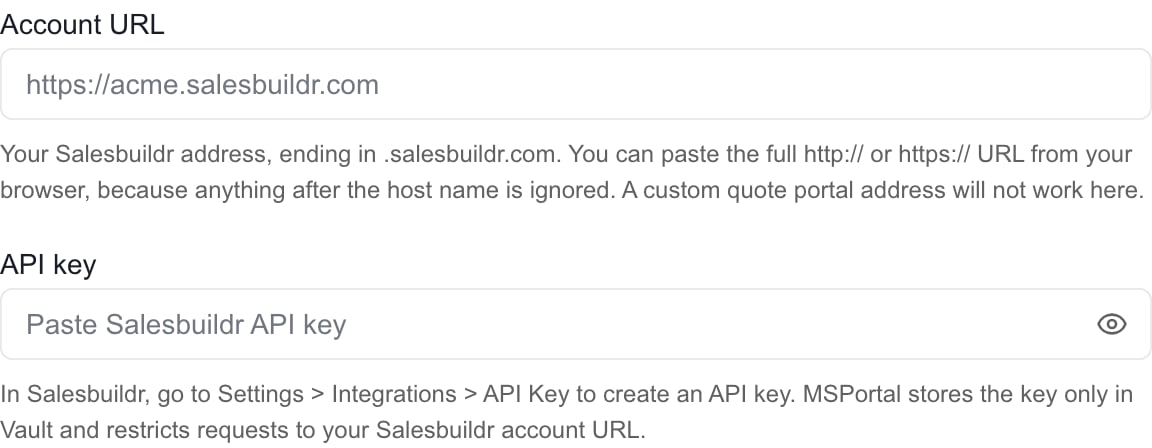
api-key: prefix.3
Test the connection
Click Test Connection. MSPortal verifies the API key and reports the number of companies it can see. Testing does not save anything.
4
Connect
Click Connect Salesbuildr. The API key is stored securely in Vault and MSPortal starts importing your Salesbuildr company list in the background.
Step 2: Map
Link each Salesbuildr company to the matching MSPortal company.- Use Quick Match to propose links by name, review the confidence scores, and apply the ones you agree with.
- Pick a company manually from the dropdown for anything Quick Match missed, or create a new MSPortal company from the Salesbuildr record.
- Click Import Selected to save pending mappings. Next also saves them before moving on.
- Only quotes for mapped companies are imported. Unmapped Salesbuildr companies are skipped until you map them.
Step 3: Complete
Click Start quote sync to pull quotes for the mapped companies now, then click Open Quotes to view them. Complete Setup also requests a quote sync before it closes the wizard. Quotes appear on the Quotes page as soon as the sync finishes.What Gets Synced
Each quote shows its number, title, status, the Salesbuildr contact and owner, and monthly, annual, and one-time totals calculated from its line items. Open in Salesbuildr opens the customer quote portal for that quote, and Download PDF fetches the current quote PDF from Salesbuildr.
Using Salesbuildr Products in Budgets
1
Open the import dialog
Go to Budgets, open Budgets Menu > Products, and click Import from Integrations. Salesbuildr products appear alongside products from your PSA, with their name, SKU, category, vendor, and unit price.
2
Import or link
Select the products you want in your catalog and import them, or link a Salesbuildr product to a catalog product you already maintain. Imported products keep their billing cadence (monthly, annual, or one-time), setup price, unit, and product type from Salesbuildr.
3
Add to a budget
In the budget builder, the Products and Services panel lists your catalog. Adding a Salesbuildr product creates a line with the right recurrence; a product with a setup fee also adds a one-time setup line so onboarding costs land in the first month.
Managing the Connection
- Click Manage on your Salesbuildr connection to test, rotate the API key, change the account URL, or adjust company mappings. Leave the API key blank to keep the stored key; the save button then reads Save settings instead of Update credentials. Save your Connect changes before you click Next, because Next does not save them.
- Mappings can also be managed on Settings > Integrations > Company Mapping alongside your other integrations. Unlinking a company removes its imported quotes; relinking moves them to the new company.
- To remove the integration, click Delete in the wizard footer and confirm. This deletes the stored connection and the imported Salesbuildr data from MSPortal. It does not change anything in Salesbuildr or delete the MSPortal companies you mapped to.
Troubleshooting
Related Resources
Quotes
Learn how MSPortal presents quote data
Import Budget Products
Import or link Salesbuildr products in your catalog
Troubleshoot Salesbuildr Quotes
Fix missing or wrong quotes
Integrations Overview
Manage all MSPortal integrations