

Before you start
- You need the write_budgets or manage_budgets permission. Deleting a saved line needs manage_budgets.
- Changing a line’s Approval status also needs the Approve budget items permission. Manage access includes it; Write access alone does not.
- The budget must be Draft or Pending Approval. Approved and Archived budgets are locked.
- Read-only users can read the budget and ask their MSP for changes.
Add a manual cost
1
Open an editable budget
Click Create New Budget, or click … then Edit on a Draft or Pending Approval budget.
2
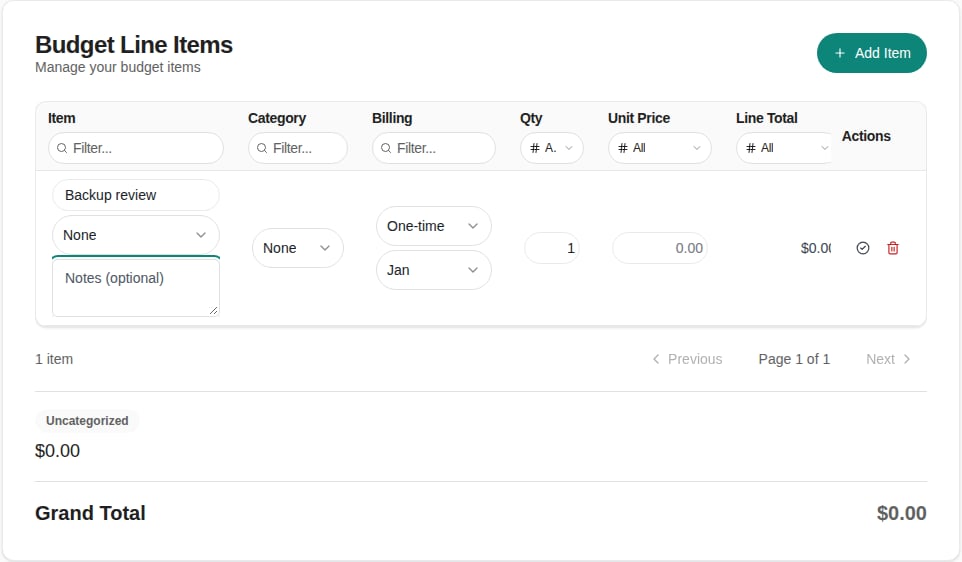
Click Add Item
Click Add Item above the table. A new row opens for editing.
3
Describe the cost
Type a clear name in the Description box. Optionally open the Link to Planner Item or Goal list and pick one, and add Notes (optional). Choose None in the list to leave it unlinked.
4
Choose a category
Pick a category in the Category column, or leave it on None.
5
Set quantity and price
Type the Qty as a whole number above zero, and the Unit Price for one unit. Line Total updates to quantity times unit price. For example, five workstations at 1,200 USD give 6,000 USD. A unit price of zero shows as blank.
6
Set the billing schedule
In the Billing column, choose the recurrence and a start month. For Custom, type the number of months in Every N months, from 1 to 60. Use One-time for a single purchase.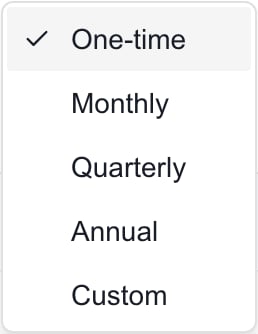
7
Close the row
Click the check mark (Confirm line item edits) in the Actions column. Press the down arrow key to move to the next row, or to add a new row after the last one.
8
Save
Click Save and wait for Budget saved successfully. Then check the budget and Monthly Breakdown.
Billing choices
Line Total is quantity times unit price for one charge. It does not add up the charges across the year. Ten licenses at 20 USD show 200 USD. A full year of monthly charges is 2,400 USD, which you see in Monthly Breakdown. Changing the budget’s Period Type does not change a line’s billing.
Edit a line
1
Open the line menu
Click the pencil button in the line’s Actions column.
2
Click Edit
Click Edit. The row opens with all its fields. Or double-click a description, category, billing, quantity or unit price cell to change only that field. Press Enter to finish a cell and Escape to cancel.
3
Save
Click the check mark, then click Save at the top of the page.
Remove a line
Click the pencil button then Delete, or click the trash icon while the row is open. Then click Save. Removing a line you have not saved just drops it. Deleting a saved line needs manage_budgets, and the Delete item is missing without it.Remove a link
Open the row, open Link to Planner Item or Goal, choose None, and click Save. The Planner item or goal itself is not deleted.Change a line’s Approval status
The Approval column holds a list with Pending, Approved, Rejected and Draft. This is the line’s own status. It is separate from the budget’s Status. The list needs the Approve budget items permission. Without it, the column shows the status read-only. People with Approve budget items but no budget write access decide lines from the budget’s View page while the budget is Pending Approval. See Approve or reject budget lines.Change several line statuses at once
1
Open Update Statuses
In the Budgets list, click … on the budget’s row, then click Update Statuses. The item appears only when you can change line statuses on that budget. On an Approved budget the item reads Update Statuses (Locked) and is unavailable.
2
Set the statuses
The Update Item Statuses dialog lists every line with its quantity and total. Pick Pending, Approved, Rejected or Draft for each one.
3
Save
Click Save Changes. A message such as Updated 3 items appears. This saves right away.
Troubleshooting
Frequently asked questions
Where do I add a cost that is not in the product catalog?
Where do I add a cost that is not in the product catalog?
Click Add Item, type the cost and billing, and click Save.
Does the check mark save the budget?
Does the check mark save the budget?
No. It only closes the row. Click Save to store your changes.
How do I budget a quarterly service starting in April?
How do I budget a quarterly service starting in April?
Set Recurrence to Quarterly and the start month to Apr, then Save. Monthly Breakdown shows April, July and October.
Does rejecting a line remove it?
Does rejecting a line remove it?
No. The line stays in the budget. A rejected line is left out of the Budgets list Total but counts in the Overview Total and in Monthly Breakdown.
Can I change billing after the budget is approved?
Can I change billing after the budget is approved?
No. Duplicate the budget and change the Draft copy.
Do line edits change my PSA or order anything?
Do line edits change my PSA or order anything?
No. They change the MSPortal budget only.