

Before you start
- You need budget edit access (the write_budgets or manage_budgets permission).
- The budget must be Draft or Pending Approval and must belong to a company.
- Planner items, goals and catalog products must already exist. See Manage products.
Find the source item
On a wide screen the three panels sit to the left of Budget Line Items. On a narrow screen they are collapsed sections above the table, named Planner Items, Strategic Goals and Current Software & Services.- Each panel has a Search… box.
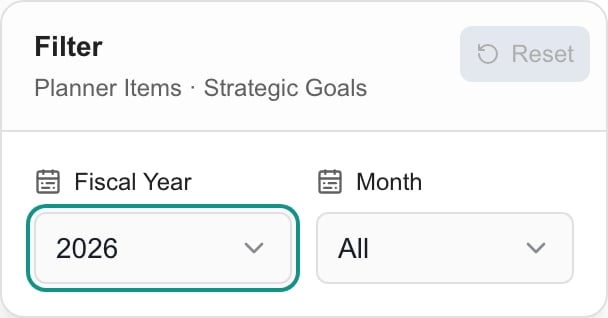
- The Planner Items · Strategic Goals box at the top has a Filter button. It opens Fiscal Year and Month lists, and a Reset button. By default it shows the budget’s fiscal year and all months. Choose All to include other years or items with no date.
- This filter only changes which planner items and goals the panels list. It does not change the budget’s fiscal year or the rows already in the budget.
- Planner Items does not list items with status Completed or Cancelled.
- In Products & Services, the all checkbox is checked by default and shows tenant-wide products and this company’s products. Clear it to see only this company’s products.
Add a Planner item
1
Find the item
Use the filter and search. Check the item’s due date, status and estimated cost.
2
Add it
Click + (Add to budget) on the item. A Planner item with several positive cost lines adds one budget line per cost, so check all of them.
3
Review the rows
The rows link back to the Planner item and use its category and cost details. The notes start with Imported from Planner: and the item’s title. The start month follows the item’s due date, then its start date, then January. Check quantity, unit price and recurrence, mainly where the estimate is incomplete.
4
Save
Click Save. Adding a row to a budget does not mark the Planner item done.
Add a strategic goal
Find the goal and click +. It adds a line linked to the goal with quantity 1, unit price 0, One-time recurrence and a January start. Type the real cost and billing schedule before you save. A goal has no price of its own.Add a catalog product
1
Find the product
In Products & Services, check the product’s name, SKU, vendor, category and unit price.
2
Add it
Click +. The row starts with quantity 1, the catalog unit price and the product’s default recurrence, starting in January. Set the real quantity and Start month.
3
Check the setup line
A product with a setup fee also adds a separate One-time row named Product name setup. Its quantity is 1. Changing the main row’s quantity does not change it.
4
Save
Click Save. The row takes the budget category with the same name as the product’s category when there is one.
Clicking + again adds another copy. These buttons do not check for duplicates. Review the line table before you add the same item twice.
Troubleshooting
Frequently asked questions
Does changing the Filter change my budget year?
Does changing the Filter change my budget year?
No. Change Fiscal Year under Budget Details for that.
Why did one Planner item add several lines?
Why did one Planner item add several lines?
Each positive cost on the item becomes its own line, so you can review each price and recurrence.
Does adding a product place an order?
Does adding a product place an order?
No. It only adds a proposed budget line.