

Before you start
- The budget must be Draft or Pending Approval and must belong to a company.
- The MSP needs an active Microsoft 365 integration with synced license data for that company.
- Your role needs budget edit access and Microsoft 365 read access (read_m365 or manage_m365). The menu item is missing without them.
- Your catalog should hold the Microsoft products you sell, with unit prices, billing recurrence and, where possible, the exact Microsoft SKU. See Create and edit budget products.
Match and import licenses
1
Open the import
Check the budget’s company and currency. Click Import, then click Import Microsoft 365 licensing. Wait for the licenses to load.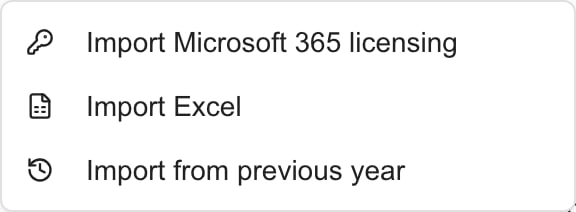
2
Read the seat counts
Each row shows the license name, the number of purchased seats and the number assigned. The budget quantity is the purchased count, including seats nobody uses yet. The summary at the top reads like 3 matched · 2 need a product.
3
Choose the MSP product
MSPortal suggests a product when a SKU or name matches exactly, ignoring capitalization and extra spaces. For any row that still needs one, click Choose an MSP product, search, and pick the product that supplies the license.The list offers tenant-wide products and products for this company. Products that belong only to another company are not shown. A row stays unselected until it has a product.
4
Check price and billing
Each row shows the product’s unit price, billing cadence and the Line total (purchased seats times unit price). A row with a zero price or a one-time cadence shows Review the zero price or one-time cadence before importing. Fix the product’s price or recurrence in the catalog, or adjust the line after import.
5
Select the rows
Matched rows start checked. Check or clear rows, or click Select All. A product already on this budget shows Already in budget and cannot be imported again. Review the existing line instead.
6
Import
Click Import N licenses. The new lines appear in the editor.
7
Adjust and save
The new lines start in January with Pending status and use the budget currency without conversion. Set the right Start month, check the category and notes, then click Save. Open Monthly Breakdown to check the schedule.
How license values become budget lines
The line also links to the product, so the same product cannot be added twice.
If a company has more than one Microsoft connection, licenses with the same SKU combine into one row with the total purchased seats. Rows with no purchased seats are left out. So are free, trial and similar non-commercial licenses.
The import is a snapshot. Later seat or price changes do not update a saved budget. Setup fees are not added by this import. Add them as separate lines.
Troubleshooting
Frequently asked questions
Does this use purchased or assigned seats?
Does this use purchased or assigned seats?
Purchased seats. Seats nobody has been assigned still cost money.
Where does the price come from?
Where does the price come from?
From the matched MSP product. The Microsoft license data supplies only the seat count.
Why are some licenses missing?
Why are some licenses missing?
Licenses with no purchased seats, and free or trial-only licenses, are left out.
Will the budget follow later seat changes?
Will the budget follow later seat changes?
No. The import is a snapshot. Edit the budget when seats or prices change.
Does importing assign users or order seats?
Does importing assign users or order seats?
No. It only adds proposed budget lines.