

Before you start
- You need manage_budgets. Without it the Sync from Budget, Sync from Planner and Save buttons are not shown.
- Select one company in the top bar and check the Base Year. See Read and adjust a company budget forecast.
Refresh starting costs from budgets
1
Check the worksheet
Check the company, the Base Year and your current overrides and percentages.
2
Click Sync from Budget
A Budget data has been refreshed from current budget. message appears.
3
Compare the amounts
Look at each Base Year amount and the totals.
4
Save
If the result is right, click Save and wait for Budget forecast rules have been saved successfully.
Merge planned costs from Planner
1
Check the horizon
Confirm the Base Year and Years to Forecast. The sync uses them.
2
Click Sync from Planner
The Sync from Planner dialog opens. Under Merge Strategy, pick Overwrite All, Add to Current or Merge (Keep Higher). It starts on Overwrite All, so check it each time.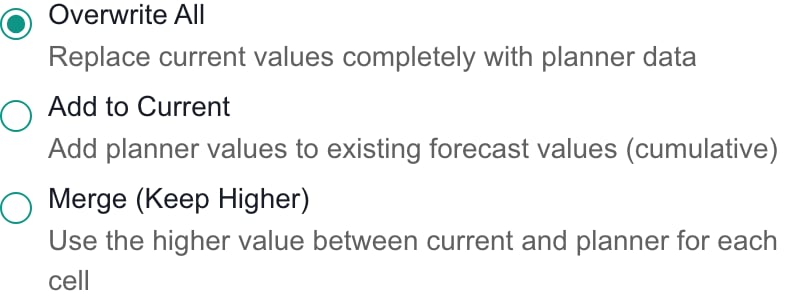
3
Choose the categories
Under Categories to Sync, clear any category you want to leave alone. Use Select All or Deselect All. You must pick at least one.
4
Run the sync
Click Sync from Planner in the dialog. A Budget data has been synced from planner items. message appears. Check the base amounts and the Override cells in the chosen categories.
5
Save
Click Save on the toolbar. The sync alone does not save anything.
Choose the merge strategy
A strategy only affects the categories you select. It leaves percentages and Include switches alone.For future years, Add and Merge look at the stored override, not the calculated number you see in the cell. If a cell shows 1,050 with no override and Planner has 500, Add to Current sets an override of 500, not 1,550. Check every year that changed.
Which Planner costs are included
The sync uses the company’s Planner items that have a category, a Due date or Start date, and are not archived or Cancelled. Completed items still count. The budget editor’s Planner panel works differently, because it leaves out Completed items. The cost year follows the Due date, or the Start date if there is no Due date. The sync uses an item’s separate cost lines when it has them, and otherwise the item’s overall estimate.- One-time costs count once, in their year, inside the forecast years.
- Monthly costs count twelve times the monthly amount in each year from their first year to the end.
- Annual costs count once each year over the same range.
Troubleshooting
Frequently asked questions
Does Sync from Budget replace future overrides?
Does Sync from Budget replace future overrides?
No. It only replaces the base amounts. Overrides, percentages and Include switches stay.
Does Sync from Planner save by itself?
Does Sync from Planner save by itself?
No. Click Save on the toolbar.
Does Merge (Keep Higher) always keep the larger number I see?
Does Merge (Keep Higher) always keep the larger number I see?
No. For future years it compares Planner with the stored override, and counts a missing override as zero.
Are Completed Planner items left out?
Are Completed Planner items left out?
No. Archived and Cancelled items are left out. The item also needs a category, a date and a cost above zero.
Are monthly Planner costs cut down for a late start?
Are monthly Planner costs cut down for a late start?
No. They count twelve months in each year from their first year.
Does syncing change Planner tasks or budgets?
Does syncing change Planner tasks or budgets?
No. It only changes the worksheet. Saving stores the forecast rules.